something appear in new windows and then disappear within millisecond

Nirzan

New member
Local time
3:11 PM
Messages
6
hello,
i used windows 7 home premium 64bit, somethin when i used my laptop, something appear on my desktop, but it only for a short period of time. i dont know what is it. it comes and goes within seconds. can anyone help to solve my problem?
 

My Computer My Computer

At a glance

Windows 7 Home Premium 64bit
OS
Windows 7 Home Premium 64bit
Keep a digital camera handy and when it happens again, take a picture then post it here.
 

My Computer My Computer

At a glance

Windows 10 Pro X64Intel Quad Core i7-4770 @ 3.4Ghz16.0GB PC3-12800 DDR3 SDRAM 1600 MHzIntel Integrated HD Graphics
Computer type
PC/Desktop
Computer Manufacturer/Model Number
Lenovo IdeaCenter 450
OS
Windows 10 Pro X64
CPU
Intel Quad Core i7-4770 @ 3.4Ghz
Memory
16.0GB PC3-12800 DDR3 SDRAM 1600 MHz
Graphics Card(s)
Intel Integrated HD Graphics
Sound Card
Realtek HD Audio
Monitor(s) Displays
HP 22" LCD
Screen Resolution
1680 x 1050
Hard Drives
250GB Samsung EVO SATA-3 SSD
2TB Seagate ST2000DM001 SATA-2
1.5TB Seagate ST3150041AS SATA
Keyboard
Dell USB
Mouse
Lenovo USB
Internet Speed
Cable via Road Runner 3MB Upload, 30MB Download
Antivirus
Windows Defender, MBAM Pro, MBAE
Browser
Seamonkey
Other Info
UEFI/GPT
PLDS DVD-RW DH16AERSH
Is it a black command window which appears for so short time a time to read and disappears?

It happens to my windows and was a mystery to me also. As I was not facing any problems with it, I ignored it.

Must be some software or windows process running and quitting.
 

My Computer My Computer

At a glance

MS Windows 7 Ultimate 64-bit SP1i5-2410M 2.3GHz (2.9GHz Turbo-Boost) Sandy Br...4GB+4GB Samsung DDR3 PC3-10700 (1333 MHz)Video Intel(R) HD Graphics Family, 1696MB ava...
Computer Manufacturer/Model Number
Toshiba Satellite P775-S7232
OS
MS Windows 7 Ultimate 64-bit SP1
CPU
i5-2410M 2.3GHz (2.9GHz Turbo-Boost) Sandy Bridge 32nm
Motherboard
Toshiba PHRAA ver. PSBY1U-00F003
Memory
4GB+4GB Samsung DDR3 PC3-10700 (1333 MHz)
Graphics Card(s)
Video Intel(R) HD Graphics Family, 1696MB available memory
Sound Card
Realtek High Definition Audio version=6.0.1.6323
Monitor(s) Displays
17.3 " Trubrite TFT LCD, LED Backlit
Screen Resolution
1600x900 32 bit, Native support for 720P content
Hard Drives
TOSHIBA MK6476GSXN
580.614 [GB] partitioned C: 80GB and D: 500GB with hidden recovery partitons.

Spare bay for 2nd HDD but no SATA connector :-(
PSU
Toshiba AC/DC Adapter
Case
Notebook
Cooling
Built-in Fan
Keyboard
Premium Raised Tile keyboard
Mouse
Logitech M215 wireless mouse
Internet Speed
Not fast enough
Other Info
Built-in Harman Kardon speakers with Dolby Advanced Audio, Waves MaxxAudio® 3. HDMI, 1xUSB3+3xUSB2 ports, WebCam, Battery life 4hrs 11mins, 4GB Readyboost SDHC card, WD My Book Essential Ext HDDs 2 TB, 2x1TB, My Passport SE 1TB and WDTV 1st Gen for Multimedia playing on a Sony Wega 32" LCD.
Recent addition to my toys are Asus Transformer Pad TF300T with 32GB onboard sd card + 32GB microsd card.
Can be the scheduler running a task set to run at boot, or to run at next boot if PC is turned off at scheduled time. Open Task Scheduler, maximize window, study the Active tasks, click on task to see the settings.

Other Troubleshooting Steps for Windows 7
 
Event Viewer?

Check the "Event Viewer".
It might have some info about the message.
 

My Computer My Computer

At a glance

W7 Ultimate SP1, LM19.2 MATE, W10 Home 1703, ...AMD Phenom II x6 1100T, 3.3 GHz12GB DDR3 1333 G-Skill (4GB x 2), G-Skill (2G...NVIDIA GeForce GTX 660
Computer type
PC/Desktop
Computer Manufacturer/Model Number
n/a
OS
W7 Ultimate SP1, LM19.2 MATE, W10 Home 1703, W10 Pro 1703 VM, #All 64 bit
CPU
AMD Phenom II x6 1100T, 3.3 GHz
Motherboard
ASUS M4A88T-M/USB3 (AM3)
Memory
12GB DDR3 1333 G-Skill (4GB x 2), G-Skill (2GB x 2)
Graphics Card(s)
NVIDIA GeForce GTX 660
Sound Card
Realtek?
Monitor(s) Displays
Samsung S23B350
Screen Resolution
1920x1080
Hard Drives
WD Green 2TB (SATA), WD Green 3TB (SATA), WD Blue 4TB (SATA), WD Blue 6TB (SATA)
PSU
Cooler Master
Case
Antec GX300 Tower
Cooling
3x Antec TRICOOL 120mm Fans
Mouse
Wired Optical
Internet Speed
DSL
Antivirus
Avast
Browser
Pale Moon (64 bit)
Other Info
2018-12-27 Upgraded HDDs
2015-12-10 Upgraded case, graphics card, storage
2015-08-15 Upgraded motherboard & RAM
2015-07-15 Upgraded LM17.1 to LM17.2
the thing that i circled is the problem.
Untitled.jpg
 

My Computer My Computer

At a glance

Windows 7 Home Premium 64bit
OS
Windows 7 Home Premium 64bit
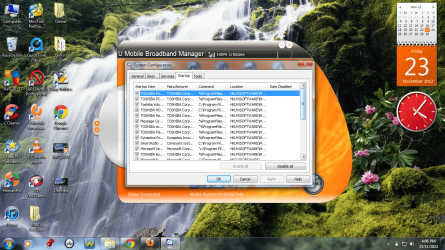
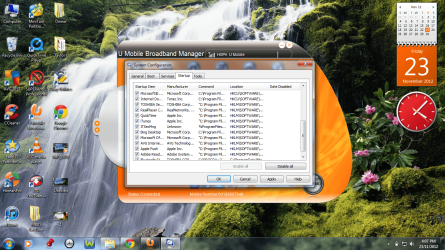
Please post back a screenshot of your maximized msconfig>Startup windows showing all checked items. You only need your A/V checked for best performance - the rest are freeloaders on your startup.

Likewise post a screenshot of msconfig>Services after Hiding all MS Services, same situation.
 
[/ATTACH][/ATTACH]

r these the screenshots u want to look?
 

Attachments

  • 1.png
    1.png
    501.9 KB · Views: 9
  • 2.png
    2.png
    498.4 KB · Views: 9

My Computer My Computer

At a glance

Windows 7 Home Premium 64bit
OS
Windows 7 Home Premium 64bit
If you're using AVG bloatware I would uninstall it and replace with free lightweight Microsoft Security Essentials.

All of the rest of those listings are a grotesque pile of freeloaders on your System Resources which can be safely disabled and started when you want to run the Program.

It's clear you still have the Toshiba factory preinstall which is corrupted by a load of crapware that throttles Win7 from its native instantaneous state. That's why most tech enthusiasts Clean Reinstall - Factory OEM Windows 7.

At the minimum I'd Clean Up Factory Bloatware to start sweeping out the ghosts in your machine.
 
since i dot have enough knowledge about computer, shud i format my laptop? i'm getting fed up with all his problems. now, when i shut down my laptop, and then open back, i cold not scroll down. i need to go back to wheel setting to be able to scroll down. shud i format? what happen if i format my laptop?
 

My Computer My Computer

At a glance

Windows 7 Home Premium 64bit
OS
Windows 7 Home Premium 64bit
This is not really where you had to post this.You could hav started a new post on this.Anyway,there is no need to format your computer as this problem is little....And if you format it you will lose all data and settings on it.Click on start, control panel, then mouse.go to the tab named "wheel" and in vertical scrolling enable the option named "The following number of lines at a time:" then type 3 in that textbox.And in horizontal scrolling also type 3 in that textbox.Hope this solves the problem.
 

My Computer My Computer

At a glance

Windows 7 Home Premium 64 bit
OS
Windows 7 Home Premium 64 bit
You can try the solutions already presented including Clean Up Factory Bloatware to see if they help.

You can also back up your files to run Toshiba HDD Recovery Utility which will set the PC back to factory condition, although it will reinstall all of the bloatware and duplicate utilities which have better version built into Win7. So after doing this I would Clean Up Factory Bloatware.

I also gave you steps to get the cleanest possible reinstall if you follow the steps closely and only use the methods and tools in Clean Reinstall - Factory OEM Windows 7. But you'll have to reinstall any programs you want. Back up your files first.

With Toshiba I would make your Recovery disks first then delete all but the Recovery partition during booted install as shown in the tutorial.
 
Back
Top