something is wrong with windows explorer on taskbar

muzcu

New member
Local time
10:03 PM
Messages
4
when i dragged a folder onto task bar, it was being attached to folder symbol on the taskbar. but right now, it doesn't work that way. no folder attaches to task bar anymore, but library folder of the current user.

i backed up computer's settings 2 weeks ago, i checked folder options, task bar options, library options; still i couldn't solve the problem and i didn't understand how it has happened suddenly.
 

My Computer

OS
Windows 7 Ultimate x64
hi muzcu, and welcome to sevenforums,

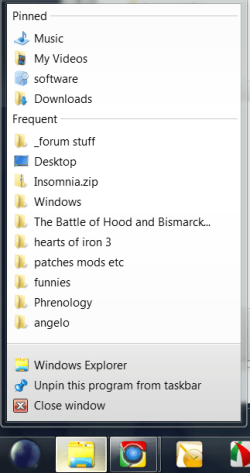
try right-clicking your explorer taskbar icon - you should see pinned folders there, at the top of the list.

pinne.png
 

My Computer

Computer Manufacturer/Model Number
mickey megabyte 1234
OS
ultimate 64 sp1
CPU
i5 2500K [email protected]
Motherboard
MSI P67A-GD53
Memory
8 gigs GSkill Ripjaws 1600
Graphics Card(s)
amd hd6950
Sound Card
creative x-fi gamer
Monitor(s) Displays
samsung 24"
Screen Resolution
1920x1080
Hard Drives
ocz vertex 2e 60 gig, samsung f3 1tb, buffalo 2tb ext
PSU
antec 550
Case
antec three hundred
Cooling
i'm a cooling fan
Keyboard
saitek eclipse ii
Mouse
logitech g3
Internet Speed
about 4 Mbps
Other Info
i love win7
dear, i know it should look just like you have shown above. mine used to look like that too, however as i told, it doesn't pin or show frequently visited folders/files etc. right now.

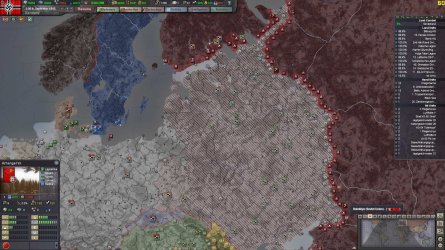
ps: yay for HoI 3 ;)
 

My Computer

OS
Windows 7 Ultimate x64
yes, i've only recently started playing again - it just takes so long!

barba.jpg

off-topic already!

i haven't been called 'dear' for a long time, either!

(Interdum feror cupidine partium magnarum Europae vincendarum.)
 

My Computer

Computer Manufacturer/Model Number
mickey megabyte 1234
OS
ultimate 64 sp1
CPU
i5 2500K [email protected]
Motherboard
MSI P67A-GD53
Memory
8 gigs GSkill Ripjaws 1600
Graphics Card(s)
amd hd6950
Sound Card
creative x-fi gamer
Monitor(s) Displays
samsung 24"
Screen Resolution
1920x1080
Hard Drives
ocz vertex 2e 60 gig, samsung f3 1tb, buffalo 2tb ext
PSU
antec 550
Case
antec three hundred
Cooling
i'm a cooling fan
Keyboard
saitek eclipse ii
Mouse
logitech g3
Internet Speed
about 4 Mbps
Other Info
i love win7
you are welcome. and pls fix my problem :)

ps: i assume japan is in your axis and you are waiting for them to take over Vladivostok in order to make "bitter peace" with Stalin. Nice work. I would like to see your west front as well.
 

My Computer

OS
Windows 7 Ultimate x64
nobody's asked to see my west front for some time either!

anyway, it's an old screenshot, and i don't think i've got the saved game anymore. irc, i had all of france, vichy'd it, and managed to fight off a couple of invasions, but usa kept trying!

sorry i can't help further on your problem.

and sorry for ruining your thread :o

hopefully somebody else will be along soon...
 

My Computer

Computer Manufacturer/Model Number
mickey megabyte 1234
OS
ultimate 64 sp1
CPU
i5 2500K [email protected]
Motherboard
MSI P67A-GD53
Memory
8 gigs GSkill Ripjaws 1600
Graphics Card(s)
amd hd6950
Sound Card
creative x-fi gamer
Monitor(s) Displays
samsung 24"
Screen Resolution
1920x1080
Hard Drives
ocz vertex 2e 60 gig, samsung f3 1tb, buffalo 2tb ext
PSU
antec 550
Case
antec three hundred
Cooling
i'm a cooling fan
Keyboard
saitek eclipse ii
Mouse
logitech g3
Internet Speed
about 4 Mbps
Other Info
i love win7

My Computer

OS
Win7U 64 RTM
CPU
Q9550
Motherboard
GA-EP45-UD3R
Memory
8GB Gskill
Graphics Card(s)
ASUS|EAH4850/HTDI/1GD3/A
Sound Card
xfi Plat
Monitor(s) Displays
Dell 2405fpw
Screen Resolution
1920x1200
Hard Drives
Seagate & WD sata Drives
PSU
Antec
Case
Antec
Keyboard
MS Natural Ergonomic 4000
Mouse
Logitech MX610 USB Cordless
programs (firefox, abobe PS/Ai/Ae etc.) show their recent items when they have been right clicked on their start icon in start menu and bottom bar. However windows explorer (folder) icon doesnt show any, i used to pin there every fav. folder of mine. It has happened months before. when it has happened i tried to restore my system to a prior date than the time this problem may have occurred. But even so, it didnt help.
 

My Computer

OS
Windows 7 Ultimate x64
Back
Top