organerito
New member
My Computer
- OS
- Vista


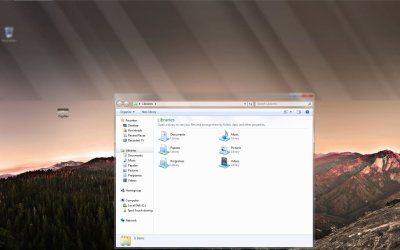
I have tried to move the taskbar to the left on top and every time I resize it it leaves like a shadow. has anyone experienced that. If yes, how do you fix it?
Ha, wow. Something else I found odd was.. take a window that size..
Now grab one of the corners of it so you can resize both ways.
Pull the corner to the top or bottom of the screen (depending on what corner you grabbed)
It should act as if it wants to maximize vertically... now drag your cursor left and right. Have fun with the window as the shadow chases it.
 You might disable it to see if it helps or not. http://www.sevenforums.com/tutorials/838-aero-peek-turn-off.html?ltr=A
Hmm, I 'm not sure exactly what you mean by moving the taskbar and resizing it makes a shadow, but I think maybe you mean the feature Aero Peek. If you move your cursor to the far right of the taskbar, it will cause all open window to become transparent and have the effect in your screenshot. Although your screenshot shows it just half way thru the desktop.
@MasterEvilAce
The effect you describe is Aero Snap.
http://www.sevenforums.com/tutorials/3069-aero-snap-turn-off.html?ltr=A
Where is your taskbar at in that screenshot? Is it set to auto-hide? It appears as if windows isn't recalculating where the taskbar is, so it's drawing the transparent aero for the... "old" location of the taskbar?I am sorry for not being so clear. As you can see in the attachment, the top of the screen is blurry. It got blurry whenI tried to make the taskbar bigger and it left a layer of aereo stuff. I still cannot explain it very well, but I think you can see that in the attachment. I moved the taskbar very far down until almost hal of the screen to make it more visible.
Yes, it's Aero Snap.. but do what I mentioned, just don't release the mouse cursor. If you have window drop shadows on, the shadow "lags" behind the window. IDK If it is intentional or not. I assume it's just a side effect of trying to make transitions "smooth"@MasterEvilAce
The effect you describe is Aero Snap.
http://www.sevenforums.com/tutorials/3069-aero-snap-turn-off.html?ltr=A
Yes, it's Aero Snap.. but do what I mentioned, just don't release the mouse cursor. If you have window drop shadows on, the shadow "lags" behind the window. IDK If it is intentional or not. I assume it's just a side effect of trying to make transitions "smooth"