Solved Something very wrong with Corsair Vengance Timings

Tomha

New member
Member
VIP
Local time
5:38 PM
Messages
391
Location
Auckland, New Zealand
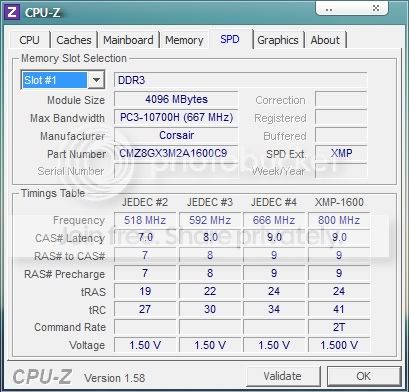
Ok...so I install my new ram, and I'm all very happy. A hour or two later I decide to run a benchmark on my ram. The benchmark says that my 16Gb of ram is only processing about 12Gb a second, when other benchmarks on the internet say Gb will do 20+ Gb/s. I open cpu-z, and pop over to the memory section, and I am greeted with this:
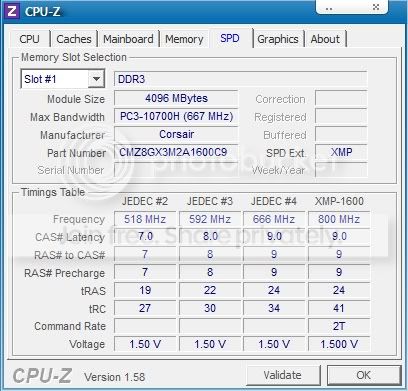
RamTimings.jpg


Somewhat worrying, although I assume that corsair would replace it considering their vengeance ram has a lifetime guarantee...but can anyone give a suggestion to what on Earth is happening here?
 

My Computer My Computer

At a glance

Windows 7 Professional 64bitIntel i7 3770k 3.5ghzCorsair Vengeance 16gb (4x4gb)Gigabyte G1 Gaming GTX970
Computer type
PC/Desktop
Computer Manufacturer/Model Number
Custom Build
OS
Windows 7 Professional 64bit
CPU
Intel i7 3770k 3.5ghz
Motherboard
Asus P8Z77-V Deluxe
Memory
Corsair Vengeance 16gb (4x4gb)
Graphics Card(s)
Gigabyte G1 Gaming GTX970
Sound Card
None
Monitor(s) Displays
3x AOC 12367fh 23"
Screen Resolution
1920x1080
Hard Drives
Western Digital Caviar Black 1TB - 64mb cache
Western Digital Caviar Green 1TB - 32mb cache
Samsung 830 SSD 128Gb Boot Drive
PSU
Corsair AX-860W ATX
Case
Corsair 500R black
Cooling
Corsair 500r Stock cooling (3x120mm, 1x200mm) & Corsair H100
Keyboard
Logitech G110 gaming keyboard
Mouse
Logitech G500s
Other Info
Corsair Hydro 100 CPU Cooler
I may be missing something, but what don't you like about that screenshot?
 

My Computer My Computer

At a glance

Windows 7 Home Premium SP1, 64-bitIntel Skylake i5-6600K, not overclocked8 GB HyperX DDR4-2666 (2 x 4 GB)none; graphics are integrated on CPU
Computer type
PC/Desktop
Computer Manufacturer/Model Number
Ignatz Special; 4 speed manual gearbox; factory air conditioning; one of one
OS
Windows 7 Home Premium SP1, 64-bit
CPU
Intel Skylake i5-6600K, not overclocked
Motherboard
AsRock Z170M Extreme 4, micro ATX
Memory
8 GB HyperX DDR4-2666 (2 x 4 GB)
Graphics Card(s)
none; graphics are integrated on CPU
Sound Card
onboard: Realtek ALC1150; external: USB Behringer UF0-202
Monitor(s) Displays
Dell S2340M 23 inch IPS
Screen Resolution
1600 x 900
Hard Drives
System: Crucial MX100 series SSD, 128 GB;
Data: Samsung Spinpoint 103SJ, 1 TB;
Backup: WD Caviar Green WD30EZRX-00D8PB0, 3 TB
PSU
Rosewill SilentNight 500 watt fanless, semi-modular
Case
Antec Solo II
Cooling
Noctua NH-U12S; Noctua F12 intake, Noctua S12A exhaust
Keyboard
Microsoft 200 6JH-00001 USB
Mouse
Dell or Microsoft optical wired; USB
Antivirus
Microsoft Security Essentials and Malwarebytes Premium
Browser
Pale Moon
Other Info
All fans PWM; speeds at idle: CPU circa 500 rpm; intake circa 600 rpm; exhaust circa 600 rpm; CPU temps 27 idle and 47 C load in a warm room (27 C/81 F) when running Intel Extreme Tuning Utility stress test.
Am I reading it wrong? The memory is meant to run at 1600mhz, and at no point there do I see 1600mhz, or a combination with the sum of 1600mhz. It appears to me as though it is under clocked or something?
 

My Computer My Computer

At a glance

Windows 7 Professional 64bitIntel i7 3770k 3.5ghzCorsair Vengeance 16gb (4x4gb)Gigabyte G1 Gaming GTX970
Computer type
PC/Desktop
Computer Manufacturer/Model Number
Custom Build
OS
Windows 7 Professional 64bit
CPU
Intel i7 3770k 3.5ghz
Motherboard
Asus P8Z77-V Deluxe
Memory
Corsair Vengeance 16gb (4x4gb)
Graphics Card(s)
Gigabyte G1 Gaming GTX970
Sound Card
None
Monitor(s) Displays
3x AOC 12367fh 23"
Screen Resolution
1920x1080
Hard Drives
Western Digital Caviar Black 1TB - 64mb cache
Western Digital Caviar Green 1TB - 32mb cache
Samsung 830 SSD 128Gb Boot Drive
PSU
Corsair AX-860W ATX
Case
Corsair 500R black
Cooling
Corsair 500r Stock cooling (3x120mm, 1x200mm) & Corsair H100
Keyboard
Logitech G110 gaming keyboard
Mouse
Logitech G500s
Other Info
Corsair Hydro 100 CPU Cooler
Am I reading it wrong? The memory is meant to run at 1600mhz, and at no point there do I see 1600mhz, it appears to me as though it is under clocked or something?

I'm no expert either.

It looks to me like it is running at 1333 (666, double data rate).

It may be capable of running at 1600 (800, double data rate), for all I know.

Have you gone into the BIOS and attempted to set it to the higher speed?
 

My Computer My Computer

At a glance

Windows 7 Home Premium SP1, 64-bitIntel Skylake i5-6600K, not overclocked8 GB HyperX DDR4-2666 (2 x 4 GB)none; graphics are integrated on CPU
Computer type
PC/Desktop
Computer Manufacturer/Model Number
Ignatz Special; 4 speed manual gearbox; factory air conditioning; one of one
OS
Windows 7 Home Premium SP1, 64-bit
CPU
Intel Skylake i5-6600K, not overclocked
Motherboard
AsRock Z170M Extreme 4, micro ATX
Memory
8 GB HyperX DDR4-2666 (2 x 4 GB)
Graphics Card(s)
none; graphics are integrated on CPU
Sound Card
onboard: Realtek ALC1150; external: USB Behringer UF0-202
Monitor(s) Displays
Dell S2340M 23 inch IPS
Screen Resolution
1600 x 900
Hard Drives
System: Crucial MX100 series SSD, 128 GB;
Data: Samsung Spinpoint 103SJ, 1 TB;
Backup: WD Caviar Green WD30EZRX-00D8PB0, 3 TB
PSU
Rosewill SilentNight 500 watt fanless, semi-modular
Case
Antec Solo II
Cooling
Noctua NH-U12S; Noctua F12 intake, Noctua S12A exhaust
Keyboard
Microsoft 200 6JH-00001 USB
Mouse
Dell or Microsoft optical wired; USB
Antivirus
Microsoft Security Essentials and Malwarebytes Premium
Browser
Pale Moon
Other Info
All fans PWM; speeds at idle: CPU circa 500 rpm; intake circa 600 rpm; exhaust circa 600 rpm; CPU temps 27 idle and 47 C load in a warm room (27 C/81 F) when running Intel Extreme Tuning Utility stress test.
Well the 2600k only supports 1333 mhz, so I wouldn't be surprised if it down clocked that, but in doing so it seems to have messed with the timings, I would expect them all to run at the same latencies, but here we have 2 at one timing, and 2 with different timings.
 

My Computer My Computer

At a glance

Windows 7 Professional 64bitIntel i7 3770k 3.5ghzCorsair Vengeance 16gb (4x4gb)Gigabyte G1 Gaming GTX970
Computer type
PC/Desktop
Computer Manufacturer/Model Number
Custom Build
OS
Windows 7 Professional 64bit
CPU
Intel i7 3770k 3.5ghz
Motherboard
Asus P8Z77-V Deluxe
Memory
Corsair Vengeance 16gb (4x4gb)
Graphics Card(s)
Gigabyte G1 Gaming GTX970
Sound Card
None
Monitor(s) Displays
3x AOC 12367fh 23"
Screen Resolution
1920x1080
Hard Drives
Western Digital Caviar Black 1TB - 64mb cache
Western Digital Caviar Green 1TB - 32mb cache
Samsung 830 SSD 128Gb Boot Drive
PSU
Corsair AX-860W ATX
Case
Corsair 500R black
Cooling
Corsair 500r Stock cooling (3x120mm, 1x200mm) & Corsair H100
Keyboard
Logitech G110 gaming keyboard
Mouse
Logitech G500s
Other Info
Corsair Hydro 100 CPU Cooler
Well the 2600k only supports 1333 mhz, so I wouldn't be surprised if it down clocked that, but in doing so it seems to have messed with the timings, I would expect them all to run at the same latencies, but here we have 2 at one timing, and 2 with different timings.

Here is your motherboard:

Newegg.com - GIGABYTE GA-P67A-UD4-B3 LGA 1155 Intel P67 SATA 6Gb/s USB 3.0 ATX Intel Motherboard

The specs say it supports up to 2133. As far as I know, the 2600K can use DDR 3 2133 if the motherboard supports it.

I am not sure I know how to read CPU-Z, but I would think that your screen shot shows that the RAM in slot 1 has timings of 9, 9, 9, 24, and 34.

I think if you want to see what the RAM in other slots is doing, you have to change away from "slot 1" in that drop down menu.

But I certainly stand to be corrected.
 

My Computer My Computer

At a glance

Windows 7 Home Premium SP1, 64-bitIntel Skylake i5-6600K, not overclocked8 GB HyperX DDR4-2666 (2 x 4 GB)none; graphics are integrated on CPU
Computer type
PC/Desktop
Computer Manufacturer/Model Number
Ignatz Special; 4 speed manual gearbox; factory air conditioning; one of one
OS
Windows 7 Home Premium SP1, 64-bit
CPU
Intel Skylake i5-6600K, not overclocked
Motherboard
AsRock Z170M Extreme 4, micro ATX
Memory
8 GB HyperX DDR4-2666 (2 x 4 GB)
Graphics Card(s)
none; graphics are integrated on CPU
Sound Card
onboard: Realtek ALC1150; external: USB Behringer UF0-202
Monitor(s) Displays
Dell S2340M 23 inch IPS
Screen Resolution
1600 x 900
Hard Drives
System: Crucial MX100 series SSD, 128 GB;
Data: Samsung Spinpoint 103SJ, 1 TB;
Backup: WD Caviar Green WD30EZRX-00D8PB0, 3 TB
PSU
Rosewill SilentNight 500 watt fanless, semi-modular
Case
Antec Solo II
Cooling
Noctua NH-U12S; Noctua F12 intake, Noctua S12A exhaust
Keyboard
Microsoft 200 6JH-00001 USB
Mouse
Dell or Microsoft optical wired; USB
Antivirus
Microsoft Security Essentials and Malwarebytes Premium
Browser
Pale Moon
Other Info
All fans PWM; speeds at idle: CPU circa 500 rpm; intake circa 600 rpm; exhaust circa 600 rpm; CPU temps 27 idle and 47 C load in a warm room (27 C/81 F) when running Intel Extreme Tuning Utility stress test.
There's nothing wrong.

The RAM is running at DDR3 1333. (The frequency is 667 MHz, and the data rate is 2X that.)

That's the default. To get the DDR3 1600 rate, you'll have to use BIOS settings either to use the XMP profile, or set the frequency and timings manually. I did the latter, and am running 4 sticks of Corsair Vengeance DDR3 1866.
 

My Computer My Computer

At a glance

Windows 7 Pro X64 SP1Intel Core I7-3930k16 GB Gskill DDR3-2133eVGA GTX680
Computer Manufacturer/Model Number
homegrown
OS
Windows 7 Pro X64 SP1
CPU
Intel Core I7-3930k
Motherboard
Asus P9X79 Pro
Memory
16 GB Gskill DDR3-2133
Graphics Card(s)
eVGA GTX680
Sound Card
Creative X-Fi Titanium
Monitor(s) Displays
As PA246Q
Screen Resolution
1920 X 1200
Hard Drives
Corsair Force GT, 120 GB
WDC 1.5TB Caviar Black
PSU
PCP&C Silencer 750 Crossfire
Case
Silverstone FT02
Cooling
Noctua NH-D14
Keyboard
cheap Logitech USB
Mouse
Microsoft Intellimouse Explorer (old optical) USB
Internet Speed
6Mb cable
Other Info
Pioneer BDR-205
Samsung SH-203B
Monsoon 5.1 speakers
So, the XMP profile is tested and approved by the manufacturer yes? I set it to that and I get the manufacturer settings at 1600 mhz without messing around with timing stability and all that?
 

My Computer My Computer

At a glance

Windows 7 Professional 64bitIntel i7 3770k 3.5ghzCorsair Vengeance 16gb (4x4gb)Gigabyte G1 Gaming GTX970
Computer type
PC/Desktop
Computer Manufacturer/Model Number
Custom Build
OS
Windows 7 Professional 64bit
CPU
Intel i7 3770k 3.5ghz
Motherboard
Asus P8Z77-V Deluxe
Memory
Corsair Vengeance 16gb (4x4gb)
Graphics Card(s)
Gigabyte G1 Gaming GTX970
Sound Card
None
Monitor(s) Displays
3x AOC 12367fh 23"
Screen Resolution
1920x1080
Hard Drives
Western Digital Caviar Black 1TB - 64mb cache
Western Digital Caviar Green 1TB - 32mb cache
Samsung 830 SSD 128Gb Boot Drive
PSU
Corsair AX-860W ATX
Case
Corsair 500R black
Cooling
Corsair 500r Stock cooling (3x120mm, 1x200mm) & Corsair H100
Keyboard
Logitech G110 gaming keyboard
Mouse
Logitech G500s
Other Info
Corsair Hydro 100 CPU Cooler
I would guess that if you choose XMP, you will get whatever timings go along with that profile.

But you may be able to ignore XMP and just set the speed manually. And then fiddle with the timings manually to see what is stable.
 

My Computer My Computer

At a glance

Windows 7 Home Premium SP1, 64-bitIntel Skylake i5-6600K, not overclocked8 GB HyperX DDR4-2666 (2 x 4 GB)none; graphics are integrated on CPU
Computer type
PC/Desktop
Computer Manufacturer/Model Number
Ignatz Special; 4 speed manual gearbox; factory air conditioning; one of one
OS
Windows 7 Home Premium SP1, 64-bit
CPU
Intel Skylake i5-6600K, not overclocked
Motherboard
AsRock Z170M Extreme 4, micro ATX
Memory
8 GB HyperX DDR4-2666 (2 x 4 GB)
Graphics Card(s)
none; graphics are integrated on CPU
Sound Card
onboard: Realtek ALC1150; external: USB Behringer UF0-202
Monitor(s) Displays
Dell S2340M 23 inch IPS
Screen Resolution
1600 x 900
Hard Drives
System: Crucial MX100 series SSD, 128 GB;
Data: Samsung Spinpoint 103SJ, 1 TB;
Backup: WD Caviar Green WD30EZRX-00D8PB0, 3 TB
PSU
Rosewill SilentNight 500 watt fanless, semi-modular
Case
Antec Solo II
Cooling
Noctua NH-U12S; Noctua F12 intake, Noctua S12A exhaust
Keyboard
Microsoft 200 6JH-00001 USB
Mouse
Dell or Microsoft optical wired; USB
Antivirus
Microsoft Security Essentials and Malwarebytes Premium
Browser
Pale Moon
Other Info
All fans PWM; speeds at idle: CPU circa 500 rpm; intake circa 600 rpm; exhaust circa 600 rpm; CPU temps 27 idle and 47 C load in a warm room (27 C/81 F) when running Intel Extreme Tuning Utility stress test.
The issue is I have NO idea about over clocking anything, what the timings mean, and how to test for stability, I would be stabbing in the dark, I have tried to read tutorials but they still confuse me. I need a over clocking for dummies book :P
 

My Computer My Computer

At a glance

Windows 7 Professional 64bitIntel i7 3770k 3.5ghzCorsair Vengeance 16gb (4x4gb)Gigabyte G1 Gaming GTX970
Computer type
PC/Desktop
Computer Manufacturer/Model Number
Custom Build
OS
Windows 7 Professional 64bit
CPU
Intel i7 3770k 3.5ghz
Motherboard
Asus P8Z77-V Deluxe
Memory
Corsair Vengeance 16gb (4x4gb)
Graphics Card(s)
Gigabyte G1 Gaming GTX970
Sound Card
None
Monitor(s) Displays
3x AOC 12367fh 23"
Screen Resolution
1920x1080
Hard Drives
Western Digital Caviar Black 1TB - 64mb cache
Western Digital Caviar Green 1TB - 32mb cache
Samsung 830 SSD 128Gb Boot Drive
PSU
Corsair AX-860W ATX
Case
Corsair 500R black
Cooling
Corsair 500r Stock cooling (3x120mm, 1x200mm) & Corsair H100
Keyboard
Logitech G110 gaming keyboard
Mouse
Logitech G500s
Other Info
Corsair Hydro 100 CPU Cooler
Well, you now know that there is nothing wrong with your RAM.

Continue to study.

Try that XMP profile and then run CPU-Z and see what the settings display--see how they are different from the pic you posted.

Try a post in the overclocker's section.

Overclocking is much easier than it used to be. Look for a recent post from Wishmaster in the overclocking and cases section. He has experience and I think he just got a new 2700K and overclocked it.

http://www.sevenforums.com/overclocking-case-mods/196402-got-my-new-case.html
 

My Computer My Computer

At a glance

Windows 7 Home Premium SP1, 64-bitIntel Skylake i5-6600K, not overclocked8 GB HyperX DDR4-2666 (2 x 4 GB)none; graphics are integrated on CPU
Computer type
PC/Desktop
Computer Manufacturer/Model Number
Ignatz Special; 4 speed manual gearbox; factory air conditioning; one of one
OS
Windows 7 Home Premium SP1, 64-bit
CPU
Intel Skylake i5-6600K, not overclocked
Motherboard
AsRock Z170M Extreme 4, micro ATX
Memory
8 GB HyperX DDR4-2666 (2 x 4 GB)
Graphics Card(s)
none; graphics are integrated on CPU
Sound Card
onboard: Realtek ALC1150; external: USB Behringer UF0-202
Monitor(s) Displays
Dell S2340M 23 inch IPS
Screen Resolution
1600 x 900
Hard Drives
System: Crucial MX100 series SSD, 128 GB;
Data: Samsung Spinpoint 103SJ, 1 TB;
Backup: WD Caviar Green WD30EZRX-00D8PB0, 3 TB
PSU
Rosewill SilentNight 500 watt fanless, semi-modular
Case
Antec Solo II
Cooling
Noctua NH-U12S; Noctua F12 intake, Noctua S12A exhaust
Keyboard
Microsoft 200 6JH-00001 USB
Mouse
Dell or Microsoft optical wired; USB
Antivirus
Microsoft Security Essentials and Malwarebytes Premium
Browser
Pale Moon
Other Info
All fans PWM; speeds at idle: CPU circa 500 rpm; intake circa 600 rpm; exhaust circa 600 rpm; CPU temps 27 idle and 47 C load in a warm room (27 C/81 F) when running Intel Extreme Tuning Utility stress test.
Ok, this is with the XMP profile:

Original:
RamTimings.jpg


XMP:
RamTimings2.jpg


I got a 2gb/s improvement, and yet nothing seems to have changed.
 

My Computer My Computer

At a glance

Windows 7 Professional 64bitIntel i7 3770k 3.5ghzCorsair Vengeance 16gb (4x4gb)Gigabyte G1 Gaming GTX970
Computer type
PC/Desktop
Computer Manufacturer/Model Number
Custom Build
OS
Windows 7 Professional 64bit
CPU
Intel i7 3770k 3.5ghz
Motherboard
Asus P8Z77-V Deluxe
Memory
Corsair Vengeance 16gb (4x4gb)
Graphics Card(s)
Gigabyte G1 Gaming GTX970
Sound Card
None
Monitor(s) Displays
3x AOC 12367fh 23"
Screen Resolution
1920x1080
Hard Drives
Western Digital Caviar Black 1TB - 64mb cache
Western Digital Caviar Green 1TB - 32mb cache
Samsung 830 SSD 128Gb Boot Drive
PSU
Corsair AX-860W ATX
Case
Corsair 500R black
Cooling
Corsair 500r Stock cooling (3x120mm, 1x200mm) & Corsair H100
Keyboard
Logitech G110 gaming keyboard
Mouse
Logitech G500s
Other Info
Corsair Hydro 100 CPU Cooler
I don't know whether or not the fact that you are actually using the XMP profile is necessarily reflected in CPU-Z.

I would assume that your RAM timings are now as shown in the last column, under "XMP-1600"--the same as 666/1333 other than the tRC.
 

My Computer My Computer

At a glance

Windows 7 Home Premium SP1, 64-bitIntel Skylake i5-6600K, not overclocked8 GB HyperX DDR4-2666 (2 x 4 GB)none; graphics are integrated on CPU
Computer type
PC/Desktop
Computer Manufacturer/Model Number
Ignatz Special; 4 speed manual gearbox; factory air conditioning; one of one
OS
Windows 7 Home Premium SP1, 64-bit
CPU
Intel Skylake i5-6600K, not overclocked
Motherboard
AsRock Z170M Extreme 4, micro ATX
Memory
8 GB HyperX DDR4-2666 (2 x 4 GB)
Graphics Card(s)
none; graphics are integrated on CPU
Sound Card
onboard: Realtek ALC1150; external: USB Behringer UF0-202
Monitor(s) Displays
Dell S2340M 23 inch IPS
Screen Resolution
1600 x 900
Hard Drives
System: Crucial MX100 series SSD, 128 GB;
Data: Samsung Spinpoint 103SJ, 1 TB;
Backup: WD Caviar Green WD30EZRX-00D8PB0, 3 TB
PSU
Rosewill SilentNight 500 watt fanless, semi-modular
Case
Antec Solo II
Cooling
Noctua NH-U12S; Noctua F12 intake, Noctua S12A exhaust
Keyboard
Microsoft 200 6JH-00001 USB
Mouse
Dell or Microsoft optical wired; USB
Antivirus
Microsoft Security Essentials and Malwarebytes Premium
Browser
Pale Moon
Other Info
All fans PWM; speeds at idle: CPU circa 500 rpm; intake circa 600 rpm; exhaust circa 600 rpm; CPU temps 27 idle and 47 C load in a warm room (27 C/81 F) when running Intel Extreme Tuning Utility stress test.
The SPD tab is read from the ram and shows the different settings it will support. The memory tab shows what it is running at. You have to go into bios and set XMP profile for it to run at the XMP settings.
 

My Computers My Computers

  • At a glance

    Windows 11 ProRyzen 9 5900X32GB G Skill DDR4-3600EVGA RTX 3080 FTW 3 Ultra
    Computer type
    PC/Desktop
    Computer Manufacturer/Model Number
    ALWAYS UNDER CONSTRUCTION
    OS
    Windows 11 Pro
    CPU
    Ryzen 9 5900X
    Motherboard
    Asus X570 Crosshair Viii Hero
    Memory
    32GB G Skill DDR4-3600
    Graphics Card(s)
    EVGA RTX 3080 FTW 3 Ultra
    Sound Card
    On Board/Sennheiser PC37X Headset
    Monitor(s) Displays
    3 X Asus 27"
    Screen Resolution
    2560x1440
    Hard Drives
    2 X 1 TB NVME drives
    PSU
    EVGA 850
    Case
    Phanteks Eclipse P400A
    Cooling
    EVGA 280 AIO
    Keyboard
    Logitech G510s/ Logitech G13
    Mouse
    Logitech G502
    Internet Speed
    24/1
    Antivirus
    ESET/MBAM Pro/SAS Pro
    Browser
    Chrome/ Firefox/ Edge
  • At a glance

    Windows 11 ProIntel Ultra 9 288V32 GB LPDDR5X 8533
    Computer type
    Laptop
    System Manufacturer/Model Number
    Dell 16 Plus
    OS
    Windows 11 Pro
    CPU
    Intel Ultra 9 288V
    Memory
    32 GB LPDDR5X 8533
    Monitor(s) Displays
    16" Mini-LED HDR600 Touch 90 Hz
    Screen Resolution
    2560X1600
    Hard Drives
    1 TB NVME
I did
 

My Computer My Computer

At a glance

Windows 7 Professional 64bitIntel i7 3770k 3.5ghzCorsair Vengeance 16gb (4x4gb)Gigabyte G1 Gaming GTX970
Computer type
PC/Desktop
Computer Manufacturer/Model Number
Custom Build
OS
Windows 7 Professional 64bit
CPU
Intel i7 3770k 3.5ghz
Motherboard
Asus P8Z77-V Deluxe
Memory
Corsair Vengeance 16gb (4x4gb)
Graphics Card(s)
Gigabyte G1 Gaming GTX970
Sound Card
None
Monitor(s) Displays
3x AOC 12367fh 23"
Screen Resolution
1920x1080
Hard Drives
Western Digital Caviar Black 1TB - 64mb cache
Western Digital Caviar Green 1TB - 32mb cache
Samsung 830 SSD 128Gb Boot Drive
PSU
Corsair AX-860W ATX
Case
Corsair 500R black
Cooling
Corsair 500r Stock cooling (3x120mm, 1x200mm) & Corsair H100
Keyboard
Logitech G110 gaming keyboard
Mouse
Logitech G500s
Other Info
Corsair Hydro 100 CPU Cooler

My Computers My Computers

  • At a glance

    Windows 11 ProRyzen 9 5900X32GB G Skill DDR4-3600EVGA RTX 3080 FTW 3 Ultra
    Computer type
    PC/Desktop
    Computer Manufacturer/Model Number
    ALWAYS UNDER CONSTRUCTION
    OS
    Windows 11 Pro
    CPU
    Ryzen 9 5900X
    Motherboard
    Asus X570 Crosshair Viii Hero
    Memory
    32GB G Skill DDR4-3600
    Graphics Card(s)
    EVGA RTX 3080 FTW 3 Ultra
    Sound Card
    On Board/Sennheiser PC37X Headset
    Monitor(s) Displays
    3 X Asus 27"
    Screen Resolution
    2560x1440
    Hard Drives
    2 X 1 TB NVME drives
    PSU
    EVGA 850
    Case
    Phanteks Eclipse P400A
    Cooling
    EVGA 280 AIO
    Keyboard
    Logitech G510s/ Logitech G13
    Mouse
    Logitech G502
    Internet Speed
    24/1
    Antivirus
    ESET/MBAM Pro/SAS Pro
    Browser
    Chrome/ Firefox/ Edge
  • At a glance

    Windows 11 ProIntel Ultra 9 288V32 GB LPDDR5X 8533
    Computer type
    Laptop
    System Manufacturer/Model Number
    Dell 16 Plus
    OS
    Windows 11 Pro
    CPU
    Intel Ultra 9 288V
    Memory
    32 GB LPDDR5X 8533
    Monitor(s) Displays
    16" Mini-LED HDR600 Touch 90 Hz
    Screen Resolution
    2560X1600
    Hard Drives
    1 TB NVME
Oh I see, memory says timings are 9-9-9-24 and the frequency is 798mhz, that's better :) Makes me want to look into over clocking though, given the speeds Im getting.
 

My Computer My Computer

At a glance

Windows 7 Professional 64bitIntel i7 3770k 3.5ghzCorsair Vengeance 16gb (4x4gb)Gigabyte G1 Gaming GTX970
Computer type
PC/Desktop
Computer Manufacturer/Model Number
Custom Build
OS
Windows 7 Professional 64bit
CPU
Intel i7 3770k 3.5ghz
Motherboard
Asus P8Z77-V Deluxe
Memory
Corsair Vengeance 16gb (4x4gb)
Graphics Card(s)
Gigabyte G1 Gaming GTX970
Sound Card
None
Monitor(s) Displays
3x AOC 12367fh 23"
Screen Resolution
1920x1080
Hard Drives
Western Digital Caviar Black 1TB - 64mb cache
Western Digital Caviar Green 1TB - 32mb cache
Samsung 830 SSD 128Gb Boot Drive
PSU
Corsair AX-860W ATX
Case
Corsair 500R black
Cooling
Corsair 500r Stock cooling (3x120mm, 1x200mm) & Corsair H100
Keyboard
Logitech G110 gaming keyboard
Mouse
Logitech G500s
Other Info
Corsair Hydro 100 CPU Cooler
Please mark the thread solved.
 

My Computers My Computers

  • At a glance

    Windows 11 ProRyzen 9 5900X32GB G Skill DDR4-3600EVGA RTX 3080 FTW 3 Ultra
    Computer type
    PC/Desktop
    Computer Manufacturer/Model Number
    ALWAYS UNDER CONSTRUCTION
    OS
    Windows 11 Pro
    CPU
    Ryzen 9 5900X
    Motherboard
    Asus X570 Crosshair Viii Hero
    Memory
    32GB G Skill DDR4-3600
    Graphics Card(s)
    EVGA RTX 3080 FTW 3 Ultra
    Sound Card
    On Board/Sennheiser PC37X Headset
    Monitor(s) Displays
    3 X Asus 27"
    Screen Resolution
    2560x1440
    Hard Drives
    2 X 1 TB NVME drives
    PSU
    EVGA 850
    Case
    Phanteks Eclipse P400A
    Cooling
    EVGA 280 AIO
    Keyboard
    Logitech G510s/ Logitech G13
    Mouse
    Logitech G502
    Internet Speed
    24/1
    Antivirus
    ESET/MBAM Pro/SAS Pro
    Browser
    Chrome/ Firefox/ Edge
  • At a glance

    Windows 11 ProIntel Ultra 9 288V32 GB LPDDR5X 8533
    Computer type
    Laptop
    System Manufacturer/Model Number
    Dell 16 Plus
    OS
    Windows 11 Pro
    CPU
    Intel Ultra 9 288V
    Memory
    32 GB LPDDR5X 8533
    Monitor(s) Displays
    16" Mini-LED HDR600 Touch 90 Hz
    Screen Resolution
    2560X1600
    Hard Drives
    1 TB NVME
Back
Top