Something with High Altitude? Any Graphic intensive Power ERROR 41

Guerilla Tactic

New member
Local time
11:38 AM
Messages
5
Hey guys i don't know what is wrong with my computer. I bought this ASUS notebook about a year ago, and its fantastic, but it appears to be over heating at high altitude? If i play Starcraft 2, Sniper Ghost Warrior 2, or use ANY form of streaming software, my computer shuts down instantly after a little bit. I don't know what it is, Microcenter couldnt tell me either. I have a cooling pad for it. At this altitude, ~7000ft, it does it with any graphic intense things. At denver elevation and lower, i can run furmark on MAX settings and it will never shut down, but if i try to run it up here at ~7000 ft, its done within 10 min. Can anyone help me? I can provide what ever information you need to help me fix this, i leave back for college where this isnt a issue on sunday, but i will be back home this summer and need this fixed.
 

Attachments

My Computer My Computer

At a glance

Windows 7 64bitI78gb2G Nvidia Gforce 630m
Computer type
Laptop
Computer Manufacturer/Model Number
Asus
OS
Windows 7 64bit
CPU
I7
Memory
8gb
Graphics Card(s)
2G Nvidia Gforce 630m
Browser
Chrome
i believe it is overheating, the temps are getting into the 90s+ C. The air at higher altitude is thinner, so in theory harder to catch. But the fan i dont ever hear actually running at its max speed
 

My Computer My Computer

At a glance

Windows 7 64bitI78gb2G Nvidia Gforce 630m
Computer type
Laptop
Computer Manufacturer/Model Number
Asus
OS
Windows 7 64bit
CPU
I7
Memory
8gb
Graphics Card(s)
2G Nvidia Gforce 630m
Browser
Chrome
If my high school science is correct. The air at 7000 ft. is thinner therefor has less capability of absorbing the heat from the card. The only way to compensate would be moving a larger volume of air across the card cooler.
 

My Computer My Computer

At a glance

Windows 10 Pro. 64/ version 1709 Windows 7 Pr...Intel i7-6800K @ 4.3Corsair Platinum 16 gig @2400EVGA GTX 1070 OC
Computer type
PC/Desktop
Computer Manufacturer/Model Number
Home made Desktop
OS
Windows 10 Pro. 64/ version 1709 Windows 7 Pro/64
CPU
Intel i7-6800K @ 4.3
Motherboard
ASUS X-99 Deluxe II
Memory
Corsair Platinum 16 gig @2400
Graphics Card(s)
EVGA GTX 1070 OC
Monitor(s) Displays
Asus 27" LED LCD/VE278Q
Screen Resolution
1920-1080 or 1280-720 HDMI
Hard Drives
INTEL SSD 730-240 Gb Sata 3.0/
PSU
EVGA Platium 1200W
Case
Phanteks Luxe Tempered Glass 8 fans/ one radiator
Cooling
XSPC/ Water Cooled CPU
Keyboard
Das 4 Professional
Mouse
Logitech M705/MX Anywhere 2-S
Internet Speed
100 mbits
Antivirus
Microsoft Security Essentials/ Malwarebytes Premium 3.0/ SAS
Browser
I.E. 11 default/Firefox/ ISP Time Warner Cable/Spectrum
Other Info
LG BluRay Burner/
Sound system-KLipsch-THX/
Icy Dock ssd Hot Swap bays.
That highschool science doesnt apply with this sort of thing. Similar to cars, computers have issues cooling at higher altitude. I am wondering how/if there is a way to change how my fan scales with temp? Because its not coming anywhere close to maximum use on the fan.
 

My Computer My Computer

At a glance

Windows 7 64bitI78gb2G Nvidia Gforce 630m
Computer type
Laptop
Computer Manufacturer/Model Number
Asus
OS
Windows 7 64bit
CPU
I7
Memory
8gb
Graphics Card(s)
2G Nvidia Gforce 630m
Browser
Chrome
Fan control is in the BIOS. I don't know if you'll have access to it being an OEM machine but you could try. Check your owner manual for access to the BIOS at boot time.
 

My Computer My Computer

At a glance

Windows 7 Pro-x64i7-2600 3.4GHz - 3.8GHz Turbo8Gb - 2x4GB, Muskin 991770 PC3-1333Integrated Intel HD 2000
Computer type
PC/Desktop
Computer Manufacturer/Model Number
Built 2/11/2011
OS
Windows 7 Pro-x64
CPU
i7-2600 3.4GHz - 3.8GHz Turbo
Motherboard
Intel DH67BL-B3
Memory
8Gb - 2x4GB, Muskin 991770 PC3-1333
Graphics Card(s)
Integrated Intel HD 2000
Sound Card
Integrated Intel 10.1 HD, RealTek ALC892
Monitor(s) Displays
Asus LCD VH222H, Haier HL24XSL2a
Screen Resolution
1920x1080, 1920x1080
Hard Drives
Crucial SSD C300-128Gb,
Western Digital WD5002AALX - 500Gb,
Western Digital WD7501AALS - 750Gb
PSU
Seasonic 650W 80+ Gold Modular
Case
Rosewill Defender
Cooling
Stock CPU, Four 120mm case fans, PCH fan added
Keyboard
Logitech EX100 Y-RBH94 Wireless
Mouse
Logitech EX100 M-RCE95 Wireless
Internet Speed
3.0/1.5 Mbs
Antivirus
Microsoft Security Essentials
Browser
Microsoft Internet Explorer 11
Other Info
Antec Veris Premier-Multimedia IR Station,
Cyber Accoustics-3602 Speakers,
AFT XM-5U Card Reader,
Hauppauge TV-HVR-2250,
Sony LX300 USB Turntable
What would i do though when i got in them?
 

My Computer My Computer

At a glance

Windows 7 64bitI78gb2G Nvidia Gforce 630m
Computer type
Laptop
Computer Manufacturer/Model Number
Asus
OS
Windows 7 64bit
CPU
I7
Memory
8gb
Graphics Card(s)
2G Nvidia Gforce 630m
Browser
Chrome
There may be a max rpm set or set to a fixed speed so that the laptop remains quiet. Change it to allow a higher speed if possible. Most of the fan controls use a percent of maximum speed. Set it to 100%.
 

My Computer My Computer

At a glance

Windows 7 Pro-x64i7-2600 3.4GHz - 3.8GHz Turbo8Gb - 2x4GB, Muskin 991770 PC3-1333Integrated Intel HD 2000
Computer type
PC/Desktop
Computer Manufacturer/Model Number
Built 2/11/2011
OS
Windows 7 Pro-x64
CPU
i7-2600 3.4GHz - 3.8GHz Turbo
Motherboard
Intel DH67BL-B3
Memory
8Gb - 2x4GB, Muskin 991770 PC3-1333
Graphics Card(s)
Integrated Intel HD 2000
Sound Card
Integrated Intel 10.1 HD, RealTek ALC892
Monitor(s) Displays
Asus LCD VH222H, Haier HL24XSL2a
Screen Resolution
1920x1080, 1920x1080
Hard Drives
Crucial SSD C300-128Gb,
Western Digital WD5002AALX - 500Gb,
Western Digital WD7501AALS - 750Gb
PSU
Seasonic 650W 80+ Gold Modular
Case
Rosewill Defender
Cooling
Stock CPU, Four 120mm case fans, PCH fan added
Keyboard
Logitech EX100 Y-RBH94 Wireless
Mouse
Logitech EX100 M-RCE95 Wireless
Internet Speed
3.0/1.5 Mbs
Antivirus
Microsoft Security Essentials
Browser
Microsoft Internet Explorer 11
Other Info
Antec Veris Premier-Multimedia IR Station,
Cyber Accoustics-3602 Speakers,
AFT XM-5U Card Reader,
Hauppauge TV-HVR-2250,
Sony LX300 USB Turntable
See if the following helps, just copy-pasted from a previous post of mine (I've done this many times already):

Most of the heat is generated by your i7 CPU as compared to GPU and HDD/SSD. Lots of heat is generated when you run a CPU/GPU intensive application like a game, for instance. To prevent this overheating follow this:

1. Go to control panel -- Power options
2. Click 'Change plan settings' link present against the selected power plan.
3. Now click on 'Advanced power settings'.
4. Now expand 'Processor power management' and select 'Maximum processor state'.
5. Now select a lower-than-100 value in the range of 80-95 (start with higher and decrease if required).
6. Click OK. Done.

Doing the above underclocks the CPU depending upon the value chosen.

In my case, I chose the value as 99 on Core i5 480M. This just disabled turbo boost and the cpu ran at a maximum of stock clock speed.

The performance difference is NOT noticeable at all (for lower than 80 value, it might be noticeable).

Choosing the value as 99 reduced my cpu's temperature by around 20 deg C (that's a big big difference) and totally cured overheating.

If you're still wondering about the performance dip (which you shouldn't at all), then create a seperate power plan and apply the above settings to that plan. Now you can switch between normal power plan and this newly created optimized plan when you want. Just select the optimized plan from the taskbar before starting a cpu intensive application such as a game.
 
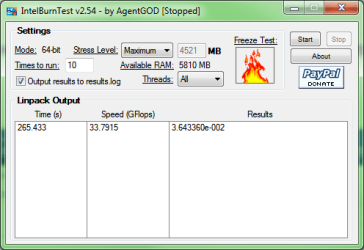
At my home, when i have ran the Furmark+Intel burn on maximum settings, it takes about 5 minutes and then the temperatures begin to reach 90+ and continue to rise. Here in pueblo, at 4500ft, 3000 ft less then my home. I can run the same settings, and after 15 min, the temp never really surpasses 90C, and when it does the fan immediately kicks in to a much higher noticeable speed and the temp drops down between 85-90 again, and maintains this. At my house, i have never heard the fan kick into that high speed that i hear down here. Here are the settings i use to test it. This laptop is a performance laptop, top of the line ASUS and can handle anything the burn in tests can do right now, without over heating. But at the higher altitude the fan doesn't work like it should. Input welcome!

Thanks
Dan
 

Attachments

  • Furmark_settings.png
    Furmark_settings.png
    33.4 KB · Views: 2
  • burnin_settings.png
    burnin_settings.png
    13 KB · Views: 2

My Computer My Computer

At a glance

Windows 7 64bitI78gb2G Nvidia Gforce 630m
Computer type
Laptop
Computer Manufacturer/Model Number
Asus
OS
Windows 7 64bit
CPU
I7
Memory
8gb
Graphics Card(s)
2G Nvidia Gforce 630m
Browser
Chrome
Back
Top