Hello Forum,
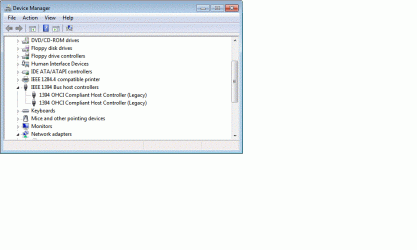
I have a SONY DRC-TRV22 HandyCam connected to my system via IEEE 1394 (FireWire). I know that Windows 7 does not support the device connected via USB. For some reason the IEEE card (SIIG 3-port 1394 (FireWire) I/O card Model NN-300012-S6) is recognized by the system, but the device (Camcorder) is not. I also have a SONY external CD-ROM drive connected to the same IEEE card. This device is recognized intermittently (sometimes it shows up under system devices, sometimes it does not). Assuming the connecting cables are good, and the connections secure, why doesn’t Windows recognize my Camcorder, and why the intermittent recognition of the CD-ROM?
My OS is Windows 7 64 bit, my motherboard is a “GIGABYTE GA-EP45-UD3P LGA 775 Intel P45 ATX Intel Motherboard”. Has anyone come across a similar situation where Windows 7 does not recognize IEEE connected devices, does anyone have a solution?? …Thanks!
I have a SONY DRC-TRV22 HandyCam connected to my system via IEEE 1394 (FireWire). I know that Windows 7 does not support the device connected via USB. For some reason the IEEE card (SIIG 3-port 1394 (FireWire) I/O card Model NN-300012-S6) is recognized by the system, but the device (Camcorder) is not. I also have a SONY external CD-ROM drive connected to the same IEEE card. This device is recognized intermittently (sometimes it shows up under system devices, sometimes it does not). Assuming the connecting cables are good, and the connections secure, why doesn’t Windows recognize my Camcorder, and why the intermittent recognition of the CD-ROM?
My OS is Windows 7 64 bit, my motherboard is a “GIGABYTE GA-EP45-UD3P LGA 775 Intel P45 ATX Intel Motherboard”. Has anyone come across a similar situation where Windows 7 does not recognize IEEE connected devices, does anyone have a solution?? …Thanks!
My Computer
At a glance
Windows 7 Home Premium 64 bit
- OS
- Windows 7 Home Premium 64 bit