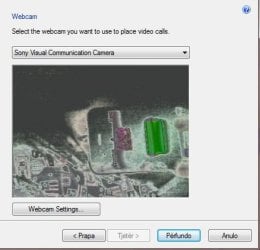
Sony Vaio Camera Resets Itself Inverted Color Picture

TheAlboPower

New member
Local time
3:58 PM
Messages
2
Location
Albania
I bought a Sony Vaio Laptop model is VPCEH190x while i was in usa now it was working fine for sometimes even when i got back to Europe but the problem now is that Camera Settings reset by itself and the picture gets like inverted effect color here is a screenshot when i move gama level it stabilizes but then again after some seconds it resets to this (check Picture down).

I've tried reinstalling windows i've changed from home premium to windows 7 ultimate, i've tried reinstalling drivers, i've tried redownloading drivers and downloading other drivers but none of my methods wouldnt work! So please help me out i would really appreciate it :)!
 

Attachments

  • sonyvaiocamissue.jpg
    sonyvaiocamissue.jpg
    33.3 KB · Views: 5

My Computer My Computer

At a glance

Windows 7 Ultimate x64Intel(R) Core(TM) i3-2310M CPU @ 2.10GHz 2.10...4GBNVIDIA GeForce 410M
Computer Manufacturer/Model Number
Sony Corporation©
OS
Windows 7 Ultimate x64
CPU
Intel(R) Core(TM) i3-2310M CPU @ 2.10GHz 2.10 GHz
Motherboard
Sony Corporation VPCEH190x
Memory
4GB
Graphics Card(s)
NVIDIA GeForce 410M
Sound Card
High Definiton Audio Controller
Monitor(s) Displays
Generic PnP Monitor
Screen Resolution
1360x768
Hello TheAlboPower and welcome to Seven Forums.

According to the US Sony eSupport website, this is the only driver thay have for the VPCEH190X webcam. Is this the one you installed?

Sony eSupport - VPCEH190X - Drivers & Software

Do you remember what you were doing when the webcam began resetting itself and the color got all crazy? How long ago did the problem first appear? Do you have a restore point going back to a date/time prior to when the problem began?

http://www.sevenforums.com/tutorials/700-system-restore.html

If system restore doesn't help you can also undo the system restore operation.

System Restore - Undo - Vista Forums (Also applies to Windows 7)

The only other suggestion I have is to contact Sony directly (links on right side of driver page) and see if they have a work around. Perhaps others have reported similar problems.
 

My Computer My Computer

At a glance

Win 7 Pro 64-bitIntel i5 2.4 Ghz8GB DDR3Intel HD 3000
Computer type
Laptop
Computer Manufacturer/Model Number
Sony Vaio VPCEB47GM Laptop
OS
Win 7 Pro 64-bit
CPU
Intel i5 2.4 Ghz
Memory
8GB DDR3
Graphics Card(s)
Intel HD 3000
Sound Card
IDT High Definition
Monitor(s) Displays
15.6 WGXA Anti-Glare LED
Screen Resolution
1280x800
Hard Drives
640Gb 7200rpm
Antivirus
MSE
Browser
Opera (primary) with IE9 backup
i bought the laptop on september when i got back here it was working fine for a month or too i came back here on the same month so it wasnt working good for more then 5 months i've tried system restore, i've tried reformating with different windows 7 version but still the same! thanks for your reply marsmimar, i'll try to contact sony and if they help i'll mark this as solved and will tell u where the problem was!
 

My Computer My Computer

At a glance

Windows 7 Ultimate x64Intel(R) Core(TM) i3-2310M CPU @ 2.10GHz 2.10...4GBNVIDIA GeForce 410M
Computer Manufacturer/Model Number
Sony Corporation©
OS
Windows 7 Ultimate x64
CPU
Intel(R) Core(TM) i3-2310M CPU @ 2.10GHz 2.10 GHz
Motherboard
Sony Corporation VPCEH190x
Memory
4GB
Graphics Card(s)
NVIDIA GeForce 410M
Sound Card
High Definiton Audio Controller
Monitor(s) Displays
Generic PnP Monitor
Screen Resolution
1360x768
I talked to a friend who said it's possible that the camera itself was damaged. A loose connection could be causing the color shift. Hard to verify without specialized testing equipment and opening the laptop cover. If you can borrow a stand-alone webcam you could use it to see if the color problems persist. If they do it might point to a bad graphics card (or some other hardware related problem) rather than the built in webcam.
 

My Computer My Computer

At a glance

Win 7 Pro 64-bitIntel i5 2.4 Ghz8GB DDR3Intel HD 3000
Computer type
Laptop
Computer Manufacturer/Model Number
Sony Vaio VPCEB47GM Laptop
OS
Win 7 Pro 64-bit
CPU
Intel i5 2.4 Ghz
Memory
8GB DDR3
Graphics Card(s)
Intel HD 3000
Sound Card
IDT High Definition
Monitor(s) Displays
15.6 WGXA Anti-Glare LED
Screen Resolution
1280x800
Hard Drives
640Gb 7200rpm
Antivirus
MSE
Browser
Opera (primary) with IE9 backup
Back
Top