Sony vaio windows explorer

Giansky26

New member
Local time
7:17 PM
Messages
4
Plzzz Help.... I just buy a new sony vaio laptop, 4gb ram, windows7 HP, 1gb graphics, 64bit..... Windows explorer is hanging and or not responding, when i try to copy my file from Outer HDD its always happening (e.g. I want to copy musics, and i used control+A to copy all then its starting to hang or not responding, what should i do...
 

My Computer

OS
Windows 7 home premium 64bit

My Computer

Computer type
Laptop
Computer Manufacturer/Model Number
Sony Vaio VPCEB47GM Laptop
OS
Win 7 Pro 64-bit
CPU
Intel i5 2.4 Ghz
Memory
8GB DDR3
Graphics Card(s)
Intel HD 3000
Sound Card
IDT High Definition
Monitor(s) Displays
15.6 WGXA Anti-Glare LED
Screen Resolution
1280x800
Hard Drives
640Gb 7200rpm
Antivirus
MSE
Browser
Opera (primary) with IE9 backup
Yes... The external HDD was being recognized..... I try to copy ten by ten files, i mean ten files first, one more ten files, and sometimes for the third or fourth time its started to hang and not responding.....
 

My Computer

OS
Windows 7 home premium 64bit
What do you mean by expanded disk management?
 

My Computer

OS
Windows 7 home premium 64bit
Was the computer finished copying the first group of ten before you tried copying the second (or third or fourth) group? If the computer wasn't finished copying you might have created a "buffer overflow" problem. A buffer overflow is when a computer tries to store more data (your music files) in the temporary data storage area (the computer memory) than it's able to hold. Everything just hangs while the computer tries to figure out what to do.

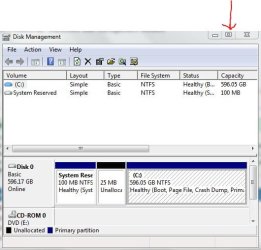
What I meant by "expanded disk management window" is when you first open Disk Management the screen might be minimized. You need to make sure you expand (maximize) the screen so all information can be seen.

disk mgmt.JPG
 

My Computer

Computer type
Laptop
Computer Manufacturer/Model Number
Sony Vaio VPCEB47GM Laptop
OS
Win 7 Pro 64-bit
CPU
Intel i5 2.4 Ghz
Memory
8GB DDR3
Graphics Card(s)
Intel HD 3000
Sound Card
IDT High Definition
Monitor(s) Displays
15.6 WGXA Anti-Glare LED
Screen Resolution
1280x800
Hard Drives
640Gb 7200rpm
Antivirus
MSE
Browser
Opera (primary) with IE9 backup
Yes... I started the other group after the first one finished.... One more i try dragging to destop the folder Music from HDD,,,, i works but it takes time.... Around 2 to 3 hrs for a 2gb files..... I will post later the screen shot of my expanded disk management...
 

My Computer

OS
Windows 7 home premium 64bit
Back
Top