Sorry...

coda46

New member
Local time
2:20 PM
Messages
3
Sorry I am a newbie at these forums and at win 7 because this would not have happened.
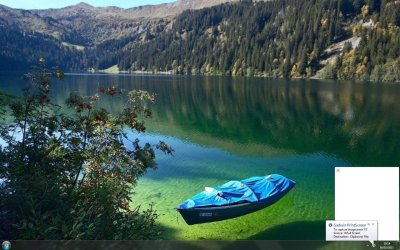
I did as most folks probably do when they get Win 7....play around with the gadgets. Some great one there, then this happened a few days ago a big white panel has appeared. Will I have to re-install Win 7 ? I hope not!!!
 

Attachments
  • ScreenShot001.jpg
    ScreenShot001.jpg
    250.1 KB · Views: 26

My Computer

OS
64 bit
Click the [x] button on that gadget and it'll be removed mate :)
 

My Computer

Computer type
PC/Desktop
Computer Manufacturer/Model Number
Custom Build
OS
Windows 7 Ultimate x64 Service Pack 1
CPU
AMD Athlon II x4 Propus 2.9 GHz
Motherboard
ASRock N68C-GS FX
Memory
2 x 4GB Corsair XMS 3 DDR3 -1600 CL9
Graphics Card(s)
AMD Radeon HD 5850 1GB GDDR5
Sound Card
On-board 6-Channel HD Audio
Monitor(s) Displays
18' LG Flatron E1942TC-BN on DVI, 18' Chimei 95ND on HDMI
Screen Resolution
1366 x 768 x 2
Hard Drives
1 x 500 GB Seagate
1 x 1 TB Western Digital Caviar Green
1 x 1 TB Hitachi Touro Mobile USB 3
PSU
Seasonic S12II 520W
Case
Generic with Cable Management
Cooling
Deep Cool Gammaxx 200
Keyboard
Dragonwar Desert Eagle
Mouse
Logitech B85
Internet Speed
5Mb/s DL, 0.9Mb/s UL
Antivirus
ESET Nod32
Browser
Google Chrome 64 Bit
Other Info
LG G4 H818P - Rooted with Xposed Framework
That looks to me like a "can't load the picture" red x than a "close the picture" red x. What is it meant to be? a gadget?
 

My Computer

Computer type
PC/Desktop
Computer Manufacturer/Model Number
Medion Erazer (note to self: insert model number) - with custom additions
OS
Windows 10 Pro x64
CPU
Intel Core i5 7400 @ 3.00GHz
Motherboard
OEM supllied with PC
Memory
8GB 2133Mhz DDR4 (OEM supplied)
Graphics Card(s)
Gygabyte Windforce GTX 1050Ti (Factory Overclocked)
Sound Card
Realtek
Monitor(s) Displays
Acer Al1980 + HKC
Screen Resolution
1360*768(HKC) / 1280*1024(Acer)
Hard Drives
1TB Toshiba
1TB WD Caviar Green
120GB Samsung Evo 840
PSU
OEM supplied (no power rating on case)
Case
OEM Supplied
Cooling
Stock
Keyboard
Logitech Wireless
Mouse
Logitect Wireless
Internet Speed
40Mb/s Down 10Mb/s Up
Antivirus
Defender
Browser
Firefox
Click the [x] button on that gadget and it'll be removed mate :)
I think I said I was a newbie to these forums not Windows !!! Been using it since Win 95, so yes I did click on the x I think it's more likely to be the second solution.
I tried a few gadgets and can't remember which !
So looks like a re-install then ? Or any other suggestions ?
 

My Computer

OS
64 bit
Apologie's coda, we have to assume that everyone who post's know's nothing about computer's, sure you understand.

Probably the easiest thing to do is uninstall all your gadgets, then reintroduce them one by one until you find the issue.

There should be no need to reinstall just for a dodgy gadget.

First try and close the gadget (if that's what it is) by right clicking it. Im fairly sure you won't be able to uninstall it while it's running. (you'll get the "in use by another process" message)

To uninstall gadget:
1. Open Windows Explorer.
2. Press Alt then click Tools>Folder Options
3. Click View>Show Hidden Files, folders and drives.
4. Navigate to C:\Users\<Username>\AppData\Local\Microsoft\Windows Sidebar
5. Delete all folders, they should all be named <something>.gadget
6. You may need to restart (not sure)
 

My Computer

Computer type
PC/Desktop
Computer Manufacturer/Model Number
Medion Erazer (note to self: insert model number) - with custom additions
OS
Windows 10 Pro x64
CPU
Intel Core i5 7400 @ 3.00GHz
Motherboard
OEM supllied with PC
Memory
8GB 2133Mhz DDR4 (OEM supplied)
Graphics Card(s)
Gygabyte Windforce GTX 1050Ti (Factory Overclocked)
Sound Card
Realtek
Monitor(s) Displays
Acer Al1980 + HKC
Screen Resolution
1360*768(HKC) / 1280*1024(Acer)
Hard Drives
1TB Toshiba
1TB WD Caviar Green
120GB Samsung Evo 840
PSU
OEM supplied (no power rating on case)
Case
OEM Supplied
Cooling
Stock
Keyboard
Logitech Wireless
Mouse
Logitect Wireless
Internet Speed
40Mb/s Down 10Mb/s Up
Antivirus
Defender
Browser
Firefox
Apologie's coda, we have to assume that everyone who post's know's nothing about computer's, sure you understand.

Probably the easiest thing to do is uninstall all your gadgets, then reintroduce them one by one until you find the issue.

There should be no need to reinstall just for a dodgy gadget.

First try and close the gadget (if that's what it is) by right clicking it. Im fairly sure you won't be able to uninstall it while it's running. (you'll get the "in use by another process" message)

To uninstall gadget:
1. Open Windows Explorer.
2. Press Alt then click Tools>Folder Options
3. Click View>Show Hidden Files, folders and drives.
4. Navigate to C:\Users\<Username>\AppData\Local\Microsoft\Windows Sidebar
5. Delete all folders, they should all be named <something>.gadget
6. You may need to restart (not sure)

Thanks Martin nice to get help from a "Narfolk" man I lived in Peterbourgh for many years before moving here to NL. Anyhoo back to my problem. I read this but when I saw the 'uninstall' word I thought Win 7 must be a simpler way...hey presto there is !
I went to the actual box which pops up from the desktop gadget option and there is an uninstall (I did install a lot, toys for the boys eh?) Job done!
Thanks for the help.
 

Attachments

  • ScreenShot002.jpg
    ScreenShot002.jpg
    60.1 KB · Views: 8

My Computer

OS
64 bit
Great stuff, glad to hear it's fixed. The reason I recommended manual uninstallation is because some gadget's don't have that option, I wanted to provide a foolproof solution. I'll go ahead and mark the thread solved for you.
 

My Computer

Computer type
PC/Desktop
Computer Manufacturer/Model Number
Medion Erazer (note to self: insert model number) - with custom additions
OS
Windows 10 Pro x64
CPU
Intel Core i5 7400 @ 3.00GHz
Motherboard
OEM supllied with PC
Memory
8GB 2133Mhz DDR4 (OEM supplied)
Graphics Card(s)
Gygabyte Windforce GTX 1050Ti (Factory Overclocked)
Sound Card
Realtek
Monitor(s) Displays
Acer Al1980 + HKC
Screen Resolution
1360*768(HKC) / 1280*1024(Acer)
Hard Drives
1TB Toshiba
1TB WD Caviar Green
120GB Samsung Evo 840
PSU
OEM supplied (no power rating on case)
Case
OEM Supplied
Cooling
Stock
Keyboard
Logitech Wireless
Mouse
Logitect Wireless
Internet Speed
40Mb/s Down 10Mb/s Up
Antivirus
Defender
Browser
Firefox
Back
Top