
You are using an out of date browser. It may not display this or other websites correctly.
You should upgrade or use an alternative browser.
You should upgrade or use an alternative browser.
sort icons in control panel
- Thread starter brucelee
- Start date

Not with the category view, but the large or small icons view are alphabetically arranged by default
My Computers
System One System Two
-
- Computer type
- PC/Desktop
- Computer Manufacturer/Model Number
- ChillBlast - Custom to my design
- OS
- Windows 11 Pro x64 [Latest Release and Release Preview]
- CPU
- Ryzen 9 5950X, 3.8 - 5.2 MHz
- Motherboard
- Asus Prime X570-Pro
- Memory
- 64GB [2 x 32GB] DDR4 3200MHz
- Graphics Card(s)
- 4GB NVIDIA GEFORCE GTX 1650 Ti
- Sound Card
- On-board SPDIF to 5.1 System + HDMI [5.1 system]
- Monitor(s) Displays
- 32" UHD 32 Bit HDR Monitor + 43" UHD 4K 32Bit HDR TV
- Screen Resolution
- 2 x 3840 x 2160 @60Hz
- Hard Drives
- 1TB M2 SSD OS, 500GB Fast Access SSD, 2 x 8TB Data + Various Externals from 1TB to 4TB, 10TB NAS
- PSU
- NZXT C750 80 PLUS Gold 750W Modular PSU
- Case
- Workstation Case [Matt Black]
- Cooling
- NZXT Kraken X63 280mm CPU Cooler +2x Quiet Case fans
- Keyboard
- Logitech Wireless MX Keys & K400 + others
- Mouse
- Logitech Wireless MX Master 3S
- Internet Speed
- 920 MB Down 50 MB Up
- Antivirus
- BitDefender Total Security Pro
- Browser
- Chrome (always run latest Non-Beta)
- Other Info
- Also run ...
Laptop - Quad 8GB - Windows 10 Pro x64
Nexus 7 Android tablet x2
Samsung 10.2" tablet
Blackview TAB 8 4G Android Tablet c/w Keyboard
Wacom Intuos Pro Medium Pen Pad
Wacom Intuos Pro Small Pen Pad
Wacom Expresskeys Remote
Loopdeck+ Graphics Controller
Shuttle Pro v2 Control
-
- Computer type
- Laptop
- System Manufacturer/Model Number
- Dell XPS 17 10750H
- OS
- Windows 11 Pro x64 Latest RP
- CPU
- Intel I7 10750H 5.0GHz
- Motherboard
- Dell XPS
- Memory
- 32GB [2x16GB] DDR4 2933 MHz
- Graphics Card(s)
- nVidia GTX1650Ti 4 GB GDDR6
- Sound Card
- Stock [Realtek] 4 Speaker
- Monitor(s) Displays
- 17" IPS UHD+ Infinity Edge Touchscreen
- Screen Resolution
- 3840 x 2400
- Hard Drives
- 2TB M2 NVMe, 4TB External + various 500GB & 1TB External NVMe (also have access to spinner HDD from
- PSU
- Stock
- Case
- Stock XPS Aluminium & Carbon Fibre
- Cooling
- Stock - Active Fan Control
- Keyboard
- Backlit + Various Logitech
- Mouse
- Stock Track Pad + Logitech MX Trackball
- Internet Speed
- 72 MB Down 18MB Up
- Browser
- Chrome
- Other Info
- Also run ...
Laptop - Quad 8GB - Windows 10 Pro x64
Nexus 7 Android tablet x2
10.2" tablet
Sony Z3 Android Smartphone
Wacom Intuos Pro Medium Pen Pad
Wacom Intuos Pro Small Pen Pad
Wacom Expresskeys Remote
Loopdeck+ Graphics Controller
Shuttle Pro v2 Control Pad
10TB NAS
Not with the category view, but the large or small icons view are alphabetically arranged by default
not for me there not.
My Computer
- OS
- Windows 7
- CPU
- Athon 64 3500
- Motherboard
- Ms-7125
- Memory
- 2gb
- Graphics Card(s)
- nvidia 9500GT
- Sound Card
- -
- Monitor(s) Displays
- 24"
- Hard Drives
- 2
- PSU
- 500w
- Case
- -
- Cooling
- -

Hello BruceLee, and welcome to Seven Forums.
Strange, could you post a screenshot of this to help see what may be happening?
You might also click on View (menu bar) and double check to make sure that Auto Arrange is checked.
Hope this helps for now,
Shawn
Strange, could you post a screenshot of this to help see what may be happening?
You might also click on View (menu bar) and double check to make sure that Auto Arrange is checked.
Hope this helps for now,
Shawn
My Computer
- Computer type
- PC/Desktop
- Computer Manufacturer/Model Number
- Self built custom
- OS
- 64-bit Windows 11 Pro for Workstations
- CPU
- Intel i7-8700K OC'd to 5 GHz
- Motherboard
- ASUS ROG Maximus XI Formula Z390
- Memory
- 64 GB (4x16GB) G.SKILL TridentZ RGB DDR4 3600 MHz
- Graphics Card(s)
- ASUS ROG-STRIX-GTX1080TI-O11G-GAMING
- Sound Card
- Integrated
- Monitor(s) Displays
- 2 x Samsung Odyssey G7 27"
- Screen Resolution
- 2560x1440
- Hard Drives
- 1TB Samsung 990 PRO M.2,
4TB Samsung 990 PRO PRO M.2,
TerraMaster F8 SSD Plus NAS
- PSU
- Seasonic Prime Titanium 850W
- Case
- Thermaltake Core P3
- Cooling
- Corsair Hydro H115i
- Keyboard
- Logitech wireless K800
- Mouse
- Logitech MX Master 4
- Internet Speed
- 2 Gb/s Download and 100 Mb/s Upload
- Antivirus
- Malwarebyte Anti-Malware Premium
- Browser
- Google Chrome
- Other Info
- Logitech Z625 speaker system,
Logitech BRIO 4K Pro webcam,
HP Color LaserJet Pro MFP M477fdn,
APC SMART-UPS RT 1000 XL - SURT1000XLI,
Galaxy S23 Plus phone
My Computer
- OS
- Windows 7
- CPU
- Athon 64 3500
- Motherboard
- Ms-7125
- Memory
- 2gb
- Graphics Card(s)
- nvidia 9500GT
- Sound Card
- -
- Monitor(s) Displays
- 24"
- Hard Drives
- 2
- PSU
- 500w
- Case
- -
- Cooling
- -

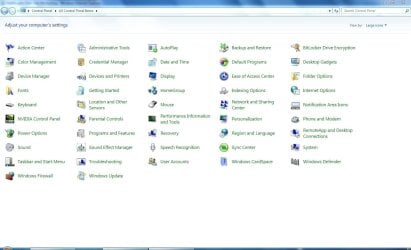
yeah from left to right mybe but not down wards. still makes it hard to find something
My Computer
- OS
- Windows 7
- CPU
- Athon 64 3500
- Motherboard
- Ms-7125
- Memory
- 2gb
- Graphics Card(s)
- nvidia 9500GT
- Sound Card
- -
- Monitor(s) Displays
- 24"
- Hard Drives
- 2
- PSU
- 500w
- Case
- -
- Cooling
- -
Simply narrow the window to show a single column  or type the first few letters of the tool you need.
To be honest I tend to type the name of the CP function I require direct into the start search and the system finds it quicker than I can by opening the Control panel
or type the first few letters of the tool you need.To be honest I tend to type the name of the CP function I require direct into the start search and the system finds it quicker than I can by opening the Control panel
My Computers
System One System Two
-
- Computer type
- PC/Desktop
- Computer Manufacturer/Model Number
- ChillBlast - Custom to my design
- OS
- Windows 11 Pro x64 [Latest Release and Release Preview]
- CPU
- Ryzen 9 5950X, 3.8 - 5.2 MHz
- Motherboard
- Asus Prime X570-Pro
- Memory
- 64GB [2 x 32GB] DDR4 3200MHz
- Graphics Card(s)
- 4GB NVIDIA GEFORCE GTX 1650 Ti
- Sound Card
- On-board SPDIF to 5.1 System + HDMI [5.1 system]
- Monitor(s) Displays
- 32" UHD 32 Bit HDR Monitor + 43" UHD 4K 32Bit HDR TV
- Screen Resolution
- 2 x 3840 x 2160 @60Hz
- Hard Drives
- 1TB M2 SSD OS, 500GB Fast Access SSD, 2 x 8TB Data + Various Externals from 1TB to 4TB, 10TB NAS
- PSU
- NZXT C750 80 PLUS Gold 750W Modular PSU
- Case
- Workstation Case [Matt Black]
- Cooling
- NZXT Kraken X63 280mm CPU Cooler +2x Quiet Case fans
- Keyboard
- Logitech Wireless MX Keys & K400 + others
- Mouse
- Logitech Wireless MX Master 3S
- Internet Speed
- 920 MB Down 50 MB Up
- Antivirus
- BitDefender Total Security Pro
- Browser
- Chrome (always run latest Non-Beta)
- Other Info
- Also run ...
Laptop - Quad 8GB - Windows 10 Pro x64
Nexus 7 Android tablet x2
Samsung 10.2" tablet
Blackview TAB 8 4G Android Tablet c/w Keyboard
Wacom Intuos Pro Medium Pen Pad
Wacom Intuos Pro Small Pen Pad
Wacom Expresskeys Remote
Loopdeck+ Graphics Controller
Shuttle Pro v2 Control
-
- Computer type
- Laptop
- System Manufacturer/Model Number
- Dell XPS 17 10750H
- OS
- Windows 11 Pro x64 Latest RP
- CPU
- Intel I7 10750H 5.0GHz
- Motherboard
- Dell XPS
- Memory
- 32GB [2x16GB] DDR4 2933 MHz
- Graphics Card(s)
- nVidia GTX1650Ti 4 GB GDDR6
- Sound Card
- Stock [Realtek] 4 Speaker
- Monitor(s) Displays
- 17" IPS UHD+ Infinity Edge Touchscreen
- Screen Resolution
- 3840 x 2400
- Hard Drives
- 2TB M2 NVMe, 4TB External + various 500GB & 1TB External NVMe (also have access to spinner HDD from
- PSU
- Stock
- Case
- Stock XPS Aluminium & Carbon Fibre
- Cooling
- Stock - Active Fan Control
- Keyboard
- Backlit + Various Logitech
- Mouse
- Stock Track Pad + Logitech MX Trackball
- Internet Speed
- 72 MB Down 18MB Up
- Browser
- Chrome
- Other Info
- Also run ...
Laptop - Quad 8GB - Windows 10 Pro x64
Nexus 7 Android tablet x2
10.2" tablet
Sony Z3 Android Smartphone
Wacom Intuos Pro Medium Pen Pad
Wacom Intuos Pro Small Pen Pad
Wacom Expresskeys Remote
Loopdeck+ Graphics Controller
Shuttle Pro v2 Control Pad
10TB NAS
ReliancePC
New member
- Local time
- 1:34 AM
- Messages
- 1
Interim measure: CP shortcuts folder
The left to right ordering in the W7 Control Panel is excruciatingly annoying. I looked around for a W7 tweaking tool that might present a different CP view and didn't see anything.
<p>
So, I put together a folder of shortcuts of W7 CP items, which can in fact be ordered any way one likes, since it's just an ordinary folder. I set the "Comment" fields of the shortcuts to match the roll-over text of the actual Control Panel items, so when the folder Comment column is enabled, the list of shortcuts look a lot like the XP/Vista CP details view.
<p>
This folder of W7 shortcuts can be downloaded here:
<p>
W7 CP Shortcuts Folder Download
<>
The downloaded file is a self-extracting 7z bundle that outputs the folder "W7 ListView Control Panel"
The left to right ordering in the W7 Control Panel is excruciatingly annoying. I looked around for a W7 tweaking tool that might present a different CP view and didn't see anything.
<p>
So, I put together a folder of shortcuts of W7 CP items, which can in fact be ordered any way one likes, since it's just an ordinary folder. I set the "Comment" fields of the shortcuts to match the roll-over text of the actual Control Panel items, so when the folder Comment column is enabled, the list of shortcuts look a lot like the XP/Vista CP details view.
<p>
This folder of W7 shortcuts can be downloaded here:
<p>
W7 CP Shortcuts Folder Download
<>
The downloaded file is a self-extracting 7z bundle that outputs the folder "W7 ListView Control Panel"
My Computer
- OS
- xp/vista/w7
Kudos!
Hey Reliance PC,
I just had to write and give you kudos for the Control Panel Shortcuts folder--great work! Norton told me not to download it since it was so new so, of course, I disregarded their warning, then clicked on their dialog box's "Safe" choice to provide feedback to Norton that your work is safe...and excellent!
Rich
Hey Reliance PC,
I just had to write and give you kudos for the Control Panel Shortcuts folder--great work! Norton told me not to download it since it was so new so, of course, I disregarded their warning, then clicked on their dialog box's "Safe" choice to provide feedback to Norton that your work is safe...and excellent!
Rich
My Computer
- Computer Manufacturer/Model Number
- Dell XPS 435T/9000
- OS
- Win 7
- CPU
- i7950 Intel 3.06GHz
- Memory
- 12GB
- Graphics Card(s)
- GT220 1024GB Nividia
- Monitor(s) Displays
- Viewsonic 24"
- Hard Drives
- 750 GB C Drive
Backup is Seagate 500GB
The OP had a curious request. Whether or not he found the answer, we do not know.
The follow up was, imo, even more mysterious. I live in the west, and use western script. All my life I have read from left to right, in spite having lived for many years in countries where it is right to left.
Until I first read this thread, a couple of months old now, I have to confess that I had not (and still do not) noticed anything unusual about the order of icons in the control panel. A to z; left to right, down a line, left to right again, works perfectly for me.
The follow up was, imo, even more mysterious. I live in the west, and use western script. All my life I have read from left to right, in spite having lived for many years in countries where it is right to left.
Until I first read this thread, a couple of months old now, I have to confess that I had not (and still do not) noticed anything unusual about the order of icons in the control panel. A to z; left to right, down a line, left to right again, works perfectly for me.
My Computer
- Computer Manufacturer/Model Number
- Three desktops and one laptop with good specs..
- OS
- Vista and now 7 in 32 and 64 bit.
rationalobserve
New member
- Local time
- 2:34 AM
- Messages
- 1
This is an old post, but the issue persists and some posters here apparently don't realize the myopia of their perspectives. Apparently davehc has done relatively little work with lists in the English language. Lists are alphabetized vertically first and then horizontally in the vast majority of cases in common western usage, including in most English patterns of usage. Unfortunately, microsoft did not see fit to allow users to order the list in control panel, instead opting for a decidedly non-standard list format alphabetized horizontally and then vertically. It would be nice to see some actual attention to user experience related design issues from a company other than Apple one of these days.
My Computer
- OS
- 7