
You are using an out of date browser. It may not display this or other websites correctly.
You should upgrade or use an alternative browser.
You should upgrade or use an alternative browser.
Solved Sort images by resolution?
- Thread starter lolcocks
- Start date

- Local time
- 10:56 AM
- Messages
- 12,011
Yes.
You use the "more options" icon in the upper right corner of Windows Explorer.
Choose "details" and you can then sort by image size, either large to small or small to large. This will show you the files by name.
After they are sorted by size, you can then go back to "more options" and choose "large icons". That will maintain the same sort that you did with "details", but will show you the actual thumbnails in the same order, rather than showing you just the file name.
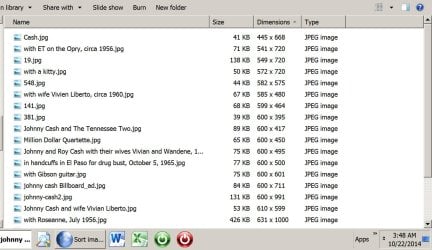
Here's an example. The first screen shot shows a bunch of pictures of Johnny Cash, using "details", sorted small to large.
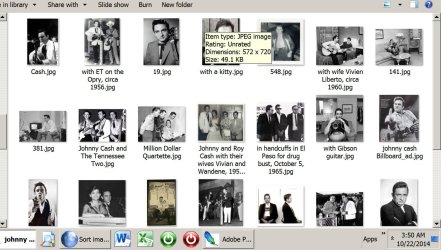
The second screen shot is the same sort, this time using "large icons".
In both screen shots, the smallest picture is the first one in the list, titled "Cash.jpg" and measuring 445 x 668. If I had sorted "large to small", the first picture in the list would have been the largest one.
You use the "more options" icon in the upper right corner of Windows Explorer.
Choose "details" and you can then sort by image size, either large to small or small to large. This will show you the files by name.
After they are sorted by size, you can then go back to "more options" and choose "large icons". That will maintain the same sort that you did with "details", but will show you the actual thumbnails in the same order, rather than showing you just the file name.
Here's an example. The first screen shot shows a bunch of pictures of Johnny Cash, using "details", sorted small to large.
The second screen shot is the same sort, this time using "large icons".
In both screen shots, the smallest picture is the first one in the list, titled "Cash.jpg" and measuring 445 x 668. If I had sorted "large to small", the first picture in the list would have been the largest one.
Attachments
My Computer
- Computer type
- PC/Desktop
- Computer Manufacturer/Model Number
- Ignatz Special; 4 speed manual gearbox; factory air conditioning; one of one
- OS
- Windows 7 Home Premium SP1, 64-bit
- CPU
- Intel Skylake i5-6600K, not overclocked
- Motherboard
- AsRock Z170M Extreme 4, micro ATX
- Memory
- 8 GB HyperX DDR4-2666 (2 x 4 GB)
- Graphics Card(s)
- none; graphics are integrated on CPU
- Sound Card
- onboard: Realtek ALC1150; external: USB Behringer UF0-202
- Monitor(s) Displays
- Dell S2340M 23 inch IPS
- Screen Resolution
- 1600 x 900
- Hard Drives
- System: Crucial MX100 series SSD, 128 GB;
Data: Samsung Spinpoint 103SJ, 1 TB;
Backup: WD Caviar Green WD30EZRX-00D8PB0, 3 TB
- PSU
- Rosewill SilentNight 500 watt fanless, semi-modular
- Case
- Antec Solo II
- Cooling
- Noctua NH-U12S; Noctua F12 intake, Noctua S12A exhaust
- Keyboard
- Microsoft 200 6JH-00001 USB
- Mouse
- Dell or Microsoft optical wired; USB
- Antivirus
- Microsoft Security Essentials and Malwarebytes Premium
- Browser
- Pale Moon
- Other Info
- All fans PWM; speeds at idle: CPU circa 500 rpm; intake circa 600 rpm; exhaust circa 600 rpm; CPU temps 27 idle and 47 C load in a warm room (27 C/81 F) when running Intel Extreme Tuning Utility stress test.

Individually Too
You can also choose "Height" and "Width" separately if you wish.
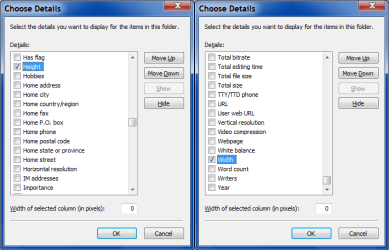
You can also choose "Height" and "Width" separately if you wish.
My Computer
- Computer type
- PC/Desktop
- Computer Manufacturer/Model Number
- n/a
- OS
- W7 Ultimate SP1, LM19.2 MATE, W10 Home 1703, W10 Pro 1703 VM, #All 64 bit
- CPU
- AMD Phenom II x6 1100T, 3.3 GHz
- Motherboard
- ASUS M4A88T-M/USB3 (AM3)
- Memory
- 12GB DDR3 1333 G-Skill (4GB x 2), G-Skill (2GB x 2)
- Graphics Card(s)
- NVIDIA GeForce GTX 660
- Sound Card
- Realtek?
- Monitor(s) Displays
- Samsung S23B350
- Screen Resolution
- 1920x1080
- Hard Drives
- WD Green 2TB (SATA), WD Green 3TB (SATA), WD Blue 4TB (SATA), WD Blue 6TB (SATA)
- PSU
- Cooler Master
- Case
- Antec GX300 Tower
- Cooling
- 3x Antec TRICOOL 120mm Fans
- Mouse
- Wired Optical
- Internet Speed
- DSL
- Antivirus
- Avast
- Browser
- Pale Moon (64 bit)
- Other Info
- 2018-12-27 Upgraded HDDs
2015-12-10 Upgraded case, graphics card, storage
2015-08-15 Upgraded motherboard & RAM
2015-07-15 Upgraded LM17.1 to LM17.2

bobkush
New member
I found the best way to sort all my images is the use the freeware Dimensions2Folders.
Dimensions2Folders is a small app that enables you to sort your digital images into folders based on their dimensions. You can create folders based on the exact resolution or set custom filters with a tolerance level to group images that are roughly the same size (e.g. 800x600 +/- 200). In addition, the program can also sort your images based on their aspect ratio (e.g. 16:9) instead of their exact dimensions.
Skwire Empire » Dimensions 2 Folders
Dimensions2Folders is a small app that enables you to sort your digital images into folders based on their dimensions. You can create folders based on the exact resolution or set custom filters with a tolerance level to group images that are roughly the same size (e.g. 800x600 +/- 200). In addition, the program can also sort your images based on their aspect ratio (e.g. 16:9) instead of their exact dimensions.
Skwire Empire » Dimensions 2 Folders
My Computer
- Computer Manufacturer/Model Number
- Toshiba L775 Laptop
- OS
- Windows 7 Home Premium
- CPU
- Intel
- Memory
- 4 Gb
I found the best way to sort all my images is the use the freeware Dimensions2Folders.
Dimensions2Folders is a small app that enables you to sort your digital images into folders based on their dimensions. You can create folders based on the exact resolution or set custom filters with a tolerance level to group images that are roughly the same size (e.g. 800x600 +/- 200). In addition, the program can also sort your images based on their aspect ratio (e.g. 16:9) instead of their exact dimensions.
Skwire Empire » Dimensions 2 Folders
If you could stop bumping my old topics, it would be nice.
My Computer
- Computer type
- PC/Desktop
- OS
- Windows 7 Ultimate x64
Hi Lolcocks,
Please mark this thread as solved.
If you think any of this post is not helpful. report the post by clicking the red exclamation point at the upper right corner of the comment box.
Please mark this thread as solved.
If you think any of this post is not helpful. report the post by clicking the red exclamation point at the upper right corner of the comment box.
My Computer
- Computer type
- PC/Desktop
- Computer Manufacturer/Model Number
- HP
- OS
- Windows 7 Pro 32bit
- CPU
- Dual Core
- Antivirus
- Trend Micro

Hi,
I personally don't see anything to report abuse about here,
Alternatively manage your subscribed threads and Unsubscribe to the the ones you want,
Click on Quick links on the top of the forum/ User PC/ scroll down the list on the left column and click on List Subscriptions.
There is also Subscriptions link on the top right of every thread or forum section you can use I just noticed
Check the boxes that you want to Unsubscribe from,
On the bottom you'll see a drop down arrow next to GO,
Switch to No Email notification then Go.
Cheers.
I personally don't see anything to report abuse about here,
Alternatively manage your subscribed threads and Unsubscribe to the the ones you want,
Click on Quick links on the top of the forum/ User PC/ scroll down the list on the left column and click on List Subscriptions.
There is also Subscriptions link on the top right of every thread or forum section you can use I just noticed
Check the boxes that you want to Unsubscribe from,
On the bottom you'll see a drop down arrow next to GO,
Switch to No Email notification then Go.
Cheers.
My Computer
- Computer type
- PC/Desktop
- Computer Manufacturer/Model Number
- Custom assembled by me :}
- OS
- Win-7-Pro64bit 7-H-Prem-64bit
- CPU
- i7-5930K 2nd i9-9940x both water blocked VRM's too
- Motherboard
- ASUS SABERTOOTH X99 2nd ASUS x299 Apex
- Memory
- Trident-z 3200C14 2nd Trident-z 3600C16
- Graphics Card(s)
- EVGA 1080ti ftw3 2nd Titan Xp both water blocked
- Sound Card
- Built-in Realtek
- Monitor(s) Displays
- 1-AOC G2460PG 24"G-Sync 144Hz/ 2nd 1-ASUS VG248QE 24" 144Hz
- Screen Resolution
- 1920 x 1080 144Hz
- Hard Drives
- 2-Samsung M.2 Evo & Evo Plus
2-Samsung 850 EVO 500GB SSD's/ 3-2.5 W.D. Black 1tb-&3-1tb/3-3.5 WD Black 1tb hdd's
- PSU
- EVGA SuperNOVA 1000-P2 2nd 1200-P2
- Case
- 2-Corsair Obsidian Series 450D Black ATX Mid Tower
- Cooling
- Custom water loops
- Keyboard
- Logitech G710+/ 2nd Logitech G910
- Mouse
- 2-RedDragon M901 Perdition 16400 dpi Gaming mouse = wired
- Internet Speed
- Comcast Ping 19ms 89.31mbps download speed 6.12mbps upload
- Antivirus
- Malwarebytes Pro/ Superantispyware Pro
- Browser
- FireFox & Pale moon
- Other Info
- 2nd ASUS X299 Apex/Intel i9-9940x with Custom water loop/7H-Prem-x64/Corsair 450D case/Ram Trident-z 3600C16 4x8gb / Samsung970Evo plus 500gb SSD/Dual ssd EZ swap evo/PSU EVGA SuperNova 1200w-P2 80+Platinum/GPU Titan Xp /8-ML-140 on push-pull on 2-280GTX rads