Sound Blaster audigy 2 Value malfunction

Matej0704

New member
Local time
1:36 PM
Messages
5
Hi. First of all, i would like to say, that i am from central europe, non-english speaking country so be tolerant to my language mistakes, please. Thanks.
I didn't find here, or anywhere else, someone with similar problem, so that im asking you for help.
Some time ago my sound card just stop working, but nothing changed in my hardware. Frist i thought that it just burned, but few days ago i tried it in other PC and its working perfectly. That brought me to thinking about driver which could work incorrect. So i downloaded lastest driver, and tried to install it. But i spent over 6 hours to uninstall old driver and still nothing happens. i tried to remove it with device manager and from properties of my sound card and still the same problem.waiting and nothing. Another, not so important problem, but could have something doing whit it, is, when system is starting or shuting down and speakers are still on, it makes some strange blasts. I think that it started to doing this when i changed my OS to win 7 but it was almost the same time when i changed my power supply due to stronger graphics card so i'm not sure.
Finaly, my question is: Which files should i delete from Hard disc and/or windows registry so that install wizard thinks that no driver is here? Or have anyone some other clue to solve that problem? I will manage with proper working sound card. Thats all what I want.

My config.:
Intel pentium 4 3,06 HT
MB MSI 915P neo 2 Platinum
RAM Kingston 2x 256 + 2x 1024
HDD Maxtor DiamondMax plus 9 250GB
zotac nVidia GeForce 9600GT
and power supply Hedy 400W
(Creative Sound Blaster Audigy 2 Value)

For all hints I thanks.
 

My Computer My Computer

OS
Windows 7
Hello !!

First i would recommend to turn off Automatic Driver Installation
then remove all the Creative Products from the Programs and Features.

1) Open Device Manager, locate your soundcard, right click it, choose Uninstall, check "Delete driver files" and click on OK. Reboot when prompted to do so.

2) Boot into Safe Mode:

For 32-bit: Open the \Windows\System32 folder and delete APOIM32.EXE, APOMngr.dll, CmdRtr.dll.

For 64-bit: Open the \Windows\System32 folder and delete APOMgr64.dll, CmdRtr64.dll.
Now open the \Windows\SysWOW64 folder and delete APOIM64.EXE, APOMngr.dll and CmdRtr.dll.

Now delete the following registry trees:

For 32-bit: HKEY_LOCAL_MACHINE\SOFTWARE\Creative Tech\Software Installed\APOIM
HKEY_LOCAL_MACHINE\SOFTWARE\Creative Tech\Installation\CTRedist\APOIM

For 64-bit: HKEY_LOCAL_MACHINE\SOFTWARE\Wow6432Node\Creative Tech\Software Installed\APOIM
HKEY_LOCAL_MACHINE\SOFTWARE\Wow6432Node\Creative Tech\Installation\CTRedist\APOIM


Then when you reboot the System it should tell you unknown Driver with a Yellow exclamation if you have got that far then it means the Drivers are out of your System. Then you could install Daniel K's Support Pack 2.7 version.
SB P17X Series Support Pack 2.7 (04/01/2010) - Aud... - Creative Labs

Hope this helps,
Captain
 

My Computer My Computer

Computer Manufacturer/Model Number
Samsung NP550P5C-S02IN
OS
Windows 7 Ultimate - 64-bit | Windows 8 Pro - 64-bit
CPU
Intel® Core™ i7 Processor 3,610QM (2.30Hz, 6MB L3 Cach
Memory
8 GB
Graphics Card(s)
NVIDIA® GeForce® GT 650M 2GB Graphics, Optimus™ techno
Sound Card
SoundAlive™ JBL 3 Speakers (With sub-Woofer)
Monitor(s) Displays
39.62cm (15.6) SuperBright 300nit HD+ LED Display
Screen Resolution
1,600 x 900, Anti-Reflective
Hard Drives
1TB S-ATA II Hard Drive (5,400RPM)
Ok, thanks. I made a progress. now, drivers are installed, everything looks fine. In Sounds tab, that green bar next to my SB audigy is moving up and down, but it makes no sound. I didn't find any of that files you mentioned in System32 nor Registry. did you have some solution?
 

My Computer My Computer

OS
Windows 7
Ok, thanks. I made a progress. now, drivers are installed, everything looks fine. In Sounds tab, that green bar next to my SB audigy is moving up and down, but it makes no sound. I didn't find any of that files you mentioned in System32 nor Registry. did you have some solution?


Green bar moving up/down?

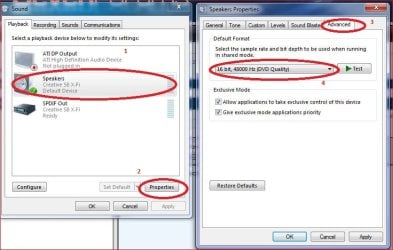
Try turning off all enhancements

Right click MS speaker icon in task bar, select playback devices.
Select default playback device (speakers), select properties...
Check "Disable All Sound Effects".

Also, double check the output jack being used for speakers. .

Ap
 

My Computer My Computer

Computer Manufacturer/Model Number
Assembled in my workshop
OS
Windows 7 Home Premium
CPU
Intel Core 2 Duo @ 3.00gHz
Motherboard
Gigabyte GA-P35-S3G
Memory
4 GB
Graphics Card(s)
ATI Radeon HD 2600 XT
Sound Card
RME 24/96 Card, Realtek Internal Audio PreSonus FireStudio
Monitor(s) Displays
Acer 1917 (x2)
Screen Resolution
1280 x 1024 on both monitors
Hard Drives
Three 250GB Seagate SATA Barracuda 7200rpm
PSU
Rosewill 500-watt
Case
Rosewill mid-tower
Cooling
Noctua NH-U9B (CPU), PwrSupply fan + single large case Fan
Keyboard
Macally w/2/USB ports.
Mouse
Trackman Wheel
Other Info
Event 20/20 bas studio monitors, Yamaha sub.
Rackmount Korg/Roland/Yamaha synthesizers,
Cubase MIDI/audio recording. Sony Soundforge audio/mastering software. CD Architect Mastering. RME & Presonus audio interfaces.
One more thing to check/change,

16bit.JPG

from the default 24 bit to the above.

Also sorry Captain but,

Then you could install Daniel K's Support Pack 2.7 version. SB P17X Series Support Pack 2.7 (04/01/2010) - Aud... - Creative Labs


Ok, thanks. I made a progress. now, drivers are installed, everything looks fine. In Sounds tab, that green bar next to my SB audigy is moving up and down, but it makes no sound. I didn't find any of that files you mentioned in System32 nor Registry. did you have some solution?

Surprised they installed at all as the Audigy 2 Value, despite having the word Value in its name is a true Audigy,

Sound Blaster Audigy - Wikipedia, the free encyclopedia

unlike the cards that driver package supports. The one you need for your card is this one,

SB Audigy Series Support Pack 3.8 (04/19/2010) - Creative Labs
 

My Computer My Computer

Computer type
PC/Desktop
Computer Manufacturer/Model Number
Me
OS
Win 7 Ultimate x64
CPU
FX-8350 @ 4.6 GHz so far
Motherboard
Asus M5A97 EVO
Memory
ADATA XPG V1 Series Black 8GB DDR3 1600
Graphics Card(s)
Sapphire R9 270x Dual-X
Sound Card
Xonar DGX w/ Corsair Vengence 1300
Monitor(s) Displays
Acer S232HL Abid
Screen Resolution
1920x1080
Hard Drives
120 GB OCZ Vertex 3
500 GB Seagate 7200.12
PSU
Antec Earthwatts 650W Green
Case
Antec Three Hundred
Cooling
Cooler Master 212 EVO
Keyboard
Logitech G510
Mouse
Logitech G500s
Internet Speed
35000/3000
thanks for all of your help, but it have no effect. still nothing. I have no audio enhancements, just drivers from Creative homepage. Testing function with WMP and Winamp... here are pics that could help solve that problem. I'm starting to think about thowing that damn PC from window...:D
1642053264_06012010_1.png
 

My Computer My Computer

OS
Windows 7
Which of the drivers do you have installed? The P17X or the other one?
 

My Computer My Computer

Computer type
PC/Desktop
Computer Manufacturer/Model Number
Me
OS
Win 7 Ultimate x64
CPU
FX-8350 @ 4.6 GHz so far
Motherboard
Asus M5A97 EVO
Memory
ADATA XPG V1 Series Black 8GB DDR3 1600
Graphics Card(s)
Sapphire R9 270x Dual-X
Sound Card
Xonar DGX w/ Corsair Vengence 1300
Monitor(s) Displays
Acer S232HL Abid
Screen Resolution
1920x1080
Hard Drives
120 GB OCZ Vertex 3
500 GB Seagate 7200.12
PSU
Antec Earthwatts 650W Green
Case
Antec Three Hundred
Cooling
Cooler Master 212 EVO
Keyboard
Logitech G510
Mouse
Logitech G500s
Internet Speed
35000/3000
That file I downloaded has name SBAX_PCDRV_LB_2_18_0017. It's from creative sites under sound blaster audigy 2 value support. that newest one. description says that they are for win 7.
 

My Computer My Computer

OS
Windows 7
Uninstall that one (or do a system restore to before you installed them) and give this one a try,

SB Audigy Series Support Pack 3.8 (04/19/2010) - Creative Labs

They have been modded somewhat for better compatibility as well as allowing for some of the old applications that came with the card (and worked with XP). No promises but that modded set (and the ones before it) are the only ones I have used with an Audigy 4 and and even older Audigy ES (same as the original Audigy minus the firewire port and golsd plated jacks), in both Vista and Windows 7 (and in both 32 and 64 bit versions of each) with no problems.
 

My Computer My Computer

Computer type
PC/Desktop
Computer Manufacturer/Model Number
Me
OS
Win 7 Ultimate x64
CPU
FX-8350 @ 4.6 GHz so far
Motherboard
Asus M5A97 EVO
Memory
ADATA XPG V1 Series Black 8GB DDR3 1600
Graphics Card(s)
Sapphire R9 270x Dual-X
Sound Card
Xonar DGX w/ Corsair Vengence 1300
Monitor(s) Displays
Acer S232HL Abid
Screen Resolution
1920x1080
Hard Drives
120 GB OCZ Vertex 3
500 GB Seagate 7200.12
PSU
Antec Earthwatts 650W Green
Case
Antec Three Hundred
Cooling
Cooler Master 212 EVO
Keyboard
Logitech G510
Mouse
Logitech G500s
Internet Speed
35000/3000
Done. I like you, guys...:)...i never thought that original drivers for that one product would be so sh*t. how can I rise your reputation? :) I never thought i would be so happy to hear again...my neighbours won't be sleeping tonight...:D
 

My Computer My Computer

OS
Windows 7
Back
Top