Solved Sound Blaster Command *and* Sound Blaster Connect?

msalton1

New member
Member
VIP
Local time
8:32 AM
Messages
325
I recently installed an AE-5 in a newly built machine. Creative installs both 'command' and 'connect'. SB Command seems like an older version and does not provide options for 5.1 surround (SB Connect does).


Does anyone know why (or if) both are required?
 

My Computer My Computer

Computer type
PC/Desktop
Computer Manufacturer/Model Number
custom
OS
windows 7 Pro 64 Bit
CPU
i5 4670K
Motherboard
Asus Max Hero 1150 socket
Memory
16GB DDR3@933mhz
Graphics Card(s)
Radeon R9 390 8192mb
Monitor(s) Displays
Dell U2415 x3
Screen Resolution
1920 (5760) x 1200 x3
Hard Drives
System: Kingston 128GB SSD

Installing to Samsung 860 EVO 500GB
WD Black 2 TB & 1 TB
PSU
Corsair CX750M
Cooling
Hyper 312
Internet Speed
50mbps
It took me forever to find SB Command. The first instance I found is an app for a android device. When the app is loaded onto the android device and the latter is connected to your computer where the speakers are installed, it's supposed to be able to configure your speakers. I installed it on my LG Android device which is connected to this system via USB. This system has a Sound Blaster Audigy sound card. When I click on speakers, it asks to connect to an audio Device. However, it never finds any devices. I have a set of 5.1 Logitech speakers connected to this system. Maybe I'm misunderstanding and the speakers need to be connected to the android device.

Being suspicious, I did a little more looking and found the SB Command for Windows. When I tried to install it, it was taking forever to install. I'm going to try to install it again tomorrow when I have more time.
 

My Computer My Computer

Computer type
Laptop
Computer Manufacturer/Model Number
Dell M6500 Precision Work Station
OS
Windows 7 Pro SP1 64 bit
Memory
8 GB
Screen Resolution
1920x
Internet Speed
30 Mbps
Antivirus
Norton Security
Browser
IE 11
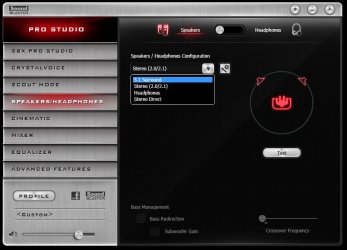
msalton1 do you have the Sound Blaster control panel installed? It may help you.

z.jpg
 

My Computers My Computers

System One System Two

  • Computer type
    PC/Desktop
    Computer Manufacturer/Model Number
    ALWAYS UNDER CONSTRUCTION
    OS
    Windows 11 Pro
    CPU
    Ryzen 9 5900X
    Motherboard
    Asus X570 Crosshair Viii Hero
    Memory
    32GB G Skill DDR4-3600
    Graphics Card(s)
    EVGA RTX 3080 FTW 3 Ultra
    Sound Card
    On Board/Sennheiser PC37X Headset
    Monitor(s) Displays
    3 X Asus 27"
    Screen Resolution
    2560x1440
    Hard Drives
    2 X 1 TB NVME drives
    PSU
    EVGA 850
    Case
    Phanteks Eclipse P400A
    Cooling
    EVGA 280 AIO
    Keyboard
    Logitech G510s/ Logitech G13
    Mouse
    Logitech G502
    Internet Speed
    24/1
    Antivirus
    ESET/MBAM Pro/SAS Pro
    Browser
    Chrome/ Firefox/ Edge
  • Computer type
    Laptop
    System Manufacturer/Model Number
    Dell 16 Plus
    OS
    Windows 11 Pro
    CPU
    Intel Ultra 9 288V
    Memory
    32 GB LPDDR5X 8533
    Monitor(s) Displays
    16" Mini-LED HDR600 Touch 90 Hz
    Screen Resolution
    2560X1600
    Hard Drives
    1 TB NVME
I finally got SB Command installed but it won't run, probably because I don't have the A-E speakers. Windows just says it stopped working and Windows is checking for a solution. We all know how that goes.
 

My Computer My Computer

Computer type
Laptop
Computer Manufacturer/Model Number
Dell M6500 Precision Work Station
OS
Windows 7 Pro SP1 64 bit
Memory
8 GB
Screen Resolution
1920x
Internet Speed
30 Mbps
Antivirus
Norton Security
Browser
IE 11
@msalton1 do you have the Sound Blaster control panel installed? It may help you.


No, only what was provided at the Creative download page for the AE-5 (SBcomm & SBconn). The documentation doesn't mention the SB control panel, is it compatible with the AE-5?


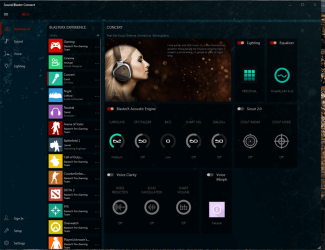
I'm guessing the SB command download was to accommodate 2 speaker systems. SB Connect has the "BlasterX Acoustic Engine", which is obviously made for the card, but it's not very well developed, IMO. Here's a screen cap:


SB Connect.PNG
 

My Computer My Computer

Computer type
PC/Desktop
Computer Manufacturer/Model Number
custom
OS
windows 7 Pro 64 Bit
CPU
i5 4670K
Motherboard
Asus Max Hero 1150 socket
Memory
16GB DDR3@933mhz
Graphics Card(s)
Radeon R9 390 8192mb
Monitor(s) Displays
Dell U2415 x3
Screen Resolution
1920 (5760) x 1200 x3
Hard Drives
System: Kingston 128GB SSD

Installing to Samsung 860 EVO 500GB
WD Black 2 TB & 1 TB
PSU
Corsair CX750M
Cooling
Hyper 312
Internet Speed
50mbps
I finally got SB Command installed but it won't run, probably because I don't have the A-E speakers. Windows just says it stopped working and Windows is checking for a solution. We all know how that goes.


Are you installing for the sake of this thread or having a problem of your own? Neither of these softwares are well designed. Creative's AE-5 support page doesn't provide an android app other than one called "Scout" for gaming, but I wouldn't need it anyway.
 

My Computer My Computer

Computer type
PC/Desktop
Computer Manufacturer/Model Number
custom
OS
windows 7 Pro 64 Bit
CPU
i5 4670K
Motherboard
Asus Max Hero 1150 socket
Memory
16GB DDR3@933mhz
Graphics Card(s)
Radeon R9 390 8192mb
Monitor(s) Displays
Dell U2415 x3
Screen Resolution
1920 (5760) x 1200 x3
Hard Drives
System: Kingston 128GB SSD

Installing to Samsung 860 EVO 500GB
WD Black 2 TB & 1 TB
PSU
Corsair CX750M
Cooling
Hyper 312
Internet Speed
50mbps
I was downloading the android and windows versions in an attempt to see if the speaker function would detect different arrangements such as 5.1 that you desire.

The Android version is here-

Sound Blaster Command - Apps on Google Play

Didn't notice until today that it says it works with Sound Blaster X3 and G3. No mention of A-E. I didn't install the Super
X-Fi.

I went to this Creative website this morning. The website shows that I have to log in to my account to enable the app. Didn't know that because it went directly to the dashboard after installation.

Creative Worldwide Support > Knowledgebase Solutions

I put in my SoundBlaster e-mail address and password and it kept saying one of the two was incorrect. I tried to reset it and it said my e-mail address doesn't exist. Wrong!

So I go to the troubleshooting guide for the SB X-3-

Creative Worldwide Support > Knowledgebase Solutions

and in the "no sound" section, it says-

Choose the correct speaker configuration type in the Sound Blaster Command application. (eg. Stereo /5.1 / 7.1)

so, apparently, the Command is supposed to let you choose.

However, I just found out that the SB X3 is an external device so, I don't know why the Command software would be installed with your sound card.

Sorry about the rambling.
 

My Computer My Computer

Computer type
Laptop
Computer Manufacturer/Model Number
Dell M6500 Precision Work Station
OS
Windows 7 Pro SP1 64 bit
Memory
8 GB
Screen Resolution
1920x
Internet Speed
30 Mbps
Antivirus
Norton Security
Browser
IE 11
I emailed Creative tech support. They say either or (as far as SB Connect2 or SB Command go). The SB2 struck me as the better audio performer.


@essenbe They also say that SB Control Panel isn't compatible with this card.


When I get a chance, I'll look into the pax drivers (if available) and see if they offer better performance/stability. I hope so. The software/drivers are really pretty pitiful.


Questions asked:


Basic Questions for AE5:
1. The download page for the AE5 contains only two files: SB Connect & SB command. I ve installed both, but they seem redundant. Are both necessary (or beneficial) to have installed for the AE5?
2. Is Sound Blaster Control Panel recommended for this card?
Thanks!


Creative's response:


Thank you for contacting Creative Labs.

To answer your questions:

1. It is not necessary. However, please note that the newest driver is bundled with the Sound Blaster Command app.
In addition, the only feature that you need to take note for the Sound Blaster Connect is for you to adjust the LED lighting for the sound card.

2. No, we only recommend either the Sound Blaster Connect or Sound Blaster Command applications for this specific card.


Also, the sound blaster control panel is incompatible with the AE-5.


My Computer My Computer

Computer type
PC/Desktop
Computer Manufacturer/Model Number
custom
OS
windows 7 Pro 64 Bit
CPU
i5 4670K
Motherboard
Asus Max Hero 1150 socket
Memory
16GB DDR3@933mhz
Graphics Card(s)
Radeon R9 390 8192mb
Monitor(s) Displays
Dell U2415 x3
Screen Resolution
1920 (5760) x 1200 x3
Hard Drives
System: Kingston 128GB SSD

Installing to Samsung 860 EVO 500GB
WD Black 2 TB & 1 TB
PSU
Corsair CX750M
Cooling
Hyper 312
Internet Speed
50mbps
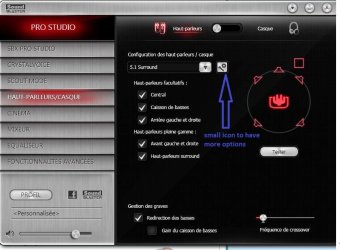
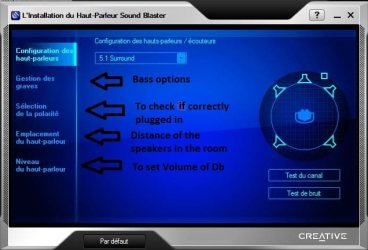
I feel a bit at shame since we discuss about Creative Sound Cards here:New Sound Card for old Logitech Z5500 speakers , that you're not totally happy with.. Mine Sound Blaster Z have slightly the same UI control Panel as essenbe.


I enjoy that card a lot and found it easy to use the parameters with a 5.1 sound system.

You should have those options somewhere and have to dig deeply the parameters.
 

Attachments

  • Capture.JPG
    Capture.JPG
    74.7 KB · Views: 0
  • Capture2.JPG
    Capture2.JPG
    45 KB · Views: 10

My Computer My Computer

Computer type
PC/Desktop
Computer Manufacturer/Model Number
Custom Build
OS
Windows 7 Professional SP1 - x64 [Non-UEFI Boot]
CPU
Ivy Bridge Core i5 3570K (Delidded)
Motherboard
Asus P8Z77-V LE PLUS
Memory
G.Skill "Ares" DDR3 PC3-12800 - 1600MHz (16Gb)
Graphics Card(s)
Asus Dual-RX480-O4G
Sound Card
Creative Sound Blaster Z w/5.1 sound system
Monitor(s) Displays
Asus IPS 23"
Screen Resolution
16/9
Hard Drives
Internal:
500Go Sata 6Gb/s (x2)
500Go Sata 3Gb/s (x2)
SSD 60Go Sata 6Gb/s
PSU
In Win C 900W Series 80+ Platinum
Case
Thermaltake Chaser A71
Cooling
Custom Water Cooling Loop
Keyboard
Cooler Master QuickFire XTi
Mouse
Razer Imperator 2012 (4G)
Antivirus
MSE
Browser
IE 11.0.xxx Rtm
Other Info
"Raid0" with Intel Smart Response Technology (HDD/SSD)
No need to feel bad, NoN. I am happy with the card and appreciated your input. Thanks for your comments here also. The software/drivers aren't what one would hope, but there are possibly PAX drivers to explore, I just haven't had time to do so. The card itself is fantastic and is capable of very high quality output. The quality is so good that it exposes flaws in the older mp3s in my collection that were ripped at a lower bit rate (HDD storage space was at a high premium in those days. I started rips at 128 kbps...I now rip at 320 kbps with lame encoder inside MediaMonkey).


If you are interested in reading about the PAX drivers, here is a site that may interest you. The discussion for your 'Z' is about 8 down:


PAX Drivers | Hardware Heaven Forums


They also talk alot about external sound solutions. Schitt Audio seems to be highly regarded. I really don't want any more stuff on my desk, which is why I went with PCIE, but may try the external solution later.


Thanks again for your help.
 

My Computer My Computer

Computer type
PC/Desktop
Computer Manufacturer/Model Number
custom
OS
windows 7 Pro 64 Bit
CPU
i5 4670K
Motherboard
Asus Max Hero 1150 socket
Memory
16GB DDR3@933mhz
Graphics Card(s)
Radeon R9 390 8192mb
Monitor(s) Displays
Dell U2415 x3
Screen Resolution
1920 (5760) x 1200 x3
Hard Drives
System: Kingston 128GB SSD

Installing to Samsung 860 EVO 500GB
WD Black 2 TB & 1 TB
PSU
Corsair CX750M
Cooling
Hyper 312
Internet Speed
50mbps
I will read about your card aswell along mine. Not so many external tips are proposal for those kind of cards, there is one here that helps to switch
SBZ Switcher - Automate Speakers/Headphones mode switching

this tool allows automated switching of Speakers/Headphones and more for Creative Sound Blaster Z-Series and Recon3D owners.
while the master volume and mute controls are handled in the OS level, the switching mechanism is on-screen
auto click based, thus is dependent on Sound Blaster Control Panel availability.
SBZ Switcher is synchronized with the Sound Blaster Control Panel via registry, to display current info and switch accordingly.
, call SBZ Switcher: SBZ Switcher - Double click Speakers/Headphones mode switching available | guru3D Forums

dunno if it's works for AE-5 series as the project stopped.

Edit: Seems Pax drivers for my card being dropped since April 10th, 2017..
 
Last edited:

My Computer My Computer

Computer type
PC/Desktop
Computer Manufacturer/Model Number
Custom Build
OS
Windows 7 Professional SP1 - x64 [Non-UEFI Boot]
CPU
Ivy Bridge Core i5 3570K (Delidded)
Motherboard
Asus P8Z77-V LE PLUS
Memory
G.Skill "Ares" DDR3 PC3-12800 - 1600MHz (16Gb)
Graphics Card(s)
Asus Dual-RX480-O4G
Sound Card
Creative Sound Blaster Z w/5.1 sound system
Monitor(s) Displays
Asus IPS 23"
Screen Resolution
16/9
Hard Drives
Internal:
500Go Sata 6Gb/s (x2)
500Go Sata 3Gb/s (x2)
SSD 60Go Sata 6Gb/s
PSU
In Win C 900W Series 80+ Platinum
Case
Thermaltake Chaser A71
Cooling
Custom Water Cooling Loop
Keyboard
Cooler Master QuickFire XTi
Mouse
Razer Imperator 2012 (4G)
Antivirus
MSE
Browser
IE 11.0.xxx Rtm
Other Info
"Raid0" with Intel Smart Response Technology (HDD/SSD)
I will read about your card aswell along mine. Not so many external tips are proposal for those kind of cards, there is one here that helps to switch , call SBZ Switcher: SBZ Switcher - Double click Speakers/Headphones mode switching available | guru3D Forums

dunno if it's works for AE-5 series as the project stopped.

Edit: Seems Pax drivers for my card being dropped since April 10th, 2017..


I don't currently use headphones, although that would change were I to get into gaming again.

The 'external sound solutions' I mentioned are stand-alone. They are purported to be much higher quality than internal components are able to produce. The pricing is a bit more, but alleged to be worth the extra money. I'll give those a shot for the next machine I build (planned for the near future). I believe that the external solutions wont' work with analog speakers.

I did run back to pax and check...seems there is no support for the AE-5. If there were, I would likely try older PAX drivers anyway, since they may well surpass Creative's in quality and stability. For anyone trying this, I would recommend creating a system image before installing (Macrium Reflect Free is a good choice).

That said, I decided to try running SB Command again (I've been using SB Connect) and am thinking that they actually do sound better than the SB Connect. The SB Command employs the newest drivers.
 
Last edited:

My Computer My Computer

Computer type
PC/Desktop
Computer Manufacturer/Model Number
custom
OS
windows 7 Pro 64 Bit
CPU
i5 4670K
Motherboard
Asus Max Hero 1150 socket
Memory
16GB DDR3@933mhz
Graphics Card(s)
Radeon R9 390 8192mb
Monitor(s) Displays
Dell U2415 x3
Screen Resolution
1920 (5760) x 1200 x3
Hard Drives
System: Kingston 128GB SSD

Installing to Samsung 860 EVO 500GB
WD Black 2 TB & 1 TB
PSU
Corsair CX750M
Cooling
Hyper 312
Internet Speed
50mbps
I guess I should update this...I've been using the AE5 since this thread. There are bugs, but I've managed to work around them and achieve high quality output. The drivers are shaky, as is the interface (and EQ), but the final result is what matters.


There's a bit of confusion regarding which driver to use, since they post 2 different ones with different interfaces without any explanation. I finally settled on the SB Command driver (as opposed to the SB Connect 2 driver), as it is the newest, and SB tech support recommends using it. Recently, an update for the SB Command driver has come out, which I intend to install and try.


One particularly irksome bug of the driver I'm currently using is that, after the system sits a while or goes to sleep, upon awakening, the sound quality is poor. THis is corrected by turning the SBX profile off and then back on.
 

My Computer My Computer

Computer type
PC/Desktop
Computer Manufacturer/Model Number
custom
OS
windows 7 Pro 64 Bit
CPU
i5 4670K
Motherboard
Asus Max Hero 1150 socket
Memory
16GB DDR3@933mhz
Graphics Card(s)
Radeon R9 390 8192mb
Monitor(s) Displays
Dell U2415 x3
Screen Resolution
1920 (5760) x 1200 x3
Hard Drives
System: Kingston 128GB SSD

Installing to Samsung 860 EVO 500GB
WD Black 2 TB & 1 TB
PSU
Corsair CX750M
Cooling
Hyper 312
Internet Speed
50mbps
Installed the new Sound Command driver yesterday. Wow! A significant improvement in sound separation and audio quality on my Logitech 5.1s. When I started this thread, I was a bit concerned, but then got everything adjusted and working to my satisfaction, but after installing the latest driver, the improvement banishes all complaints. I'm very happy with this card now and very appreciative of the quality of sound.
 

My Computer My Computer

Computer type
PC/Desktop
Computer Manufacturer/Model Number
custom
OS
windows 7 Pro 64 Bit
CPU
i5 4670K
Motherboard
Asus Max Hero 1150 socket
Memory
16GB DDR3@933mhz
Graphics Card(s)
Radeon R9 390 8192mb
Monitor(s) Displays
Dell U2415 x3
Screen Resolution
1920 (5760) x 1200 x3
Hard Drives
System: Kingston 128GB SSD

Installing to Samsung 860 EVO 500GB
WD Black 2 TB & 1 TB
PSU
Corsair CX750M
Cooling
Hyper 312
Internet Speed
50mbps
I'm glad your problem is resolved.
 

My Computer My Computer

Computer type
Laptop
Computer Manufacturer/Model Number
Dell M6500 Precision Work Station
OS
Windows 7 Pro SP1 64 bit
Memory
8 GB
Screen Resolution
1920x
Internet Speed
30 Mbps
Antivirus
Norton Security
Browser
IE 11
Back
Top