sound card

deanie44

New member
Member
Local time
4:21 PM
Messages
66
Location
West Haven, CT
Hi Everyone. I have a hdmi cable coming from pc to my lcd tv as a secondary monitor. The sound is alright. The problem is that when I do not have the tv on hdmi I cannot hear any sounds. Before reinstalled Windows 7, I could attach a audio cable to an audio input on the tv and hear sound on my pc. Unfortunately that is not working anymore. I updated the driver for the sound card, but that did not help. I changed the default audio to speakers instead of hdmi. Still no audio without turning the tv th hdmi mode. I do not have physical speakers attached to my pc for I did not need them. I can attach a headphone to the pc and hear the sound, so I know the card is working. What am I doing wrong? Any help will be appreciated. deanie44:(
 

My Computer

Computer Manufacturer/Model Number
INSPIRON 560MT
OS
windows 7 X64
CPU
Intel(R) Pentium(4) CPU 3.06 GHz
Memory
4 GB OF RAM
Sound Card
REALTEK HD AUDIO
Monitor(s) Displays
Dell Generic Monitor and Vizio E320VL LCD TV
Screen Resolution
1280 X 720
Hard Drives
1 TB SATA II HARDDRIVE
Keyboard
Dell generic keyboard
Internet Speed
16 Mbp
A couple of things to consider. When you are using HDMI and the audio from the HDMI it is being generated by the audio chip in the Video card. Your PC audio (Realtek in this case) is not doing anything.

When you have the hdmi cable plugged in it should automatically default to the HDMI as the "default playback device" which also overrides and mutes any audio from the PC's sound "card".

However, you can't hear what is on the TV back to the PC, which is what I gather you want to do from your post. The HDMI is a one way, from the PC to the TV only.

If you want PC audio, without using the TV and HDMI you will have to buy a standard analog computer speaker set and plug that into the GREEN speaker jack on the rear motherboard I/O panel.

As far as reinstalling and not having everything. Did you use the Dell recovery partition (F8 at POST)? or did you manually install? The F8 recovery is the preferred method as that restores it to the original factory condition and no discs are needed. If you used discs, Windows 7 may have installed some incorrect drivers, such as the audio, or there are some drivers missing.

I do a lot of support on the Dell Community users forum, so I'm familiar with Dell's.
 

My Computer

Computer type
PC/Desktop
Computer Manufacturer/Model Number
My Own Build
OS
Windows 10 64 bit
CPU
Intel i7 6700K
Motherboard
ASUS ROG Maximus VIII Hero
Memory
16GB Corsair Dominator
Graphics Card(s)
Intel CPU Graphics
Sound Card
RealTek
Monitor(s) Displays
27" Dell S2719dgf
Screen Resolution
2560X1440
Hard Drives
1 TB Samsung 850 EVO SSD for Win 10 Pro
500GB Samsung 850 EVO SSD for Win 10 Insider
2 TB drive for backup
PSU
EVGA Supernova 750G2
Case
BeQuiet Silent Base 600
Cooling
Deepcool Captain 120EX
Keyboard
Microsoft Wireless 2000
Mouse
Microsoft wireless
Internet Speed
100 MB/sec (Cable)
Antivirus
Microsoft Defender and Malwarebytes
Browser
Edge/Firefox
Other Info
Cakewalk (Sonar) by BandLab and Studio One 4.1 Pro recording studio software. MOTU 896Mk3 Hybrid recording interface, Frontier Tranzport wireless control unit, Behringer X-Touch Control Surface.
Five USB connected optical drives for CD Audio production using Nero BurningROM
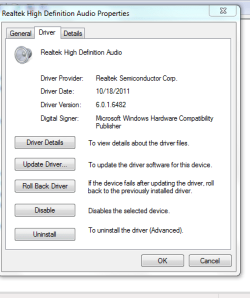
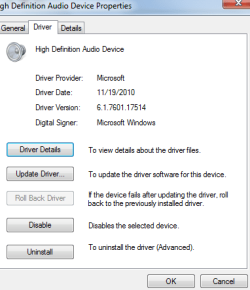
Hi Mr. Fireberd. Thank you for answering my post. When I attach the audio cable to the Compag(Vista Home Premium) it works fine. I can hear the audio without using an analog computer speaker. Unfortunately, when I do the same to the inspiron, it does not work. I did a windows 7 dvd reinstallation. Do you think the drivers are missing? I am uploading screenshots of the sound card and drivers. Thank you deanie44
 

Attachments

  • audio devices.PNG
    audio devices.PNG
    1 KB · Views: 168
  • driver details 2.PNG
    driver details 2.PNG
    14.4 KB · Views: 11
  • driver details.PNG
    driver details.PNG
    10.7 KB · Views: 10

My Computer

Computer Manufacturer/Model Number
INSPIRON 560MT
OS
windows 7 X64
CPU
Intel(R) Pentium(4) CPU 3.06 GHz
Memory
4 GB OF RAM
Sound Card
REALTEK HD AUDIO
Monitor(s) Displays
Dell Generic Monitor and Vizio E320VL LCD TV
Screen Resolution
1280 X 720
Hard Drives
1 TB SATA II HARDDRIVE
Keyboard
Dell generic keyboard
Internet Speed
16 Mbp
You have two PC sound drivers installed based on your screen shots. You only want the RealTek and not the Micrsoft High Definition Audio Device. That is conflicting with the RealTek. Uninstall the High Definition Device, in the Device Manager Right click on the entry for that device and then Left Click Uninstall and also check the box to uninstall the drivers. Restart the PC and you should then only have the RealTek listed in the Audio.

Also, I can't verify if the RealTek you have is from Dell or from RealTek. You must use the Dell provided driver for proper operation. Drivers and Downloads | Dell [United States]

You should also install the latest ATI Radeon Video drivers, from the AMD site (you don't need Dell drivers for that).
HD4300 drivers (download the catalyst suit). ATI Radeon

Install these and then see if the HDMI works OK. When you plug in the HDMI cable it may or may not automatically switch to the HDMI as the Default Playback Device (this is located in the Sound Panel/Playback

When you reinstalled, you should have used the Dell Recovery Partition on the hard drive, accessed by F8 at POST (Power On Self Test) as this would have restored the PC to the original factory conditon (and no discs or extra drivers needed).
 

My Computer

Computer type
PC/Desktop
Computer Manufacturer/Model Number
My Own Build
OS
Windows 10 64 bit
CPU
Intel i7 6700K
Motherboard
ASUS ROG Maximus VIII Hero
Memory
16GB Corsair Dominator
Graphics Card(s)
Intel CPU Graphics
Sound Card
RealTek
Monitor(s) Displays
27" Dell S2719dgf
Screen Resolution
2560X1440
Hard Drives
1 TB Samsung 850 EVO SSD for Win 10 Pro
500GB Samsung 850 EVO SSD for Win 10 Insider
2 TB drive for backup
PSU
EVGA Supernova 750G2
Case
BeQuiet Silent Base 600
Cooling
Deepcool Captain 120EX
Keyboard
Microsoft Wireless 2000
Mouse
Microsoft wireless
Internet Speed
100 MB/sec (Cable)
Antivirus
Microsoft Defender and Malwarebytes
Browser
Edge/Firefox
Other Info
Cakewalk (Sonar) by BandLab and Studio One 4.1 Pro recording studio software. MOTU 896Mk3 Hybrid recording interface, Frontier Tranzport wireless control unit, Behringer X-Touch Control Surface.
Five USB connected optical drives for CD Audio production using Nero BurningROM
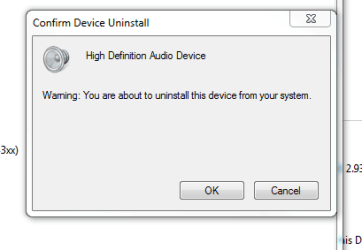
Hi Mr. Fireberd. I tried to delete the High Definition Audio driver from Device Manager, but when I restart my Pc, It reinstalls the driver. The driver software cannot be uninstalled. I believe the High Definition Audio Device was put there by Microsoft. I do not have the ATI graphics card installed anymore. I use the hdmi cable that is attached to the Pc to listen and view the monitor on my Tv. Any suggestions concerning this matter will be appreciated. Thank you. deanie44
 

Attachments

  • Audio device 2.PNG
    Audio device 2.PNG
    5.4 KB · Views: 10

My Computer

Computer Manufacturer/Model Number
INSPIRON 560MT
OS
windows 7 X64
CPU
Intel(R) Pentium(4) CPU 3.06 GHz
Memory
4 GB OF RAM
Sound Card
REALTEK HD AUDIO
Monitor(s) Displays
Dell Generic Monitor and Vizio E320VL LCD TV
Screen Resolution
1280 X 720
Hard Drives
1 TB SATA II HARDDRIVE
Keyboard
Dell generic keyboard
Internet Speed
16 Mbp
There are a couple of issues. (1) The Windows installed High Definition Audio Device is the wrong driver for Dell Integrated Audio systems such as yours. We have found on the Dell forum that the Integrated audio sound will only work correctly with the Dell driver. (2) Having two sound devices listed in the Device Manager as you show is also incorrect and will conflict.

Finally, the HDMI output. You state it works correctly when the TV is on and you get audio through the HDMI to the TV. However, when you do not have the TV on there is no audio. You also state you do not have standard PC speakers so that will be the case. When the TV is off and the HDMI cable is still plugged into the PC there isn't any way to get audio via the HDMI cable that is plugged into the TV.

Back to basics. The PC audio has two choices, audio via your PC's sound device to PC speakers connected to the sound device's output (e.g. GREEN speaker connection) OR (not both) sound via the HDMI to some external device such as a TV that has an HDMI input. However, when the TV is not powered on or when the HDMI input is NOT selected on the TV then there will not be any PC audio.

Finally, if it all worked correctly before reinstalling Windows 7 all of this could have been avoided if you would have used the Dell recovery partition on the hard drive to reinstall.
 

My Computer

Computer type
PC/Desktop
Computer Manufacturer/Model Number
My Own Build
OS
Windows 10 64 bit
CPU
Intel i7 6700K
Motherboard
ASUS ROG Maximus VIII Hero
Memory
16GB Corsair Dominator
Graphics Card(s)
Intel CPU Graphics
Sound Card
RealTek
Monitor(s) Displays
27" Dell S2719dgf
Screen Resolution
2560X1440
Hard Drives
1 TB Samsung 850 EVO SSD for Win 10 Pro
500GB Samsung 850 EVO SSD for Win 10 Insider
2 TB drive for backup
PSU
EVGA Supernova 750G2
Case
BeQuiet Silent Base 600
Cooling
Deepcool Captain 120EX
Keyboard
Microsoft Wireless 2000
Mouse
Microsoft wireless
Internet Speed
100 MB/sec (Cable)
Antivirus
Microsoft Defender and Malwarebytes
Browser
Edge/Firefox
Other Info
Cakewalk (Sonar) by BandLab and Studio One 4.1 Pro recording studio software. MOTU 896Mk3 Hybrid recording interface, Frontier Tranzport wireless control unit, Behringer X-Touch Control Surface.
Five USB connected optical drives for CD Audio production using Nero BurningROM
Back
Top