
Sound control

Win7userPT

New member
Local time
5:35 AM
Messages
9
Hi there,

in my laptop (asus) i have keys to control the sound (FN+ f10-f11-f12), enable/ disable and up and down the volume, but since i get win7 i cant control them...

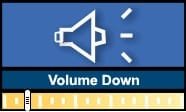
i press the Fn+f11 appears the pics below but nothing happen...
i instal the sound drivers realtek but still the same...

Help pls:confused:

In the realtek audio manager i also cant control de sound up ou down...
 

Attachments
  • sound.jpg
    sound.jpg
    4.3 KB · Views: 1,276

My Computer

OS
win7

My Computer

Computer Manufacturer/Model Number
Gateway GT5692
OS
Windows 7 Ulti. x64
CPU
AMD Phenom 8450 triple-core 2.10 ghz
Memory
4GB
Graphics Card(s)
ATI Radion HD 3200
Monitor(s) Displays
Gateway FPD1775W
Screen Resolution
1280x720
Hard Drives
465.6613 Gibibytes
You gotta install the ACPI drivers as well.

Go to asus's site and get them, I'd be surprised if you can get them from windows update.
 

My Computer

OS
7264x64/7260x86
:confused: i try what myzr7 said and dont work...

i go to asus and dont find acpi drivers...

i do a search on google and download a pack of controler which said include uaa try to install,appears something saying that ,that pack is not for my realtek...
grrrrrrrrr...:mad:

dont know wt to do more...any more ideas...???please
 

My Computer

OS
win7
What model is your laptop? The ACPI drivers for my asus netbook were under ATK section.
 

My Computer

OS
7264x64/7260x86
Boas!

copernicus my laptop asus is a A6JC nvidiaGF 7300
Audio is a realtek...

u had the same problem??:confused:

Thanks
 

My Computer

OS
win7
Copernicos did u have win 7 instaled? first which OS i choose??win 7 is not on the list...

Which atk driver did u instal for sound control?

i need to change compatibility?

sorry but i dont get

how to put my sound control working :cry:
 

My Computer

OS
win7
Choose vista 32 and run the setup.exe you will get from inside the zip file. It may run normally, if not run it in compatability mode.

The hardware keys are driven by the acpi drivers. I had to do the same thing for my 1000he to get most of the keys working.
 

My Computer

OS
7264x64/7260x86
Well i instal the drivers and it work for the first time...

but after reboot dont work again...:confused:
 

My Computer

OS
win7
Back
Top