
Hello, firstly i would like to say im not great with computers so please could you give as much detail as possible if you have a solution.
i have just bought a new pc (custom built) as far as i know everything is working fine.
the problem i have is getting my sound to work, i have tried plugging in the different cables (HD Audio, AC97 and none) and i have tried near enough every driver going but i still cannot solve this problem.
i am connecting to a monitor not a tv, i do not have speakers i just have a gaming headset which has a headphone and microphone jack. and my monitor does not have built in speakers.
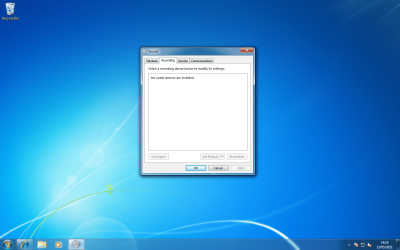
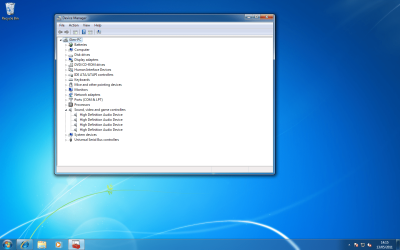
i have looked around the net and people have had the same sort of problem as mine but their sound menu can find playback and recording devices (where they have a picture of the headset and microphone) but mine doesnt even find these. i know the headset is working because i have tried it on other computers
my motherboard is the asus m4a785td-m evo and i have got drivers from both asus and realtek websites and still nothing.
i have uploaded some screenshots to try to help, if there is anything else i need let me know.
EDIT: i have checked the "show disbaled devices" box.
thanks, Glen
i have just bought a new pc (custom built) as far as i know everything is working fine.
the problem i have is getting my sound to work, i have tried plugging in the different cables (HD Audio, AC97 and none) and i have tried near enough every driver going but i still cannot solve this problem.
i am connecting to a monitor not a tv, i do not have speakers i just have a gaming headset which has a headphone and microphone jack. and my monitor does not have built in speakers.
i have looked around the net and people have had the same sort of problem as mine but their sound menu can find playback and recording devices (where they have a picture of the headset and microphone) but mine doesnt even find these. i know the headset is working because i have tried it on other computers
my motherboard is the asus m4a785td-m evo and i have got drivers from both asus and realtek websites and still nothing.
i have uploaded some screenshots to try to help, if there is anything else i need let me know.
EDIT: i have checked the "show disbaled devices" box.
thanks, Glen
Attachments

Last edited:
My Computer
- OS
- windows 7 64

 thank you very much ive spend 2 days trying to solve this and it was just disabled in bios