
Solved sound driver issues

debdola2

New member
Local time
2:57 PM
Messages
5
Location
Boston, MA
Okay so here I am after going nuts my sound is not working. It all started after I logged into this game I play often and after a while the sound would just drop so I went to the Toshiba website found a conexant driver for my system which is a 64 bit windows 7 home premium and downloaded it. So I went back on my game sound was on and boom cut out again. pulled up my change sound card settings while still in the game clicked on the tab recording and showed a microphone and my sound came back on. thats all I did very strange. So went back to my game started playing and it went off again. did the same thing just hit a tab on the sound card setting box and sound came on. Now I'm frustrated so I uninstall and and try reinstalling and same thing. Played around with the settings nothing. Well now I uninstalled everything so under sound it said nothing..
Then had the computer search for a sound driver found one Microsoft. Now Im getting no sound at all. :drool:been at this for at least 2 days. I got to go to bed hopefully in the morning I can figure this out. I will come back here to see if anyone has any idea what is going on. My profile should have all my system info loaded.
Thanks a bizzillon
 

My Computer

Computer type
PC/Desktop
OS
Microsoft Windows 7 Home Premium 64-bit 7601 Multiprocessor Free Service Pack 1
CPU
Intel(R) Pentium(R) CPU B940 @ 2.00GHz
Motherboard
Intel Corp. Base Board Product Name
Memory
4.00 GB
Graphics Card(s)
Intel(R) HD Graphics Family
Sound Card
(1) High Definition Audio Device (2) High Definition Audio
Screen Resolution
1366 x 768 x 32 bits (4294967296 colors) @ 59 Hz
Hard Drives
(1) ST500LM012 HN-M500MBB ATA Device (2) Generic- Multi-Card USB Device
The Microsoft "High Definition Audio Driver/Codec" is only a generic, basic function sound driver. Reinstall the correct driver, Conexant in your case.

Why its cutting out??? Apparently the game is causing that. May want to post in the gaming section and mention the game that is causing it.
 

My Computer

Computer type
PC/Desktop
Computer Manufacturer/Model Number
My Own Build
OS
Windows 10 64 bit
CPU
Intel i7 6700K
Motherboard
ASUS ROG Maximus VIII Hero
Memory
16GB Corsair Dominator
Graphics Card(s)
Intel CPU Graphics
Sound Card
RealTek
Monitor(s) Displays
27" Dell S2719dgf
Screen Resolution
2560X1440
Hard Drives
1 TB Samsung 850 EVO SSD for Win 10 Pro
500GB Samsung 850 EVO SSD for Win 10 Insider
2 TB drive for backup
PSU
EVGA Supernova 750G2
Case
BeQuiet Silent Base 600
Cooling
Deepcool Captain 120EX
Keyboard
Microsoft Wireless 2000
Mouse
Microsoft wireless
Internet Speed
100 MB/sec (Cable)
Antivirus
Microsoft Defender and Malwarebytes
Browser
Edge/Firefox
Other Info
Cakewalk (Sonar) by BandLab and Studio One 4.1 Pro recording studio software. MOTU 896Mk3 Hybrid recording interface, Frontier Tranzport wireless control unit, Behringer X-Touch Control Surface.
Five USB connected optical drives for CD Audio production using Nero BurningROM
Okay going to reinstall off of the website. I did contact game support and they advise me it must be my CPU because I tole them that seems to be when the sound cuts out. But it cant be the problem could it?
 

My Computer

Computer type
PC/Desktop
OS
Microsoft Windows 7 Home Premium 64-bit 7601 Multiprocessor Free Service Pack 1
CPU
Intel(R) Pentium(R) CPU B940 @ 2.00GHz
Motherboard
Intel Corp. Base Board Product Name
Memory
4.00 GB
Graphics Card(s)
Intel(R) HD Graphics Family
Sound Card
(1) High Definition Audio Device (2) High Definition Audio
Screen Resolution
1366 x 768 x 32 bits (4294967296 colors) @ 59 Hz
Hard Drives
(1) ST500LM012 HN-M500MBB ATA Device (2) Generic- Multi-Card USB Device
Unistall driver on system or **

Can you tell me why there are two drivers listed and how many should show up when I update to the new driver? Do I unistall these both and then install new conexant driver? Thanks :sarc: See attached PDF..
 

Attachments

My Computer

Computer type
PC/Desktop
OS
Microsoft Windows 7 Home Premium 64-bit 7601 Multiprocessor Free Service Pack 1
CPU
Intel(R) Pentium(R) CPU B940 @ 2.00GHz
Motherboard
Intel Corp. Base Board Product Name
Memory
4.00 GB
Graphics Card(s)
Intel(R) HD Graphics Family
Sound Card
(1) High Definition Audio Device (2) High Definition Audio
Screen Resolution
1366 x 768 x 32 bits (4294967296 colors) @ 59 Hz
Hard Drives
(1) ST500LM012 HN-M500MBB ATA Device (2) Generic- Multi-Card USB Device
The second driver is the Intel driver for HDMI audio. Leave that alone.

Usually, when you install the correct driver, it automatically uninstalls the generic HD Audio Codec. But, if it does not, you can uninstall the HD Audio Codec manually after the install.

By the way, here is the instructions on posting screenshots on this forum.
http://www.sevenforums.com/tutorials/9733-screenshots-files-upload-post-seven-forums.html

A dual core and only 4 GB of memory could be the issue for a gaming PC. Also, with only 4GB of RAM, the 64 bit OS is not doing you any good. The reason to use the 64 bit OS is so you can address more than 4GB of RAM. A 64 bit OS requires more RAM than a 32 bit OS and thus you have less memory out of the 4GB for programs. Thus the game support could be right, especially with only 4GB of RAM.
 

My Computer

Computer type
PC/Desktop
Computer Manufacturer/Model Number
My Own Build
OS
Windows 10 64 bit
CPU
Intel i7 6700K
Motherboard
ASUS ROG Maximus VIII Hero
Memory
16GB Corsair Dominator
Graphics Card(s)
Intel CPU Graphics
Sound Card
RealTek
Monitor(s) Displays
27" Dell S2719dgf
Screen Resolution
2560X1440
Hard Drives
1 TB Samsung 850 EVO SSD for Win 10 Pro
500GB Samsung 850 EVO SSD for Win 10 Insider
2 TB drive for backup
PSU
EVGA Supernova 750G2
Case
BeQuiet Silent Base 600
Cooling
Deepcool Captain 120EX
Keyboard
Microsoft Wireless 2000
Mouse
Microsoft wireless
Internet Speed
100 MB/sec (Cable)
Antivirus
Microsoft Defender and Malwarebytes
Browser
Edge/Firefox
Other Info
Cakewalk (Sonar) by BandLab and Studio One 4.1 Pro recording studio software. MOTU 896Mk3 Hybrid recording interface, Frontier Tranzport wireless control unit, Behringer X-Touch Control Surface.
Five USB connected optical drives for CD Audio production using Nero BurningROM
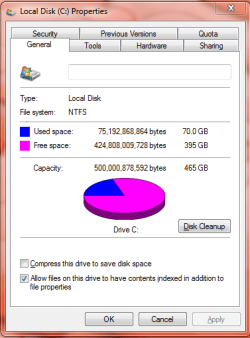
I just checked the specs says I have 395GB free on the C drive. I read this article and seems only a 3% increase if you have 8GB not a big difference.

http://www.pcauthority.com.au/Feature/375815,how-to-how-much-ram-do--you-really-need.aspx

Plus this game is not run through a browser I play it with my son its called wizard101. It opens up its own window its not run through a browser it's there own program. In additon the sound was always working for like 5 yrs I have been playing with him. I will have to get in touch with them again. If you have any further thoughts they are appreciated. Thanks for your help.
 

Attachments

  • Capture.PNG
    Capture.PNG
    16.9 KB · Views: 12

My Computer

Computer type
PC/Desktop
OS
Microsoft Windows 7 Home Premium 64-bit 7601 Multiprocessor Free Service Pack 1
CPU
Intel(R) Pentium(R) CPU B940 @ 2.00GHz
Motherboard
Intel Corp. Base Board Product Name
Memory
4.00 GB
Graphics Card(s)
Intel(R) HD Graphics Family
Sound Card
(1) High Definition Audio Device (2) High Definition Audio
Screen Resolution
1366 x 768 x 32 bits (4294967296 colors) @ 59 Hz
Hard Drives
(1) ST500LM012 HN-M500MBB ATA Device (2) Generic- Multi-Card USB Device
I'm not talking about hard drive space. I'm talking about actual memory "RAM". It has nothing to do with how much unused space on the hard drive.

Programs are loaded into RAM memory. Only a certain number can be loaded and the PC work efficiently. If too much memory is used the PC or programs can slow down or processes not work. 4GB was more than enough for older operating systems and even Windows XP. For modern operating systems, such as Windows 7 4GB, especially with a 64 bit operating system that requires more of the memory to even load, that can be a drawback. Most new PC's sold today come with 6GB or 8GB or even more memory.
 

My Computer

Computer type
PC/Desktop
Computer Manufacturer/Model Number
My Own Build
OS
Windows 10 64 bit
CPU
Intel i7 6700K
Motherboard
ASUS ROG Maximus VIII Hero
Memory
16GB Corsair Dominator
Graphics Card(s)
Intel CPU Graphics
Sound Card
RealTek
Monitor(s) Displays
27" Dell S2719dgf
Screen Resolution
2560X1440
Hard Drives
1 TB Samsung 850 EVO SSD for Win 10 Pro
500GB Samsung 850 EVO SSD for Win 10 Insider
2 TB drive for backup
PSU
EVGA Supernova 750G2
Case
BeQuiet Silent Base 600
Cooling
Deepcool Captain 120EX
Keyboard
Microsoft Wireless 2000
Mouse
Microsoft wireless
Internet Speed
100 MB/sec (Cable)
Antivirus
Microsoft Defender and Malwarebytes
Browser
Edge/Firefox
Other Info
Cakewalk (Sonar) by BandLab and Studio One 4.1 Pro recording studio software. MOTU 896Mk3 Hybrid recording interface, Frontier Tranzport wireless control unit, Behringer X-Touch Control Surface.
Five USB connected optical drives for CD Audio production using Nero BurningROM
Back
Top