Hello all.
I have recently purchased my computer through Dell, just this past Friday it had arrived.
Specs:
Operating System:Windows 2.6.1.7600 (Win 7, 64-bit)
CPU Type:AMD Phenom(tm) II X6 1035T Processor
CPU Speed (GHz):2.62
System Memory (GB):4
Sound Card: ATI High Definition Audio Device, Realtek High Definition Audio
When I had everything loaded up, I tried to play music and have Skype on with my boyfriend only to find any time he spoke, my music would go low or mute itself. And when he stopped talking, my music would go extremely loud.
I checked with other sound sources (Games, youtube, ventrilo, etc...) and the same thing would happen across the board. Which ever was the currently 'started' would come in loud and the rest would go quiet/mute.
I had asked a friend about this, and he directed me to the latest 64bit version of the Realtek driver, as it seemed mine is the 32-bit. It worked at first, but then my mouse began to lag, and anytime I hit enter or tab to enter text into a text-field it would lag for 10seconds.
I finally had to do a System Restore, which fixed it for a short while again, only to have the same thing repeat.
I tried to do a second System Restore and Windows refused to load up after the restart. So I reformatted the computer back to the basic system it was when it arrived.
Now I'm back to the flux/overriding audio problem.
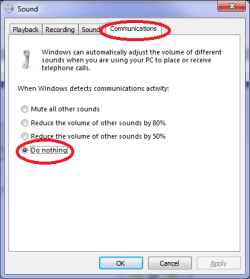
Edit: Forgot to mention I already set the Communications under Sound to "Do Nothing". This did not work. As even having just Youtube and Windows Media Player up will have the same sound flux/override (ie: if I play a video, the video is loud. If I turn off the video, WMP becomes loud.)
I have recently purchased my computer through Dell, just this past Friday it had arrived.
Specs:
Operating System:Windows 2.6.1.7600 (Win 7, 64-bit)
CPU Type:AMD Phenom(tm) II X6 1035T Processor
CPU Speed (GHz):2.62
System Memory (GB):4
Sound Card: ATI High Definition Audio Device, Realtek High Definition Audio
When I had everything loaded up, I tried to play music and have Skype on with my boyfriend only to find any time he spoke, my music would go low or mute itself. And when he stopped talking, my music would go extremely loud.
I checked with other sound sources (Games, youtube, ventrilo, etc...) and the same thing would happen across the board. Which ever was the currently 'started' would come in loud and the rest would go quiet/mute.
I had asked a friend about this, and he directed me to the latest 64bit version of the Realtek driver, as it seemed mine is the 32-bit. It worked at first, but then my mouse began to lag, and anytime I hit enter or tab to enter text into a text-field it would lag for 10seconds.
I finally had to do a System Restore, which fixed it for a short while again, only to have the same thing repeat.
I tried to do a second System Restore and Windows refused to load up after the restart. So I reformatted the computer back to the basic system it was when it arrived.
Now I'm back to the flux/overriding audio problem.
Edit: Forgot to mention I already set the Communications under Sound to "Do Nothing". This did not work. As even having just Youtube and Windows Media Player up will have the same sound flux/override (ie: if I play a video, the video is loud. If I turn off the video, WMP becomes loud.)
Last edited:
My Computer
At a glance
Windows 7, 64bitAMD Phenom(tm) II x6 1035T4 GBATI Radeon HD 5700
- Computer Manufacturer/Model Number
- Dell, 8W23MM1
- OS
- Windows 7, 64bit
- CPU
- AMD Phenom(tm) II x6 1035T
- Memory
- 4 GB
- Graphics Card(s)
- ATI Radeon HD 5700
- Sound Card
- Realtek HD Audio, ATI HD Audio Device
- Monitor(s) Displays
- Generic PnP Monitor x2