Sound gone

JonFrum

New member
Local time
7:16 PM
Messages
8
This afternoon, I tried to listen to a local radio show on their stream, and I got no sound. I figured it was the player they have on the site, but then I tried to listen to another streaming radio show that uses Windows Media Player for Mp3s The player opens, the indicator starts moving, but no sound. I checked the volume control on the player - OK. I checked the speaker icon on the taskbar, and the green level line is going up and down, but I'm getting no sound. I tried some files on my hard drive, no sound. Real Player, no sound. All of them open and indicate there's a file being played, but I get no sound through the laptop speakers.

This make any sense to anyone?
 

My Computer

OS
Windows 7 64
Hi JonFrum. You should check if the sound card drivers are installed, maybe someone unistalled them.
 

My Computer

Computer Manufacturer/Model Number
HP Pavilon Slimline
OS
Windows 7 Ultimate 64 bits
CPU
Dual Core Intel Core 2 Duo E7500
Motherboard
MSI MS-7525 (Boston)
Memory
2x[2048 MB DDR2-SDRAM (PC2-6400 / 800 MHz), 2 Gb]; Total:4Gb
Graphics Card(s)
Intel(R) G33/G31 Express Chipset Family (256 MB)
Sound Card
Realtek ALC662 @ Intel 82801GB ICH7 - HD Audio Controller
Monitor(s) Displays
HP 2009m 20'' LCD
Screen Resolution
1600x900
Hard Drives
SAMSUNG HD642JJ (596 GB)
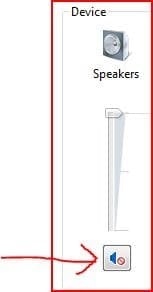
Check to make sure you haven't muted your sound.
 

Attachments

  • Capture.JPG
    Capture.JPG
    12.1 KB · Views: 196

My Computer

Computer Manufacturer/Model Number
Dell and Custom
OS
Systems 1 and 2: Windows 7 Enterprise x64, Win 8 Developer
CPU
System 1: i7 [email protected], System 2: AMD FX-4100 Zambezi 3.6G
Motherboard
System 1:Dell 06NWYK System 2: ASUS M5A97 AM3+
Memory
System 1: 8GB System 2: 8GB
Graphics Card(s)
System 1: ATI FirePro V4800 System 2: Radeon HD 6850
Sound Card
System 1: onboard System 2: onboard
Monitor(s) Displays
System1: Viewsonic HDMI 24"
Screen Resolution
System 1: 1920x1080 System 2: 1920x1080
Hard Drives
System 1: Mirrored .5B drives System 2: Seagate Barracuda ST1000DM003 1TB 7200 RPM 64MB Cache SATA 6.0Gb/s
Case
System 1: Dell System 2: Cooler Master
Internet Speed
10 MBPS
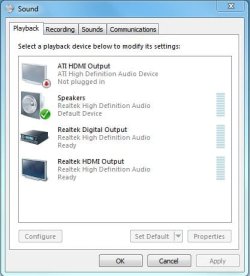
Ensure that you have the correct device enabled.
 

Attachments

  • Sound.JPG
    Sound.JPG
    33.3 KB · Views: 2

My Computer

Computer type
PC/Desktop
Computer Manufacturer/Model Number
Custom Build
OS
Windows 7 Home Premium 64 bit SP1
CPU
Intel i7 4790k
Motherboard
MSI Z97-G55 SLI
Memory
16 GB Corsair 2400 MHz DDR3
Graphics Card(s)
Visiontek Radeon R9 285
Sound Card
None
Monitor(s) Displays
Gateway FHX2402L
Screen Resolution
1920 X 1080
Hard Drives
Samsung 840 EVO 500GB
PSU
Corsair 750 TX
Case
Fractal Design
Cooling
Stock fans
Keyboard
Logitech K800
Mouse
Logitech M510
Internet Speed
60.88 Mbps download 10.47 Mbps upload (Speedtest.net)
Antivirus
Norton
Browser
Opera
Other Info
First Computer used: A Commodore Pet of course
Love using Manjaro KDE Linux 64 bit and Windows 7/10 64 bit
Do you have an 'actual' volume control anywhere on the laptop - like a wheel ? I had one on my last lappie - must have caught it one day and accidentally turned it down - didn't even know it was there! I had no sound for a few days until I found it. Doh!
 

My Computer

Computer Manufacturer/Model Number
Acer 7738G
OS
Windows 7 Home Premium X64 SP1
CPU
Intel Core2 duo T6600
Memory
4gb
Graphics Card(s)
Nvidia GeForce GT 1gb
Hard Drives
2 X 500 gb
Yeah, I have a Dell with an external button mute.
 

My Computer

Computer Manufacturer/Model Number
Dell and Custom
OS
Systems 1 and 2: Windows 7 Enterprise x64, Win 8 Developer
CPU
System 1: i7 [email protected], System 2: AMD FX-4100 Zambezi 3.6G
Motherboard
System 1:Dell 06NWYK System 2: ASUS M5A97 AM3+
Memory
System 1: 8GB System 2: 8GB
Graphics Card(s)
System 1: ATI FirePro V4800 System 2: Radeon HD 6850
Sound Card
System 1: onboard System 2: onboard
Monitor(s) Displays
System1: Viewsonic HDMI 24"
Screen Resolution
System 1: 1920x1080 System 2: 1920x1080
Hard Drives
System 1: Mirrored .5B drives System 2: Seagate Barracuda ST1000DM003 1TB 7200 RPM 64MB Cache SATA 6.0Gb/s
Case
System 1: Dell System 2: Cooler Master
Internet Speed
10 MBPS
The sound is not muted - it's a laptop, no sound card, no external volume knob - I ran the audio troubleshooting app from MS and it didn't find a problem.
 

My Computer

OS
Windows 7 64
Did you recently install new software? Can you perform a system restore to the last time sound was working correctly?

You're talking about a laptop, right? So there are no speaker cables to be plugged in--correct? I had a similar situation, and lo and behold, I tried everything. Then I looked at the back of the computer case--I had moved the computer a bit and the plug to the sound card simply came undone.
 

My Computer

Computer type
PC/Desktop
Computer Manufacturer/Model Number
Dell Studio XPS 8100, Dell XPS 15 laptop
OS
Windows 10 Home, 64 bit
CPU
Intel Core i7 860 @ 2.8 GHz
Motherboard
Dell 0T568R (CPU1)
Memory
8.0 GB Dual Channel DDR3 @ 664 MHz (9-9-9-24)
Graphics Card(s)
nVidia GeForce GTS 240
Sound Card
M-Audio Delta Audiophile 2496
Monitor(s) Displays
Dell 2407WFP
Screen Resolution
1920x1200
Hard Drives
977 GB Western Digital WDC WD1001FAES-75W7A0 (SCSI)
Antivirus
Windows Defender, MalwareBytes Anti-Malware, AdwCleaner
Browser
Firefox, occasionally IE and Edge
Other Info
Mozilla Firefox, Mozilla Thunderbird. Western Digital Passport 250 GB external HD, two Mushkin Enhanced Mulholland 32GB USB flash drives, AKG K240 Studio headphones, Asus AC-1900 dual band wireless router.
Go into Control Panel. select Hardware and Sound, then select Manage Audio Devices under Sound. See what the default is under playback and let us know.
 

My Computer

Computer type
PC/Desktop
Computer Manufacturer/Model Number
Custom Build
OS
Windows 7 Home Premium 64 bit SP1
CPU
Intel i7 4790k
Motherboard
MSI Z97-G55 SLI
Memory
16 GB Corsair 2400 MHz DDR3
Graphics Card(s)
Visiontek Radeon R9 285
Sound Card
None
Monitor(s) Displays
Gateway FHX2402L
Screen Resolution
1920 X 1080
Hard Drives
Samsung 840 EVO 500GB
PSU
Corsair 750 TX
Case
Fractal Design
Cooling
Stock fans
Keyboard
Logitech K800
Mouse
Logitech M510
Internet Speed
60.88 Mbps download 10.47 Mbps upload (Speedtest.net)
Antivirus
Norton
Browser
Opera
Other Info
First Computer used: A Commodore Pet of course
Love using Manjaro KDE Linux 64 bit and Windows 7/10 64 bit
I restarted in Safe Mode and got the sound back eventually. I still don't know what caused the problem. Thanks for the suggestions.
 

My Computer

OS
Windows 7 64
Back
Top