Sound help

Deralnocor

New member
Local time
2:53 AM
Messages
9
Hi.

I have a ASUS m70sr and the sound does not work.

The startup sound and external sound works. Iwe tried everything. Downloaded loads and loads of different drivers.

I'm sorry if the solve is on the forums but i have looked around for ages and im satrting to get nuts :cry:
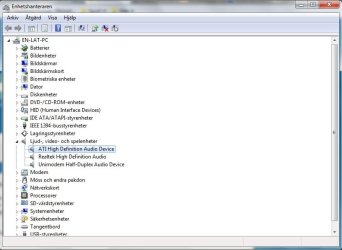
enhet.jpg
LJud.jpg
 

My Computer

Computer Manufacturer/Model Number
Asus m70sr
OS
Windows 7 Ultimate x32
CPU
Intel Core 2 Duo T8100 / 2.1 GHz
Memory
3 Gigabyte DDR2 SDRAM - 667 MHz
Graphics Card(s)
ATI Mobility Radeon HD 3470
Sound Card
Dolby Home Theater
Monitor(s) Displays
17" TFT
Hard Drives
250 GB - Serial ATA-150 - 5400 rpm
PSU
AC 120/230 V ( 50/60 Hz )
Do you have external speakers?
 

My Computer

Computer type
PC/Desktop
Computer Manufacturer/Model Number
Bruce ... somewhere in his 40's
OS
Windows 7 Ultimate 32bit SP1
CPU
Intel(R) Core(TM)2 Quad CPU @ 2.40GHz, 2400 MHz
Motherboard
INTEL/D975XBX2
Memory
4 GB
Graphics Card(s)
ATI Radeon HD 2600 Pro
Monitor(s) Displays
Samsung SyncMaster 914v
Screen Resolution
1280 x 1024
Hard Drives
2/500GB each ... ST3500630AS ATA Device.
One is not connected
PSU
Rocketfish 700 W
Case
G.Skill Gigabyte Chassis
Keyboard
Standard PS/2 Keyboard
Mouse
Microsoft PS/2 Mouse
Internet Speed
DSL
Antivirus
Avira Internet Security
Browser
IE 11
Other Info
ATI HDMI Audio
No. i have a headset.
 

My Computer

Computer Manufacturer/Model Number
Asus m70sr
OS
Windows 7 Ultimate x32
CPU
Intel Core 2 Duo T8100 / 2.1 GHz
Memory
3 Gigabyte DDR2 SDRAM - 667 MHz
Graphics Card(s)
ATI Mobility Radeon HD 3470
Sound Card
Dolby Home Theater
Monitor(s) Displays
17" TFT
Hard Drives
250 GB - Serial ATA-150 - 5400 rpm
PSU
AC 120/230 V ( 50/60 Hz )
Last edited:

My Computer

Computer type
PC/Desktop
Computer Manufacturer/Model Number
Dell inspiron 1564
OS
MS Windows 8
CPU
Intel Core i5 @ 2.27GHz Arrandale 32nm Technology
Motherboard
Dell Inc. 0M9XW4 (U2E1)
Memory
8.0GB Dual-Channel DDR3 @ 532MHz (7-7-7-20)
Graphics Card(s)
ATI Mobility Radeon HD 4300 Series (Dell)
Sound Card
Realtek High Definition Audio
Monitor(s) Displays
Generic PnP Monitor on ATI Mobility Radeon HD 4330
Screen Resolution
1366x768 pixels
Hard Drives
1 tb TOSHIBA (SATA)
PSU
built-in
Case
Dell Laptop
Cooling
built-in
Keyboard
built-in
Mouse
Dell Touchpad/Microsoft Arc Mouse
Other Info
Snake Laptop Skin, Detachable Alfa USB wifi with custom 15dbi antenna (for better signal range)
i tried to do this but when i tried to install the windows vista drivers i got the
"no driving circuit was supported in this drive circuit package" roughly translated.


and now not even my headset works. . .
 

My Computer

Computer Manufacturer/Model Number
Asus m70sr
OS
Windows 7 Ultimate x32
CPU
Intel Core 2 Duo T8100 / 2.1 GHz
Memory
3 Gigabyte DDR2 SDRAM - 667 MHz
Graphics Card(s)
ATI Mobility Radeon HD 3470
Sound Card
Dolby Home Theater
Monitor(s) Displays
17" TFT
Hard Drives
250 GB - Serial ATA-150 - 5400 rpm
PSU
AC 120/230 V ( 50/60 Hz )

My Computer

Computer type
PC/Desktop
Computer Manufacturer/Model Number
Custom Build
OS
Windows 7 Home Premium 64 bit
CPU
Intel Core i7-4790
Motherboard
GA-Z87X-D3H
Memory
G.SKILL 8GB (2 x 4GB) DDR3 F3-10666CL9D-8GBNT
Graphics Card(s)
AMD Radeon R7 250
Sound Card
Realtek ALC892
Monitor(s) Displays
Samsung UN32EH5000, Dell 1703FPT
Screen Resolution
1920 x 1080, 1280 x 1024
Hard Drives
WD5003AZEX
WD10EZEX
Samsung HD103SJ
Samsung 128 GB 840 PRO
PSU
SeaSonic M12II SS-500GM
Case
Fractal Design Define R4
Cooling
Zalman CNPS9900ALED
Keyboard
Logitech K800
Mouse
Logitech M705
Internet Speed
16 Mbps
Antivirus
Avast
Browser
Firefox
Other Info
Bose Companion 2 Multimedia Speakers
You may want to try the Windows 7 driver from here. Realtek
If it doesn't work, try using the Vista driver, you may have to run it in compatibility mode. http://www.sevenforums.com/tutorials/316-compatibility-mode.html

I tried this before. did not work, but do you think it will work since i used the sweeper?

And which vista driver do you mean? the Realtek or the Asus?

I allready tried the asus driver in compatibility mode.

And what should i do if a driver does'nt work should i use the sweeper again? can this be a source to that the 'new' driver does'nt work?
 

My Computer

Computer Manufacturer/Model Number
Asus m70sr
OS
Windows 7 Ultimate x32
CPU
Intel Core 2 Duo T8100 / 2.1 GHz
Memory
3 Gigabyte DDR2 SDRAM - 667 MHz
Graphics Card(s)
ATI Mobility Radeon HD 3470
Sound Card
Dolby Home Theater
Monitor(s) Displays
17" TFT
Hard Drives
250 GB - Serial ATA-150 - 5400 rpm
PSU
AC 120/230 V ( 50/60 Hz )
Have you tried setting the Realtek High Definition Audio device to be the default for your headset?
 

My Computer

Computer type
PC/Desktop
Computer Manufacturer/Model Number
Bruce ... somewhere in his 40's
OS
Windows 7 Ultimate 32bit SP1
CPU
Intel(R) Core(TM)2 Quad CPU @ 2.40GHz, 2400 MHz
Motherboard
INTEL/D975XBX2
Memory
4 GB
Graphics Card(s)
ATI Radeon HD 2600 Pro
Monitor(s) Displays
Samsung SyncMaster 914v
Screen Resolution
1280 x 1024
Hard Drives
2/500GB each ... ST3500630AS ATA Device.
One is not connected
PSU
Rocketfish 700 W
Case
G.Skill Gigabyte Chassis
Keyboard
Standard PS/2 Keyboard
Mouse
Microsoft PS/2 Mouse
Internet Speed
DSL
Antivirus
Avira Internet Security
Browser
IE 11
Other Info
ATI HDMI Audio
What do you mean?

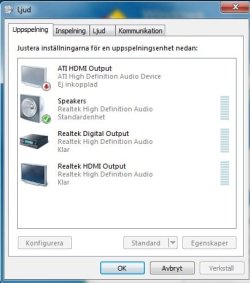
As you can see on the picture i have the Realtek High Definition Audio Speakers as Standard.

And the relatek HD drivers did not help...
 

My Computer

Computer Manufacturer/Model Number
Asus m70sr
OS
Windows 7 Ultimate x32
CPU
Intel Core 2 Duo T8100 / 2.1 GHz
Memory
3 Gigabyte DDR2 SDRAM - 667 MHz
Graphics Card(s)
ATI Mobility Radeon HD 3470
Sound Card
Dolby Home Theater
Monitor(s) Displays
17" TFT
Hard Drives
250 GB - Serial ATA-150 - 5400 rpm
PSU
AC 120/230 V ( 50/60 Hz )
I just went into the device manager and i uninstalled everything under sound and rebooted, then i tried to install the relatek HD drivers again but windows automatically installed the same as i installed just before...
can this be the problem?


My Computer

Computer Manufacturer/Model Number
Asus m70sr
OS
Windows 7 Ultimate x32
CPU
Intel Core 2 Duo T8100 / 2.1 GHz
Memory
3 Gigabyte DDR2 SDRAM - 667 MHz
Graphics Card(s)
ATI Mobility Radeon HD 3470
Sound Card
Dolby Home Theater
Monitor(s) Displays
17" TFT
Hard Drives
250 GB - Serial ATA-150 - 5400 rpm
PSU
AC 120/230 V ( 50/60 Hz )
Don't set the speakers as your default device, try the one below (in your snapshot), or the ATI
 

My Computer

Computer type
PC/Desktop
Computer Manufacturer/Model Number
Bruce ... somewhere in his 40's
OS
Windows 7 Ultimate 32bit SP1
CPU
Intel(R) Core(TM)2 Quad CPU @ 2.40GHz, 2400 MHz
Motherboard
INTEL/D975XBX2
Memory
4 GB
Graphics Card(s)
ATI Radeon HD 2600 Pro
Monitor(s) Displays
Samsung SyncMaster 914v
Screen Resolution
1280 x 1024
Hard Drives
2/500GB each ... ST3500630AS ATA Device.
One is not connected
PSU
Rocketfish 700 W
Case
G.Skill Gigabyte Chassis
Keyboard
Standard PS/2 Keyboard
Mouse
Microsoft PS/2 Mouse
Internet Speed
DSL
Antivirus
Avira Internet Security
Browser
IE 11
Other Info
ATI HDMI Audio

My Computer

Computer Manufacturer/Model Number
Custom Built
OS
Windows 7 Ultimate 32 Bit, Windows Developer Preview, Linux Mint 9 Gnome 32 Bit
CPU
Intel Pentium Dual CPU E2180@2GHz
Motherboard
Elitegroup 671T-M3
Graphics Card(s)
NVIDIA GeForce 7200 GS
Monitor(s) Displays
AOC TFT1560 15" LCD Monitor
Screen Resolution
1024x768
Keyboard
Logitech USB Keyboard
Don't set the speakers as your default device, try the one below (in your snapshot), or the ATI

Tried this, did'nt work. i also 'tested' all of the options, but no one worked...

You can take a look at these very recent threads that discuss relevant sound issues with your case. You might see some important info from in there. Good Luck.

http://www.sevenforums.com/sound-audio/162058-speakers-not-working.html

http://www.sevenforums.com/sound-audio/161979-no-sound-speakers-onboard-audio.html
Looked trough and no one has the same problem...

My speakers work with the startup sound... so i know that they are not broken.
 

My Computer

Computer Manufacturer/Model Number
Asus m70sr
OS
Windows 7 Ultimate x32
CPU
Intel Core 2 Duo T8100 / 2.1 GHz
Memory
3 Gigabyte DDR2 SDRAM - 667 MHz
Graphics Card(s)
ATI Mobility Radeon HD 3470
Sound Card
Dolby Home Theater
Monitor(s) Displays
17" TFT
Hard Drives
250 GB - Serial ATA-150 - 5400 rpm
PSU
AC 120/230 V ( 50/60 Hz )
I just saw this!!!
Med hörlur i.jpg

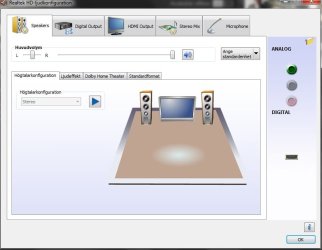
with nothing attached to the 3 outputs one of them is still active :O

i usually use the middle (the black one) to connect my headphones.

when i look at the computer it says S/PDIF on the one that is active.

Why is this exit avtice all the time?

It must be the problem...
 

My Computer

Computer Manufacturer/Model Number
Asus m70sr
OS
Windows 7 Ultimate x32
CPU
Intel Core 2 Duo T8100 / 2.1 GHz
Memory
3 Gigabyte DDR2 SDRAM - 667 MHz
Graphics Card(s)
ATI Mobility Radeon HD 3470
Sound Card
Dolby Home Theater
Monitor(s) Displays
17" TFT
Hard Drives
250 GB - Serial ATA-150 - 5400 rpm
PSU
AC 120/230 V ( 50/60 Hz )
BUMP!

Can it be that i have the wrong drivers? or is it something wrong with the output? something electrical? What do you think?
 

My Computer

Computer Manufacturer/Model Number
Asus m70sr
OS
Windows 7 Ultimate x32
CPU
Intel Core 2 Duo T8100 / 2.1 GHz
Memory
3 Gigabyte DDR2 SDRAM - 667 MHz
Graphics Card(s)
ATI Mobility Radeon HD 3470
Sound Card
Dolby Home Theater
Monitor(s) Displays
17" TFT
Hard Drives
250 GB - Serial ATA-150 - 5400 rpm
PSU
AC 120/230 V ( 50/60 Hz )
Back
Top