
Sound is very quiet

Gerulis

New member
Local time
7:40 PM
Messages
6
The sound is very quiet and can barely be heard and even when I mute the sound I can still hear that very quiet sound. Tried reinstalling drivers but nothing changed, still the same.
 

My Computer My Computer

Computer type
PC/Desktop
OS
Microsoft Windows 7 Home Premium 32-bit 7601 Multiprocessor Free Service Pack 1
CPU
Intel(R) Pentium(R) 4 CPU 2.00GHz
Motherboard
Hewlett-Packard HP System Board
Memory
2,00 GB
Graphics Card(s)
Standard VGA Graphics Adapter
Sound Card
Intel(r) 82801DB/DBM AC '97 Audio Controller
Screen Resolution
0 x 0 x 0 bits (0 colors) @ 0 Hz
Hard Drives
(1) SAMSUNG SP1213N ATA Device (2) ST3120022A ATA Device

My Computer My Computer

Computer type
PC/Desktop
Computer Manufacturer/Model Number
Dude Build
OS
Windows 10 Pro X64
CPU
Intel(R) Core(TM) i5-3570K CPU OC@ 4.5GHZ Turbo
Motherboard
MSI Z77A-G45 Gaming
Memory
8.00 GB DDR3 1600Mhz
Graphics Card(s)
MSI Gaming X GTX 1070
Sound Card
Realtek High Definition
Monitor(s) Displays
Dell S23O9W, HP L1710
Screen Resolution
DELL-1920 x 1080 HP-1280 x1024
Hard Drives
Crucial m4 256 SSD, WD 7200RPM 500GB WD 1TB
PSU
Seasonic X650 GOLD
Case
Zalman Z12
Cooling
Antec Kuhler 920
Keyboard
Logitech
Mouse
MSI DS100 Interceptor
Internet Speed
50 down and 5 up
Antivirus
MSE
Browser
Chrome, IE 11
Other Info
Logitech X-620 Speakers
Have filled in system specs. Sorry for taking so long.
 

My Computer My Computer

Computer type
PC/Desktop
OS
Microsoft Windows 7 Home Premium 32-bit 7601 Multiprocessor Free Service Pack 1
CPU
Intel(R) Pentium(R) 4 CPU 2.00GHz
Motherboard
Hewlett-Packard HP System Board
Memory
2,00 GB
Graphics Card(s)
Standard VGA Graphics Adapter
Sound Card
Intel(r) 82801DB/DBM AC '97 Audio Controller
Screen Resolution
0 x 0 x 0 bits (0 colors) @ 0 Hz
Hard Drives
(1) SAMSUNG SP1213N ATA Device (2) ST3120022A ATA Device
Did you check the levels in the properties of your playback device.
 

Attachments

  • 2013-07-01_1058.png
    2013-07-01_1058.png
    13.2 KB · Views: 1

My Computer My Computer

Computer Manufacturer/Model Number
HP, Dell, Gateway, Toshiba - 4 laptops and 2 desktops
OS
Vista, Windows7, Mint Mate, Zorin, Windows 8
CPU
from 1.6GHz Duo to i7
Monitor(s) Displays
2x HP w2207
Hard Drives
5x HDD, 7x SSD, 12x Externals
Keyboard
with trackball - no mices
Mouse
Trackball mice
Internet Speed
DSL 6000
And while you are at it,go to general,highlight speakers,properties,enhancements and check loudness equalization,should boost your volume level
 

My Computer My Computer

Computer type
PC/Desktop
Computer Manufacturer/Model Number
Homebuilt,Quadcore processor on Asus MB
OS
Microsoft Windows 7 Ultimate 64-bit Service Pack 1
CPU
Intel(R) Core(TM)2 Quad Q 9550 @ 2.83 GHz
Motherboard
ASUS P5B-Deluxe Wi-Fi Edition
Memory
4x1024 GB DDR2 Corsair PC2-6400 800 Mhz
Graphics Card(s)
MSI TwiFrozer II 1024MB GDDR5
Sound Card
Realtek ALC883 @ Intel 82801HB ICH8 - High Def
Monitor(s) Displays
Asus VW195 [19" LCD]
Screen Resolution
1440x860 pixels
Hard Drives
OCZ Vertex Plus Series SATA II 2.5" SSD 128GB-

Westarn Digital SATA II 250GB
PSU
Corsair CX600W
Case
Custom built,cut and painted
Cooling
Xigmatek Gaia 2x120mm fan
Keyboard
MS Generic
Mouse
MS Optical 6000
Internet Speed
never enough
Antivirus
ESET Smart Security 6.0.306.0
Yes, I did. No matter what I do its always the same and like I said before even with sound muted I can still hear it, just very quiet.
 

My Computer My Computer

Computer type
PC/Desktop
OS
Microsoft Windows 7 Home Premium 32-bit 7601 Multiprocessor Free Service Pack 1
CPU
Intel(R) Pentium(R) 4 CPU 2.00GHz
Motherboard
Hewlett-Packard HP System Board
Memory
2,00 GB
Graphics Card(s)
Standard VGA Graphics Adapter
Sound Card
Intel(r) 82801DB/DBM AC '97 Audio Controller
Screen Resolution
0 x 0 x 0 bits (0 colors) @ 0 Hz
Hard Drives
(1) SAMSUNG SP1213N ATA Device (2) ST3120022A ATA Device
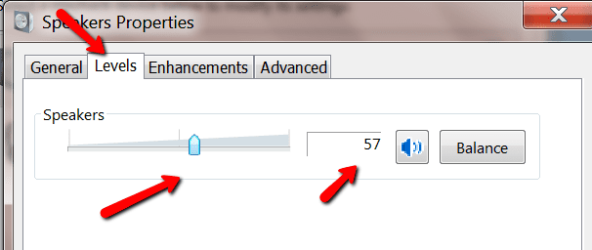
I suppose that you have a simple set of two speakers,are those plugged in the (usually) green input at the backplate of your motherboard?Did you try playing with the connector,a bit in or out?Can you verify that the speaker set is operational?
 

My Computer My Computer

Computer type
PC/Desktop
Computer Manufacturer/Model Number
Homebuilt,Quadcore processor on Asus MB
OS
Microsoft Windows 7 Ultimate 64-bit Service Pack 1
CPU
Intel(R) Core(TM)2 Quad Q 9550 @ 2.83 GHz
Motherboard
ASUS P5B-Deluxe Wi-Fi Edition
Memory
4x1024 GB DDR2 Corsair PC2-6400 800 Mhz
Graphics Card(s)
MSI TwiFrozer II 1024MB GDDR5
Sound Card
Realtek ALC883 @ Intel 82801HB ICH8 - High Def
Monitor(s) Displays
Asus VW195 [19" LCD]
Screen Resolution
1440x860 pixels
Hard Drives
OCZ Vertex Plus Series SATA II 2.5" SSD 128GB-

Westarn Digital SATA II 250GB
PSU
Corsair CX600W
Case
Custom built,cut and painted
Cooling
Xigmatek Gaia 2x120mm fan
Keyboard
MS Generic
Mouse
MS Optical 6000
Internet Speed
never enough
Antivirus
ESET Smart Security 6.0.306.0
its not my computer and I'm using headphones which work perfectly fine on my computer. Yes, its plugged in the green input, though have tried all inputs/outputs just in case, but only while plugged in the green input that little sound can be heard.
 

My Computer My Computer

Computer type
PC/Desktop
OS
Microsoft Windows 7 Home Premium 32-bit 7601 Multiprocessor Free Service Pack 1
CPU
Intel(R) Pentium(R) 4 CPU 2.00GHz
Motherboard
Hewlett-Packard HP System Board
Memory
2,00 GB
Graphics Card(s)
Standard VGA Graphics Adapter
Sound Card
Intel(r) 82801DB/DBM AC '97 Audio Controller
Screen Resolution
0 x 0 x 0 bits (0 colors) @ 0 Hz
Hard Drives
(1) SAMSUNG SP1213N ATA Device (2) ST3120022A ATA Device
Please do try another speaker set.
 

My Computer My Computer

Computer type
PC/Desktop
Computer Manufacturer/Model Number
Homebuilt,Quadcore processor on Asus MB
OS
Microsoft Windows 7 Ultimate 64-bit Service Pack 1
CPU
Intel(R) Core(TM)2 Quad Q 9550 @ 2.83 GHz
Motherboard
ASUS P5B-Deluxe Wi-Fi Edition
Memory
4x1024 GB DDR2 Corsair PC2-6400 800 Mhz
Graphics Card(s)
MSI TwiFrozer II 1024MB GDDR5
Sound Card
Realtek ALC883 @ Intel 82801HB ICH8 - High Def
Monitor(s) Displays
Asus VW195 [19" LCD]
Screen Resolution
1440x860 pixels
Hard Drives
OCZ Vertex Plus Series SATA II 2.5" SSD 128GB-

Westarn Digital SATA II 250GB
PSU
Corsair CX600W
Case
Custom built,cut and painted
Cooling
Xigmatek Gaia 2x120mm fan
Keyboard
MS Generic
Mouse
MS Optical 6000
Internet Speed
never enough
Antivirus
ESET Smart Security 6.0.306.0
Tried different set of speakers and still the same.
 

My Computer My Computer

Computer type
PC/Desktop
OS
Microsoft Windows 7 Home Premium 32-bit 7601 Multiprocessor Free Service Pack 1
CPU
Intel(R) Pentium(R) 4 CPU 2.00GHz
Motherboard
Hewlett-Packard HP System Board
Memory
2,00 GB
Graphics Card(s)
Standard VGA Graphics Adapter
Sound Card
Intel(r) 82801DB/DBM AC '97 Audio Controller
Screen Resolution
0 x 0 x 0 bits (0 colors) @ 0 Hz
Hard Drives
(1) SAMSUNG SP1213N ATA Device (2) ST3120022A ATA Device
I have my speakers wired to the front outlet where you usually attach the earphones. Did you try that ??
 

My Computer My Computer

Computer Manufacturer/Model Number
HP, Dell, Gateway, Toshiba - 4 laptops and 2 desktops
OS
Vista, Windows7, Mint Mate, Zorin, Windows 8
CPU
from 1.6GHz Duo to i7
Monitor(s) Displays
2x HP w2207
Hard Drives
5x HDD, 7x SSD, 12x Externals
Keyboard
with trackball - no mices
Mouse
Trackball mice
Internet Speed
DSL 6000
yes I tried all possible places, also forgot to mention that on top of that really quiet sound there is also some sort of static or something like this sound.
 

My Computer My Computer

Computer type
PC/Desktop
OS
Microsoft Windows 7 Home Premium 32-bit 7601 Multiprocessor Free Service Pack 1
CPU
Intel(R) Pentium(R) 4 CPU 2.00GHz
Motherboard
Hewlett-Packard HP System Board
Memory
2,00 GB
Graphics Card(s)
Standard VGA Graphics Adapter
Sound Card
Intel(r) 82801DB/DBM AC '97 Audio Controller
Screen Resolution
0 x 0 x 0 bits (0 colors) @ 0 Hz
Hard Drives
(1) SAMSUNG SP1213N ATA Device (2) ST3120022A ATA Device

My Computer My Computer

Computer type
PC/Desktop
OS
Microsoft Windows 7 Home Premium 64-bit 7601 Multiprocessor Free Service Pack 1
CPU
Intel(R) Core(TM) i7-3770 CPU @ 3.40GHz
Motherboard
ASUSTeK COMPUTER INC. P8H77-M
Memory
8.00 GB
Graphics Card(s)
Intel(R) HD Graphics 4000
Sound Card
On Board
Monitor(s) Displays
Dell 24"
Screen Resolution
1920 x 1080
Hard Drives
(1) INTEL SSDSC2CT180A3 ATA Device (2) ST500DM002-1BD142 ATA Device (3) WDC WD3200AAKS-75L9A0 ATA Device (4) Generic- Compact Flash USB Device (5) Generic- MS/MS-Pro USB Device (6) Generic- SD/MMC USB Device (7) Generic- SM/xD-Picture USB
PSU
500w Corsair
Case
Cooler Master
Cooling
3 Fans
Keyboard
Logitech MK300
Mouse
Logitech WOM
Internet Speed
75Mb
Antivirus
Norton 360
Browser
Firefox, Opera, IE
Back
Top