
Sound latency in live monitoring

Art Howard

New member
Local time
11:35 PM
Messages
12
When plugging a microphone or instrument into the mic/line input of my new Windows 8.1 computer (the issue also exists in Windows 7), there is a 1/8 or 1/16 note lag in the sound coming through my desktop speakers/headphones. Recording is fine, I'm talking about live monitoring.

I've used an XP computer for several years to record multi-track music, and also to record Skype conversations for a podcast. My mixer has always been plugged into the line in of the factory sound card, and monitored either with my desktop speakers or by plugging headphones into the desktop speakers, no problem.

Now I've been forced to upgrade to Windows 8.1, and the basic function of plugging a mic into an input jack and hearing myself doesn't work. This goes for analog and USB gear. There are HUNDREDS of pages on the Internet about this, since Windows 7, with no solutions.

Here is a video I made detailing the problem, and demonstrating how any proposed fix (update drivers, use the sound card software, try USB, use high performance power settings) hasn't worked.

If this can't be fixed in the next couple of days, this thing is going back to Best Buy!


My Computer My Computer

At a glance

Windows 7 Home8 GBAMD Radeon A8
Computer type
PC/Desktop
Computer Manufacturer/Model Number
Hewlett-Packard
OS
Windows 7 Home
Memory
8 GB
Graphics Card(s)
AMD Radeon A8
Hard Drives
2 TB
Antivirus
Norton Internet Security
Browser
Firefox
I have a Recording Studio, using Sonar X3. Latency is an issue in PC audio systems and more so than professional recording interface units. I have a Roland Octa-Capture and get reliable operation at 6ms Latency. Before the Octa-Capture, which is USB connected, I had a Focsurite Saffire Pro 40 which is Firewire connected and the best I could do for reliable operation was 11ms.

The DPC Latency Checker (only for Windows 7 as its not Win 8 compatible) may show some PC issues. There is the Resplendence Latency monitor that is also available that will work with both Win 7 and Win 8 and will provide more in-depth system analysis.

Vista/Win7/Win8 handles some audio functions differently than XP so what happened or worked in XP may not in newer OS'.
 

My Computer My Computer

At a glance

Windows 10 64 bitIntel i7 6700K16GB Corsair DominatorIntel CPU Graphics
Computer type
PC/Desktop
Computer Manufacturer/Model Number
My Own Build
OS
Windows 10 64 bit
CPU
Intel i7 6700K
Motherboard
ASUS ROG Maximus VIII Hero
Memory
16GB Corsair Dominator
Graphics Card(s)
Intel CPU Graphics
Sound Card
RealTek
Monitor(s) Displays
27" Dell S2719dgf
Screen Resolution
2560X1440
Hard Drives
1 TB Samsung 850 EVO SSD for Win 10 Pro
500GB Samsung 850 EVO SSD for Win 10 Insider
2 TB drive for backup
PSU
EVGA Supernova 750G2
Case
BeQuiet Silent Base 600
Cooling
Deepcool Captain 120EX
Keyboard
Microsoft Wireless 2000
Mouse
Microsoft wireless
Internet Speed
100 MB/sec (Cable)
Antivirus
Microsoft Defender and Malwarebytes
Browser
Edge/Firefox
Other Info
Cakewalk (Sonar) by BandLab and Studio One 4.1 Pro recording studio software. MOTU 896Mk3 Hybrid recording interface, Frontier Tranzport wireless control unit, Behringer X-Touch Control Surface.
Five USB connected optical drives for CD Audio production using Nero BurningROM
I appreciate the reply and will look into those latency checkers.

However, this is not an issue of syncing five banks of MIDI keyboards to some synth drums and a choir for a multi-track recording. This is plugging a mic into a jack and being able to hear yourself. Someone who wants to plug their $10 mic from Office Depot into the computer to say "hi" to grandma on Skype is not buying a $300 outboard piece of gear to do so. And although I've got a nice mic and mixer, that's basically all I'm trying to accomplish here.

Again I appreciate the reply, but I think Microsoft and Best Buy have a PC coming back to them.
 

My Computer My Computer

At a glance

Windows 7 Home8 GBAMD Radeon A8
Computer type
PC/Desktop
Computer Manufacturer/Model Number
Hewlett-Packard
OS
Windows 7 Home
Memory
8 GB
Graphics Card(s)
AMD Radeon A8
Hard Drives
2 TB
Antivirus
Norton Internet Security
Browser
Firefox
I'm not sure why you have the listen option turned on for a mic anyway unless you like to hear yourself talk. Skype doesn't work that way. The software you use to record should control the output to the speakers. Set the Windows option for exclusive use by software. Did you check to make sure there were NO Sound Effects turned on in the audio controller? I don't have a mic to test with but Environment options like room, chamber, reverb, etc. are listed under sound effects and will cause a delay.

I use Audacity to record my vinyls (pressed records if you're under 30 :) ) and had to turn off listen or I'd get a reverb sound. The speakers were driven by Audacity itself.
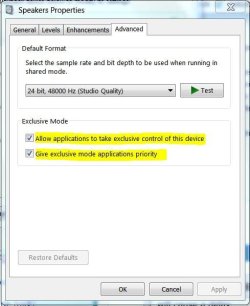
 

Attachments

  • Speaker Optons.JPG
    Speaker Optons.JPG
    40.2 KB · Views: 30

My Computer My Computer

At a glance

Windows 7 Pro-x64i7-2600 3.4GHz - 3.8GHz Turbo8Gb - 2x4GB, Muskin 991770 PC3-1333Integrated Intel HD 2000
Computer type
PC/Desktop
Computer Manufacturer/Model Number
Built 2/11/2011
OS
Windows 7 Pro-x64
CPU
i7-2600 3.4GHz - 3.8GHz Turbo
Motherboard
Intel DH67BL-B3
Memory
8Gb - 2x4GB, Muskin 991770 PC3-1333
Graphics Card(s)
Integrated Intel HD 2000
Sound Card
Integrated Intel 10.1 HD, RealTek ALC892
Monitor(s) Displays
Asus LCD VH222H, Haier HL24XSL2a
Screen Resolution
1920x1080, 1920x1080
Hard Drives
Crucial SSD C300-128Gb,
Western Digital WD5002AALX - 500Gb,
Western Digital WD7501AALS - 750Gb
PSU
Seasonic 650W 80+ Gold Modular
Case
Rosewill Defender
Cooling
Stock CPU, Four 120mm case fans, PCH fan added
Keyboard
Logitech EX100 Y-RBH94 Wireless
Mouse
Logitech EX100 M-RCE95 Wireless
Internet Speed
3.0/1.5 Mbs
Antivirus
Microsoft Security Essentials
Browser
Microsoft Internet Explorer 11
Other Info
Antec Veris Premier-Multimedia IR Station,
Cyber Accoustics-3602 Speakers,
AFT XM-5U Card Reader,
Hauppauge TV-HVR-2250,
Sony LX300 USB Turntable
I'm not sure why you have the listen option turned on for a mic anyway unless you like to hear yourself talk.
I have a laptop plugged into my mixer as well as my mic, and I use sound effects, like a morning radio show, while I do interviews (applause, etc.). I have to hear to balance the sound. Also to balance my mic and whoever I'm talking to on Skype.

And then other times I'm making music and play guitar along with a track. If I can't hear the sound of the amp emulator through the speakers/headphones in real time with the music, I can't get in sync with it.

I use Audacity to record my vinyls (pressed records if you're under 30 :) ) and had to turn off listen or I'd get a reverb sound. The speakers were driven by Audacity itself.
You shouldn't have to turn off the Listen feature to do that. I used to record cassettes and radio shows in Windows ME and listen as I did it in 2001. Apparently a 2001 PC could do things a 2 TB drive, 3.5 MHz computer with 8 GB of RAM in 2014 can't do.
 

My Computer My Computer

At a glance

Windows 7 Home8 GBAMD Radeon A8
Computer type
PC/Desktop
Computer Manufacturer/Model Number
Hewlett-Packard
OS
Windows 7 Home
Memory
8 GB
Graphics Card(s)
AMD Radeon A8
Hard Drives
2 TB
Antivirus
Norton Internet Security
Browser
Firefox
As I previously mentioned, Vista/Win 7/Win 8 handle some sound functions differently than XP and earlier. Thus what worked in XP may not work the same in newer OS'. Maybe Linux would do what you want, or if you want to pay 3 times as much for a PC, a MAC "may" do what you want.

A $150 two channel USB recording interface MAY do what you want. Buy something such as the Focusrite 2i2 unit somewhere that has a liberal return policy in case it too does not do what you want.
 

My Computer My Computer

At a glance

Windows 10 64 bitIntel i7 6700K16GB Corsair DominatorIntel CPU Graphics
Computer type
PC/Desktop
Computer Manufacturer/Model Number
My Own Build
OS
Windows 10 64 bit
CPU
Intel i7 6700K
Motherboard
ASUS ROG Maximus VIII Hero
Memory
16GB Corsair Dominator
Graphics Card(s)
Intel CPU Graphics
Sound Card
RealTek
Monitor(s) Displays
27" Dell S2719dgf
Screen Resolution
2560X1440
Hard Drives
1 TB Samsung 850 EVO SSD for Win 10 Pro
500GB Samsung 850 EVO SSD for Win 10 Insider
2 TB drive for backup
PSU
EVGA Supernova 750G2
Case
BeQuiet Silent Base 600
Cooling
Deepcool Captain 120EX
Keyboard
Microsoft Wireless 2000
Mouse
Microsoft wireless
Internet Speed
100 MB/sec (Cable)
Antivirus
Microsoft Defender and Malwarebytes
Browser
Edge/Firefox
Other Info
Cakewalk (Sonar) by BandLab and Studio One 4.1 Pro recording studio software. MOTU 896Mk3 Hybrid recording interface, Frontier Tranzport wireless control unit, Behringer X-Touch Control Surface.
Five USB connected optical drives for CD Audio production using Nero BurningROM

My Computer My Computer

At a glance

Windows 7 pro x64 SP1Intel i7-2600k o/c to 4.6GHz8GB Mushkin 1866MHzNvidia GTX 750 Ti 2GB
Computer type
PC/Desktop
Computer Manufacturer/Model Number
self build
OS
Windows 7 pro x64 SP1
CPU
Intel i7-2600k o/c to 4.6GHz
Motherboard
MSI Z68-GD80
Memory
8GB Mushkin 1866MHz
Graphics Card(s)
Nvidia GTX 750 Ti 2GB
Sound Card
integrated
Monitor(s) Displays
Liyama ProLite 27"
Screen Resolution
1920*1080 px
Hard Drives
Seagate 2TB
PSU
Coolermaster GX 750W
Case
Antec 300 case + 5 fans
Cooling
Dark Rock Pro
Internet Speed
62Mbit down 18Mbit up
Antivirus
MSE
Browser
Firefox
Other Info
Blackgold BGT3650 Quad HD TV card. Also have various 3770 + 4770K render boxes.
Thank you for the video, 3D Jed, but I couldn't get it to open. Could you post it to YouTube?
 

My Computer My Computer

At a glance

Windows 7 Home8 GBAMD Radeon A8
Computer type
PC/Desktop
Computer Manufacturer/Model Number
Hewlett-Packard
OS
Windows 7 Home
Memory
8 GB
Graphics Card(s)
AMD Radeon A8
Hard Drives
2 TB
Antivirus
Norton Internet Security
Browser
Firefox

My Computer My Computer

At a glance

Windows 7 pro x64 SP1Intel i7-2600k o/c to 4.6GHz8GB Mushkin 1866MHzNvidia GTX 750 Ti 2GB
Computer type
PC/Desktop
Computer Manufacturer/Model Number
self build
OS
Windows 7 pro x64 SP1
CPU
Intel i7-2600k o/c to 4.6GHz
Motherboard
MSI Z68-GD80
Memory
8GB Mushkin 1866MHz
Graphics Card(s)
Nvidia GTX 750 Ti 2GB
Sound Card
integrated
Monitor(s) Displays
Liyama ProLite 27"
Screen Resolution
1920*1080 px
Hard Drives
Seagate 2TB
PSU
Coolermaster GX 750W
Case
Antec 300 case + 5 fans
Cooling
Dark Rock Pro
Internet Speed
62Mbit down 18Mbit up
Antivirus
MSE
Browser
Firefox
Other Info
Blackgold BGT3650 Quad HD TV card. Also have various 3770 + 4770K render boxes.
Yes, I'd like to hear the sound "upstream" and live as you're doing in that video. But I CAN'T. The only way to hear the sound is "listen to this device!" Otherwise, the sound is muted. And as you say, if I were trying to play a piano over a backing track, I wouldn't be able to hear what I was playing to the music.

You've got the Realtek card, which seems to have a workaround to this. My computer came installed with the IDT High Definition Codec, which doesn't seem to be able to give me the upstream sound. I've also bought an Audigy Soundblaster card, and that's not working, either.

The people on this 32-page thread on this forum had my identical issue. Sure would be nice if they would join in on this one!
 

My Computer My Computer

At a glance

Windows 7 Home8 GBAMD Radeon A8
Computer type
PC/Desktop
Computer Manufacturer/Model Number
Hewlett-Packard
OS
Windows 7 Home
Memory
8 GB
Graphics Card(s)
AMD Radeon A8
Hard Drives
2 TB
Antivirus
Norton Internet Security
Browser
Firefox
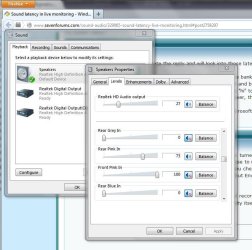
Well I'm sorry I couldn't help you. I have Gigabyte and MSI based W7 computers, just using onboard sound and both behave as in the video. I'd be interested in a screenshot of what you see on your pc when you click speaker properties like here -

spkr_props.JPG

I've got to admit, trying to work out which are the i/p's and the o/p's on the sound panel is kinda confusing.
 

My Computer My Computer

At a glance

Windows 7 pro x64 SP1Intel i7-2600k o/c to 4.6GHz8GB Mushkin 1866MHzNvidia GTX 750 Ti 2GB
Computer type
PC/Desktop
Computer Manufacturer/Model Number
self build
OS
Windows 7 pro x64 SP1
CPU
Intel i7-2600k o/c to 4.6GHz
Motherboard
MSI Z68-GD80
Memory
8GB Mushkin 1866MHz
Graphics Card(s)
Nvidia GTX 750 Ti 2GB
Sound Card
integrated
Monitor(s) Displays
Liyama ProLite 27"
Screen Resolution
1920*1080 px
Hard Drives
Seagate 2TB
PSU
Coolermaster GX 750W
Case
Antec 300 case + 5 fans
Cooling
Dark Rock Pro
Internet Speed
62Mbit down 18Mbit up
Antivirus
MSE
Browser
Firefox
Other Info
Blackgold BGT3650 Quad HD TV card. Also have various 3770 + 4770K render boxes.
I've made a video trying your approach, and did it with the IDT HD Codec, the Audigy Sound Blaster, and then also on my Windows 7 Home desktop.

I think the big difference is the sound cards. People with the Realtek find a way around this problem. Those of us with a IDT continue to have the issue. However, even adding the Audigy (I don't see Realtek's sold in stores here) didn't make a difference.
 

My Computer My Computer

At a glance

Windows 7 Home8 GBAMD Radeon A8
Computer type
PC/Desktop
Computer Manufacturer/Model Number
Hewlett-Packard
OS
Windows 7 Home
Memory
8 GB
Graphics Card(s)
AMD Radeon A8
Hard Drives
2 TB
Antivirus
Norton Internet Security
Browser
Firefox
video says private

BTW Reaktek in my screenshot is just onboard, not a card.
 

My Computer My Computer

At a glance

Windows 7 pro x64 SP1Intel i7-2600k o/c to 4.6GHz8GB Mushkin 1866MHzNvidia GTX 750 Ti 2GB
Computer type
PC/Desktop
Computer Manufacturer/Model Number
self build
OS
Windows 7 pro x64 SP1
CPU
Intel i7-2600k o/c to 4.6GHz
Motherboard
MSI Z68-GD80
Memory
8GB Mushkin 1866MHz
Graphics Card(s)
Nvidia GTX 750 Ti 2GB
Sound Card
integrated
Monitor(s) Displays
Liyama ProLite 27"
Screen Resolution
1920*1080 px
Hard Drives
Seagate 2TB
PSU
Coolermaster GX 750W
Case
Antec 300 case + 5 fans
Cooling
Dark Rock Pro
Internet Speed
62Mbit down 18Mbit up
Antivirus
MSE
Browser
Firefox
Other Info
Blackgold BGT3650 Quad HD TV card. Also have various 3770 + 4770K render boxes.
Last edited:

My Computer My Computer

At a glance

Windows 7 Home8 GBAMD Radeon A8
Computer type
PC/Desktop
Computer Manufacturer/Model Number
Hewlett-Packard
OS
Windows 7 Home
Memory
8 GB
Graphics Card(s)
AMD Radeon A8
Hard Drives
2 TB
Antivirus
Norton Internet Security
Browser
Firefox
I watched the last video and you are right - there's no sliders like in my screenshot. I'm out of ideas.
 

My Computer My Computer

At a glance

Windows 7 pro x64 SP1Intel i7-2600k o/c to 4.6GHz8GB Mushkin 1866MHzNvidia GTX 750 Ti 2GB
Computer type
PC/Desktop
Computer Manufacturer/Model Number
self build
OS
Windows 7 pro x64 SP1
CPU
Intel i7-2600k o/c to 4.6GHz
Motherboard
MSI Z68-GD80
Memory
8GB Mushkin 1866MHz
Graphics Card(s)
Nvidia GTX 750 Ti 2GB
Sound Card
integrated
Monitor(s) Displays
Liyama ProLite 27"
Screen Resolution
1920*1080 px
Hard Drives
Seagate 2TB
PSU
Coolermaster GX 750W
Case
Antec 300 case + 5 fans
Cooling
Dark Rock Pro
Internet Speed
62Mbit down 18Mbit up
Antivirus
MSE
Browser
Firefox
Other Info
Blackgold BGT3650 Quad HD TV card. Also have various 3770 + 4770K render boxes.
I'm thinking the problem is with the sound chip/software packaged with the OS. Realtek has accessible audio options. The IDT has almost nothing. And even when I installed a Sound Blaster card, it didn't get any better. If I could just find a card/driver/interface that would let me hear the analog input audio, I'd be fine! As it is, I guess I have to get a $150 USB interface to get this to work. Thanks for trying, though.
 

My Computer My Computer

At a glance

Windows 7 Home8 GBAMD Radeon A8
Computer type
PC/Desktop
Computer Manufacturer/Model Number
Hewlett-Packard
OS
Windows 7 Home
Memory
8 GB
Graphics Card(s)
AMD Radeon A8
Hard Drives
2 TB
Antivirus
Norton Internet Security
Browser
Firefox
Although it will cost you, one of the two channel USB recording interface units probably is the best option. The Focusrite Scarlett units are popular on recording forums that I visit.

There are others. Here is the listing on the Sweetwater music site (where I buy most of my recording studio equipment).
USB Audio Interfaces | Sweetwater.com
 

My Computer My Computer

At a glance

Windows 10 64 bitIntel i7 6700K16GB Corsair DominatorIntel CPU Graphics
Computer type
PC/Desktop
Computer Manufacturer/Model Number
My Own Build
OS
Windows 10 64 bit
CPU
Intel i7 6700K
Motherboard
ASUS ROG Maximus VIII Hero
Memory
16GB Corsair Dominator
Graphics Card(s)
Intel CPU Graphics
Sound Card
RealTek
Monitor(s) Displays
27" Dell S2719dgf
Screen Resolution
2560X1440
Hard Drives
1 TB Samsung 850 EVO SSD for Win 10 Pro
500GB Samsung 850 EVO SSD for Win 10 Insider
2 TB drive for backup
PSU
EVGA Supernova 750G2
Case
BeQuiet Silent Base 600
Cooling
Deepcool Captain 120EX
Keyboard
Microsoft Wireless 2000
Mouse
Microsoft wireless
Internet Speed
100 MB/sec (Cable)
Antivirus
Microsoft Defender and Malwarebytes
Browser
Edge/Firefox
Other Info
Cakewalk (Sonar) by BandLab and Studio One 4.1 Pro recording studio software. MOTU 896Mk3 Hybrid recording interface, Frontier Tranzport wireless control unit, Behringer X-Touch Control Surface.
Five USB connected optical drives for CD Audio production using Nero BurningROM
I just tried using the Skype "echo test." I can hear the Skype message just fine, and their configuration identifies my sound card, but doesn't hear my microphone! Considering Skype is now another Microsoft product, it's insane this doesn't work.
 

My Computer My Computer

At a glance

Windows 7 Home8 GBAMD Radeon A8
Computer type
PC/Desktop
Computer Manufacturer/Model Number
Hewlett-Packard
OS
Windows 7 Home
Memory
8 GB
Graphics Card(s)
AMD Radeon A8
Hard Drives
2 TB
Antivirus
Norton Internet Security
Browser
Firefox
Now I've found some excellent (but ultimately unhelpful) information on the subject. The PC makers are shipping the computers with the ability to monitor the mic/line inputs turned off! Some people were able to do a registry edit in Vista that fixed the problem, but I haven't found anything to help in 7/8/8.1. However, I'm not alone!

"Dell ships its notebook computers with the ability to monitor the input jack turned off. This means that you can't hear an audio signal routed through the mic or line-in jack even though you can record the audio and hear it when you play back the recording."

http://en.community.dell.com/support-forums/laptop/f/3517/t/18112824.aspx

http://consciousvibes.com/computers/EnableInputMonitor.html#What

These links pertain to Vista, but it's the identical issue. Unfortunately the identical fix doesn't work. If only there was something similar for Windows 7/8/8.1.
 

My Computer My Computer

At a glance

Windows 7 Home8 GBAMD Radeon A8
Computer type
PC/Desktop
Computer Manufacturer/Model Number
Hewlett-Packard
OS
Windows 7 Home
Memory
8 GB
Graphics Card(s)
AMD Radeon A8
Hard Drives
2 TB
Antivirus
Norton Internet Security
Browser
Firefox
Those Dell pcs are probably using onboard sound. I have onboard Realtek sound on all my boxes and I have those speaker i/p monitoring sliders. You use discreet cards and don't have the sliders. Maybe this feature is a Realtek thing. Is your mobo onboard sound Realtek by any chance and what do you see if you just use that ?

You'd think discreet cards would have more facilities not less.
 

My Computer My Computer

At a glance

Windows 7 pro x64 SP1Intel i7-2600k o/c to 4.6GHz8GB Mushkin 1866MHzNvidia GTX 750 Ti 2GB
Computer type
PC/Desktop
Computer Manufacturer/Model Number
self build
OS
Windows 7 pro x64 SP1
CPU
Intel i7-2600k o/c to 4.6GHz
Motherboard
MSI Z68-GD80
Memory
8GB Mushkin 1866MHz
Graphics Card(s)
Nvidia GTX 750 Ti 2GB
Sound Card
integrated
Monitor(s) Displays
Liyama ProLite 27"
Screen Resolution
1920*1080 px
Hard Drives
Seagate 2TB
PSU
Coolermaster GX 750W
Case
Antec 300 case + 5 fans
Cooling
Dark Rock Pro
Internet Speed
62Mbit down 18Mbit up
Antivirus
MSE
Browser
Firefox
Other Info
Blackgold BGT3650 Quad HD TV card. Also have various 3770 + 4770K render boxes.
Back
Top