Solved Sound looping and frame freeze during gaming

svennd

New member
Member
Local time
5:49 PM
Messages
29
Location
belgium
Hello,

I'm at the end of my know-how, I have sound looping during gaming my computer could handle in the past, also my screen freezes. (eg. Enemy territory) I have a Elitebook 8530p, and a ATI mobility Radeon HD 3650 grafix card.

I installed (using the tool from AMD) the latest driver for my card, I also installed the sound updates from HP. But nothing worked.

I tried to contact HP but there new website won't let me speak to a technician w/o a "read" from my computer, however my computer is not supported. (yeah its a joke)

I fear some of my hardware might be broken, but I cannot find much info on the web. I still got a pickup and repair service for a few months, so I'd like to see it fixed. I will reinstall windows 7 but I doubt this is the cause.

Any help is very much appriciated !

Svenn

// edit

I reïnstalled my window 7 (only installed winrar and ET) and the issue remains, when loading the game. I use ET cause its 'old' and I know my computer should be able to run it!

// edit 2

This is how I see every game right now : http://www.youtube.com/watch?v=bcmG-LiTqLQ (this isn't mine, just as reference to the "looping")
 
Last edited:

My Computer My Computer

At a glance

Windows 7 professional 32bitIntel Core 2 Duo CPU [email protected]2*2GBATI Mobility Radeon HD3650
Computer Manufacturer/Model Number
HP Elitebook 8530p
OS
Windows 7 professional 32bit
CPU
Intel Core 2 Duo CPU [email protected]
Memory
2*2GB
Graphics Card(s)
ATI Mobility Radeon HD3650
Sound Card
AMD High Definition Audio Device, SoundMAX Integrated DigitA
Hard Drives
TOSHIBA MK2555GSX ATA DEVICE
My Computer My Computer

At a glance

Windows 7 x64 Professional SP1Intel C2D T9550 2.66 GHz @ 2.793 GHz (Thanks ...8 GB DDR3ATI MOBILITY RADEON 4670
Computer Manufacturer/Model Number
DELL SXPS 1640
OS
Windows 7 x64 Professional SP1
CPU
Intel C2D T9550 2.66 GHz @ 2.793 GHz (Thanks ThrottleStop!!)
Motherboard
Intel PM45
Memory
8 GB DDR3
Graphics Card(s)
ATI MOBILITY RADEON 4670
Sound Card
CREATIVE XFI AUDIO NOTEBOOK
Monitor(s) Displays
16.1 WLED
Screen Resolution
1920x1080
Hard Drives
Seagate ST9500420AS 500GB (465GiBi) 7200 RPM Drive

External Drives:-
2 TB WD Essentials x 3
1 TB WD Mybook Gen 1
1 TB WD Mybook Gen 2
1 TB Seagate
1 TB Seagate
320 GB WD Scorpio Black (enclosed)
PSU
90W Dell Power Brick
Case
Dell Chassis
Cooling
Coolermaster Cooling Pad
Keyboard
Built-in backlighted Keyboard
Mouse
Logitech Wireless Mini Mouse
Internet Speed
4/0.5
Thx for the reply, I fear its not limited to games only thought, but I followed the guide.

"Updated" driver using auto-search tool from AMD; I couldn't find a soundcard driver as I don't know if I have a soundcard, or witch type I have. I checked Systeminformation and there are seemingly 2.

"AMD High Definition Audio Device" and "High Definition Audio-apparaat"
 

My Computer My Computer

At a glance

Windows 7 professional 32bitIntel Core 2 Duo CPU [email protected]2*2GBATI Mobility Radeon HD3650
Computer Manufacturer/Model Number
HP Elitebook 8530p
OS
Windows 7 professional 32bit
CPU
Intel Core 2 Duo CPU [email protected]
Memory
2*2GB
Graphics Card(s)
ATI Mobility Radeon HD3650
Sound Card
AMD High Definition Audio Device, SoundMAX Integrated DigitA
Hard Drives
TOSHIBA MK2555GSX ATA DEVICE
The AMD High Definition Audio Device is the audio chip that allows for HDMI audio out when you've connected your laptop to an external monitor or television. This is not the one to look for.

The High Definition Audio Device is the device you want to update drivers for general audio production on the system.

EDIT:- After perusing your problem again, and seeing how it's not just limited to games, you may indeed have general hardware issues.

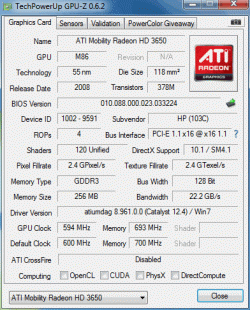
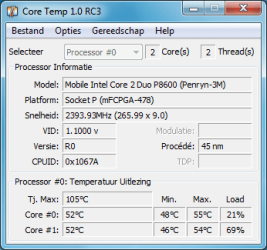
Please download GPUz and CoreTemp (graphic card and CPU monitoring software), and please post screenshots from those two softwares please by using the following links:-

GPU-Z Video card GPU Information Utility

Core Temp

http://www.sevenforums.com/tutorials/9733-screenshots-files-upload-post-seven-forums.html

How to Use the Snipping Tool in Vista - Vista Forums

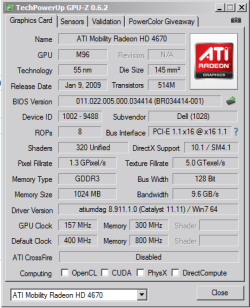
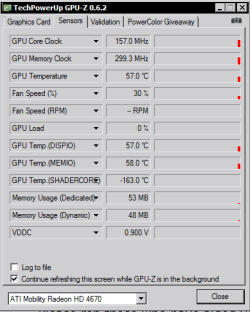
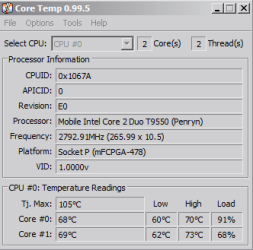
For example, here're screenshots from my own system:-

Capture1.PNG Capture3.PNG

Capture2.PNG

(My temps are high from encoding video using Handbrake)
 

My Computer My Computer

At a glance

Windows 7 x64 Professional SP1Intel C2D T9550 2.66 GHz @ 2.793 GHz (Thanks ...8 GB DDR3ATI MOBILITY RADEON 4670
Computer Manufacturer/Model Number
DELL SXPS 1640
OS
Windows 7 x64 Professional SP1
CPU
Intel C2D T9550 2.66 GHz @ 2.793 GHz (Thanks ThrottleStop!!)
Motherboard
Intel PM45
Memory
8 GB DDR3
Graphics Card(s)
ATI MOBILITY RADEON 4670
Sound Card
CREATIVE XFI AUDIO NOTEBOOK
Monitor(s) Displays
16.1 WLED
Screen Resolution
1920x1080
Hard Drives
Seagate ST9500420AS 500GB (465GiBi) 7200 RPM Drive

External Drives:-
2 TB WD Essentials x 3
1 TB WD Mybook Gen 1
1 TB WD Mybook Gen 2
1 TB Seagate
1 TB Seagate
320 GB WD Scorpio Black (enclosed)
PSU
90W Dell Power Brick
Case
Dell Chassis
Cooling
Coolermaster Cooling Pad
Keyboard
Built-in backlighted Keyboard
Mouse
Logitech Wireless Mini Mouse
Internet Speed
4/0.5
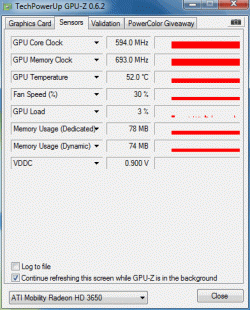
I added them, I'm gonne look for this sound driver, though, pre-reinstallation the issue was there when it was the latest.

I will install just to be sure.


Thank you for the help so far!
 

Attachments

  • sensors.gif
    sensors.gif
    15.4 KB · Views: 18
  • gfx_card.gif
    gfx_card.gif
    23.4 KB · Views: 14
  • CoreTemp-Scr.png
    CoreTemp-Scr.png
    11.2 KB · Views: 15

My Computer My Computer

At a glance

Windows 7 professional 32bitIntel Core 2 Duo CPU [email protected]2*2GBATI Mobility Radeon HD3650
Computer Manufacturer/Model Number
HP Elitebook 8530p
OS
Windows 7 professional 32bit
CPU
Intel Core 2 Duo CPU [email protected]
Memory
2*2GB
Graphics Card(s)
ATI Mobility Radeon HD3650
Sound Card
AMD High Definition Audio Device, SoundMAX Integrated DigitA
Hard Drives
TOSHIBA MK2555GSX ATA DEVICE
Hmm.. all temperatures and clocks look normal so far... well within tolerable parameters.. so thats some good news, it indicates there're no pre-existing overheating issues with your machine at idle.

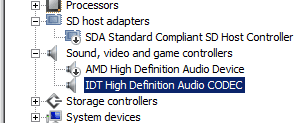
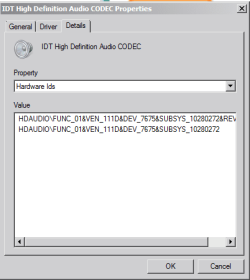
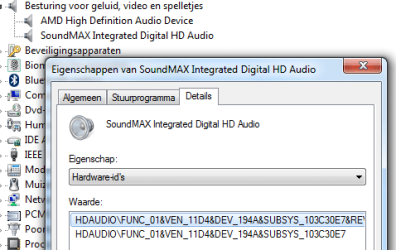
To know the correct driver for your sound card (Soundmax digital audio from your system specs) can you go to Device Manager:-

Start|type in device manager|enter|head to the high definition audio device|Right click|Properties
Details Tab|Select Hardware Ids from Dropdown menu|

Take a screenshot and upload it here please.

Example from mine:-

In Device Manager:-

Capture2.PNG

Properties Box:-

Capture1.PNG
 

My Computer My Computer

At a glance

Windows 7 x64 Professional SP1Intel C2D T9550 2.66 GHz @ 2.793 GHz (Thanks ...8 GB DDR3ATI MOBILITY RADEON 4670
Computer Manufacturer/Model Number
DELL SXPS 1640
OS
Windows 7 x64 Professional SP1
CPU
Intel C2D T9550 2.66 GHz @ 2.793 GHz (Thanks ThrottleStop!!)
Motherboard
Intel PM45
Memory
8 GB DDR3
Graphics Card(s)
ATI MOBILITY RADEON 4670
Sound Card
CREATIVE XFI AUDIO NOTEBOOK
Monitor(s) Displays
16.1 WLED
Screen Resolution
1920x1080
Hard Drives
Seagate ST9500420AS 500GB (465GiBi) 7200 RPM Drive

External Drives:-
2 TB WD Essentials x 3
1 TB WD Mybook Gen 1
1 TB WD Mybook Gen 2
1 TB Seagate
1 TB Seagate
320 GB WD Scorpio Black (enclosed)
PSU
90W Dell Power Brick
Case
Dell Chassis
Cooling
Coolermaster Cooling Pad
Keyboard
Built-in backlighted Keyboard
Mouse
Logitech Wireless Mini Mouse
Internet Speed
4/0.5
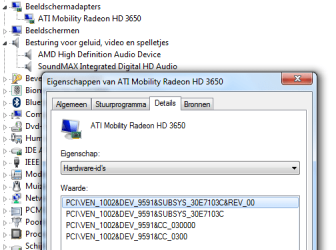
I made the screenshot, also made a screenshot of my grafixs card.

I made a video to show what the issue is : looping sound bug ET - YouTube (enemy territory, old game),
LOL LOOP - YouTube (League of legends, new game)

Quality is bad but maybe this helps to identify the problem.

// edit

full first line on audio driver :
HDAUDIO\FUNC_01&BEN_11D4&DEV_194A&SUBSYS_103C30E7&REV_1004
 

Attachments

  • hardware_id.png
    hardware_id.png
    17.5 KB · Views: 19
  • hardware_id_gfx.png
    hardware_id_gfx.png
    19.2 KB · Views: 15

My Computer My Computer

At a glance

Windows 7 professional 32bitIntel Core 2 Duo CPU [email protected]2*2GBATI Mobility Radeon HD3650
Computer Manufacturer/Model Number
HP Elitebook 8530p
OS
Windows 7 professional 32bit
CPU
Intel Core 2 Duo CPU [email protected]
Memory
2*2GB
Graphics Card(s)
ATI Mobility Radeon HD3650
Sound Card
AMD High Definition Audio Device, SoundMAX Integrated DigitA
Hard Drives
TOSHIBA MK2555GSX ATA DEVICE
Hmm... Thanks for the youtube videos demonstrating the problem(s)...

It's definitely the Soundmax sound card at fault, you said you installed the sound drivers from HP right?

Does the same issue occur using Windows 7 default sound drivers?

(The ones that came automatically installed when you did a fresh install of Windows 7)

Also try and disable the AMD High Definition Device for now, we want to isolate the problem completely to just the Soundmax Integrated Card...

Right Click on AMD High Definition Audio Device|Disable|Yes
 

My Computer My Computer

At a glance

Windows 7 x64 Professional SP1Intel C2D T9550 2.66 GHz @ 2.793 GHz (Thanks ...8 GB DDR3ATI MOBILITY RADEON 4670
Computer Manufacturer/Model Number
DELL SXPS 1640
OS
Windows 7 x64 Professional SP1
CPU
Intel C2D T9550 2.66 GHz @ 2.793 GHz (Thanks ThrottleStop!!)
Motherboard
Intel PM45
Memory
8 GB DDR3
Graphics Card(s)
ATI MOBILITY RADEON 4670
Sound Card
CREATIVE XFI AUDIO NOTEBOOK
Monitor(s) Displays
16.1 WLED
Screen Resolution
1920x1080
Hard Drives
Seagate ST9500420AS 500GB (465GiBi) 7200 RPM Drive

External Drives:-
2 TB WD Essentials x 3
1 TB WD Mybook Gen 1
1 TB WD Mybook Gen 2
1 TB Seagate
1 TB Seagate
320 GB WD Scorpio Black (enclosed)
PSU
90W Dell Power Brick
Case
Dell Chassis
Cooling
Coolermaster Cooling Pad
Keyboard
Built-in backlighted Keyboard
Mouse
Logitech Wireless Mini Mouse
Internet Speed
4/0.5
Thx, Yes the default sound drivers give the same issue. I clean installed and I forced windows not to update, I installed the game and the problem was there. Updating and installing the drivers from HP result in the same issue.

I don't know if you see it, but the screen freezes aswell, normally the enemy territory game startup is a fluent all-action intro. While now fps hit 0.

I disabled the "AMD High Definition Audio Device"; Issue remains.

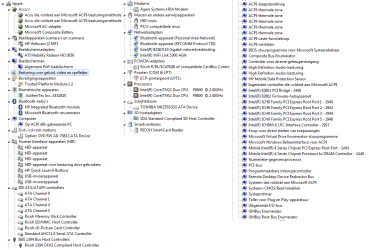
I added a view of most items on that screen, I noted on "Systemdevices" (Systeemapparaten) that there are 2 "High Definition Audio controllers" (translated; see screen) Though I have no idea what they do. Should I stop one ?

// disabling this din't make any difference

I also disabled the SoundMax HD audio device (so I have no sound anymore) but when I load up ET by example I see framerates drop aswell. :(
 

Attachments

  • overview.png
    overview.png
    38.3 KB · Views: 25
Last edited:

My Computer My Computer

At a glance

Windows 7 professional 32bitIntel Core 2 Duo CPU [email protected]2*2GBATI Mobility Radeon HD3650
Computer Manufacturer/Model Number
HP Elitebook 8530p
OS
Windows 7 professional 32bit
CPU
Intel Core 2 Duo CPU [email protected]
Memory
2*2GB
Graphics Card(s)
ATI Mobility Radeon HD3650
Sound Card
AMD High Definition Audio Device, SoundMAX Integrated DigitA
Hard Drives
TOSHIBA MK2555GSX ATA DEVICE
I just think I found a important piece of the bug. When I Install my game on my external drive, and fire it up, the loading works just fine. No lag, perfect sound. Also when the lag occurs when I use my c:/ game, my drive is-working-led is on (like its really working hard). So I think the issue is related to the hard drive.

However when playing on my external hard drive the issue shows aswell but allot lesser. I checked my hard drive for errors, but nothing big came up. :(
 
Last edited:

My Computer My Computer

At a glance

Windows 7 professional 32bitIntel Core 2 Duo CPU [email protected]2*2GBATI Mobility Radeon HD3650
Computer Manufacturer/Model Number
HP Elitebook 8530p
OS
Windows 7 professional 32bit
CPU
Intel Core 2 Duo CPU [email protected]
Memory
2*2GB
Graphics Card(s)
ATI Mobility Radeon HD3650
Sound Card
AMD High Definition Audio Device, SoundMAX Integrated DigitA
Hard Drives
TOSHIBA MK2555GSX ATA DEVICE
Hello again svennd,

Sorry for the rather late follow up, but i have been occupied.

Another step I'd like you take (after reading about these new findings of yours), is to peform a Clean Boot by unchecking everything in msconfig>Startup and rebooting after that...

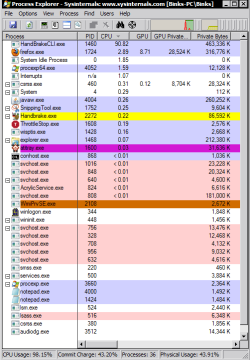
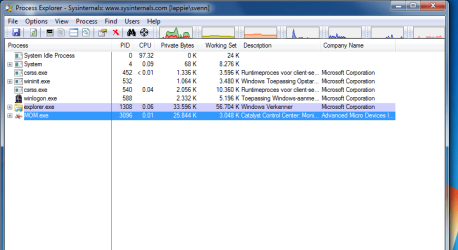
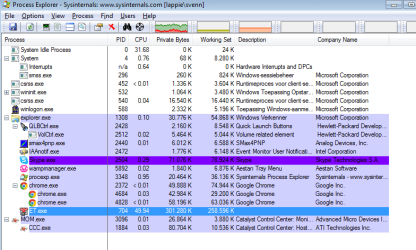
After that, download and run process explorer while running the game in windowed mode and to take 2 screenshots of process explorer sorted by CPU usage; one before the problem occurs and one when the problem occurs and upload it here using the previous tutorial for uploading i linked to you earlier on.

Process Explorer

Here's mine for example sorted by CPU usage:-

Capture3.PNG
 

My Computer My Computer

At a glance

Windows 7 x64 Professional SP1Intel C2D T9550 2.66 GHz @ 2.793 GHz (Thanks ...8 GB DDR3ATI MOBILITY RADEON 4670
Computer Manufacturer/Model Number
DELL SXPS 1640
OS
Windows 7 x64 Professional SP1
CPU
Intel C2D T9550 2.66 GHz @ 2.793 GHz (Thanks ThrottleStop!!)
Motherboard
Intel PM45
Memory
8 GB DDR3
Graphics Card(s)
ATI MOBILITY RADEON 4670
Sound Card
CREATIVE XFI AUDIO NOTEBOOK
Monitor(s) Displays
16.1 WLED
Screen Resolution
1920x1080
Hard Drives
Seagate ST9500420AS 500GB (465GiBi) 7200 RPM Drive

External Drives:-
2 TB WD Essentials x 3
1 TB WD Mybook Gen 1
1 TB WD Mybook Gen 2
1 TB Seagate
1 TB Seagate
320 GB WD Scorpio Black (enclosed)
PSU
90W Dell Power Brick
Case
Dell Chassis
Cooling
Coolermaster Cooling Pad
Keyboard
Built-in backlighted Keyboard
Mouse
Logitech Wireless Mini Mouse
Internet Speed
4/0.5
Hello solarmystic, for a weird reason, the issue resolved. I updated seemingly unrelated items and the issue is gone. I installed a package who added HP_TOOLS partition (original), the bios kinda seems looking for items in that partition. Also I installed a tool for raid configuration. (I only have 1 hard drive so I wouldn't guess the connection)

Other then that I haven't installed stuff, or changed stuff, but the issue seems to be gone :/ I will search further on this, but for now, I guess I only have to thank you for your support!

Once I found the issue, ill report it back here, thx Solarmystic !
 

My Computer My Computer

At a glance

Windows 7 professional 32bitIntel Core 2 Duo CPU [email protected]2*2GBATI Mobility Radeon HD3650
Computer Manufacturer/Model Number
HP Elitebook 8530p
OS
Windows 7 professional 32bit
CPU
Intel Core 2 Duo CPU [email protected]
Memory
2*2GB
Graphics Card(s)
ATI Mobility Radeon HD3650
Sound Card
AMD High Definition Audio Device, SoundMAX Integrated DigitA
Hard Drives
TOSHIBA MK2555GSX ATA DEVICE
Glad you got it sorted out! Will be here for your reports, if any..
 

My Computer My Computer

At a glance

Windows 7 x64 Professional SP1Intel C2D T9550 2.66 GHz @ 2.793 GHz (Thanks ...8 GB DDR3ATI MOBILITY RADEON 4670
Computer Manufacturer/Model Number
DELL SXPS 1640
OS
Windows 7 x64 Professional SP1
CPU
Intel C2D T9550 2.66 GHz @ 2.793 GHz (Thanks ThrottleStop!!)
Motherboard
Intel PM45
Memory
8 GB DDR3
Graphics Card(s)
ATI MOBILITY RADEON 4670
Sound Card
CREATIVE XFI AUDIO NOTEBOOK
Monitor(s) Displays
16.1 WLED
Screen Resolution
1920x1080
Hard Drives
Seagate ST9500420AS 500GB (465GiBi) 7200 RPM Drive

External Drives:-
2 TB WD Essentials x 3
1 TB WD Mybook Gen 1
1 TB WD Mybook Gen 2
1 TB Seagate
1 TB Seagate
320 GB WD Scorpio Black (enclosed)
PSU
90W Dell Power Brick
Case
Dell Chassis
Cooling
Coolermaster Cooling Pad
Keyboard
Built-in backlighted Keyboard
Mouse
Logitech Wireless Mini Mouse
Internet Speed
4/0.5
Yeah, I posted to fast, it happened again, but only on a very low frequency, I had it once (3 seconds sound loop) during 2-3 hours of playing.

But my games are playable again, and that was in essence I was going after.
 

My Computer My Computer

At a glance

Windows 7 professional 32bitIntel Core 2 Duo CPU [email protected]2*2GBATI Mobility Radeon HD3650
Computer Manufacturer/Model Number
HP Elitebook 8530p
OS
Windows 7 professional 32bit
CPU
Intel Core 2 Duo CPU [email protected]
Memory
2*2GB
Graphics Card(s)
ATI Mobility Radeon HD3650
Sound Card
AMD High Definition Audio Device, SoundMAX Integrated DigitA
Hard Drives
TOSHIBA MK2555GSX ATA DEVICE
Just for the completeness of this topic.

I installed these software from hp website
- ADI SoundMAX AD1984A Audio Driver for Microsoft Windows 7
- Intel AMT Driver
- Intel Matrix Storage Manager Driver
- HP 3D DriveGuard
- HP System Diagnostics UEFI

I think that the last tool was the "fix" it added a new partition called HP_TOOLS it was there on default install, and i know BIOS needs some stuff from that partition in order to give some functionality. (pre-OS presentation, mail & web)
The issue itself is not completely gone, but hardly testable for solutions. I noted that my ping turns horrible when it occurs. (25->+800-+999)
 

My Computer My Computer

At a glance

Windows 7 professional 32bitIntel Core 2 Duo CPU [email protected]2*2GBATI Mobility Radeon HD3650
Computer Manufacturer/Model Number
HP Elitebook 8530p
OS
Windows 7 professional 32bit
CPU
Intel Core 2 Duo CPU [email protected]
Memory
2*2GB
Graphics Card(s)
ATI Mobility Radeon HD3650
Sound Card
AMD High Definition Audio Device, SoundMAX Integrated DigitA
Hard Drives
TOSHIBA MK2555GSX ATA DEVICE
Just for the completeness of this topic.

I installed these software from hp website
- ADI SoundMAX AD1984A Audio Driver for Microsoft Windows 7
- Intel AMT Driver
- Intel Matrix Storage Manager Driver
- HP 3D DriveGuard
- HP System Diagnostics UEFI

I think that the last tool was the "fix" it added a new partition called HP_TOOLS it was there on default install, and i know BIOS needs some stuff from that partition in order to give some functionality. (pre-OS presentation, mail & web)
The issue itself is not completely gone, but hardly testable for solutions. I noted that my ping turns horrible when it occurs. (25->+800-+999)

If you'd like some suggestions into improving/stablizing your gaming ping, have look at what i wrote in this thread:-

http://www.sevenforums.com/gaming/2...s-while-playing-online-games.html#post1994115
 

My Computer My Computer

At a glance

Windows 7 x64 Professional SP1Intel C2D T9550 2.66 GHz @ 2.793 GHz (Thanks ...8 GB DDR3ATI MOBILITY RADEON 4670
Computer Manufacturer/Model Number
DELL SXPS 1640
OS
Windows 7 x64 Professional SP1
CPU
Intel C2D T9550 2.66 GHz @ 2.793 GHz (Thanks ThrottleStop!!)
Motherboard
Intel PM45
Memory
8 GB DDR3
Graphics Card(s)
ATI MOBILITY RADEON 4670
Sound Card
CREATIVE XFI AUDIO NOTEBOOK
Monitor(s) Displays
16.1 WLED
Screen Resolution
1920x1080
Hard Drives
Seagate ST9500420AS 500GB (465GiBi) 7200 RPM Drive

External Drives:-
2 TB WD Essentials x 3
1 TB WD Mybook Gen 1
1 TB WD Mybook Gen 2
1 TB Seagate
1 TB Seagate
320 GB WD Scorpio Black (enclosed)
PSU
90W Dell Power Brick
Case
Dell Chassis
Cooling
Coolermaster Cooling Pad
Keyboard
Built-in backlighted Keyboard
Mouse
Logitech Wireless Mini Mouse
Internet Speed
4/0.5
This is so damn frustrating, I thought it was fixed now its back :/

I added both screenshots for the process explorer, and I'm going to try the guide on game ping.

What happens is that during the game my cpu is around 50% and it suddenly drops hard, and "system idle process" takes over. (seemingly there is nothing to do ?)
 

Attachments

  • pre.png
    pre.png
    23.4 KB · Views: 25
  • during.png
    during.png
    25.2 KB · Views: 29
  • during_oke.png
    during_oke.png
    26.6 KB · Views: 27
Last edited:

My Computer My Computer

At a glance

Windows 7 professional 32bitIntel Core 2 Duo CPU [email protected]2*2GBATI Mobility Radeon HD3650
Computer Manufacturer/Model Number
HP Elitebook 8530p
OS
Windows 7 professional 32bit
CPU
Intel Core 2 Duo CPU [email protected]
Memory
2*2GB
Graphics Card(s)
ATI Mobility Radeon HD3650
Sound Card
AMD High Definition Audio Device, SoundMAX Integrated DigitA
Hard Drives
TOSHIBA MK2555GSX ATA DEVICE
Did you perform the Clean boot like I told you to in my previous post, before trying the game out and taking those two screenshots?

Another step I'd like you take (after reading about these new findings of yours), is to peform a Clean Boot by unchecking everything in msconfig>Startup and rebooting after that...

I see some unrelated processes in Process Monitor which shouldn't be there.

Nevermind that, follow these new instructions for performing a Clean Boot:-

1) Click Start, type msconfig in the Start Search box, and then press ENTER.

2) If you are prompted for an administrator password or for a confirmation, type the password, or click Continue.

3) On the General tab, click Selective Startup.

4) Under Selective Startup, click to clear the Load Startup Items check box.

5) Click the Services tab, click to select the Hide All Microsoft Services check box, and then click Disable All

6) Click OK.

7) When you are prompted, click Restart.

(You can easily reverse those steps If you need to when we're done troubleshooting)

Then, play the game again, and see whether the issue occurs.

EDIT:-

A thought just occured to me. Try this:-

Run the game like usual. Alt-Tab and head to Task Manager (Ctrl-Shift-Esc), find the ET.exe process and right click on it, select CPU Affinity (set affinity), tick only one CPU (CPU 0 or CPU 1) in the next box, and press ok, and go back to your game.

See whether the problems still occur.
 

My Computer My Computer

At a glance

Windows 7 x64 Professional SP1Intel C2D T9550 2.66 GHz @ 2.793 GHz (Thanks ...8 GB DDR3ATI MOBILITY RADEON 4670
Computer Manufacturer/Model Number
DELL SXPS 1640
OS
Windows 7 x64 Professional SP1
CPU
Intel C2D T9550 2.66 GHz @ 2.793 GHz (Thanks ThrottleStop!!)
Motherboard
Intel PM45
Memory
8 GB DDR3
Graphics Card(s)
ATI MOBILITY RADEON 4670
Sound Card
CREATIVE XFI AUDIO NOTEBOOK
Monitor(s) Displays
16.1 WLED
Screen Resolution
1920x1080
Hard Drives
Seagate ST9500420AS 500GB (465GiBi) 7200 RPM Drive

External Drives:-
2 TB WD Essentials x 3
1 TB WD Mybook Gen 1
1 TB WD Mybook Gen 2
1 TB Seagate
1 TB Seagate
320 GB WD Scorpio Black (enclosed)
PSU
90W Dell Power Brick
Case
Dell Chassis
Cooling
Coolermaster Cooling Pad
Keyboard
Built-in backlighted Keyboard
Mouse
Logitech Wireless Mini Mouse
Internet Speed
4/0.5
Yep, for ET this seems to solve the problem. Weird, maybe some updates broke stuff :/ ?

Again thx you very much.
 

My Computer My Computer

At a glance

Windows 7 professional 32bitIntel Core 2 Duo CPU [email protected]2*2GBATI Mobility Radeon HD3650
Computer Manufacturer/Model Number
HP Elitebook 8530p
OS
Windows 7 professional 32bit
CPU
Intel Core 2 Duo CPU [email protected]
Memory
2*2GB
Graphics Card(s)
ATI Mobility Radeon HD3650
Sound Card
AMD High Definition Audio Device, SoundMAX Integrated DigitA
Hard Drives
TOSHIBA MK2555GSX ATA DEVICE
Yep, for ET this seems to solve the problem. Weird, maybe some updates broke stuff :/ ?

Again thx you very much.


Glad to know.. once again, thanks for following up on this problem with us, so that others can benefit.
 

My Computer My Computer

At a glance

Windows 7 x64 Professional SP1Intel C2D T9550 2.66 GHz @ 2.793 GHz (Thanks ...8 GB DDR3ATI MOBILITY RADEON 4670
Computer Manufacturer/Model Number
DELL SXPS 1640
OS
Windows 7 x64 Professional SP1
CPU
Intel C2D T9550 2.66 GHz @ 2.793 GHz (Thanks ThrottleStop!!)
Motherboard
Intel PM45
Memory
8 GB DDR3
Graphics Card(s)
ATI MOBILITY RADEON 4670
Sound Card
CREATIVE XFI AUDIO NOTEBOOK
Monitor(s) Displays
16.1 WLED
Screen Resolution
1920x1080
Hard Drives
Seagate ST9500420AS 500GB (465GiBi) 7200 RPM Drive

External Drives:-
2 TB WD Essentials x 3
1 TB WD Mybook Gen 1
1 TB WD Mybook Gen 2
1 TB Seagate
1 TB Seagate
320 GB WD Scorpio Black (enclosed)
PSU
90W Dell Power Brick
Case
Dell Chassis
Cooling
Coolermaster Cooling Pad
Keyboard
Built-in backlighted Keyboard
Mouse
Logitech Wireless Mini Mouse
Internet Speed
4/0.5
Back
Top