Sound Mixer Issues

ilKhan Ozy

New member
Local time
4:54 PM
Messages
3
Not so much an issue, as a general question.

Is there a mod or update that will allow you to select which audio output device a program will use? I know some programs allow you the prioritize outputs, similar to Skype, but I am an avid fan of ... "home videos" and it would be rather embarrassing if I was watching one and it began to play through my main speakers. That might attract undue attention to my ... "home videos" if you follow.

I have tried going into the control panel and forcing the headset as the default device, but Windows is all high and mighty about using the built in speakers for some reason.
 

My Computer

Computer Manufacturer/Model Number
HP dv7-1448dx
OS
Windows 7 Home Premium 64-Bit
CPU
AMD Turion x2 2.2 GHz
Normally, if you plug in a headset to the front panel headset jack (on a desktop) or the headset jack on a Laptop it mutes the PC's speakers and you get "private" audio.

I don't know of anything that will allow outputting different audio on different devices. You only have one audio "card" (chip) and it's taking whatever input it is getting and converting it to audio and sending it to the speakers or headset depending on what is plugged in or selected.

When you are viewing "private" videos only have that audio playing back and control where it's heard.
 

My Computer

Computer type
PC/Desktop
Computer Manufacturer/Model Number
My Own Build
OS
Windows 10 64 bit
CPU
Intel i7 6700K
Motherboard
ASUS ROG Maximus VIII Hero
Memory
16GB Corsair Dominator
Graphics Card(s)
Intel CPU Graphics
Sound Card
RealTek
Monitor(s) Displays
27" Dell S2719dgf
Screen Resolution
2560X1440
Hard Drives
1 TB Samsung 850 EVO SSD for Win 10 Pro
500GB Samsung 850 EVO SSD for Win 10 Insider
2 TB drive for backup
PSU
EVGA Supernova 750G2
Case
BeQuiet Silent Base 600
Cooling
Deepcool Captain 120EX
Keyboard
Microsoft Wireless 2000
Mouse
Microsoft wireless
Internet Speed
100 MB/sec (Cable)
Antivirus
Microsoft Defender and Malwarebytes
Browser
Edge/Firefox
Other Info
Cakewalk (Sonar) by BandLab and Studio One 4.1 Pro recording studio software. MOTU 896Mk3 Hybrid recording interface, Frontier Tranzport wireless control unit, Behringer X-Touch Control Surface.
Five USB connected optical drives for CD Audio production using Nero BurningROM
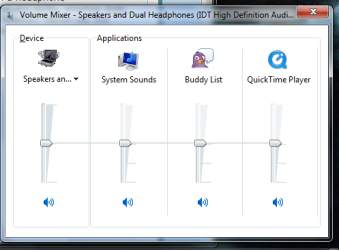
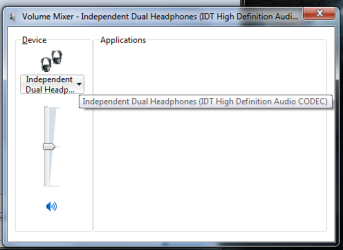
Theirin lies my issue. I have the speakers set to mutes, and my headphones set to emit sound, but Win7 defaults media player to the System Speakers. There is no way to jump it over to the headset sound board. I'll see if I can get som screens up this evening to show you what I mean.
 

My Computer

Computer Manufacturer/Model Number
HP dv7-1448dx
OS
Windows 7 Home Premium 64-Bit
CPU
AMD Turion x2 2.2 GHz
If your hardware (and sound drivers) are working correctly when you plug in a headphone to the front panel headphone jack it will automatically mute the speakers and any audio, whether from WMP or any other application that is playing audio will go to the plugged in headset. Herein lies the problem, your sound card (or integrated audio chip) is not muting the speakers when you plug the headset in.
 
Last edited:

My Computer

Computer type
PC/Desktop
Computer Manufacturer/Model Number
My Own Build
OS
Windows 10 64 bit
CPU
Intel i7 6700K
Motherboard
ASUS ROG Maximus VIII Hero
Memory
16GB Corsair Dominator
Graphics Card(s)
Intel CPU Graphics
Sound Card
RealTek
Monitor(s) Displays
27" Dell S2719dgf
Screen Resolution
2560X1440
Hard Drives
1 TB Samsung 850 EVO SSD for Win 10 Pro
500GB Samsung 850 EVO SSD for Win 10 Insider
2 TB drive for backup
PSU
EVGA Supernova 750G2
Case
BeQuiet Silent Base 600
Cooling
Deepcool Captain 120EX
Keyboard
Microsoft Wireless 2000
Mouse
Microsoft wireless
Internet Speed
100 MB/sec (Cable)
Antivirus
Microsoft Defender and Malwarebytes
Browser
Edge/Firefox
Other Info
Cakewalk (Sonar) by BandLab and Studio One 4.1 Pro recording studio software. MOTU 896Mk3 Hybrid recording interface, Frontier Tranzport wireless control unit, Behringer X-Touch Control Surface.
Five USB connected optical drives for CD Audio production using Nero BurningROM
Not quite. There is no issue with the system speakers being muted or unmuted. I can do that manually. It is simply an issue of the sound card or windows internal prioritization failing to produce the sound signal at both the 3.5 mm jack and through the system speakers.

I have a feeling that this is part of the Windows 7 enhancement features or whatever. I feel this way because it will list the Player as being sent out on the Speaker channel, whereas it will so far only direct Skype or what have you to the 3.5 jack.

Check my attached images, they show you what I am talking about. I think the key issue lies in the fact that the Windows Sound Mixer chooses for you, instead of letting you choose where to send the sound output signal.
 

Attachments

  • Mixer Base.png
    Mixer Base.png
    17.3 KB · Views: 12
  • Mixer Far.png
    Mixer Far.png
    13.2 KB · Views: 11

My Computer

Computer Manufacturer/Model Number
HP dv7-1448dx
OS
Windows 7 Home Premium 64-Bit
CPU
AMD Turion x2 2.2 GHz
This is the first I've seen or heard of this. I don't have that on my SoundBlaster sound card and no one on the Dell forum, with IDT has brought this up. I can't help you with this. Maybe one of the others here can help.
 

My Computer

Computer type
PC/Desktop
Computer Manufacturer/Model Number
My Own Build
OS
Windows 10 64 bit
CPU
Intel i7 6700K
Motherboard
ASUS ROG Maximus VIII Hero
Memory
16GB Corsair Dominator
Graphics Card(s)
Intel CPU Graphics
Sound Card
RealTek
Monitor(s) Displays
27" Dell S2719dgf
Screen Resolution
2560X1440
Hard Drives
1 TB Samsung 850 EVO SSD for Win 10 Pro
500GB Samsung 850 EVO SSD for Win 10 Insider
2 TB drive for backup
PSU
EVGA Supernova 750G2
Case
BeQuiet Silent Base 600
Cooling
Deepcool Captain 120EX
Keyboard
Microsoft Wireless 2000
Mouse
Microsoft wireless
Internet Speed
100 MB/sec (Cable)
Antivirus
Microsoft Defender and Malwarebytes
Browser
Edge/Firefox
Other Info
Cakewalk (Sonar) by BandLab and Studio One 4.1 Pro recording studio software. MOTU 896Mk3 Hybrid recording interface, Frontier Tranzport wireless control unit, Behringer X-Touch Control Surface.
Five USB connected optical drives for CD Audio production using Nero BurningROM
Back
Top