
I was doing some things with CCleaner and then I installed some over due Windows updates, just the critical ones.
After I restarted my PC(WIndows 7) I get no sound, nada. It seems like the drivers are installed, it says they are working properly and updated. For some reason I do have to types of sound drivers installed it looks like, I don't know what they are as I'm not tech savvy.

Any idea what I can do? I have an Asus monitor https://cdn.sevenforums.com/images/styles/window7/editor/attach.gifwith a tiny speaker built in so it's simply the HDMI cord from the monitor to my PC. Screenshots below.
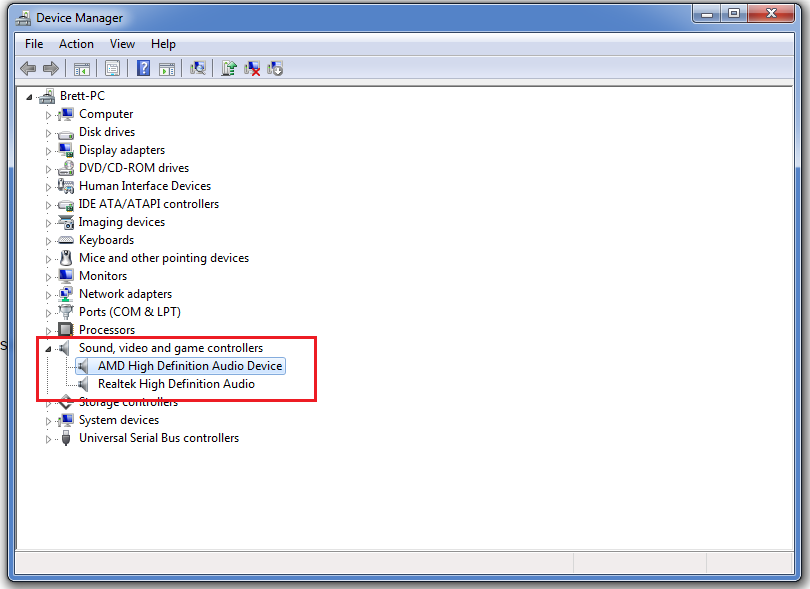

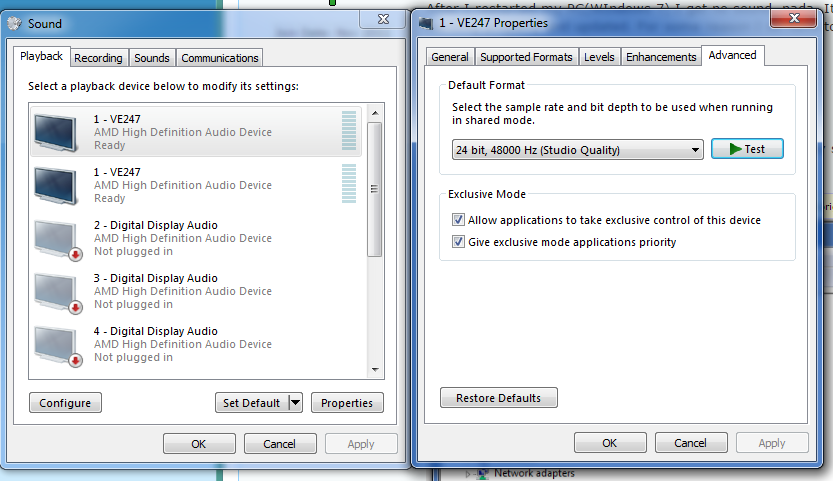
However, when I go here it plays a sound. If I click on 1 - VE247, the 1st one(I have no idea why their are two?), right-click, select properties. When I hit "test" I heard a sound. Thats it, I dont hear and movies that play on my PC. music, no sound on YouTube, etc. Only that test sound works.
After I restarted my PC(WIndows 7) I get no sound, nada. It seems like the drivers are installed, it says they are working properly and updated. For some reason I do have to types of sound drivers installed it looks like, I don't know what they are as I'm not tech savvy.
Any idea what I can do? I have an Asus monitor https://cdn.sevenforums.com/images/styles/window7/editor/attach.gifwith a tiny speaker built in so it's simply the HDMI cord from the monitor to my PC. Screenshots below.
However, when I go here it plays a sound. If I click on 1 - VE247, the 1st one(I have no idea why their are two?), right-click, select properties. When I hit "test" I heard a sound. Thats it, I dont hear and movies that play on my PC. music, no sound on YouTube, etc. Only that test sound works.
My Computer
At a glance
Windows 7 x64Intel Core i5-4440 3.1GHz Quad-CoreG.Skill Ripjaws X Series 8GB (2 x 4GB) DDR3-1600HIS Radeon R9 270 2GB IceQ X²
- Computer type
- PC/Desktop
- Computer Manufacturer/Model Number
- Custom build
- OS
- Windows 7 x64
- CPU
- Intel Core i5-4440 3.1GHz Quad-Core
- Motherboard
- ASRock Z97 PRO4 ATX LGA1150
- Memory
- G.Skill Ripjaws X Series 8GB (2 x 4GB) DDR3-1600
- Graphics Card(s)
- HIS Radeon R9 270 2GB IceQ X²
- Monitor(s) Displays
- Asus VE247H 23.6"
- Screen Resolution
- 1920x1080
- Hard Drives
- Crucial M500 240GB SSD, Western Digital Caviar Blue 1TB HDD & Western Digital My Book Essential 1TB External HDD
- PSU
- Rosewill 750W
- Case
- Corsair 200R ATX Mid Tower
- Cooling
- Cooler Master Hyper 212 EVO 82.9 CFM Sleeve Bearing
- Keyboard
- Logitech Wireless Illuminated Keyboard K800
- Mouse
- Logitech Anywhere Mouse MX
- Internet Speed
- Verizon FiOS 75/75 Mbps
- Antivirus
- MSE & Malwarebytes
- Browser
- Chrome 39.0.2171.95 m


