Sound not playing through headphone jack

jinzu

New member
Local time
12:31 AM
Messages
13
Hello,

I am running Windows 7 x64 on an Asus U56E machine. The audio works fine on my Linux partition through both the speakers and headphone jack. The headphone jack therefore works.
But I cannot get sound using working headphones while listening through the headphone jack in Windows 7.
How to fix this?
 

My Computer My Computer

Computer type
Laptop
Computer Manufacturer/Model Number
Asus U56E
OS
Windows 7 Ultimate x64
CPU
Intel Core i5 2410M CPU @ 2.30GHz
Motherboard
ASUSTeK Computer Inc. U56E
Memory
DDR3 6144 MBytes PC3-10700 (667 MHz)
Graphics Card(s)
Integrated Intel GMA HD
Sound Card
Realtek High Definition Audio
Monitor(s) Displays
15.6" 16:9
Screen Resolution
1366 x 768
Hard Drives
Seagate 640GB 5400rpm
Internet Speed
20 Mb Cable
Antivirus
Microsoft Security Essentialx
Browser
Google Chrome
Welcome to the Windows 7 Forum.

Researching that model (you failed to fully fill out the "My System Specs") you have RealTek audio.

Do you have the RealTek sound driver installed? Here is the link to the ASUS drivers ASUSTeK Computer Inc. -Support- Drivers and Download U56E

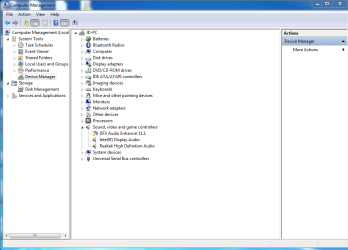
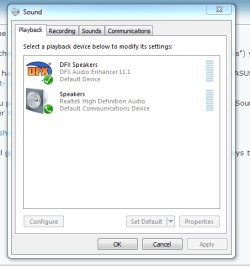
Can you post a screen shot of the Control Panel/Hardware and Sound, Sound Panel Playback and the Device Manager Sound sections.

http://www.sevenforums.com/tutorials/9733-screenshots-files-upload-post-seven-forums.html

This will give us something to start with. Since it works in Linux that says the hardware is OK.
 

My Computer My Computer

Computer type
PC/Desktop
Computer Manufacturer/Model Number
My Own Build
OS
Windows 10 64 bit
CPU
Intel i7 6700K
Motherboard
ASUS ROG Maximus VIII Hero
Memory
16GB Corsair Dominator
Graphics Card(s)
Intel CPU Graphics
Sound Card
RealTek
Monitor(s) Displays
27" Dell S2719dgf
Screen Resolution
2560X1440
Hard Drives
1 TB Samsung 850 EVO SSD for Win 10 Pro
500GB Samsung 850 EVO SSD for Win 10 Insider
2 TB drive for backup
PSU
EVGA Supernova 750G2
Case
BeQuiet Silent Base 600
Cooling
Deepcool Captain 120EX
Keyboard
Microsoft Wireless 2000
Mouse
Microsoft wireless
Internet Speed
100 MB/sec (Cable)
Antivirus
Microsoft Defender and Malwarebytes
Browser
Edge/Firefox
Other Info
Cakewalk (Sonar) by BandLab and Studio One 4.1 Pro recording studio software. MOTU 896Mk3 Hybrid recording interface, Frontier Tranzport wireless control unit, Behringer X-Touch Control Surface.
Five USB connected optical drives for CD Audio production using Nero BurningROM
Hello,

Yes, I have the latest sound driver from Asus website.

Here are the screenshots.
 

Attachments

  • control_panel.jpg
    control_panel.jpg
    69.3 KB · Views: 0
  • device_manager.png
    device_manager.png
    30.1 KB · Views: 0
  • sound_panel.png
    sound_panel.png
    12.7 KB · Views: 9

My Computer My Computer

Computer type
Laptop
Computer Manufacturer/Model Number
Asus U56E
OS
Windows 7 Ultimate x64
CPU
Intel Core i5 2410M CPU @ 2.30GHz
Motherboard
ASUSTeK Computer Inc. U56E
Memory
DDR3 6144 MBytes PC3-10700 (667 MHz)
Graphics Card(s)
Integrated Intel GMA HD
Sound Card
Realtek High Definition Audio
Monitor(s) Displays
15.6" 16:9
Screen Resolution
1366 x 768
Hard Drives
Seagate 640GB 5400rpm
Internet Speed
20 Mb Cable
Antivirus
Microsoft Security Essentialx
Browser
Google Chrome
I wonder4 if the DFX is causing the problem. Are there any setup options for this that could affect the headphone jack? If not, temporarily disable the DFX in the Device Manager, then restart the PC and the "Speakers" should be set as default playback device and then see if the headphone jack will work.
 

My Computer My Computer

Computer type
PC/Desktop
Computer Manufacturer/Model Number
My Own Build
OS
Windows 10 64 bit
CPU
Intel i7 6700K
Motherboard
ASUS ROG Maximus VIII Hero
Memory
16GB Corsair Dominator
Graphics Card(s)
Intel CPU Graphics
Sound Card
RealTek
Monitor(s) Displays
27" Dell S2719dgf
Screen Resolution
2560X1440
Hard Drives
1 TB Samsung 850 EVO SSD for Win 10 Pro
500GB Samsung 850 EVO SSD for Win 10 Insider
2 TB drive for backup
PSU
EVGA Supernova 750G2
Case
BeQuiet Silent Base 600
Cooling
Deepcool Captain 120EX
Keyboard
Microsoft Wireless 2000
Mouse
Microsoft wireless
Internet Speed
100 MB/sec (Cable)
Antivirus
Microsoft Defender and Malwarebytes
Browser
Edge/Firefox
Other Info
Cakewalk (Sonar) by BandLab and Studio One 4.1 Pro recording studio software. MOTU 896Mk3 Hybrid recording interface, Frontier Tranzport wireless control unit, Behringer X-Touch Control Surface.
Five USB connected optical drives for CD Audio production using Nero BurningROM
I have disabled the dfx enhancer in my device manager. Yet, the audio still is not played through the audio jack.
When playing music, the volume mixer shows sound playing. It can be heard through laptop speakers but not the headphones.
 

My Computer My Computer

Computer type
Laptop
Computer Manufacturer/Model Number
Asus U56E
OS
Windows 7 Ultimate x64
CPU
Intel Core i5 2410M CPU @ 2.30GHz
Motherboard
ASUSTeK Computer Inc. U56E
Memory
DDR3 6144 MBytes PC3-10700 (667 MHz)
Graphics Card(s)
Integrated Intel GMA HD
Sound Card
Realtek High Definition Audio
Monitor(s) Displays
15.6" 16:9
Screen Resolution
1366 x 768
Hard Drives
Seagate 640GB 5400rpm
Internet Speed
20 Mb Cable
Antivirus
Microsoft Security Essentialx
Browser
Google Chrome
Did you restart the PC after disabling? If not, give that a try.

Otherwise, try uninstalling the RealTek in the Device Manager (DO NOT uninstall the drivers) then restart the PC. If there were any Windows corruption in the RealTek this will fix it.

Did this ever work OK?
 

My Computer My Computer

Computer type
PC/Desktop
Computer Manufacturer/Model Number
My Own Build
OS
Windows 10 64 bit
CPU
Intel i7 6700K
Motherboard
ASUS ROG Maximus VIII Hero
Memory
16GB Corsair Dominator
Graphics Card(s)
Intel CPU Graphics
Sound Card
RealTek
Monitor(s) Displays
27" Dell S2719dgf
Screen Resolution
2560X1440
Hard Drives
1 TB Samsung 850 EVO SSD for Win 10 Pro
500GB Samsung 850 EVO SSD for Win 10 Insider
2 TB drive for backup
PSU
EVGA Supernova 750G2
Case
BeQuiet Silent Base 600
Cooling
Deepcool Captain 120EX
Keyboard
Microsoft Wireless 2000
Mouse
Microsoft wireless
Internet Speed
100 MB/sec (Cable)
Antivirus
Microsoft Defender and Malwarebytes
Browser
Edge/Firefox
Other Info
Cakewalk (Sonar) by BandLab and Studio One 4.1 Pro recording studio software. MOTU 896Mk3 Hybrid recording interface, Frontier Tranzport wireless control unit, Behringer X-Touch Control Surface.
Five USB connected optical drives for CD Audio production using Nero BurningROM
I disabled and restarted but it did not resolve the problem.
I uninstalled the Realtek, not drivers, and restarted but the problem persists.
The sound worked one month ago.
This problem has occurred before but I was able to fix it by uninstalling the Realtek and restarting my PC, but I cannot get it to work now.
 

My Computer My Computer

Computer type
Laptop
Computer Manufacturer/Model Number
Asus U56E
OS
Windows 7 Ultimate x64
CPU
Intel Core i5 2410M CPU @ 2.30GHz
Motherboard
ASUSTeK Computer Inc. U56E
Memory
DDR3 6144 MBytes PC3-10700 (667 MHz)
Graphics Card(s)
Integrated Intel GMA HD
Sound Card
Realtek High Definition Audio
Monitor(s) Displays
15.6" 16:9
Screen Resolution
1366 x 768
Hard Drives
Seagate 640GB 5400rpm
Internet Speed
20 Mb Cable
Antivirus
Microsoft Security Essentialx
Browser
Google Chrome
Disable the DFX then Uninstall the RealTek AND the drivers and then restart. Windows will install the generic HD Audio Codec sound drivers. See if this works.

If the headphone jack works OK with the generic HD Audio Codec drivers, try installing the RealTek drivers direct from RealTek and see if that works. Realtek
 

My Computer My Computer

Computer type
PC/Desktop
Computer Manufacturer/Model Number
My Own Build
OS
Windows 10 64 bit
CPU
Intel i7 6700K
Motherboard
ASUS ROG Maximus VIII Hero
Memory
16GB Corsair Dominator
Graphics Card(s)
Intel CPU Graphics
Sound Card
RealTek
Monitor(s) Displays
27" Dell S2719dgf
Screen Resolution
2560X1440
Hard Drives
1 TB Samsung 850 EVO SSD for Win 10 Pro
500GB Samsung 850 EVO SSD for Win 10 Insider
2 TB drive for backup
PSU
EVGA Supernova 750G2
Case
BeQuiet Silent Base 600
Cooling
Deepcool Captain 120EX
Keyboard
Microsoft Wireless 2000
Mouse
Microsoft wireless
Internet Speed
100 MB/sec (Cable)
Antivirus
Microsoft Defender and Malwarebytes
Browser
Edge/Firefox
Other Info
Cakewalk (Sonar) by BandLab and Studio One 4.1 Pro recording studio software. MOTU 896Mk3 Hybrid recording interface, Frontier Tranzport wireless control unit, Behringer X-Touch Control Surface.
Five USB connected optical drives for CD Audio production using Nero BurningROM
I disabled DFX, uninstalled Realtek and the drivers. The sound drivers were installed as High Definition Audio Device instead of Realtek. But the problem remains. I can hear the audio through speakers but not the audio jack.
 

My Computer My Computer

Computer type
Laptop
Computer Manufacturer/Model Number
Asus U56E
OS
Windows 7 Ultimate x64
CPU
Intel Core i5 2410M CPU @ 2.30GHz
Motherboard
ASUSTeK Computer Inc. U56E
Memory
DDR3 6144 MBytes PC3-10700 (667 MHz)
Graphics Card(s)
Integrated Intel GMA HD
Sound Card
Realtek High Definition Audio
Monitor(s) Displays
15.6" 16:9
Screen Resolution
1366 x 768
Hard Drives
Seagate 640GB 5400rpm
Internet Speed
20 Mb Cable
Antivirus
Microsoft Security Essentialx
Browser
Google Chrome
Ouch! If its still working OK in Linux, it has to be something in the OS. I don't have any info on any tweaks that can be made to correct this. I'm at a loss.
 

My Computer My Computer

Computer type
PC/Desktop
Computer Manufacturer/Model Number
My Own Build
OS
Windows 10 64 bit
CPU
Intel i7 6700K
Motherboard
ASUS ROG Maximus VIII Hero
Memory
16GB Corsair Dominator
Graphics Card(s)
Intel CPU Graphics
Sound Card
RealTek
Monitor(s) Displays
27" Dell S2719dgf
Screen Resolution
2560X1440
Hard Drives
1 TB Samsung 850 EVO SSD for Win 10 Pro
500GB Samsung 850 EVO SSD for Win 10 Insider
2 TB drive for backup
PSU
EVGA Supernova 750G2
Case
BeQuiet Silent Base 600
Cooling
Deepcool Captain 120EX
Keyboard
Microsoft Wireless 2000
Mouse
Microsoft wireless
Internet Speed
100 MB/sec (Cable)
Antivirus
Microsoft Defender and Malwarebytes
Browser
Edge/Firefox
Other Info
Cakewalk (Sonar) by BandLab and Studio One 4.1 Pro recording studio software. MOTU 896Mk3 Hybrid recording interface, Frontier Tranzport wireless control unit, Behringer X-Touch Control Surface.
Five USB connected optical drives for CD Audio production using Nero BurningROM
Yes, it is still working in Linux. I will have to probably reinstall Windows. Even system restore doesn't help it.

Off topic but is Windows 8/8/1.x better than Windows 7? I am using Windows 7 because Windows 8 looks like it is optimized for touch screen PC.

Thank you for looking at this post.
 

My Computer My Computer

Computer type
Laptop
Computer Manufacturer/Model Number
Asus U56E
OS
Windows 7 Ultimate x64
CPU
Intel Core i5 2410M CPU @ 2.30GHz
Motherboard
ASUSTeK Computer Inc. U56E
Memory
DDR3 6144 MBytes PC3-10700 (667 MHz)
Graphics Card(s)
Integrated Intel GMA HD
Sound Card
Realtek High Definition Audio
Monitor(s) Displays
15.6" 16:9
Screen Resolution
1366 x 768
Hard Drives
Seagate 640GB 5400rpm
Internet Speed
20 Mb Cable
Antivirus
Microsoft Security Essentialx
Browser
Google Chrome
I didn't want to suggest a "clean" reinstall (reformat and install).

Both sides to Win 8.1. Some hate it and others do not. I have it installed as a dual boot. I also have "Start8" which makes Win 8 work and look just like Windows 7. However, if I want I can use the "Metro" which is the Tiled screens.

I have a recording studio and all my recording hardware and software (Sonar X3) runs equally on both Win 7 and Win 8/8.1 (with the Start8).
 

My Computer My Computer

Computer type
PC/Desktop
Computer Manufacturer/Model Number
My Own Build
OS
Windows 10 64 bit
CPU
Intel i7 6700K
Motherboard
ASUS ROG Maximus VIII Hero
Memory
16GB Corsair Dominator
Graphics Card(s)
Intel CPU Graphics
Sound Card
RealTek
Monitor(s) Displays
27" Dell S2719dgf
Screen Resolution
2560X1440
Hard Drives
1 TB Samsung 850 EVO SSD for Win 10 Pro
500GB Samsung 850 EVO SSD for Win 10 Insider
2 TB drive for backup
PSU
EVGA Supernova 750G2
Case
BeQuiet Silent Base 600
Cooling
Deepcool Captain 120EX
Keyboard
Microsoft Wireless 2000
Mouse
Microsoft wireless
Internet Speed
100 MB/sec (Cable)
Antivirus
Microsoft Defender and Malwarebytes
Browser
Edge/Firefox
Other Info
Cakewalk (Sonar) by BandLab and Studio One 4.1 Pro recording studio software. MOTU 896Mk3 Hybrid recording interface, Frontier Tranzport wireless control unit, Behringer X-Touch Control Surface.
Five USB connected optical drives for CD Audio production using Nero BurningROM
Should I just back up my Windows partition and install again? Not a clean install but as in deleting Windows partition, not reformatting, and then only installing Windows over that free space? Or should I just back up files and programs, then install Windows only and add in my files again?
 

My Computer My Computer

Computer type
Laptop
Computer Manufacturer/Model Number
Asus U56E
OS
Windows 7 Ultimate x64
CPU
Intel Core i5 2410M CPU @ 2.30GHz
Motherboard
ASUSTeK Computer Inc. U56E
Memory
DDR3 6144 MBytes PC3-10700 (667 MHz)
Graphics Card(s)
Integrated Intel GMA HD
Sound Card
Realtek High Definition Audio
Monitor(s) Displays
15.6" 16:9
Screen Resolution
1366 x 768
Hard Drives
Seagate 640GB 5400rpm
Internet Speed
20 Mb Cable
Antivirus
Microsoft Security Essentialx
Browser
Google Chrome
In most cases a "clean" install should be done. Backup your user data first. Programs will have to be reinstalled.

I don't know how the partitioning works on a dual boot system with Linux. Windows 7, on a clean/new install to a hard drive installs two partitions, a "System Reserved" and the NTFS partition.
 

My Computer My Computer

Computer type
PC/Desktop
Computer Manufacturer/Model Number
My Own Build
OS
Windows 10 64 bit
CPU
Intel i7 6700K
Motherboard
ASUS ROG Maximus VIII Hero
Memory
16GB Corsair Dominator
Graphics Card(s)
Intel CPU Graphics
Sound Card
RealTek
Monitor(s) Displays
27" Dell S2719dgf
Screen Resolution
2560X1440
Hard Drives
1 TB Samsung 850 EVO SSD for Win 10 Pro
500GB Samsung 850 EVO SSD for Win 10 Insider
2 TB drive for backup
PSU
EVGA Supernova 750G2
Case
BeQuiet Silent Base 600
Cooling
Deepcool Captain 120EX
Keyboard
Microsoft Wireless 2000
Mouse
Microsoft wireless
Internet Speed
100 MB/sec (Cable)
Antivirus
Microsoft Defender and Malwarebytes
Browser
Edge/Firefox
Other Info
Cakewalk (Sonar) by BandLab and Studio One 4.1 Pro recording studio software. MOTU 896Mk3 Hybrid recording interface, Frontier Tranzport wireless control unit, Behringer X-Touch Control Surface.
Five USB connected optical drives for CD Audio production using Nero BurningROM
I will do this. Should this topic be marked as solved? The problem was not fixed but can be fixed through a clean install.
 

My Computer My Computer

Computer type
Laptop
Computer Manufacturer/Model Number
Asus U56E
OS
Windows 7 Ultimate x64
CPU
Intel Core i5 2410M CPU @ 2.30GHz
Motherboard
ASUSTeK Computer Inc. U56E
Memory
DDR3 6144 MBytes PC3-10700 (667 MHz)
Graphics Card(s)
Integrated Intel GMA HD
Sound Card
Realtek High Definition Audio
Monitor(s) Displays
15.6" 16:9
Screen Resolution
1366 x 768
Hard Drives
Seagate 640GB 5400rpm
Internet Speed
20 Mb Cable
Antivirus
Microsoft Security Essentialx
Browser
Google Chrome
That should fix it (hopefully) but don't mark it solved until you are sure.
 

My Computer My Computer

Computer type
PC/Desktop
Computer Manufacturer/Model Number
My Own Build
OS
Windows 10 64 bit
CPU
Intel i7 6700K
Motherboard
ASUS ROG Maximus VIII Hero
Memory
16GB Corsair Dominator
Graphics Card(s)
Intel CPU Graphics
Sound Card
RealTek
Monitor(s) Displays
27" Dell S2719dgf
Screen Resolution
2560X1440
Hard Drives
1 TB Samsung 850 EVO SSD for Win 10 Pro
500GB Samsung 850 EVO SSD for Win 10 Insider
2 TB drive for backup
PSU
EVGA Supernova 750G2
Case
BeQuiet Silent Base 600
Cooling
Deepcool Captain 120EX
Keyboard
Microsoft Wireless 2000
Mouse
Microsoft wireless
Internet Speed
100 MB/sec (Cable)
Antivirus
Microsoft Defender and Malwarebytes
Browser
Edge/Firefox
Other Info
Cakewalk (Sonar) by BandLab and Studio One 4.1 Pro recording studio software. MOTU 896Mk3 Hybrid recording interface, Frontier Tranzport wireless control unit, Behringer X-Touch Control Surface.
Five USB connected optical drives for CD Audio production using Nero BurningROM
Back
Top