Sound on music files but not on videos

SpringerSam

New member
Local time
1:54 PM
Messages
2
Hi everyone, complete novice at this but here goes!

I am having a problem where the sound on WMP is fine when listening to music tracks but there is no sound when watching videos. Strangely mpeg4 files do have sound.

All videos play ok but with no sound.

Sorry if this has been asked before but I did a quick search and wasn't able to find a definitive solution.

I have windows 7 home premium with 64 bit operating system and the laptop is a HP G62.

More than grateful for any assistance,
Thanks

Sam
 

My Computer My Computer

Computer Manufacturer/Model Number
HP
OS
Windows 7 Ultimate x64
CPU
[email protected]
Motherboard
[email protected]
Memory
[email protected]
Graphics Card(s)
[email protected]
What kind of videos are you NOT getting sound from? I mean, the file name extension (like .MOV or .AVI)? Where did you get them from?

Did these previously play with no problem on another machine? What was that OS... WinXP?
 

My Computer My Computer

At a glance

Windows 7 Pro x64 (1), Win7 Pro X64 (2)i5-3350p 3.1Ghz/6MB-cache (1); E8400 3.0Ghz/6...8GB PC3-12800 DDR3 (1); 4GB PC3-10600 DDR3 (2)ATI HD7750 (1), (see TV cards); ATI R7 250 (2)
Computer type
PC/Desktop
Computer Manufacturer/Model Number
Home-built, two systems (1) and (2)
OS
Windows 7 Pro x64 (1), Win7 Pro X64 (2)
CPU
i5-3350p 3.1Ghz/6MB-cache (1); E8400 3.0Ghz/6MB-cache (2)
Motherboard
ASUS P8Z77-V Pro (1); ASUS P5Q3 (2)
Memory
8GB PC3-12800 DDR3 (1); 4GB PC3-10600 DDR3 (2)
Graphics Card(s)
ATI HD7750 (1), (see TV cards); ATI R7 250 (2)
Sound Card
Realtek ALC892 HD Audio (1); Realtek ALC1200 HD Audio (2)
Monitor(s) Displays
Eizo HD2441W LCD, Eizo S2433W (1); Eizo 24" S2433W (2)
Screen Resolution
1920x1200, 1920x1200 (1); 1920x1200 (2)
Hard Drives
(1) 1TB SATA-II (7200RPM), 2x2TB SATA-III (7200RPM), 250GB SATA-III (10000RPM) for OS; 2x2TB external USB 3.0

(2) 320GB SATA-II (7200RPM), 750GB SATA-II (7200RPM), 150GB SATA-II (10000RPM) for OS; 2TB external USB 3.0
PSU
Nesteq ECS-6001 600W (1); Nesteq ECS-5001 500W (2)
Case
Acousti-Case 360 (1) and (2)
Cooling
Noctua NH-U12P SE2 for CPU, 2x120mm case fans (1) and (2)
Keyboard
IBM PS/2 (1) and (2)
Mouse
Logitech MX Revolution wireless (1); Microsoft wired (2)
Internet Speed
100mbps down / 10mbps up
Antivirus
Microsoft Security Essentials; Malwarebyte Anti-Malware Pro
Browser
Firefox
Other Info
Ceton InfiniTV 4-tuner cablecard-enabled TV card as well as Hauppauge HVR-2250 OTA/ATSC 2-tuner TV card in (1), running under Win7 WMC
Hi,
Thanks for the reply.
The videos are home movies taken from a JVC camcorder in mpeg format.
They played great on my vista laptop but I have had to replace it last week.
Avi, .wmv and mp4 videos play ok as well as the wmv sample videos on the machine.

According to the troubleshooter, the sound cards are ok and working as they should so sort of out of my depth:confused:

Is there anyway I can restore all the default settings on the WMP?
 

My Computer My Computer

Computer Manufacturer/Model Number
HP
OS
Windows 7 Ultimate x64
CPU
[email protected]
Motherboard
[email protected]
Memory
[email protected]
Graphics Card(s)
[email protected]
Well, if you're getting sound from lots of other videos and audio files, then it's clearly not a hardware problem. There's something unusual about the audio on your camcorder-produced MPEG files.

Win7 has an astonishing number of audio/video codecs built into it that play just about anything you can throw at it with Windows Media Player... right out of the box. Nevertheless, there's obviously something unusual about the audio track on the output from your camcorder that perhaps need a 3rd-party codec installed. Don't know without more information and details.

(1) If you had a small one and could post it somewhere so that it could be downloaded and examined, someone here could help.

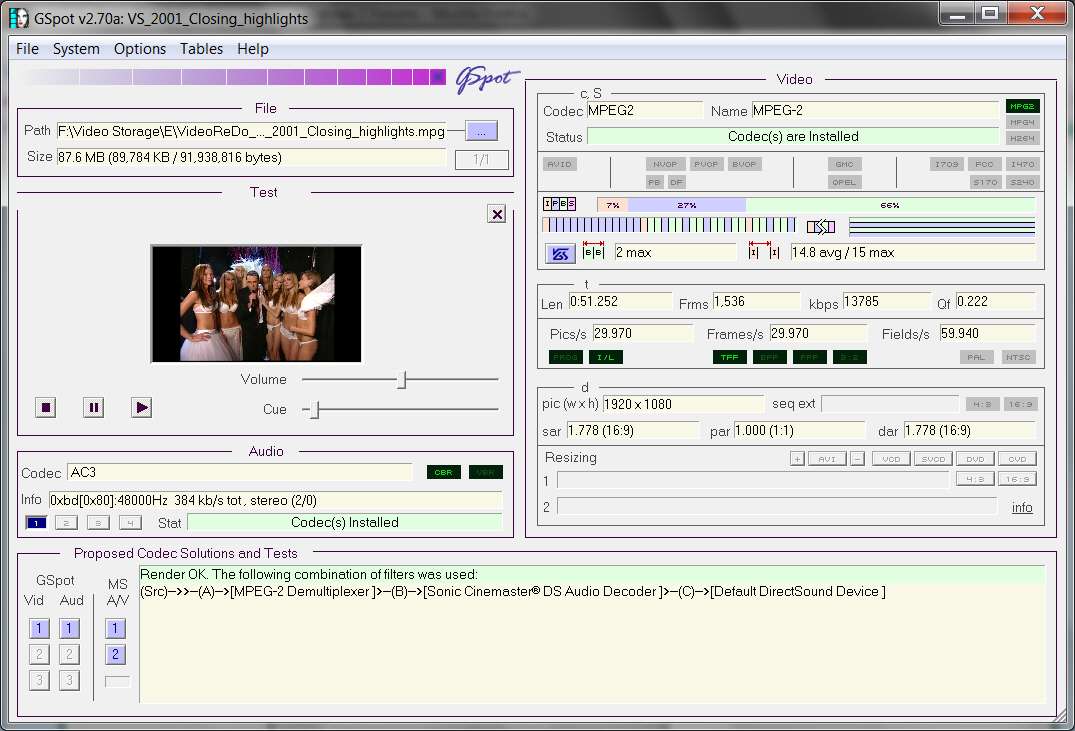
(2) Alternatively, you might download for yourself and install GSpot Codec Information Appliance. The "install" is really nothing more than unzipping this file into a directory somewhere and then running the EXE. Once opened, you'll get a dialog that looks like this (you can re-size the window or maximize it):

gspoth.jpg


On the upper-left quadrant of the you push the "..." button to navigate to your video (not every video format is supported, but AVI and MPG definitely are). The program will then analyze the video and show you the audio and video codecs involved, plus other details about the frame size, frame rate, bitrate, quality, aspect ratio, etc.

There's even a way you can manually "render" (i.e. play) both the audio and video portions right here in the program, with the 1/2/3 buttons down at the lower-left... which will also show if you have multiple possible "connections" that might work. There's also a PLAY window.

Very nice utility, that is very helpful in detailing the inside internals of video files.

Anyway, if you can run this program on one of your problem MPEG videos and then give us audio codec information shown, that would be very useful in trying to diagnose what your issue might be.
 

My Computer My Computer

At a glance

Windows 7 Pro x64 (1), Win7 Pro X64 (2)i5-3350p 3.1Ghz/6MB-cache (1); E8400 3.0Ghz/6...8GB PC3-12800 DDR3 (1); 4GB PC3-10600 DDR3 (2)ATI HD7750 (1), (see TV cards); ATI R7 250 (2)
Computer type
PC/Desktop
Computer Manufacturer/Model Number
Home-built, two systems (1) and (2)
OS
Windows 7 Pro x64 (1), Win7 Pro X64 (2)
CPU
i5-3350p 3.1Ghz/6MB-cache (1); E8400 3.0Ghz/6MB-cache (2)
Motherboard
ASUS P8Z77-V Pro (1); ASUS P5Q3 (2)
Memory
8GB PC3-12800 DDR3 (1); 4GB PC3-10600 DDR3 (2)
Graphics Card(s)
ATI HD7750 (1), (see TV cards); ATI R7 250 (2)
Sound Card
Realtek ALC892 HD Audio (1); Realtek ALC1200 HD Audio (2)
Monitor(s) Displays
Eizo HD2441W LCD, Eizo S2433W (1); Eizo 24" S2433W (2)
Screen Resolution
1920x1200, 1920x1200 (1); 1920x1200 (2)
Hard Drives
(1) 1TB SATA-II (7200RPM), 2x2TB SATA-III (7200RPM), 250GB SATA-III (10000RPM) for OS; 2x2TB external USB 3.0

(2) 320GB SATA-II (7200RPM), 750GB SATA-II (7200RPM), 150GB SATA-II (10000RPM) for OS; 2TB external USB 3.0
PSU
Nesteq ECS-6001 600W (1); Nesteq ECS-5001 500W (2)
Case
Acousti-Case 360 (1) and (2)
Cooling
Noctua NH-U12P SE2 for CPU, 2x120mm case fans (1) and (2)
Keyboard
IBM PS/2 (1) and (2)
Mouse
Logitech MX Revolution wireless (1); Microsoft wired (2)
Internet Speed
100mbps down / 10mbps up
Antivirus
Microsoft Security Essentials; Malwarebyte Anti-Malware Pro
Browser
Firefox
Other Info
Ceton InfiniTV 4-tuner cablecard-enabled TV card as well as Hauppauge HVR-2250 OTA/ATSC 2-tuner TV card in (1), running under Win7 WMC
Back
Top