Sound on my DVD

Majicmanmaj

New member
Local time
6:50 PM
Messages
13
I have made a DVD on my laptop using Windows Live Movie Maker and then burnt it to a DVD using first Windows DVD Maker and then Freemake. On both occasions the DVD was burnt successfully but wouldn't play on the laptop (Windows 7) or my PC (Windows XP). The DVD did play on my other laptop (Windows XP) but there wasn't any sound. I need to send (working) copies of the DVD to family and I'm getting really frustrated. Can anyone help please? :confused:
 

My Computer My Computer

OS
Windows 7 64 bit
Is there a possibility that codecs on your computer are corrupted or not installed correctly?
You can try to play your DVD with VLC media player. It has all major free codecs embedded.
And also if you could describe or show exactly what happens when it won't play the disc (errors windows etc.)
 

My Computer My Computer

Computer type
PC/Desktop
OS
Windows 8.1 ; Windows 7 x86 (Dec2008-Jan2013)
Other Info
"The scale icon at the top right of a post or tutorial is how you can give rep to the member."
Cheers for your reply

I don't know if there's anything that I have downloaded that would affect the playback or not. When I put the DVD in my laptop or PC it asks me if I want to burn a disc:

swpbup.jpg


It says it is a CD even though it is a DVD.

Tried it in VLC media but it says this:

2rqytjn.jpg
 

My Computer My Computer

OS
Windows 7 64 bit
Is there a possibility that this laptop can read/write CDs, but DVDs are read only (like in older version of a drive)?

Please download utility CPUID - System & hardware benchmark, monitoring, reporting
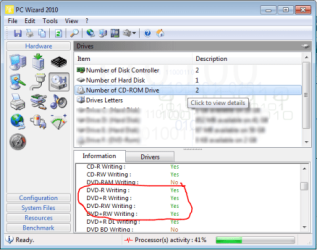
In this application to Hardware tab - Drives - select Number of CD drives and in the tab below check whether drive itself supports DVD writing.

dvd-part should look like this
Code:
DVD-R Writing :    Yes 
DVD+R Writing :    Yes 
DVD-RW Writing :    Yes 
DVD+RW Writing :    Yes 
DVD+R DL Writing :    Yes
 

Attachments

  • PC_WIZARD.png
    PC_WIZARD.png
    37.8 KB · Views: 3

My Computer My Computer

Computer type
PC/Desktop
OS
Windows 8.1 ; Windows 7 x86 (Dec2008-Jan2013)
Other Info
"The scale icon at the top right of a post or tutorial is how you can give rep to the member."
Here's what it came up with:

Information CD-Rom #1 :
Drive : D:\
Model : HL-DT-STDVDRAM GT30N
Serial Number : KZ9A62B2425
Revision (Firmware) : 1.01
Serial ATA : Yes
Serial ATA Version : 1.0 - (SATA-150)
Support : ATA/ATAPI-7
Multiword DMA Mode : 2
PIO Mode : PIO 4
UDMA Mode max. : 5 (ATA-100)
UDMA Mode Enabled : 2 (ATA-33)
Transport : 07
Buffer Size : 1024KB
Rotation : CLV

CD-R Read : Yes
CD-RW Reading : Yes
DVD-Rom Reading : Yes
DVD-RAM Reading : Yes
DVD-R Reading : Yes
DVD-RW Reading : Yes
DVD Dual-RW Reading : No
DVD Dual-R Reading : Yes
DVD+R Reading : Yes
DVD+RW Reading : Yes
DVD+R DL Reading : Yes
DVD BD Reading : No
DVD BD-RE Reading 1.0 : No
DVD BD-RE Reading 2.0 : No
DVD BD-R Reading : No
DVD BD-Rom Reading : No
DVD HD Reading : No

CD-R Writing : Yes
CD-RW Writing : Yes
DVD-RAM Writing : Yes
DVD-R Writing : Yes
DVD+R Writing : Yes
DVD-RW Writing : Yes
DVD+RW Writing : Yes
DVD+R DL Writing : Yes
DVD BD Writing : No
DVD BD-RE Writing 1.0 : No
DVD BD-RE Writing 2.0 : No
DVD BD-R Wrting : No
DVD HD Writing : No
DVD HD-RW Writing : No

SMART : No
DVD CSS : Yes
DVD CPRM : Yes
AACS : No
VCPS : No
Mount Rainier (MRW) : No
Buffer Underrun : Yes
JustLink : No
LabelFlash : No
LightScribe : No
LightScribe Drive Speed : No
SolidBurn : No

Method 2 : Yes
CD-Audio Support : Yes
MultiSession or Photo-CD : Yes
Side Change Capable : No

Reading CD-Rom : 24x (4234KB/s)
Reading DVD-Rom : 8x

Writing CD-R : 62x (11080KB/s)
Writing CD-RW : 38x
Writing DVD-R : 12x
Writing DVD-RW : 6x
Writing DVD+R : 12x
Writing DVD+RW : 6x
Writing DVD+R DL : 4x

Region Code : Installed
Region : 1
User Changes : 4
Vendor Changes : 4
RPC Phase II : Yes

CD-Rom Information :
Manufacturer : HL-DT-ST
Model : DVDRAM GT30N
Revision : 1.01
Buffer Size : 1024KB
Rotation : CLV

CD-R Read : Yes
CD-RW Reading : Yes
DVD-Rom Reading : Yes
DVD-RAM Reading : Yes
DVD-R Reading : Yes
DVD-RW Reading : Yes
DVD Dual-RW Reading : No
DVD Dual-R Reading : Yes
DVD+R Reading : Yes
DVD+RW Reading : Yes
DVD+R DL Reading : Yes
DVD BD Reading : No
DVD BD-RE Reading 1.0 : No
DVD BD-RE Reading 2.0 : No
DVD BD-R Reading : No
DVD BD-Rom Reading : No
DVD HD Reading : No

CD-R Writing : Yes
CD-RW Writing : Yes
DVD-RAM Writing : Yes
DVD-R Writing : Yes
DVD+R Writing : Yes
DVD-RW Writing : Yes
DVD+RW Writing : Yes
DVD+R DL Writing : Yes
DVD BD Writing : No
DVD BD-RE Writing 1.0 : No
DVD BD-RE Writing 2.0 : No
DVD BD-R Wrting : No
DVD HD Writing : No
DVD HD-RW Writing : No

SMART : No
DVD CSS : Yes
DVD CPRM : Yes
AACS : No
VCPS : No
Mount Rainier (MRW) : No
Buffer Underrun : Yes
JustLink : No
LabelFlash : No
LightScribe : No
LightScribe Drive Speed : No
SolidBurn : No

Method 2 : Yes
CD-Audio Support : Yes
MultiSession or Photo-CD : Yes
Side Change Capable : No

Reading CD-Rom : 24x (4234KB/s)
Reading DVD-Rom : 8x

Writing CD-R : 62x (11080KB/s)
Writing CD-RW : 38x
Writing DVD-R : 12x
Writing DVD-RW : 6x
Writing DVD+R : 12x
Writing DVD+RW : 6x
Writing DVD+R DL : 4x

Region Code : Installed
Region : 1
User Changes : 4
Vendor Changes : 4
RPC Phase II : Yes
 

My Computer My Computer

OS
Windows 7 64 bit
Well, you clearly have DVD drive which can write dvds.
Now, the other possible issue are blank discs. Are you absolutely sure that those are DVDs?
If system detects that this is a CD, that gotta be a cd.
Sometimes there could be defective discs/switch-ups. Simply look at the opposite mirror side of the disc (opposite of the picture/text).

If it is blueish/greenish that is definitely a CD, if it is reddish, purplish - that would be DVD.
 

My Computer My Computer

Computer type
PC/Desktop
OS
Windows 8.1 ; Windows 7 x86 (Dec2008-Jan2013)
Other Info
"The scale icon at the top right of a post or tutorial is how you can give rep to the member."
Definitely DVDs. The film has burnt and will play as a DVD on one of my laptops minus the sound. The problem lies with the laptop that created the DVD and my PC. The frustrating thing is that the laptop is less than 12 months old.
 

My Computer My Computer

OS
Windows 7 64 bit
Well, there might be something wrong with the process of burning.
You burning this film as avi, mpeg or vob?
You burning it as data or as playable by stand alone dvd player?
Software versions?
 

My Computer My Computer

Computer type
PC/Desktop
OS
Windows 8.1 ; Windows 7 x86 (Dec2008-Jan2013)
Other Info
"The scale icon at the top right of a post or tutorial is how you can give rep to the member."
Burning using WMV files converted from Quick Time Movie files. Burning to be played as a normal DVD.
 

My Computer My Computer

OS
Windows 7 64 bit
ok. Here is a confusion: you are burning data files on the DVD disc, but in VLC you are trying to open it as DVD-Video.
I have got the same error, as you posted.

So, instead in VLC go to Media menu - Open file and then open you files on that disc.
 

My Computer My Computer

Computer type
PC/Desktop
OS
Windows 8.1 ; Windows 7 x86 (Dec2008-Jan2013)
Other Info
"The scale icon at the top right of a post or tutorial is how you can give rep to the member."
Back
Top