Solved Sound/Playback

metaguy

Always Appreciative
Member
VIP
Local time
1:15 PM
Messages
140
Location
California
Can 2 speaker systems both be set as default? Reasoning - 1 set is on desktop and 2nd set in another room. Presently I have to switch 'default' when going from one room to another. Maybe in registry? Thanks.
 

My Computer

Computer type
Laptop
Computer Manufacturer/Model Number
Dell E6420 Laptop 64 bit
OS
Win 7 Ultimate
CPU
Intel i5-2520M CPU 2.50 Ghz
Memory
8 GB
Graphics Card(s)
Intel(R) HD Graphics 3000
Sound Card
Intel(R) Display Audio
Monitor(s) Displays
Samsung 32" and Dell 23"
Screen Resolution
1920 x 1080 and 1366 x 768
Hard Drives
Hitachi HTS545032B9A300
Fantom G-Force 2GB
Antivirus
Bitdefender
Browser
Firefox, primary
It looks like the issue you're having is that you have two sound cards that are driving two separate speaker systems and that's why you have to chose from one device over the other. Is that correct?

I have three possible solutions with a tip:

A: Watch and hear this Russian tell you how to mix two audio cards to one output. YouTube

B: This USB audio card may work if your speakers are powered. Audio Adapter Converter USB External Stereo Sound Card For 3.5mm Headset Laptop | eBay

C: This is another USB audio card from a company I know and trust. You'd use the headphone jack for one set of speakers and the front 2.1 audio output jack for the other set of speakers. Keep in mind you'll also need powered speakers. Robot Check <--- Click on the robot check link. It goes to Amazon.

I can't really vouch about the USB sound card method and not sure if that will work, but it just may if you can't do this software wise from the YouTube video.

Tip: If you manage to get those to work from a software stand point as shown in the video, you may have some delay in audio. This could be due to an under-powered computer, drivers, etc, etc. One way to find out if a program or driver is responsible is to run LatencyMon and find out. Resplendence Software - LatencyMon: suitability checker for real-time audio and other tasks
 

My Computer

Computer type
PC/Desktop
OS
Windows 7 Ultimate x64
I just recently bought ten USB sound cards for a project I want to do involving ten Windows XP VMware instances. When I tried one of the USB audio cards I was surprised that it was plug & play and I had audio input from the get go. Though, the USB sound cards are not the two I listed above. But these USB sound cards are truly plug & play. In the audio device properties you should see a name saying something like USB sound card.

The USB sound card idea is in case the software method doesn't work for you in the video.

If you're into multi-room audio, check out a few Amazon Echo Dot's. They use WiFi and you can add an Amazon Music, Pandora, Spotify or iHeartradio App to your Amazon account in the Alexa App and play music in all rooms. Just some food for thought. That's really the cheap route. The more expensive route are SONOS smart speakers. But do note that the Echo Dots do have an external audio jack for speakers.

Full disclosure: I used to have Amazon Music, but from time to time sound tracks would disappear from my playlists. And I'm not the only one who had that issue. So being fed up with that nonsense I went for Spotify. Between Amazon Music, Spotify and Pandora, they all have their ups and downs. It seems you can't tell the Amazon Echo Dot by voice command to add such and such song if it isn't Amazon Music. Maybe that will change in the future. But using the Spotify App on a phone, tablet or computer, you can play music that way and control what devices play audio that are tied to your Spotify account. Be it on the computer or the Echo Dots at the same time.

Also, if you have the Spotify family plan, you can't add individual family members plan's to their Amazon Echo Dot. Each individual will have to have their own Amazon account tied to the Family plan so they have their own Spotify playlists. It's been at least three or four years now and many people have been asking about making it a feature to host all Spotify individuals in the family plan per one Amazon account and nothing has changed since then. It's really stupid because a minor can't have their own Amazon account. But there you go in case you or someone else reading this wanted to know.

 

My Computer

Computer type
PC/Desktop
OS
Windows 7 Ultimate x64
Good stuff, however I only have one sound card in my laptop ( Intel Display Audio), and I have to switch between the 2 speaker systems, where as I'd like them Both to be active. (see attachment)
 

Attachments

  • Sound - speakers.jpg
    Sound - speakers.jpg
    19 KB · Views: 11

My Computer

Computer type
Laptop
Computer Manufacturer/Model Number
Dell E6420 Laptop 64 bit
OS
Win 7 Ultimate
CPU
Intel i5-2520M CPU 2.50 Ghz
Memory
8 GB
Graphics Card(s)
Intel(R) HD Graphics 3000
Sound Card
Intel(R) Display Audio
Monitor(s) Displays
Samsung 32" and Dell 23"
Screen Resolution
1920 x 1080 and 1366 x 768
Hard Drives
Hitachi HTS545032B9A300
Fantom G-Force 2GB
Antivirus
Bitdefender
Browser
Firefox, primary
If you're having to swith between one sound device and another, then that tells me you have two audio sources. Are you plugging in the other speakers all the time or just changing audio sources? If you're changing audio sources, that video should help you.
 

My Computer

Computer type
PC/Desktop
OS
Windows 7 Ultimate x64
I have one source, my pc playing live stream or recordings, and 2 sets of speakers, each via separate USB jacks. I'm getting the feeling I'll just have to switch back and forth.
 

My Computer

Computer type
Laptop
Computer Manufacturer/Model Number
Dell E6420 Laptop 64 bit
OS
Win 7 Ultimate
CPU
Intel i5-2520M CPU 2.50 Ghz
Memory
8 GB
Graphics Card(s)
Intel(R) HD Graphics 3000
Sound Card
Intel(R) Display Audio
Monitor(s) Displays
Samsung 32" and Dell 23"
Screen Resolution
1920 x 1080 and 1366 x 768
Hard Drives
Hitachi HTS545032B9A300
Fantom G-Force 2GB
Antivirus
Bitdefender
Browser
Firefox, primary
The two USB devices are indeed two sound cards. Please watch the video I gave you. It'll will show you how to mix both USB audio sources to one output.
 

My Computer

Computer type
PC/Desktop
OS
Windows 7 Ultimate x64
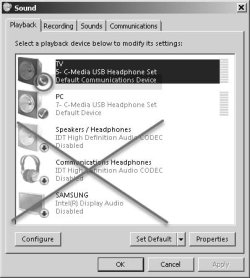
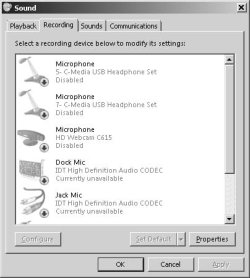
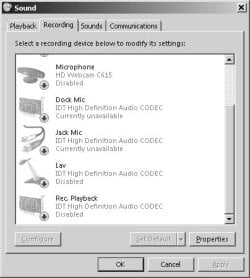
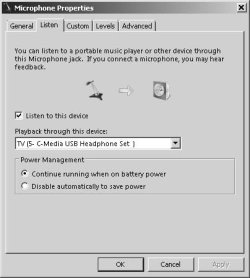
My apology for not watching the instructions b4. However, I still only get 1 set working. Capture #1 is playback as set. 'TV' is "Default Communication Device" while 'PC' is "Default Device." Switching to Recording tab... #2a Capture is most of Recording tab. #2b includes bottom 2 devices. I do not have "Stereo Mix" which he uses. I chose Mic 5-C - #3 with TV as playback device. Still only 1 set speakers playback. I reset with PC as playback device = no go. Then I reversed the processes using 7-C plus and alternated playback devices, still no go. Note: the HD Webcam microphone does work. Suggestion? You've been great to stay with this. Thanks.#1 playback.jpg

2a.jpg

2b.jpg

#3.jpg
 

My Computer

Computer type
Laptop
Computer Manufacturer/Model Number
Dell E6420 Laptop 64 bit
OS
Win 7 Ultimate
CPU
Intel i5-2520M CPU 2.50 Ghz
Memory
8 GB
Graphics Card(s)
Intel(R) HD Graphics 3000
Sound Card
Intel(R) Display Audio
Monitor(s) Displays
Samsung 32" and Dell 23"
Screen Resolution
1920 x 1080 and 1366 x 768
Hard Drives
Hitachi HTS545032B9A300
Fantom G-Force 2GB
Antivirus
Bitdefender
Browser
Firefox, primary
Reading here it appears you either need to update you audio drivers or downgrade them., How to Enable “Stereo Mix” in Windows and Record Audio from Your PC

If you had a "what you hear" option in the recording options you could "listen to a device" that way as well.

Also, if you right click both recording inputs you use and chose properties and the "listen to this device" option. Chose your default play back speakers for each recording input for the "listen to option."
 

My Computer

Computer type
PC/Desktop
OS
Windows 7 Ultimate x64
F22 Simpilot - You've done a lot, but I've reach a high level of frustration. I'd already done the "listen to device" (see earlier post).


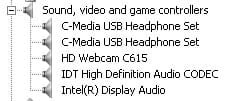
The How To Geek article didn't help as Mixer did not show. I went to Dell to see about an earlier audio chipset drivers and there was an Urgent firmware update from 2019. I installed it, but no difference - still no mixer. I downloaded RealTek as I thought it would maybe install the Mixer, but RealTek doesn't even show in Device Mgr. I now assume it has to be RealTek hardware too. Attached is Device Mgr - Sound. All show working ok. I'm willing to live with switching manually.


I have an o/s not holding window position and size issue. Can I piggy back here or open a new ticket?[FONT=&quot][/FONT]
 

Attachments

  • Device Mgr - Sound.jpg
    Device Mgr - Sound.jpg
    6.5 KB · Views: 7

My Computer

Computer type
Laptop
Computer Manufacturer/Model Number
Dell E6420 Laptop 64 bit
OS
Win 7 Ultimate
CPU
Intel i5-2520M CPU 2.50 Ghz
Memory
8 GB
Graphics Card(s)
Intel(R) HD Graphics 3000
Sound Card
Intel(R) Display Audio
Monitor(s) Displays
Samsung 32" and Dell 23"
Screen Resolution
1920 x 1080 and 1366 x 768
Hard Drives
Hitachi HTS545032B9A300
Fantom G-Force 2GB
Antivirus
Bitdefender
Browser
Firefox, primary
Then have a look at the two USB sound cards I gave a link to above which might give you dual speakers ability.

Yes, for the other issue open another thread in the appropriate category.
 

My Computer

Computer type
PC/Desktop
OS
Windows 7 Ultimate x64
Would I be correct in uninstalling RealTek. Will look at USB Sound cards. I came across this: Windows 7 missing Stereo MixIt's long so I've attached the important highlights. Will let you know what success if any I have. Thanks so much. gw
 

Attachments

My Computer

Computer type
Laptop
Computer Manufacturer/Model Number
Dell E6420 Laptop 64 bit
OS
Win 7 Ultimate
CPU
Intel i5-2520M CPU 2.50 Ghz
Memory
8 GB
Graphics Card(s)
Intel(R) HD Graphics 3000
Sound Card
Intel(R) Display Audio
Monitor(s) Displays
Samsung 32" and Dell 23"
Screen Resolution
1920 x 1080 and 1366 x 768
Hard Drives
Hitachi HTS545032B9A300
Fantom G-Force 2GB
Antivirus
Bitdefender
Browser
Firefox, primary

My Computer

Computer type
Laptop
Computer Manufacturer/Model Number
Dell E6420 Laptop 64 bit
OS
Win 7 Ultimate
CPU
Intel i5-2520M CPU 2.50 Ghz
Memory
8 GB
Graphics Card(s)
Intel(R) HD Graphics 3000
Sound Card
Intel(R) Display Audio
Monitor(s) Displays
Samsung 32" and Dell 23"
Screen Resolution
1920 x 1080 and 1366 x 768
Hard Drives
Hitachi HTS545032B9A300
Fantom G-Force 2GB
Antivirus
Bitdefender
Browser
Firefox, primary
Read the Doc. It appears to really be driver related more than anything. Either the driver supports stereo mix or it doesn't. To find out, either update the driver (not the firmware) or downgrade the driver and see if the stereo mix option appears.

I don't think this is some kind of DRM/recording industry conspiracy or anything about stereo mix. I have a Creative Sound Blaster Z which is a pretty decent card, but no stereo mix. But it does have a "what you hear" option and I can record music from what's playing on my PC very easily. So if the RIAA wanted to get rid of that ability they'd force sound card manufacturers to get rid of the "what you hear" option as well as the stereo mix option and I don't see that ever happening.

Read my post again about using the "listen to device" option. You might be able to achieve this without the stereo mix.
 

My Computer

Computer type
PC/Desktop
OS
Windows 7 Ultimate x64

My Computer

Computer type
PC/Desktop
OS
Windows 7 Ultimate x64

My Computer

Computer type
Laptop
Computer Manufacturer/Model Number
Dell E6420 Laptop 64 bit
OS
Win 7 Ultimate
CPU
Intel i5-2520M CPU 2.50 Ghz
Memory
8 GB
Graphics Card(s)
Intel(R) HD Graphics 3000
Sound Card
Intel(R) Display Audio
Monitor(s) Displays
Samsung 32" and Dell 23"
Screen Resolution
1920 x 1080 and 1366 x 768
Hard Drives
Hitachi HTS545032B9A300
Fantom G-Force 2GB
Antivirus
Bitdefender
Browser
Firefox, primary
Promised to get back to you. Tried lot of different things but no go, so happily I'll just switch back and forth for the two speaker systems. Tech from Dell provided a link I want to share with you. It has everything Dell put out - great reference. [FONT=&quot]Dell Product support. Thanks for everything. Closing this ticket.[/FONT]
 

My Computer

Computer type
Laptop
Computer Manufacturer/Model Number
Dell E6420 Laptop 64 bit
OS
Win 7 Ultimate
CPU
Intel i5-2520M CPU 2.50 Ghz
Memory
8 GB
Graphics Card(s)
Intel(R) HD Graphics 3000
Sound Card
Intel(R) Display Audio
Monitor(s) Displays
Samsung 32" and Dell 23"
Screen Resolution
1920 x 1080 and 1366 x 768
Hard Drives
Hitachi HTS545032B9A300
Fantom G-Force 2GB
Antivirus
Bitdefender
Browser
Firefox, primary
Back
Top