
Sound Recorder

huffman

New member
Pro User
Local time
5:36 PM
Messages
715
The Sound Recorder that comes with Windows 7 really sucks. It only records and as far as I can see it will not allow editing. It also will NOT save as wav files.

I learned this trick a long time ago. From Windows XP I copied the sound recorder file and pasted it to Win 7. This works fine except I have a memory issue because I have to much memory.

When I go to edit a wav file, such as:

soundrecorder0.jpg

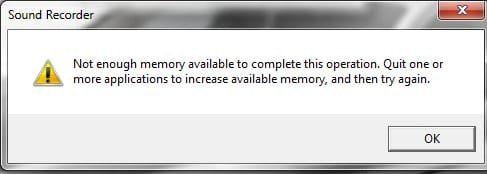
When I select an option such as "Delete before current position" I get the following message:
soundrecorder.jpg

According to Microsoft this will happen with any pc with more than 2 gb of memory.

Does anyone know of a fix for this other than removing memory?

Thanks
 

My Computer

OS
Windows 7 Pro
CPU
Intel(R) Pentium(R) Duel CPU E2200 2.20 Ghz
Motherboard
GA-G41M-ES2L
Memory
4 gb 2.96 Usable
Graphics Card(s)
Onboard
Sound Card
Onboard
Hard Drives
2 - 1TB WD Sata Drives
.....to force Sound Recorder to save as WAV, the user must start Sound Recorder with the command line "soundrecorder /file outputfile.wav"

from the wiki.

EDIT: type it without the quotation marks, it will ask for a place to save the file when u have finished recording. Oh and this is for the win7 sound recorder.
 

My Computer

Computer Manufacturer/Model Number
HP dv6519tx
OS
Windows 7 Ultimate x64
CPU
1.80 GHz Intel Core 2 Duo processor T7100
Memory
3 gig ddr2
Graphics Card(s)
NVIDIA GeForce 8400M GS
Sound Card
Realtek High Definition Audio
Monitor(s) Displays
15.4” WXGA High Definition BrightView Widescreen
Screen Resolution
1280 x 800
Hard Drives
Hitachi 320 GB (5400 rpm)
PSU
90 W AC Power Adapter
Cooling
Kitchen plate under the lappy
Keyboard
101 key compatible
Mouse
Touch Pad with On/Off button and dedicated vertical Scroll
Internet Speed
Three Wireless internet prepaid using E160G USB dongle
Thanks for the replies :D.

A very good program is Audacity

I agree that Audacity is a good program, but I don't believe it will save or convert into the (wav) formats that the XP Sound Record is capable of. I will give it another shot and see.

force Sound Recorder to save as WAV

good to know, but still it will not edit.

I still want to know if there is a way around or a fix for the 2gb rule for the XP Sound Recorder.
 

My Computer

OS
Windows 7 Pro
CPU
Intel(R) Pentium(R) Duel CPU E2200 2.20 Ghz
Motherboard
GA-G41M-ES2L
Memory
4 gb 2.96 Usable
Graphics Card(s)
Onboard
Sound Card
Onboard
Hard Drives
2 - 1TB WD Sata Drives
I have been trying to save a sound recorded file in wav format for sometime now. I tried the command prompt with no luck. A friend even sent me the sound files in wav but still could not use it, as it showed up as wav.wpl whatever that is. I just need to convert the file to wav format as I need to upload it on a website that supports wav format only for audio playback. Please help :cry:
 

My Computer

Computer Manufacturer/Model Number
hewlet packard
OS
Windows 7 home premium 64 bit
Memory
5.5
I forgot to add I am using windows 7 home premium 64 bit if this helps:o
 

My Computer

Computer Manufacturer/Model Number
hewlet packard
OS
Windows 7 home premium 64 bit
Memory
5.5

My Computer

OS
Windows 7 Pro
CPU
Intel(R) Pentium(R) Duel CPU E2200 2.20 Ghz
Motherboard
GA-G41M-ES2L
Memory
4 gb 2.96 Usable
Graphics Card(s)
Onboard
Sound Card
Onboard
Hard Drives
2 - 1TB WD Sata Drives
I'll try the dvd/videosoft audio , but I also tried to download Audacity with no luck, it took me to something different, never could find the page it showed.
 

My Computer

Computer Manufacturer/Model Number
hewlet packard
OS
Windows 7 home premium 64 bit
Memory
5.5
I know this is an old thread, but I had the memory problem on my Windows XP machine too but it seemed to work ok when I was using up a bunch of memory with other programs.
 

My Computer

Computer type
PC/Desktop
OS
Windows 7 x64
Back
Top