Sound repeatedly crashing, newest drivers reinstallation not helping.

Phoenix JM

New member
Local time
1:49 PM
Messages
3
Hi guys, Im getting quite frustrated here.

Im getting the well known "No speakers or headphoens are plugged in" error. In system properties it simply shows that completely no audio devices are plugged in. DXDiag did not see any soundcard or drivers either. Windows can not find any drivers by itself because it says that they are up to date, troubleshooter cannot identify the problem. This should be easily solved by manual reinstallation of drivers.

Reinstallation does help, but only temporarily, usually after restarting the computer or just waking it up from the sleep mode, i get this error again, sometimes even while working on the laptop, so I ended up reinstalling drivers and restarting the laptop 6times a day. Everytime there is a new version of Realtek drivers, the reinstallation of the old ones tends to stop working.

The worst thing is though, that its random, sometimes i go maybe few days without this error, sometimes it bothers me all the time.

Thank you in advance, for any help.

Asus X551CA
 
Last edited:

My Computer My Computer

At a glance

Win7 Professional 64bit
Computer type
Laptop
Computer Manufacturer/Model Number
Asus X551CA
OS
Win7 Professional 64bit
Hello and welcome JM I cannot find the drivers on the Asus siteas such - the Windows feature is not something I use a lot as is flimsy for want of a better term.

See this


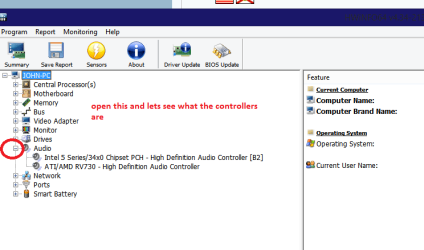
Using HW Info general components

DownloadHW Info and pick the right bit version - HWiNFO, HWiNFO32/64 - Download - (copy andpaste this site into the search bar) If you do not need the running informationin the smaller right hand panel close it. In the left hand window click on the+ for the individual device groupings and they will open out to the variouscomponents.

Goon opening out further until you get to the device itself. click on it and itwill highlight. In the right hand window there will be a very detaileddescription of that device as in brand, speeds model number etc etc These arevery detailed and are just what is needed for searching for drivers etc.

Seemy pic for an example - in this I have opened out one my components (audio) and then highlighted one of the one you need andyou can see the detail.

but first run these

http://www.sevenforums.com/tutorials/1538-sfc-scannow-command-system-file-checker.html

http://www.sevenforums.com/tutorials/433-disk-check.html < use the /f option in Option 2 ifnecessary
 

Attachments

  • HW AUDIO.PNG
    HW AUDIO.PNG
    16.3 KB · Views: 2

My Computer My Computer

At a glance

Desk1 7 Home Prem / Desk2 10 Pro / Main lap A...Desk1 i5 3750K / Laptop i7 GTX 860M / Desk2 i...Desk1 8GB (1866) / Desk2 16GB (1333) / Laptop...Desk 1& 2NVidia GTX 650 & Laptops on board Intel
Computer type
PC/Desktop
Computer Manufacturer/Model Number
Own build (new) Desk1 / Asus ROG Win 7 / Desk2 1st build
OS
Desk1 7 Home Prem / Desk2 10 Pro / Main lap Asus ROG 10 Pro 2 laptop Toshiba 7 Pro Asus P2520 7 & 10
CPU
Desk1 i5 3750K / Laptop i7 GTX 860M / Desk2 i5 2500
Motherboard
Desk1 Asus P877-V / Desk2 Gigabyte H67 UD3H / Laptop ?
Memory
Desk1 8GB (1866) / Desk2 16GB (1333) / Laptop 8Gb DDR3
Graphics Card(s)
Desk 1& 2NVidia GTX 650 & Laptops on board Intel
Sound Card
Desk 1 & 2 -XONAR DG Realtek High Def audio Laptop
Monitor(s) Displays
Desk 1 Benq HD 2450 / Desk2 Philips 24" / Laptop 17.5"
Screen Resolution
1920x1080 D1 & D2 & Laptop 1
Hard Drives
Desk1 Samsung 120GB 830 SSD
Asus ROG 256GB 850 Pro SSD
Desk2 Samsung 840 256 SSD
Toshiba 120GB EVO
PSU
Desk 1 Corsair HX 1050/ Laptop ? / Desk 2 Corsair HX 650
Case
Desk 1 Cooler HAF XM ? Toshiba laptop / Desk2 Coolermaster
Cooling
Fans on all Desk1 -2 Desk2 - all Coolermasters 5 Laptop ?
Keyboard
Desk 1 MS Sidewinder X6 Desk 2 MS Sidewinder X 4
Mouse
Desk 1&2 - Gigabyte MS 900 gamer - laptop - Logitec wireless
Internet Speed
ADSL2+
Other Info
One other Desktop (tester) and spare Toshba laptop both with SSD's
Running Kaspersky 2016 ISS on all machines config'd identically
Logitec audio stereo systems on each machine (x3)
Canon MG5250MFC
Router/modem TP-Link running WPA2SK
So so far, ive tried the sfc, verify only found integrity problems so i ran the scannow, the message was that it successfully fixed some issues right then windows found 1 important update, than i restarted and it seemed good because there were sounds on startup, which is a sign of sound working, but then i was hit by a bluescreen during the startup, because windows wasnt able to startup, so then when starting up normally didnt work i had to go with the other option, windows tried to fix itself, started up, but no sounds again, so i think it maybe recoered itself before the inident eventough whne it asked me during the reparation i chose not to recover to a previous point.
Now im aout to run the disk check. But what do you think? What does that imply?
 

My Computer My Computer

At a glance

Win7 Professional 64bit
Computer type
Laptop
Computer Manufacturer/Model Number
Asus X551CA
OS
Win7 Professional 64bit

I am not sure JM but the chkdsk with the /f and the /r switches might begood to run as well - anyway do both in safe mode.
Can you check the model number of your machine too mate as I cannot find it on the Asus site for support > drivers:confused:
 

My Computer My Computer

At a glance

Desk1 7 Home Prem / Desk2 10 Pro / Main lap A...Desk1 i5 3750K / Laptop i7 GTX 860M / Desk2 i...Desk1 8GB (1866) / Desk2 16GB (1333) / Laptop...Desk 1& 2NVidia GTX 650 & Laptops on board Intel
Computer type
PC/Desktop
Computer Manufacturer/Model Number
Own build (new) Desk1 / Asus ROG Win 7 / Desk2 1st build
OS
Desk1 7 Home Prem / Desk2 10 Pro / Main lap Asus ROG 10 Pro 2 laptop Toshiba 7 Pro Asus P2520 7 & 10
CPU
Desk1 i5 3750K / Laptop i7 GTX 860M / Desk2 i5 2500
Motherboard
Desk1 Asus P877-V / Desk2 Gigabyte H67 UD3H / Laptop ?
Memory
Desk1 8GB (1866) / Desk2 16GB (1333) / Laptop 8Gb DDR3
Graphics Card(s)
Desk 1& 2NVidia GTX 650 & Laptops on board Intel
Sound Card
Desk 1 & 2 -XONAR DG Realtek High Def audio Laptop
Monitor(s) Displays
Desk 1 Benq HD 2450 / Desk2 Philips 24" / Laptop 17.5"
Screen Resolution
1920x1080 D1 & D2 & Laptop 1
Hard Drives
Desk1 Samsung 120GB 830 SSD
Asus ROG 256GB 850 Pro SSD
Desk2 Samsung 840 256 SSD
Toshiba 120GB EVO
PSU
Desk 1 Corsair HX 1050/ Laptop ? / Desk 2 Corsair HX 650
Case
Desk 1 Cooler HAF XM ? Toshiba laptop / Desk2 Coolermaster
Cooling
Fans on all Desk1 -2 Desk2 - all Coolermasters 5 Laptop ?
Keyboard
Desk 1 MS Sidewinder X6 Desk 2 MS Sidewinder X 4
Mouse
Desk 1&2 - Gigabyte MS 900 gamer - laptop - Logitec wireless
Internet Speed
ADSL2+
Other Info
One other Desktop (tester) and spare Toshba laptop both with SSD's
Running Kaspersky 2016 ISS on all machines config'd identically
Logitec audio stereo systems on each machine (x3)
Canon MG5250MFC
Router/modem TP-Link running WPA2SK
ASUSTeK Computer Inc. -Support- Drivers and Download X551CA this is the exact page with the drivers for my laptop, that are not working though, just temporarily as i mentioned before.

I did run the diskc checks, everything is fine.

Plus the drivers for other devices like PCI device, SM bus controller and universal serial bus are not installed and windows cannot find and install them itself, asi it never manages to correctly fix it. so these are missing too, but i guess they have no effect on the sound though. Ill try now the hardware info.
 

My Computer My Computer

At a glance

Win7 Professional 64bit
Computer type
Laptop
Computer Manufacturer/Model Number
Asus X551CA
OS
Win7 Professional 64bit
Back
Top