Sound Scheme changes not remembered

djs

New member
Member
Local time
3:38 PM
Messages
68
Location
Plymouth
I've unticked the 'Play Windows Startup Sound' and selected the 'no sounds'
from the drop down box, but these are not remembered on next boot up.

I also tried deleting all of the files in Windows Media folder, but the sound still sounds on boot up.

This has been the same on 2 clean installations of x64 beta 7000.
Any information on how to correct this please ?

David.
 

My Computer

Computer Manufacturer/Model Number
Self Build
OS
Windows RC 7100 x64, Vista Ultimate x64,
CPU
Intel Q6700
Motherboard
Asus P5Q3 Deluxe wi-fi
Memory
Corsair DDR3 4gb
Graphics Card(s)
ATI X1650
Monitor(s) Displays
LCD
Hard Drives
WD 1500gb 10k
WD 320gb 7.5k
WD 320gb 7.5k
Samsung 750gb 7.5k
PSU
Enermax 500w
Case
Lian-Li PC-7B Plus
Cooling
Scythe Infinity
Keyboard
Logitech cordless
Mouse
Logitech cordless
Internet Speed
20meg Cable
Have you tried saving your theme after disabling sounds?
 

My Computer

Computer Manufacturer/Model Number
Home Brew
OS
Windows 7 Ultimate Vista Ultimate x64
CPU
Core 2 Duo E8500 3.16Ghz @ 3.8Ghz
Motherboard
eVGA 750i FTW
Memory
2x2Gigs Patriot PC2-6400 LL
Graphics Card(s)
Inno3D GeForce GTX260 216 SP
Monitor(s) Displays
ASUS VW222U 22" 2ms Response time
Screen Resolution
1680x1050
Hard Drives
SATA 150GB
SATA II 250GB
USB IDE 750GB Ext.
PSU
HYTEC 600W & Thermaltake 650W Toughpower Power Exp
Case
Thermaltake Armor LCS (Liquid Cooling System)
Cooling
Liquid Cooling System
Keyboard
Logitech G15 Gaming Keyboard
Mouse
Logitech G9 Gaming Mouse
Tried that thanks, but the boot up sound is still there.
Can you tell me where that sound file is located as I've deleted all of the files in the media folder.
David
 

My Computer

Computer Manufacturer/Model Number
Self Build
OS
Windows RC 7100 x64, Vista Ultimate x64,
CPU
Intel Q6700
Motherboard
Asus P5Q3 Deluxe wi-fi
Memory
Corsair DDR3 4gb
Graphics Card(s)
ATI X1650
Monitor(s) Displays
LCD
Hard Drives
WD 1500gb 10k
WD 320gb 7.5k
WD 320gb 7.5k
Samsung 750gb 7.5k
PSU
Enermax 500w
Case
Lian-Li PC-7B Plus
Cooling
Scythe Infinity
Keyboard
Logitech cordless
Mouse
Logitech cordless
Internet Speed
20meg Cable
Have you any further thoughts Mr Grim please.

I've tried every combination of settings to disable windows sounds.
Deleting all of the files from the media folder has killed all but the Windows Start up default sound, which is what I'm desperate to get rid of.
I always stop the windows sounds on every new installation, one of the first tweaks I make on a new installation.

Should maybe add that the x64 beta 7000 is from a direct download from MS and I've done a couple of clean installations with the same result.

David.
 

My Computer

Computer Manufacturer/Model Number
Self Build
OS
Windows RC 7100 x64, Vista Ultimate x64,
CPU
Intel Q6700
Motherboard
Asus P5Q3 Deluxe wi-fi
Memory
Corsair DDR3 4gb
Graphics Card(s)
ATI X1650
Monitor(s) Displays
LCD
Hard Drives
WD 1500gb 10k
WD 320gb 7.5k
WD 320gb 7.5k
Samsung 750gb 7.5k
PSU
Enermax 500w
Case
Lian-Li PC-7B Plus
Cooling
Scythe Infinity
Keyboard
Logitech cordless
Mouse
Logitech cordless
Internet Speed
20meg Cable
Have you activated any of those installs?
 

My Computers

System One System Two

  • Computer type
    PC/Desktop
    Computer Manufacturer/Model Number
    The Beast Model A (homebrew)
    OS
    Windows 11 21H2 Current build
    CPU
    AMD Ryzen 9 3950X
    Motherboard
    MSI MEG X570 GODLIKE
    Memory
    4 * 32 GB - Corsair Vengeance 3600 MHz
    Graphics Card(s)
    EVGA GeForce RTX 3080 Ti XC3 ULTRA GAMING (12G-P5-3955-KR)
    Sound Card
    Realtek® ALC1220 Codec
    Monitor(s) Displays
    2x Eve Spectrum ES07D03 4K Gaming Monitor (Matte) | Eve Spec
    Screen Resolution
    3x 3840 x 2160
    Hard Drives
    3x Samsung 980 Pro NVMe PCIe 4 M.2 2 TB SSD (MZ-V8P2T0B/AM) } 3x Sabrent Rocket NVMe 4.0 1 TB SSD
    PSU
    PC Power & Cooling’s Silencer Series 1050 Watt, 80 Plus Plat
    Case
    Fractal Design Define 7 XL Dark ATX Full Tower Case
    Cooling
    SteelSeries Apex Pro Wired Gaming Keyboard
    Keyboard
    SteelSeries Apex Pro
    Mouse
    Logitech MX Master 3S | MX Master 3 for business
    Internet Speed
    AT&T LightSpeed Gigabit Duplex Ftth
    Antivirus
    Windows Defender + MB 3
    Browser
    Nightly (default) + Firefox (stable),Chrome, Edge
  • Computer type
    PC/Desktop
    System Manufacturer/Model Number
    Dell Latitude E5470
    OS
    ChromeOS Flex Dev Channel (current)
    CPU
    Intel(R) Core(TM) i5-6300U CPU @ 2.40GHz, 2501 Mhz, 2 Core(s), 4 Logical Processor(s)
    Motherboard
    Dell
    Memory
    16 GB
    Graphics Card(s)
    Intel(R) HD Graphics 520
    Sound Card
    Intel(R) HD Graphics 520 + RealTek Audio
    Monitor(s) Displays
    Dell laptop display 15"
    Screen Resolution
    1920 * 1080
    Hard Drives
    Toshiba 128GB M.2 22300 drive
    INTEL Cherryville 520 Series SSDSC2CW180A 180 GB SATA III SSD
    PSU
    Dell
    Case
    Dell
    Cooling
    Dell
    Keyboard
    Dell
    Mouse
    Logitech MX Master 3S (shared w. Sys 1) | Dell TouchPad
    Internet Speed
    AT&T LightSpeed Gigabit Duplex Ftth
Activated win 7 with the key given by Microsoft for beta downloads.
Keys for the x64 and the x86 versions, but I've not tried the x86 version yet.

I've done exactly the same as in vista adjustments, to stop default window sounds, but can't stop the start up sound from win 7.

Does anyone know were that particular file is within window system folder please.
 

My Computer

Computer Manufacturer/Model Number
Self Build
OS
Windows RC 7100 x64, Vista Ultimate x64,
CPU
Intel Q6700
Motherboard
Asus P5Q3 Deluxe wi-fi
Memory
Corsair DDR3 4gb
Graphics Card(s)
ATI X1650
Monitor(s) Displays
LCD
Hard Drives
WD 1500gb 10k
WD 320gb 7.5k
WD 320gb 7.5k
Samsung 750gb 7.5k
PSU
Enermax 500w
Case
Lian-Li PC-7B Plus
Cooling
Scythe Infinity
Keyboard
Logitech cordless
Mouse
Logitech cordless
Internet Speed
20meg Cable
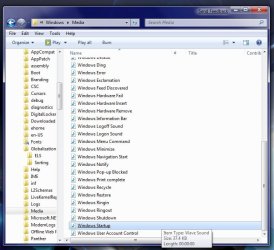
I had a look and I think it's the one in the windows\media directory

2009-01-17_211717.jpg
 

My Computer

Computer Manufacturer/Model Number
Home Brew
OS
Windows 7 Ultimate Vista Ultimate x64
CPU
Core 2 Duo E8500 3.16Ghz @ 3.8Ghz
Motherboard
eVGA 750i FTW
Memory
2x2Gigs Patriot PC2-6400 LL
Graphics Card(s)
Inno3D GeForce GTX260 216 SP
Monitor(s) Displays
ASUS VW222U 22" 2ms Response time
Screen Resolution
1680x1050
Hard Drives
SATA 150GB
SATA II 250GB
USB IDE 750GB Ext.
PSU
HYTEC 600W & Thermaltake 650W Toughpower Power Exp
Case
Thermaltake Armor LCS (Liquid Cooling System)
Cooling
Liquid Cooling System
Keyboard
Logitech G15 Gaming Keyboard
Mouse
Logitech G9 Gaming Mouse
That's the strange thing, I've deleted all of the files in the media folder, after altering folder options to show hidden files and system files.
Still the windows default sound is there on each boot up.
 

My Computer

Computer Manufacturer/Model Number
Self Build
OS
Windows RC 7100 x64, Vista Ultimate x64,
CPU
Intel Q6700
Motherboard
Asus P5Q3 Deluxe wi-fi
Memory
Corsair DDR3 4gb
Graphics Card(s)
ATI X1650
Monitor(s) Displays
LCD
Hard Drives
WD 1500gb 10k
WD 320gb 7.5k
WD 320gb 7.5k
Samsung 750gb 7.5k
PSU
Enermax 500w
Case
Lian-Li PC-7B Plus
Cooling
Scythe Infinity
Keyboard
Logitech cordless
Mouse
Logitech cordless
Internet Speed
20meg Cable
Found it.
All of the window sounds are in Documents, Win Sounds.

I'll report back after deleting from here.
 

My Computer

Computer Manufacturer/Model Number
Self Build
OS
Windows RC 7100 x64, Vista Ultimate x64,
CPU
Intel Q6700
Motherboard
Asus P5Q3 Deluxe wi-fi
Memory
Corsair DDR3 4gb
Graphics Card(s)
ATI X1650
Monitor(s) Displays
LCD
Hard Drives
WD 1500gb 10k
WD 320gb 7.5k
WD 320gb 7.5k
Samsung 750gb 7.5k
PSU
Enermax 500w
Case
Lian-Li PC-7B Plus
Cooling
Scythe Infinity
Keyboard
Logitech cordless
Mouse
Logitech cordless
Internet Speed
20meg Cable
I crowed too soon.
Deleted all of the files in the documents, win sounds folder, but the start up sound is still there. So there are now NO sound files in Windows Media and Documents Win Sounds. :mad:
 

My Computer

Computer Manufacturer/Model Number
Self Build
OS
Windows RC 7100 x64, Vista Ultimate x64,
CPU
Intel Q6700
Motherboard
Asus P5Q3 Deluxe wi-fi
Memory
Corsair DDR3 4gb
Graphics Card(s)
ATI X1650
Monitor(s) Displays
LCD
Hard Drives
WD 1500gb 10k
WD 320gb 7.5k
WD 320gb 7.5k
Samsung 750gb 7.5k
PSU
Enermax 500w
Case
Lian-Li PC-7B Plus
Cooling
Scythe Infinity
Keyboard
Logitech cordless
Mouse
Logitech cordless
Internet Speed
20meg Cable
Why are you so keen to remove the startup sound?
 

My Computer

Computer Manufacturer/Model Number
Home Brew
OS
Windows 7 Ultimate Vista Ultimate x64
CPU
Core 2 Duo E8500 3.16Ghz @ 3.8Ghz
Motherboard
eVGA 750i FTW
Memory
2x2Gigs Patriot PC2-6400 LL
Graphics Card(s)
Inno3D GeForce GTX260 216 SP
Monitor(s) Displays
ASUS VW222U 22" 2ms Response time
Screen Resolution
1680x1050
Hard Drives
SATA 150GB
SATA II 250GB
USB IDE 750GB Ext.
PSU
HYTEC 600W & Thermaltake 650W Toughpower Power Exp
Case
Thermaltake Armor LCS (Liquid Cooling System)
Cooling
Liquid Cooling System
Keyboard
Logitech G15 Gaming Keyboard
Mouse
Logitech G9 Gaming Mouse
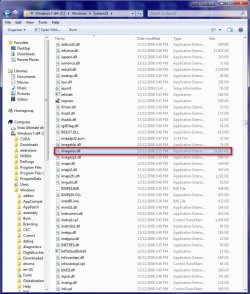
OK I found the culprit for you but you will need to get ResHacker first because it's inside a dll that also contains all your windows icons so it would also be a good idea to back up the file incase something goes wrong, this is the location of the dll C:\Windows\System32. File name: imageres.dll

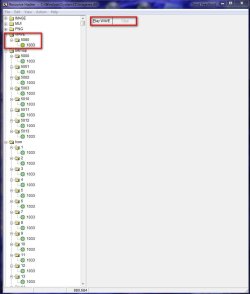
Open ResHacker and look for that file to open or just use explorer and drag and drop it in the left pane of ResHacker, now in ResHacker go to the directry named Wave and expand it and you will notice on the right side you have the option to "Play Wave".

Once you are happy that is the one you want to remove right click on the Wave Directory and select delete resource Wave and then go to file and save. If it tells you that it cant save that means you do not have ownership on the file and to do this you need to right click on the dll and select properties.

In properties navigate to the security tab and select advanced and navigate to the owner tab and then edit and select your user name and ok, now you need to go back to the first screen in properties and select edit and give yourself full privleges and now you can modify and save changes on the dll.

Alternatively you can use this shortcut to right click on the file and take ownership.

http://www.sevenforums.com/tutorials/1911-take-ownership-shortcut.html?ltr=T

2009-01-17_225632.jpg2009-01-17_225724.jpg
 

My Computer

Computer Manufacturer/Model Number
Home Brew
OS
Windows 7 Ultimate Vista Ultimate x64
CPU
Core 2 Duo E8500 3.16Ghz @ 3.8Ghz
Motherboard
eVGA 750i FTW
Memory
2x2Gigs Patriot PC2-6400 LL
Graphics Card(s)
Inno3D GeForce GTX260 216 SP
Monitor(s) Displays
ASUS VW222U 22" 2ms Response time
Screen Resolution
1680x1050
Hard Drives
SATA 150GB
SATA II 250GB
USB IDE 750GB Ext.
PSU
HYTEC 600W & Thermaltake 650W Toughpower Power Exp
Case
Thermaltake Armor LCS (Liquid Cooling System)
Cooling
Liquid Cooling System
Keyboard
Logitech G15 Gaming Keyboard
Mouse
Logitech G9 Gaming Mouse
Thank you very much Mr Grim.

I was stopped getting full ownership of the file, I had already put the Take Ownership into the registry, I tried, take ownership of the actual file and take ownership of the System 32 folder, but was unable to save the altered file from ResHack.

So I booted into Vista x64 and tried from there, still unable to alter the file in the Windows 7 x64 partition, but I was able to alter and save the file in the Windows 7 x86 partition, from within Vista.
I then copied the altered file from the Windows 7 32bit installation to the 64bit installation and everything is working perfectly.
I'm sure it's a roundabout way, but thanks to your information all done.

As to your question about why I wanted to do this, I just hate unwanted sounds.

Thank again,
David.
 

My Computer

Computer Manufacturer/Model Number
Self Build
OS
Windows RC 7100 x64, Vista Ultimate x64,
CPU
Intel Q6700
Motherboard
Asus P5Q3 Deluxe wi-fi
Memory
Corsair DDR3 4gb
Graphics Card(s)
ATI X1650
Monitor(s) Displays
LCD
Hard Drives
WD 1500gb 10k
WD 320gb 7.5k
WD 320gb 7.5k
Samsung 750gb 7.5k
PSU
Enermax 500w
Case
Lian-Li PC-7B Plus
Cooling
Scythe Infinity
Keyboard
Logitech cordless
Mouse
Logitech cordless
Internet Speed
20meg Cable
No worries Dave and welcome to the forums.
 

My Computer

Computer Manufacturer/Model Number
Home Brew
OS
Windows 7 Ultimate Vista Ultimate x64
CPU
Core 2 Duo E8500 3.16Ghz @ 3.8Ghz
Motherboard
eVGA 750i FTW
Memory
2x2Gigs Patriot PC2-6400 LL
Graphics Card(s)
Inno3D GeForce GTX260 216 SP
Monitor(s) Displays
ASUS VW222U 22" 2ms Response time
Screen Resolution
1680x1050
Hard Drives
SATA 150GB
SATA II 250GB
USB IDE 750GB Ext.
PSU
HYTEC 600W & Thermaltake 650W Toughpower Power Exp
Case
Thermaltake Armor LCS (Liquid Cooling System)
Cooling
Liquid Cooling System
Keyboard
Logitech G15 Gaming Keyboard
Mouse
Logitech G9 Gaming Mouse
How am I supposed to save these changes if I only have a Vista x64 installation and a Windows 7 x64 installation (Both on seperate hard drives)?

I've changed every permission possible with the Windows 7 x64 installation but it still won't let me save the changes. Even if I save it to a new file, delete the old imageres.dll in \system32, and put the new one in it's place, the WAVE directory is added back into the file when I open it back up..
 

My Computer

Computer Manufacturer/Model Number
Gateway P7801
OS
7 x64 + XP Pro x86
CPU
Undervolted T9900 3.06 GHz Core2Duo
Memory
4GB DDR3 1066MHz
Graphics Card(s)
NVIDIA 9800M GTS 1GB DDR3 1066 MHz
Monitor(s) Displays
17" WUXGA
Screen Resolution
1920x1200
Hard Drives
32GB Patriot V2 SSD w/ Hyperfast
PSU
9-cell Lithium Ion
Keyboard
Logitech Classic
Mouse
Logitech MX310
Internet Speed
slow AT&T
Other Info
Nlited XP x86 (540MB C:) locked with EWF
I have the same 2 installation partitions, Vista 64 and Windows 7 64bit.
It worked for me when booted into the Vista installation and altering the file from within Vista. Then copying it into the Win 7 system 32 folder.

I couldn't get permission enough from within Win7 to alter the file, but it worked perfectly doing it booted into Vista.
 
Last edited:

My Computer

Computer Manufacturer/Model Number
Self Build
OS
Windows RC 7100 x64, Vista Ultimate x64,
CPU
Intel Q6700
Motherboard
Asus P5Q3 Deluxe wi-fi
Memory
Corsair DDR3 4gb
Graphics Card(s)
ATI X1650
Monitor(s) Displays
LCD
Hard Drives
WD 1500gb 10k
WD 320gb 7.5k
WD 320gb 7.5k
Samsung 750gb 7.5k
PSU
Enermax 500w
Case
Lian-Li PC-7B Plus
Cooling
Scythe Infinity
Keyboard
Logitech cordless
Mouse
Logitech cordless
Internet Speed
20meg Cable
Has anyone ever come up with an answer on getting rid of the startup and sign off sounds on win7-64 ? They irratate me no end. HELP ME ! thanks...........c
 

My Computer

Computer Manufacturer/Model Number
Compaq presario CQ5210F
OS
win 7 home 64 bit
CPU
AMD Athion II215 dual core
Motherboard
Chipset nVidia MCP61.........Pegatron Corp
Memory
3 gb
Graphics Card(s)
nVida Geforce 6150 SE
Sound Card
realtec 6.0.1.5882 6-26-09
Monitor(s) Displays
ativa M22HZR
Back
Top