
sound scheme: where can i find other sounds?

Double

New member
Member
VIP
Local time
4:53 PM
Messages
140
I like customizing the sound scheme, but I'm having troubles finding alternative sounds similar to the ones already found in Windows. Where do people go to find more of these types of sounds?

Most of the sounds i find on the internet are usually at least 15 seconds long, don't contain download links, or are cult-classic related.
 

My Computer My Computer

At a glance

Windows 10 Home 64-bitIntel Core i5 430M @2.27GHz6.00GB Dual-Channel DDR3 @532MHz512MB NVIDIA GeForce G105M
Computer type
Laptop
Computer Manufacturer/Model Number
HP Pavilion dv7-3188cl
OS
Windows 10 Home 64-bit
CPU
Intel Core i5 430M @2.27GHz
Motherboard
Hewlett-Packard 365C
Memory
6.00GB Dual-Channel DDR3 @532MHz
Graphics Card(s)
512MB NVIDIA GeForce G105M
Sound Card
IDT High Definition Audio CODEC
Monitor(s) Displays
Generic PnP Monitor
Screen Resolution
1600x900 @60Hz
Hard Drives
298GB Hitachi
PSU
AC 100-240V~1.6A 50-60Hz, DC 19V 4.7A
Mouse
Razer DeathAdder Left-Hander
Antivirus
Avast Free
Browser
Google Chrome
Other Info
Malwarebytes Pro, Malwarebytes Anti-Exploit, uBlock Origin
Most of the sounds i find on the internet are usually at least 15 seconds long, don't contain download links, or are cult-classic related.

so what are you looking for more specifically?
 

My Computer My Computer

At a glance

windows 7 ultimate x64
Computer type
PC/Desktop
OS
windows 7 ultimate x64
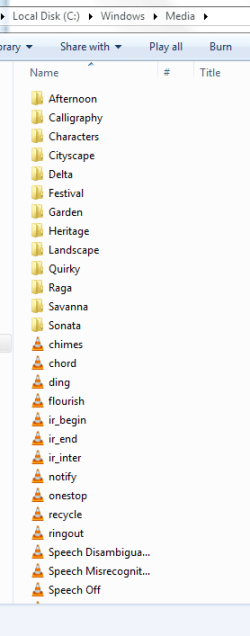
something similar to the files found in this directory
 

Attachments

  • Capture.PNG
    Capture.PNG
    8.4 KB · Views: 1

My Computer My Computer

At a glance

Windows 10 Home 64-bitIntel Core i5 430M @2.27GHz6.00GB Dual-Channel DDR3 @532MHz512MB NVIDIA GeForce G105M
Computer type
Laptop
Computer Manufacturer/Model Number
HP Pavilion dv7-3188cl
OS
Windows 10 Home 64-bit
CPU
Intel Core i5 430M @2.27GHz
Motherboard
Hewlett-Packard 365C
Memory
6.00GB Dual-Channel DDR3 @532MHz
Graphics Card(s)
512MB NVIDIA GeForce G105M
Sound Card
IDT High Definition Audio CODEC
Monitor(s) Displays
Generic PnP Monitor
Screen Resolution
1600x900 @60Hz
Hard Drives
298GB Hitachi
PSU
AC 100-240V~1.6A 50-60Hz, DC 19V 4.7A
Mouse
Razer DeathAdder Left-Hander
Antivirus
Avast Free
Browser
Google Chrome
Other Info
Malwarebytes Pro, Malwarebytes Anti-Exploit, uBlock Origin
If you want a complete sound package try downloading a theme pack. Microsoft has a few, make sure you choose one with sound Themes - Microsoft Windows
Install the theme, go to Control Panel, Sound and click to open. The sound scheme that has been installed with the theme will be top of the list. Click on Save As and save it with a different name. Now change the theme back to what you want, go back to sounds and from the drop down list choose the previously saved scheme.

You might find this link useful as well if you are going to play with themes
http://blogs.windows.com/windows/b/...ws-7-themes-reusing-custom-sound-schemes.aspx
 

My Computer My Computer

At a glance

windows 7 ultimate x64
Computer type
PC/Desktop
OS
windows 7 ultimate x64
It's a good idea, but I'm not looking to replace all existing sounds. I'm looking to replace only a select few, like the minimize/maximize/restore-up/restore-down type sounds.

This guy for instance, where he get dem sounds?
How to Customize Your Windows Sound Scheme - YouTube
 

My Computer My Computer

At a glance

Windows 10 Home 64-bitIntel Core i5 430M @2.27GHz6.00GB Dual-Channel DDR3 @532MHz512MB NVIDIA GeForce G105M
Computer type
Laptop
Computer Manufacturer/Model Number
HP Pavilion dv7-3188cl
OS
Windows 10 Home 64-bit
CPU
Intel Core i5 430M @2.27GHz
Motherboard
Hewlett-Packard 365C
Memory
6.00GB Dual-Channel DDR3 @532MHz
Graphics Card(s)
512MB NVIDIA GeForce G105M
Sound Card
IDT High Definition Audio CODEC
Monitor(s) Displays
Generic PnP Monitor
Screen Resolution
1600x900 @60Hz
Hard Drives
298GB Hitachi
PSU
AC 100-240V~1.6A 50-60Hz, DC 19V 4.7A
Mouse
Razer DeathAdder Left-Hander
Antivirus
Avast Free
Browser
Google Chrome
Other Info
Malwarebytes Pro, Malwarebytes Anti-Exploit, uBlock Origin
I think that you tube video is quite clear: all over the internet. :D
You don't have to use the whole sound scheme. Once you have it downloaded you can pick and choose just the sounds you want. Just look for something that suits your taste whether is nature sounds, mechanical, cartoons.......
 

My Computer My Computer

At a glance

windows 7 ultimate x64
Computer type
PC/Desktop
OS
windows 7 ultimate x64
Back
Top