
Sound through HDMI

mrcheesete0

New member
Member
Local time
3:44 PM
Messages
48
First off specs of the Computer:http://h10025.www1.hp.com/ewfrf/wc/document?docname=c01859812&tmp_track_link=ot_faqs/top_issues/en_us/c01859812/loc:5&lc=en&dlc=en&cc=us〈=en&product=4041179
To Sum it up:

Processor: AMD Sempron LE-1300 (S) 2.3 GHz (45W)
Chipset: GeForce 6150SE nForce 430
Motherboard: Pegatron M2N68-LA
Memory: 2GB 240 pin, DDR2 SDRAM
Hard Drive: 250 GB SATA 3G (3.0 Gb/sec) 7200 RPM
Disk Drive: SuperMulti DVD Burner with LightScribe Technology
Video Graphics: nVidia GeForce 9500 GT
Sound/Audio: PPA Int'l 8.1 Channel PCI Sound Card
OS:Microsoft Windows 7 Home Premium (64-bit)


Now my problem is that I am usind a 32" Slyvania brand Flatscreen LCD TV as my Main Monitor, running this through an HDMI cable. The TV itself doesn't have a Mini-Stereo jack type input for sound, so I am trying to get the sound to run through my HDMI port and cable. The Sound Card specifications state that sound is available through the port, and comes with a guide on how to do it. It has a 4-pin to two-pin SPDIF cable that plugs into the Graphics Card, the problem is the SPDIF on my motherboard isn't the 4-pin needed. it is only a 3-pin. After talking to the Customer Support on both the computer and the Graphics card and with GeekSquad, I was told I need to buy a sound card. hence the sound card in my configuration. I am still having problems getting sound to my TV, basically, I have never heard any sound come out of it. ^_^ Any Ideas?
 

My Computer

Computer Manufacturer/Model Number
Compaq Presario CQ5205Y
OS
Windows 7
Graphics Card(s)
ASUS GeForce 9500 GT
Sound Card
PPA 8.1 channel surround something or other
The three pin SPDIF connector, is it a configuration like this?

0 0 X 0

Where the 0 spots are pins, and the X marks an empty pin?

If so, check the wires on your four pin cable. Most of them have one of the four wire slots empty. That means there's no wire in it. If the cable is like that, line the connector up with the pin header on your motherboard so that the empty pin slot lines up with the missing pin, and the wires line up with the pins that are there.

It's easier to make a connector like that with one wire unpopulated for keying, rather than three separate little wires that the end user can plug in wrong.

Let us know if that works.
 

My Computer

Computer type
PC/Desktop
Computer Manufacturer/Model Number
Mellon Labs (custom build)
OS
Win 7 Pro x64/Win 10 Pro x64 dual boot
CPU
AMD FX 8350 Vishera @ 4200
Motherboard
ASUS M5A97 R2.0
Memory
16 GB Mushkin Blackline DDR3-2400 @ 1866 (9-10-10-10-31)
Graphics Card(s)
XFX Radeon R9 280 Double D Black Edition
Sound Card
Realtek HD Audio on MB. Sounds great.
Monitor(s) Displays
Acer 24", Acer 22"
Screen Resolution
3840 x 1080
Hard Drives
1 x Mushkin Chronos 120 GB SSD (Win 10)
1 x Samsung 850 EVO 250 GB SSD (Win 7)
1 x WD 1TB SATA Blue
1 x WD 1TB SATA Green
PSU
Corsair TX-750
Case
CoolerMaster HAF 912+
Cooling
Coolermaster Seidon 240M Liquid AIO. 6 case fans
Keyboard
Logitech G710+
Mouse
Logitech G500s
Internet Speed
Much better since I got fiber, but still way overpriced.
Antivirus
MSE, Malware Bytes for scanning
Browser
Firefox
Other Info
Corsair VOID USB headphones.

A Mellon Labs X-1 - LCD Smartie driven system status display.

Brought to you by the letter E
The three pin SPDIF connector, is it a configuration like this?

0 0 X 0

Where the 0 spots are pins, and the X marks an empty pin?

If so, check the wires on your four pin cable. Most of them have one of the four wire slots empty. That means there's no wire in it. If the cable is like that, line the connector up with the pin header on your motherboard so that the empty pin slot lines up with the missing pin, and the wires line up with the pins that are there.

It's easier to make a connector like that with one wire unpopulated for keying, rather than three separate little wires that the end user can plug in wrong.

Let us know if that works.
No, the 2-pin to four-pin Cable that came with the Graphics Card ahs two empty holes, and two with wires. teh 3-pin connector on the Motherboard is like a little white box divided into 3 sections by half-walls between them and a pin in each box.

the 4-pin connector wouldn't work no matter how I tried doing it, unless I opened it up and spliced the wires on myself, which I am afraid to do.
 

My Computer

Computer Manufacturer/Model Number
Compaq Presario CQ5205Y
OS
Windows 7
Graphics Card(s)
ASUS GeForce 9500 GT
Sound Card
PPA 8.1 channel surround something or other
Yeah. I had a quick peek at the motherboard on the HP site, and you're pretty much screwed. HP is using a non standard (read: probably proprietary and hard to get) connector for the SPDIF signal. You're probably going to have to get one direct from an HP dealer, or maybe from ASUS.

Is there any way to use the SPDIF connector on the rear of the chassis? At least that one is standard.
 

My Computer

Computer type
PC/Desktop
Computer Manufacturer/Model Number
Mellon Labs (custom build)
OS
Win 7 Pro x64/Win 10 Pro x64 dual boot
CPU
AMD FX 8350 Vishera @ 4200
Motherboard
ASUS M5A97 R2.0
Memory
16 GB Mushkin Blackline DDR3-2400 @ 1866 (9-10-10-10-31)
Graphics Card(s)
XFX Radeon R9 280 Double D Black Edition
Sound Card
Realtek HD Audio on MB. Sounds great.
Monitor(s) Displays
Acer 24", Acer 22"
Screen Resolution
3840 x 1080
Hard Drives
1 x Mushkin Chronos 120 GB SSD (Win 10)
1 x Samsung 850 EVO 250 GB SSD (Win 7)
1 x WD 1TB SATA Blue
1 x WD 1TB SATA Green
PSU
Corsair TX-750
Case
CoolerMaster HAF 912+
Cooling
Coolermaster Seidon 240M Liquid AIO. 6 case fans
Keyboard
Logitech G710+
Mouse
Logitech G500s
Internet Speed
Much better since I got fiber, but still way overpriced.
Antivirus
MSE, Malware Bytes for scanning
Browser
Firefox
Other Info
Corsair VOID USB headphones.

A Mellon Labs X-1 - LCD Smartie driven system status display.

Brought to you by the letter E
Yeah. I had a quick peek at the motherboard on the HP site, and you're pretty much screwed. HP is using a non standard (read: probably proprietary and hard to get) connector for the SPDIF signal. You're probably going to have to get one direct from an HP dealer, or maybe from ASUS.

Is there any way to use the SPDIF connector on the rear of the chassis? At least that one is standard.
Yeah, nVidia when I was on support with them told me the same thing about the non-standard. Said nVidia was the manufacturer of it also. and I am not seeing the SPDIF on the rear of it? where is it in relation to the SPDIF that is 3-pronged?
 

My Computer

Computer Manufacturer/Model Number
Compaq Presario CQ5205Y
OS
Windows 7
Graphics Card(s)
ASUS GeForce 9500 GT
Sound Card
PPA 8.1 channel surround something or other
According to the pic I saw at the HP website, it's the round, orange connector beside your PS2 connectors. It kinda looks like the jacks you would find on the back of a stereo.

Speaking of stereos, you might try getting the audio out of the sound card by a 1/8" to dual RCA cable. They sell them at Radio Shack, and most LCD TVs have an audio input that will accept that type of connector. They're usually on the back and they are red and white, side by side. My TV even has one of it's HDMI connectors paired up to a set of inputs like that, in case the audio isn't available through the HDMI cable.

It's worth a look.
 

My Computer

Computer type
PC/Desktop
Computer Manufacturer/Model Number
Mellon Labs (custom build)
OS
Win 7 Pro x64/Win 10 Pro x64 dual boot
CPU
AMD FX 8350 Vishera @ 4200
Motherboard
ASUS M5A97 R2.0
Memory
16 GB Mushkin Blackline DDR3-2400 @ 1866 (9-10-10-10-31)
Graphics Card(s)
XFX Radeon R9 280 Double D Black Edition
Sound Card
Realtek HD Audio on MB. Sounds great.
Monitor(s) Displays
Acer 24", Acer 22"
Screen Resolution
3840 x 1080
Hard Drives
1 x Mushkin Chronos 120 GB SSD (Win 10)
1 x Samsung 850 EVO 250 GB SSD (Win 7)
1 x WD 1TB SATA Blue
1 x WD 1TB SATA Green
PSU
Corsair TX-750
Case
CoolerMaster HAF 912+
Cooling
Coolermaster Seidon 240M Liquid AIO. 6 case fans
Keyboard
Logitech G710+
Mouse
Logitech G500s
Internet Speed
Much better since I got fiber, but still way overpriced.
Antivirus
MSE, Malware Bytes for scanning
Browser
Firefox
Other Info
Corsair VOID USB headphones.

A Mellon Labs X-1 - LCD Smartie driven system status display.

Brought to you by the letter E
Speaking of stereos, you might try getting the audio out of the sound card by a 1/8" to dual RCA cable. They sell them at Radio Shack, and most LCD TVs have an audio input that will accept that type of connector. They're usually on the back and they are red and white, side by side. My TV even has one of it's HDMI connectors paired up to a set of inputs like that, in case the audio isn't available through the HDMI cable.

That is what GeekSquad suggested. I happened to have that specific cable lying around from a boom chair I bought awhile back, and Tried it. didn't work.


gimme 5-10 I'll look for that orange connector and post the results
 

My Computer

Computer Manufacturer/Model Number
Compaq Presario CQ5205Y
OS
Windows 7
Graphics Card(s)
ASUS GeForce 9500 GT
Sound Card
PPA 8.1 channel surround something or other
m'kay I found it, and I tried, BUT my 4-pronged cable won't fit on it because of the small circular half-sized thingy. I know the name of it but I can't think of it right now.
 

My Computer

Computer Manufacturer/Model Number
Compaq Presario CQ5205Y
OS
Windows 7
Graphics Card(s)
ASUS GeForce 9500 GT
Sound Card
PPA 8.1 channel surround something or other
I THINK I may have just found a way to do it, but in order to get to it tehre is a card in my way


is my Integrated 10/100 Base-T networking interface card important? I haven't ever touched it since I bought the computer...

if it isn't would it harm my computer at all if while it was off I removed this card?
 

My Computer

Computer Manufacturer/Model Number
Compaq Presario CQ5205Y
OS
Windows 7
Graphics Card(s)
ASUS GeForce 9500 GT
Sound Card
PPA 8.1 channel surround something or other
OK first thing wrong is listening to anything from the Geek Squad. Sorry but I wouldn't trust those clowns (no offense to clowns) with changing a light bulb.

Also Nvidia isn't going to help as they didn't make the motherboard, all they made is the chipset. Asus made the motherboard and they won't help either as it is custom made for HP.

Next the SPDIF header on the motherboard is here,

m2n68laspdif.PNG

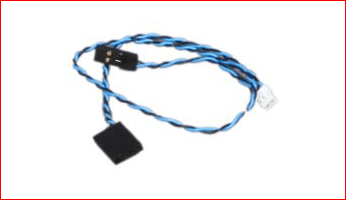
now despite it being a 3 pin header, it only actually requires 2 wires. I am assuming the cable you have looks something like this one (minus the white connector),

View attachment 91882

If so a sharp knife and a steady hand is all it will take to get it to fit. If the 4 pin connector is like the one above with both wires beside each other, then it is just a matter of cutting off the two unused ones, without cutting into where the wires are inserted.
spdifcable.PNG
Then it is juts a matter of connecting one end to the video card and the other to the SPDIF header on the motherboard. It may take a couple of tries to get it oriented the right way; it could be pins 1-2, 2-3, or at worst 1-3 which if that is the case will require splitting the now 2 wire connector into 2 1 wire connectors.
 
Last edited:

My Computer

Computer type
PC/Desktop
Computer Manufacturer/Model Number
Me
OS
Win 7 Ultimate x64
CPU
FX-8350 @ 4.6 GHz so far
Motherboard
Asus M5A97 EVO
Memory
ADATA XPG V1 Series Black 8GB DDR3 1600
Graphics Card(s)
Sapphire R9 270x Dual-X
Sound Card
Xonar DGX w/ Corsair Vengence 1300
Monitor(s) Displays
Acer S232HL Abid
Screen Resolution
1920x1080
Hard Drives
120 GB OCZ Vertex 3
500 GB Seagate 7200.12
PSU
Antec Earthwatts 650W Green
Case
Antec Three Hundred
Cooling
Cooler Master 212 EVO
Keyboard
Logitech G510
Mouse
Logitech G500s
Internet Speed
35000/3000
now despite it being a 3 pin header, it only actually requires 2 wires. I am assuming the cable you have looks something like this one (minus the white connector),

If so a sharp knife and a steady hand is all it will take to get it to fit. If the 4 pin connector is like the one above with both wires beside each other, then it is just a matter of cutting off the two unused ones, without cutting into where the wires are inserted.
View attachment 91885
Then it is juts a matter of connecting one end to the video card and the other to the SPDIF header on the motherboard. It may take a couple of tries to get it oriented the right way; it could be pins 1-2, 2-3, or at worst 1-3 which if that is the case will require splitting the now 2 wire connector into 2 1 wire connectors.
Yeah, as the dude was telling me it I was thinking "you don't know what you're talkin about..."

That is exactly what my cable is, WITH the white header even. Exact replica. BUT, instead of cutting the 4-pin, if I plug it into the 2-pin on the Graphics card, orienting it the same way the 2-pin is supposed to be (Black where black goes blue where blue goes), and then use the two-pin on the 3-pronged would that work?

also then it could be 1-2, 1-2 (flip the black and blue around), 2-3, 2-3(flip the black and blue around), or at worst 3-1, 3-1(flip the black and blue around)

then all I would need is trial and error?


ALSO, will this 3-pin connector work and send sound through the HDMI while my on-board sound card is disabled because of the "after-market" sound card? Or should I remove that sound card FIRST, then attempt to get this working?
 

My Computer

Computer Manufacturer/Model Number
Compaq Presario CQ5205Y
OS
Windows 7
Graphics Card(s)
ASUS GeForce 9500 GT
Sound Card
PPA 8.1 channel surround something or other
That is exactly what my cable is, WITH the white header even. Exact replica. BUT, instead of cutting the 4-pin, if I plug it into the 2-pin on the Graphics card, orienting it the same way the 2-pin is supposed to be (Black where black goes blue where blue goes), and then use the two-pin on the 3-pronged would that work?

Seeing as it is the same as the one I posted and assuming the white end goes on the card, then yes it will work with the 2 pin as long as the cable is long enough.

also then it could be 1-2, 1-2 (flip the black and blue around), 2-3, 2-3(flip the black and blue around), or at worst 3-1, 3-1(flip the black and blue around)

then all I would need is trial and error?

Yep. It should be 1-2, but you never know. You will also have to make sure you have the settings right in both the Windows and Realtek audio controls. If you can't get them right hopefully someone with a Nvidia card set up the same way will pop in and say which settings to use.
 

My Computer

Computer type
PC/Desktop
Computer Manufacturer/Model Number
Me
OS
Win 7 Ultimate x64
CPU
FX-8350 @ 4.6 GHz so far
Motherboard
Asus M5A97 EVO
Memory
ADATA XPG V1 Series Black 8GB DDR3 1600
Graphics Card(s)
Sapphire R9 270x Dual-X
Sound Card
Xonar DGX w/ Corsair Vengence 1300
Monitor(s) Displays
Acer S232HL Abid
Screen Resolution
1920x1080
Hard Drives
120 GB OCZ Vertex 3
500 GB Seagate 7200.12
PSU
Antec Earthwatts 650W Green
Case
Antec Three Hundred
Cooling
Cooler Master 212 EVO
Keyboard
Logitech G510
Mouse
Logitech G500s
Internet Speed
35000/3000
That is exactly what my cable is, WITH the white header even. Exact replica. BUT, instead of cutting the 4-pin, if I plug it into the 2-pin on the Graphics card, orienting it the same way the 2-pin is supposed to be (Black where black goes blue where blue goes), and then use the two-pin on the 3-pronged would that work?
Seeing as it is the same as the one I posted and assuming the white end goes on the card, then yes it will work with the 2 pin as long as the cable is long enough.
Actually, the white connector is for Eye Candy tbh.

There are two black connectors each connected to a wire, the wires meet in the white connector to for a lopsided V shape. odd right?
 

My Computer

Computer Manufacturer/Model Number
Compaq Presario CQ5205Y
OS
Windows 7
Graphics Card(s)
ASUS GeForce 9500 GT
Sound Card
PPA 8.1 channel surround something or other
Back
Top