Hello fellas!
I need pair of fresh eyes for what I am missing and new brains for the ideas, but the issue bugs me and I cant solve it.
Generally I do have right now two systems win7 and win10. I already excluded hardware problem as on win10 there is no problem with device, neither drivers. Problem lays 100% into the windows7 system files and I cannot locate the issue. I hope for your help in here.
In short: I cannot install the soundcard driver on win7 system anymore. It used to work just fine and I've installed it previously with no problems. There are some events (unsuccessful udpates) that could potentially destroy some important files/signatures/permissions ... So let me tell you about these events.
Will try to paint the story here, sry for long post I try to be detailed here.
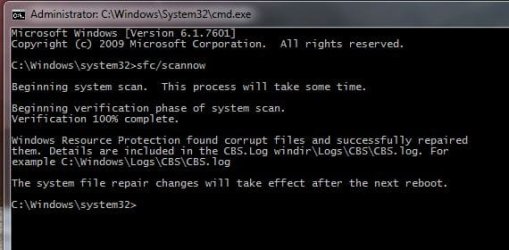
On win7 drivers for my pci soundcard ESI Julia were working normally, but I started to mess with few critical windows updates, and months ago I've noticed first time that at some point just by touching volume slider (speaker icon on systray) did cause sound to stop completely and only restart would help (or restarting services- audio devices). So I thought reinstall of drivers would help - but it did not help at all. So i did try to get all the most critical updates for win7 - oh boy here I was wrong... Installations were fine, only on the logon screen it was stuck on 13% and could not go further - pc was restarting 3 times and reverted the updates. Tried again and once did 'hard reset' at these 13% and system did not boot up.... Got just information (black screen white font) that fvevol.sys file is corrupted or not found so windows cannot boot. So I did boot from usb to get into windows RE, found that file and replaced it with the file from another win7 installation on laptop (the same system edition and 64bit as well). Now no more black screen, but this time gave me bsod this time (0x00000007B). Tried to solve this one with various commends found online (did run sfc/ scannow, chkdsk, icacls and similar as found online some solutions) but did not work.
I did extra reading and search even more online, extracted original fvevol.sys from win7 install files, prepared the copies and replaced again. Worked - but another issue arisen - pci.sys. File was there so I did copy by renaming and pasted new pci.sys that previously I extracted from win7 install files. Ok, went further but now it shows me that disk.sys is corrupted or missing. I go again to the windows RE and cant find disk.sys at all in the /drivers/ folder. So i did copy original disk.sys as well, and restarted. WELL - system booted, logged into the desktop. Success here.
From the first boot I've noticed the sound icon has a red cross. First thought lets do driver install but I cannot install at all the drivers for my pci soundcard. Did download multiple versions, tried even in the safe mode, nothing, nothing can make it work.
I did enable onboard Realtek audio just to perform a test, connetect a jack to green port and well it works alright. But my setup include pci soundcard Julia and I cant use Realtek, so I try to find solution.
So there is a this specific driver problem. In device manager the card/device is somehow found but detected incorrectly as "Multimedia Audio Controller".
I have disabled automatic driver installations on win7 from day 1 so I did try everything uninstall it , disabled device, scanned for new devices after restart - nothings changing. Tried manual driver installation via device manager as well, but it just gives me that installator cannot install and nothing can be done.
Standard install gives such error:
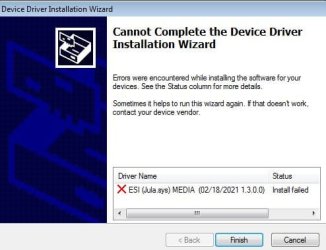
Below I have some logs ready from todays installation attempt - maybe something pop out in your eyes as a red flag. I am already lost and feel stupid.
Do anyone knows, what are the windows system files/drivers/dll's that are related with pci, sound/multimedia related stuff so I could try to replace them manually? I've noticed some files in logs, but dont want to mess even more..
I need pair of fresh eyes for what I am missing and new brains for the ideas, but the issue bugs me and I cant solve it.
Generally I do have right now two systems win7 and win10. I already excluded hardware problem as on win10 there is no problem with device, neither drivers. Problem lays 100% into the windows7 system files and I cannot locate the issue. I hope for your help in here.
In short: I cannot install the soundcard driver on win7 system anymore. It used to work just fine and I've installed it previously with no problems. There are some events (unsuccessful udpates) that could potentially destroy some important files/signatures/permissions ... So let me tell you about these events.
Will try to paint the story here, sry for long post I try to be detailed here.
On win7 drivers for my pci soundcard ESI Julia were working normally, but I started to mess with few critical windows updates, and months ago I've noticed first time that at some point just by touching volume slider (speaker icon on systray) did cause sound to stop completely and only restart would help (or restarting services- audio devices). So I thought reinstall of drivers would help - but it did not help at all. So i did try to get all the most critical updates for win7 - oh boy here I was wrong... Installations were fine, only on the logon screen it was stuck on 13% and could not go further - pc was restarting 3 times and reverted the updates. Tried again and once did 'hard reset' at these 13% and system did not boot up.... Got just information (black screen white font) that fvevol.sys file is corrupted or not found so windows cannot boot. So I did boot from usb to get into windows RE, found that file and replaced it with the file from another win7 installation on laptop (the same system edition and 64bit as well). Now no more black screen, but this time gave me bsod this time (0x00000007B). Tried to solve this one with various commends found online (did run sfc/ scannow, chkdsk, icacls and similar as found online some solutions) but did not work.
I did extra reading and search even more online, extracted original fvevol.sys from win7 install files, prepared the copies and replaced again. Worked - but another issue arisen - pci.sys. File was there so I did copy by renaming and pasted new pci.sys that previously I extracted from win7 install files. Ok, went further but now it shows me that disk.sys is corrupted or missing. I go again to the windows RE and cant find disk.sys at all in the /drivers/ folder. So i did copy original disk.sys as well, and restarted. WELL - system booted, logged into the desktop. Success here.
From the first boot I've noticed the sound icon has a red cross. First thought lets do driver install but I cannot install at all the drivers for my pci soundcard. Did download multiple versions, tried even in the safe mode, nothing, nothing can make it work.
I did enable onboard Realtek audio just to perform a test, connetect a jack to green port and well it works alright. But my setup include pci soundcard Julia and I cant use Realtek, so I try to find solution.
So there is a this specific driver problem. In device manager the card/device is somehow found but detected incorrectly as "Multimedia Audio Controller".
I have disabled automatic driver installations on win7 from day 1 so I did try everything uninstall it , disabled device, scanned for new devices after restart - nothings changing. Tried manual driver installation via device manager as well, but it just gives me that installator cannot install and nothing can be done.
Standard install gives such error:
Below I have some logs ready from todays installation attempt - maybe something pop out in your eyes as a red flag. I am already lost and feel stupid.
Code:
>>>  [Device Install (UpdateDriverForPlugAndPlayDevices) - PCI\VEN_1412&DEV_1724&SUBSYS_45533031&REV_01]
>>>  Section start 2024/02/12 14:30:11.800
      cmd: "C:\Program Files\ESI\Juli@ PCI Driver\dpinst64.EXE" /F /C
     dvi: Set selected driver complete.
     dvi: {Build Driver List} 14:30:11.812
     dvi:      Searching for hardware ID(s):
     dvi:           pci\ven_1412&dev_1724&subsys_45533031&rev_01
     dvi:           pci\ven_1412&dev_1724&subsys_45533031
     dvi:           pci\ven_1412&dev_1724&cc_040100
     dvi:           pci\ven_1412&dev_1724&cc_0401
     dvi:      Searching for compatible ID(s):
     dvi:           pci\ven_1412&dev_1724&rev_01
     dvi:           pci\ven_1412&dev_1724
     dvi:           pci\ven_1412&cc_040100
     dvi:           pci\ven_1412&cc_0401
     dvi:           pci\ven_1412
     dvi:           pci\cc_040100
     dvi:           pci\cc_0401
     cpy:      Policy is set to make all digital signatures equal.
     dvi:      Processing a single INF: 'c:\windows\system32\driverstore\filerepository\julia.inf_amd64_neutral_d4787fdd194cfbf7\julia.inf'
     inf:      Opened PNF: 'c:\windows\system32\driverstore\filerepository\julia.inf_amd64_neutral_d4787fdd194cfbf7\julia.inf' ([strings])
     sig:      {_VERIFY_FILE_SIGNATURE} 14:30:11.833
     sig:           Key      = julia.inf
     sig:           FilePath = c:\windows\system32\driverstore\filerepository\julia.inf_amd64_neutral_d4787fdd194cfbf7\julia.inf
     sig:           Catalog  = C:\Windows\System32\DriverStore\FileRepository\julia.inf_amd64_neutral_d4787fdd194cfbf7\amd64.cat
!    sig:           Verifying file against specific (valid) catalog failed! (0x800b0109)
!    sig:           Error 0x800b0109: A certificate chain processed, but terminated in a root certificate which is not trusted by the trust provider.
     sig:      {_VERIFY_FILE_SIGNATURE exit(0x800b0109)} 14:30:11.841
     sig:      {_VERIFY_FILE_SIGNATURE} 14:30:11.842
     sig:           Key      = julia.inf
     sig:           FilePath = c:\windows\system32\driverstore\filerepository\julia.inf_amd64_neutral_d4787fdd194cfbf7\julia.inf
     sig:           Catalog  = C:\Windows\System32\DriverStore\FileRepository\julia.inf_amd64_neutral_d4787fdd194cfbf7\amd64.cat
     sig:           Success: File is signed in Authenticode(tm) catalog.
     sig:           Error 0xe0000242: The publisher of an Authenticode(tm) signed catalog has not yet been established as trusted.
     sig:      {_VERIFY_FILE_SIGNATURE exit(0xe0000242)} 14:30:11.853
     dvi:      Created Driver Node:
     dvi:           HardwareID   - PCI\VEN_1412&DEV_1724&SUBSYS_45533031
     dvi:           InfName      - c:\windows\system32\driverstore\filerepository\julia.inf_amd64_neutral_d4787fdd194cfbf7\julia.inf
     dvi:           DevDesc      - Juli@ Controller
     dvi:           DrvDesc      - Juli@ Controller
     dvi:           Provider     - ESI
     dvi:           Mfg          - ESI
     dvi:           ModelsSec    - DEVICES.NTamd64
     dvi:           InstallSec   - DEVICE_BB
     dvi:           ActualSec    - DEVICE_BB
     dvi:           Rank         - 0x00ff0001
     dvi:           Signer       - ESI Audiotechnik GmbH
     dvi:           Signer Score - Authenticode
     dvi:           DrvDate      - 02/18/2021
     dvi:           Version      - 1.3.0.0
     dvi: {Build Driver List - exit(0x00000000)} 14:30:11.871
     dvi: {DIF_SELECTBESTCOMPATDRV} 14:30:11.872
     dvi:      Using exported function 'MediaClassInstaller' in module 'C:\Windows\system32\mmci.dll'.
     dvi:      Class installer == mmci.dll,MediaClassInstaller
     dvi:      Using exported function 'MediaClassCoInstaller' in module 'C:\Windows\system32\mmcico.dll'.
     dvi:      CoInstaller 1 == mmcico.dll,MediaClassCoInstaller
     dvi:      Using exported function 'ClassCoInstaller_Entry' in module 'C:\Windows\system32\nvnusbaudio_coinst.dll'.
     dvi:      CoInstaller 2 == nvnusbaudio_coinst.dll,ClassCoInstaller_Entry
     dvi:      CoInstaller 1: Enter 14:30:11.881
     dvi:      CoInstaller 1: Exit
     dvi:      CoInstaller 2: Enter 14:30:11.883
     dvi:      CoInstaller 2: Exit
     dvi:      Class installer: Enter 14:30:11.886
     inf:           Opened PNF: 'C:\Windows\INF\oem45.inf' ([strings])
     dvi:      Class installer: Exit
     dvi:      Default installer: Enter 14:30:11.890
     dvi:           {Select Best Driver}
     dvi:                Selected driver installs from section [DEVICE_BB] in 'c:\windows\system32\driverstore\filerepository\julia.inf_amd64_neutral_d4787fdd194cfbf7\julia.inf'.
     dvi:                Class GUID of device changed to: {4d36e96c-e325-11ce-bfc1-08002be10318}.
     dvi:                {DIF_DESTROYPRIVATEDATA} 14:30:11.894
     dvi:                     CoInstaller 1: Enter 14:30:11.895
     dvi:                     CoInstaller 1: Exit
     dvi:                     CoInstaller 2: Enter 14:30:11.897
     dvi:                     CoInstaller 2: Exit
     dvi:                     Class installer: Enter 14:30:11.899
     dvi:                     Class installer: Exit
     dvi:                     Default installer: Enter 14:30:11.902
     dvi:                     Default installer: Exit
     dvi:                {DIF_DESTROYPRIVATEDATA - exit(0xe000020e)} 14:30:11.904
     dvi:                Set selected driver complete.
     dvi:                Selected:
     dvi:                     Description - [Juli@ Controller]
     dvi:                     InfFile     - [c:\windows\system32\driverstore\filerepository\julia.inf_amd64_neutral_d4787fdd194cfbf7\julia.inf]
     dvi:                     Section     - [DEVICE_BB]
     dvi:                     Signer      - [ESI Audiotechnik GmbH]
     dvi:                     Rank        - [0x00ff0001]
     dvi:           {Select Best Driver - exit(0x00000000)}
     dvi:      Default installer: Exit
     dvi: {DIF_SELECTBESTCOMPATDRV - exit(0x00000000)} 14:30:11.914
     inf: {SetupCopyOEMInf: C:\Windows\INF\oem45.inf} 14:30:11.916
     inf:      Driver Store location: C:\Windows\System32\DriverStore\FileRepository\julia.inf_amd64_neutral_d4787fdd194cfbf7\julia.inf
     inf:      Published Inf Path: C:\Windows\INF\oem45.inf
     inf:      Opened PNF: 'C:\Windows\INF\oem45.inf' ([strings])
     inf:      Installing catalog amd64.cat as: oem45.CAT
!    inf:      Failed to install catalog - error ignored
!    inf:      Error 2: The system cannot find the file specified.
     inf:      OEM source media location: C:\Windows\INF\
     inf: {SetupCopyOEMInf exit (0x00000000)} 14:30:11.946
     dvi: Searching for hardware ID(s):
     dvi:      pci\ven_1412&dev_1724&subsys_45533031&rev_01
     dvi:      pci\ven_1412&dev_1724&subsys_45533031
     dvi:      pci\ven_1412&dev_1724&cc_040100
     dvi:      pci\ven_1412&dev_1724&cc_0401
     dvi: Searching for compatible ID(s):
     dvi:      pci\ven_1412&dev_1724&rev_01
     dvi:      pci\ven_1412&dev_1724
     dvi:      pci\ven_1412&cc_040100
     dvi:      pci\ven_1412&cc_0401
     dvi:      pci\ven_1412
     dvi:      pci\cc_040100
     dvi:      pci\cc_0401
     inf: Opened PNF: 'C:\Windows\System32\DriverStore\FileRepository\julia.inf_amd64_neutral_d4787fdd194cfbf7\julia.inf' ([strings])
     sig: {_VERIFY_FILE_SIGNATURE} 14:30:11.966
     sig:      Key      = julia.inf
     sig:      FilePath = C:\Windows\System32\DriverStore\FileRepository\julia.inf_amd64_neutral_d4787fdd194cfbf7\julia.inf
     sig:      Catalog  = C:\Windows\System32\DriverStore\FileRepository\julia.inf_amd64_neutral_d4787fdd194cfbf7\amd64.cat
!    sig:      Verifying file against specific (valid) catalog failed! (0x800b0109)
!    sig:      Error 0x800b0109: A certificate chain processed, but terminated in a root certificate which is not trusted by the trust provider.
     sig: {_VERIFY_FILE_SIGNATURE exit(0x800b0109)} 14:30:11.974
     sig: {_VERIFY_FILE_SIGNATURE} 14:30:11.975
     sig:      Key      = julia.inf
     sig:      FilePath = C:\Windows\System32\DriverStore\FileRepository\julia.inf_amd64_neutral_d4787fdd194cfbf7\julia.inf
     sig:      Catalog  = C:\Windows\System32\DriverStore\FileRepository\julia.inf_amd64_neutral_d4787fdd194cfbf7\amd64.cat
     sig:      Success: File is signed in Authenticode(tm) catalog.
     sig:      Error 0xe0000242: The publisher of an Authenticode(tm) signed catalog has not yet been established as trusted.
     sig: {_VERIFY_FILE_SIGNATURE exit(0xe0000242)} 14:30:11.986
     dvi: Selected driver installs from section [DEVICE_BB] in 'c:\windows\system32\driverstore\filerepository\julia.inf_amd64_neutral_d4787fdd194cfbf7\julia.inf'.
     dvi: Class GUID of device changed to: {4d36e96c-e325-11ce-bfc1-08002be10318}.
     dvi: Set selected driver complete.
     ump: Installation deferred (too early)
     ump: Installation will be processed asynchronously
     ndv: Device Install failed for new device...installing NULL driver.
     ump: Installation deferred (too early)
     ump: Installation will be processed asynchronously
     dvi: {Build Driver List} 14:30:11.997
!    dvi:      Driver list already built
     dvi: {Build Driver List - exit(0x00000000)} 14:30:11.999
     dvi: {DIF_SELECTBESTCOMPATDRV} 14:30:12.000
     dvi:      Using exported function 'MediaClassInstaller' in module 'C:\Windows\system32\mmci.dll'.
     dvi:      Class installer == mmci.dll,MediaClassInstaller
     dvi:      Using exported function 'MediaClassCoInstaller' in module 'C:\Windows\system32\mmcico.dll'.
     dvi:      CoInstaller 1 == mmcico.dll,MediaClassCoInstaller
     dvi:      Using exported function 'ClassCoInstaller_Entry' in module 'C:\Windows\system32\nvnusbaudio_coinst.dll'.
     dvi:      CoInstaller 2 == nvnusbaudio_coinst.dll,ClassCoInstaller_Entry
     dvi:      CoInstaller 1: Enter 14:30:12.009
     dvi:      CoInstaller 1: Exit
     dvi:      CoInstaller 2: Enter 14:30:12.011
     dvi:      CoInstaller 2: Exit
     dvi:      Class installer: Enter 14:30:12.013
     inf:           Opened PNF: 'C:\Windows\INF\oem45.inf' ([strings])
     dvi:      Class installer: Exit
     dvi:      Default installer: Enter 14:30:12.017
     dvi:           {Select Best Driver}
     dvi:                Selected driver installs from section [DEVICE_BB] in 'c:\windows\system32\driverstore\filerepository\julia.inf_amd64_neutral_d4787fdd194cfbf7\julia.inf'.
     dvi:                Class GUID of device changed to: {4d36e96c-e325-11ce-bfc1-08002be10318}.
     dvi:                {DIF_DESTROYPRIVATEDATA} 14:30:12.022
     dvi:                     CoInstaller 1: Enter 14:30:12.024
     dvi:                     CoInstaller 1: Exit
     dvi:                     CoInstaller 2: Enter 14:30:12.026
     dvi:                     CoInstaller 2: Exit
     dvi:                     Class installer: Enter 14:30:12.028
     dvi:                     Class installer: Exit
     dvi:                     Default installer: Enter 14:30:12.030
     dvi:                     Default installer: Exit
     dvi:                {DIF_DESTROYPRIVATEDATA - exit(0xe000020e)} 14:30:12.032
     dvi:                Set selected driver complete.
     dvi:                Selected:
     dvi:                     Description - [Juli@ Controller]
     dvi:                     InfFile     - [c:\windows\system32\driverstore\filerepository\julia.inf_amd64_neutral_d4787fdd194cfbf7\julia.inf]
     dvi:                     Section     - [DEVICE_BB]
     dvi:                     Signer      - [ESI Audiotechnik GmbH]
     dvi:                     Rank        - [0x00ff0001]
     dvi:           {Select Best Driver - exit(0x00000000)}
     dvi:      Default installer: Exit
     dvi: {DIF_SELECTBESTCOMPATDRV - exit(0x00000000)} 14:30:12.043
     dvi: {DIF_NEWDEVICEWIZARD_FINISHINSTALL} 14:30:12.044
     dvi:      Using exported function 'MediaClassInstaller' in module 'C:\Windows\system32\mmci.dll'.
     dvi:      Class installer == mmci.dll,MediaClassInstaller
     dvi:      Using exported function 'MediaClassCoInstaller' in module 'C:\Windows\system32\mmcico.dll'.
     dvi:      CoInstaller 1 == mmcico.dll,MediaClassCoInstaller
     dvi:      Using exported function 'ClassCoInstaller_Entry' in module 'C:\Windows\system32\nvnusbaudio_coinst.dll'.
     dvi:      CoInstaller 2 == nvnusbaudio_coinst.dll,ClassCoInstaller_Entry
     dvi:      CoInstaller 1: Enter 14:30:12.054
     dvi:      CoInstaller 1: Exit
     dvi:      CoInstaller 2: Enter 14:30:12.056
     dvi:      CoInstaller 2: Exit
     dvi:      Class installer: Enter 14:30:12.058
     dvi:      Class installer: Exit
     dvi:      Default installer: Enter 14:30:12.060
     dvi:      Default installer: Exit
     dvi: {DIF_NEWDEVICEWIZARD_FINISHINSTALL - exit(0xe000020e)} 14:30:12.063
     dvi: {DIF_DESTROYPRIVATEDATA} 14:30:12.064
     dvi:      CoInstaller 1: Enter 14:30:12.065
     dvi:      CoInstaller 1: Exit
     dvi:      CoInstaller 2: Enter 14:30:12.067
     dvi:      CoInstaller 2: Exit
     dvi:      Class installer: Enter 14:30:12.069
     dvi:      Class installer: Exit
     dvi:      Default installer: Enter 14:30:12.071
     dvi:      Default installer: Exit
     dvi: {DIF_DESTROYPRIVATEDATA - exit(0xe000020e)} 14:30:12.074
<<<  Section end 2024/02/12 14:30:12.075
<<<  [Exit status: SUCCESS]
Do anyone knows, what are the windows system files/drivers/dll's that are related with pci, sound/multimedia related stuff so I could try to replace them manually? I've noticed some files in logs, but dont want to mess even more..
My Computers
-
At a glance
Win 7 64bi7 4790k16GB DDR3 , Corsair 2133MHz CL9GTX 970 MSI- Computer type
- PC/Desktop
- Computer Manufacturer/Model Number
- -
- OS
- Win 7 64b
- CPU
- i7 4790k
- Motherboard
- ASrock z97 extr.3
- Memory
- 16GB DDR3 , Corsair 2133MHz CL9
- Graphics Card(s)
- GTX 970 MSI
- Hard Drives
- 2x ssd, 2x hdd
- Antivirus
- ESET + Comodo firewall
- Browser
- firefox, chrome
-
- Computer type
- PC/Desktop