Sounds still plays through speakers when headphones plugged in

2danny9

New member
Local time
8:17 AM
Messages
13
Location
UK
Hi,

Did my first budget pc build and I feel really sick because of a problem!

I've grown tired trying to fix this on my own and i see this as my last resort.
My problem is that when i plug in my headphones to the front panel of my PC, the sound plays out of the speakers still.
What i want is for the speakers to cut out when i plug my headphones in.
Headphones work as on my laptop speakers cut out when i plug in the headphones!

I've gone through forums and stuff and the instructions/help they have does not cover mine.

Here are 4 printscreens of my problem:

Below is the printscreen of the Speaker properties. As you can see, it shows the front and rear port together. :cry:
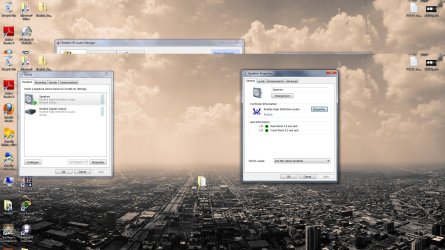
speaker_rearandfront.jpg

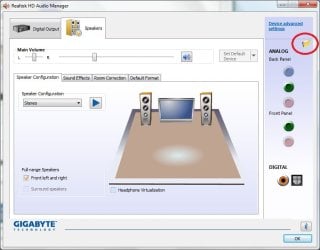
Below is the window i get when i click on the folder icon (connector settings ) on realtek manager:
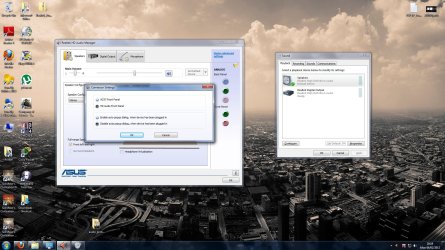
connect_set_yelfolder.jpg

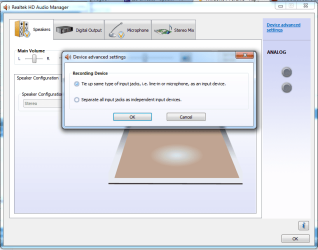
Below is when i click on the link 'device advanced settings':
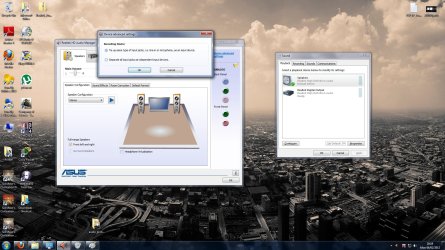
device_advanced.jpg

Below is when i click on the speaker icon in taskbar and click on 'volume control options':
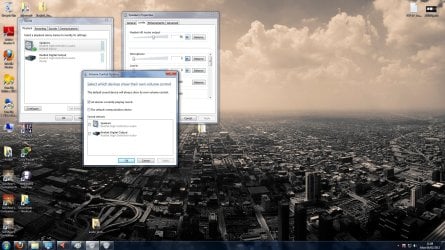
volumecontroloptions.jpg

So many forums/help guides have the disabled rear panel option thing and among other things but i dont have them.
The audio driver i downloaded from the asus website with respect to my mobo.
I've tried to include everything and sorry if i've left anything out.
Will be checking constantly for replies so i can reply back!

Please guys/girls,

Is there a way to fix this? I'm 20 and i've had really crap headaches over this. :(
My temp fix is to remove my audio cable from the rear lime panel that goes to my monitor speakers.
I beg that you great people can fix this thorn in my side!!!!!

Please!

Thank you,

Daniel

ps. system spec i added when i registered, sorry my head hurts

Edit: i have uninstalled and re-installed the audio driver from the asus site many times.
my anti virus is kasperksy internet security 2012
edit:

i've alsso, gone into BIOS and put on HD and AC front panel and vice versa, however it does not change any of the settings.

(in realtek when i click on connector settings and click HD, i get pop saying "you've just unplugged device.... and the front panel fades. when i go back to ac, the front panel comes back.)
 

Attachments
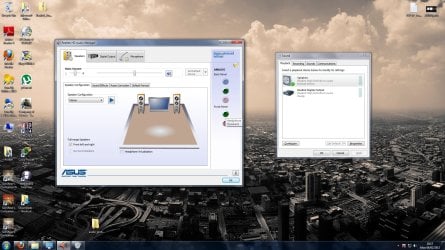
  • realtek_and_sound.jpg
    realtek_and_sound.jpg
    275.4 KB · Views: 429
Last edited:

My Computer My Computer

At a glance

Windows 7 Home Premium 64 bitAMD Athlon II X3 4554GB DD3 1333 KingstonGeforce GT430
OS
Windows 7 Home Premium 64 bit
CPU
AMD Athlon II X3 455
Motherboard
Asus M5A78L-M LX
Memory
4GB DD3 1333 Kingston
Graphics Card(s)
Geforce GT430
Sound Card
Onboard
Monitor(s) Displays
HANNS-G HH221DP
Hard Drives
Seagate 500GB 3.5" SATA-III 6Gb/s Barracuda Hard Drive 7200RPM 16MB Cache
PSU
Powercool 550W 80plus
Case
Casecom MA-1188 Black Micro ATX
Cooling
Stock
sorry for the large images, i should have cropped. sorry :(

edit: show have done it on first thread sorry, just saw edit button :)
 

My Computer My Computer

At a glance

Windows 7 Home Premium 64 bitAMD Athlon II X3 4554GB DD3 1333 KingstonGeforce GT430
OS
Windows 7 Home Premium 64 bit
CPU
AMD Athlon II X3 455
Motherboard
Asus M5A78L-M LX
Memory
4GB DD3 1333 Kingston
Graphics Card(s)
Geforce GT430
Sound Card
Onboard
Monitor(s) Displays
HANNS-G HH221DP
Hard Drives
Seagate 500GB 3.5" SATA-III 6Gb/s Barracuda Hard Drive 7200RPM 16MB Cache
PSU
Powercool 550W 80plus
Case
Casecom MA-1188 Black Micro ATX
Cooling
Stock
If your case doesn't have HD audio front inputs the modern Realtek drivers won't be able to detect when a connection is made and thus cannot mute the rear device.
 

My Computer My Computer

At a glance

Windows 7 Ultimate x64AMD Phenom II X4 98016 GB Patriot DDR3nVidia GeForce GTX 580 1536 MB
OS
Windows 7 Ultimate x64
CPU
AMD Phenom II X4 980
Motherboard
GA-970A-UD3
Memory
16 GB Patriot DDR3
Graphics Card(s)
nVidia GeForce GTX 580 1536 MB
Sound Card
Realtek ALC889
Screen Resolution
1920x1080
Hard Drives
Crucial M4 128 GB SATA III SSD
2x WD Black 1 TB 7200 RPM SATA III in RAID 0
PSU
Antec High Current Gamer 900W
Case
Antec DF-30
Keyboard
Logitech G510
Mouse
Logitech G500
If your case doesn't have HD audio front inputs the modern Realtek drivers won't be able to detect when a connection is made and thus cannot mute the rear device.

Any advice on what to do? Do i download OLD realtek drivers?
 

My Computer My Computer

At a glance

Windows 7 Home Premium 64 bitAMD Athlon II X3 4554GB DD3 1333 KingstonGeforce GT430
OS
Windows 7 Home Premium 64 bit
CPU
AMD Athlon II X3 455
Motherboard
Asus M5A78L-M LX
Memory
4GB DD3 1333 Kingston
Graphics Card(s)
Geforce GT430
Sound Card
Onboard
Monitor(s) Displays
HANNS-G HH221DP
Hard Drives
Seagate 500GB 3.5" SATA-III 6Gb/s Barracuda Hard Drive 7200RPM 16MB Cache
PSU
Powercool 550W 80plus
Case
Casecom MA-1188 Black Micro ATX
Cooling
Stock
If your case doesn't have HD audio front inputs the modern Realtek drivers won't be able to detect when a connection is made and thus cannot mute the rear device.

Any advice on what to do? Do i download OLD realtek drivers?

I'll update again with the case front panel audio. the case I brought only came with one fron panel audio cable, if i remember correctly it was HD audio, but i'll confirm that later on.

thanks for the post though!
 

My Computer My Computer

At a glance

Windows 7 Home Premium 64 bitAMD Athlon II X3 4554GB DD3 1333 KingstonGeforce GT430
OS
Windows 7 Home Premium 64 bit
CPU
AMD Athlon II X3 455
Motherboard
Asus M5A78L-M LX
Memory
4GB DD3 1333 Kingston
Graphics Card(s)
Geforce GT430
Sound Card
Onboard
Monitor(s) Displays
HANNS-G HH221DP
Hard Drives
Seagate 500GB 3.5" SATA-III 6Gb/s Barracuda Hard Drive 7200RPM 16MB Cache
PSU
Powercool 550W 80plus
Case
Casecom MA-1188 Black Micro ATX
Cooling
Stock
I dont think other drivers would work since HD audio is a completely different device. Every Realtek HD chip I've had has had an option in Connector Settings (The folder icon) to enable/disable Front Panel jack detection. I see yours doesn't so to be honest I'm not exactly sure what the deal is.

If your case is new (2009 or so) it should have HD audio ports. Usually the front ports have 2 connectors, one for HDA and another for AC97. You might check to make sure the right one (HD) is being used to connect to the motherboard.
 

My Computer My Computer

At a glance

Windows 7 Ultimate x64AMD Phenom II X4 98016 GB Patriot DDR3nVidia GeForce GTX 580 1536 MB
OS
Windows 7 Ultimate x64
CPU
AMD Phenom II X4 980
Motherboard
GA-970A-UD3
Memory
16 GB Patriot DDR3
Graphics Card(s)
nVidia GeForce GTX 580 1536 MB
Sound Card
Realtek ALC889
Screen Resolution
1920x1080
Hard Drives
Crucial M4 128 GB SATA III SSD
2x WD Black 1 TB 7200 RPM SATA III in RAID 0
PSU
Antec High Current Gamer 900W
Case
Antec DF-30
Keyboard
Logitech G510
Mouse
Logitech G500
I dont think other drivers would work since HD audio is a completely different device. Every Realtek HD chip I've had has had an option in Connector Settings (The folder icon) to enable/disable Front Panel jack detection. I see yours doesn't so to be honest I'm not exactly sure what the deal is.

If your case is new (2009 or so) it should have HD audio ports. Usually the front ports have 2 connectors, one for HDA and another for AC97. You might check to make sure the right one (HD) is being used to connect to the motherboard.

The case i have is a cheap crap thing, came with no manual. ill check my front panel cables once more.
the mobo does support HD audo/AC so i dont get it. if i took a picture of the front panel connectors would it help?
Can anyone recommend a cheap case that takes micro atx boards and atx psu that has HD audio?
 

My Computer My Computer

At a glance

Windows 7 Home Premium 64 bitAMD Athlon II X3 4554GB DD3 1333 KingstonGeforce GT430
OS
Windows 7 Home Premium 64 bit
CPU
AMD Athlon II X3 455
Motherboard
Asus M5A78L-M LX
Memory
4GB DD3 1333 Kingston
Graphics Card(s)
Geforce GT430
Sound Card
Onboard
Monitor(s) Displays
HANNS-G HH221DP
Hard Drives
Seagate 500GB 3.5" SATA-III 6Gb/s Barracuda Hard Drive 7200RPM 16MB Cache
PSU
Powercool 550W 80plus
Case
Casecom MA-1188 Black Micro ATX
Cooling
Stock
Personally I don't know how to tell what kind of connectors they are by visual inspection though there is probably a way.
 

My Computer My Computer

At a glance

Windows 7 Ultimate x64AMD Phenom II X4 98016 GB Patriot DDR3nVidia GeForce GTX 580 1536 MB
OS
Windows 7 Ultimate x64
CPU
AMD Phenom II X4 980
Motherboard
GA-970A-UD3
Memory
16 GB Patriot DDR3
Graphics Card(s)
nVidia GeForce GTX 580 1536 MB
Sound Card
Realtek ALC889
Screen Resolution
1920x1080
Hard Drives
Crucial M4 128 GB SATA III SSD
2x WD Black 1 TB 7200 RPM SATA III in RAID 0
PSU
Antec High Current Gamer 900W
Case
Antec DF-30
Keyboard
Logitech G510
Mouse
Logitech G500
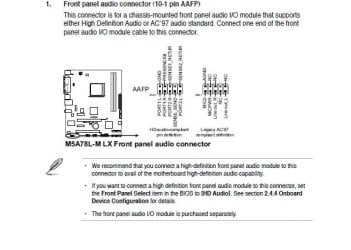
This is the front panel from my mobo:

mobofrontpanel.jpg

As I'm away from my pc, i won't be able to look for the audio cable, but I'm sure, from memory, that may case only had one audio cable, which was named as HD Audio cable - I WILL TAKE a pic to confirm guys, i really want to fix this.

If i confirm that my case has only one audio cable, than i confirm that my case is sh and you know what?
 

My Computer My Computer

At a glance

Windows 7 Home Premium 64 bitAMD Athlon II X3 4554GB DD3 1333 KingstonGeforce GT430
OS
Windows 7 Home Premium 64 bit
CPU
AMD Athlon II X3 455
Motherboard
Asus M5A78L-M LX
Memory
4GB DD3 1333 Kingston
Graphics Card(s)
Geforce GT430
Sound Card
Onboard
Monitor(s) Displays
HANNS-G HH221DP
Hard Drives
Seagate 500GB 3.5" SATA-III 6Gb/s Barracuda Hard Drive 7200RPM 16MB Cache
PSU
Powercool 550W 80plus
Case
Casecom MA-1188 Black Micro ATX
Cooling
Stock
Hi 2danny9, i have got exactly the same problem on my Dell latitude. Did you find any solution?

thanks.
 

My Computer My Computer

At a glance

Deutschland
OS
Deutschland
Ran into this issue just now. Found out I had plugged the wrong audio cable into my motherboard.

Check to make sure that you plugged in your case's HD Audio cable and not the AC97 cable. They should both be on the same strand of wires.
 

My Computer My Computer

At a glance

Windows 7 64bit
OS
Windows 7 64bit
problem still not resolved. I keep getting the audio from the loud speaker even when the headphones are enabled. For example when skype login, i head a loud login sound. When someone sends a message ..it happens the same and so. It is very annoying at times. The headphones works also but i don't understand the loud speaker enabling from time to time.

Thanks.
 

My Computer My Computer

At a glance

Deutschland
OS
Deutschland
I am having the same problem you are. My Sound/Playback tab looks the same with the only two options being the Speaker (Realtek) and Realtek Digital Output. However when I click under "jack information" I only get one option, which is listed as "ATAPI internal ATAPI jack". Last night I was able to get it so that sound was coming through both the headphones and speakers. I was able to mute the speakers manually, and that worked, but I accidentally reverted the settings.

I've also re-installed the drivers, but nothing seems to help the problem. I'm running this on a laptop, model ASUS U41S. Any help would be appreciated.
 

My Computer My Computer

At a glance

Win 7 Ultimate 64 bit
OS
Win 7 Ultimate 64 bit
Problem Solved

On that Realtek HD Audio Manager... Above the ANALOG word, there is an icon of a folder, click it!

make sure "Disable front panel jack detection" is off!

Works for me!
 

My Computer My Computer

At a glance

Windows 7 Ultimate 32bit
OS
Windows 7 Ultimate 32bit
On that Realtek HD Audio Manager... Above the ANALOG word, there is an icon of a folder, click it!

make sure "Disable front panel jack detection" is off!

Works for me!

I don't have a folder above "ANALOG". There is text that says "Device Advanced Settings".

When I click on that, i get the option to tie up input jacks, or leave them the same. See the picture below.
 

Attachments

  • screenshot.PNG
    screenshot.PNG
    38.6 KB · Views: 118

My Computer My Computer

At a glance

Win 7 Ultimate 64 bit
OS
Win 7 Ultimate 64 bit
Some pictures...

As you can see in the first screen I have this folder icon, when I click it the second screen appears with "Disable front.."

I have a desktop, you have a laptop... Maybe you should try to search for drivers that have the folder icon. :confused:
 

Attachments

  • first.jpg
    first.jpg
    47.5 KB · Views: 71
  • second.JPG
    second.JPG
    54.9 KB · Views: 100

My Computer My Computer

At a glance

Windows 7 Ultimate 32bit
OS
Windows 7 Ultimate 32bit
let me try to help you... I can check if my drivers are good for your laptop...

At your screen you can see " i " button a little above the OK button... click it and tell me whats your Audio Codec.
 

My Computer My Computer

At a glance

Windows 7 Ultimate 32bit
OS
Windows 7 Ultimate 32bit

My Computer My Computer

At a glance

Win 7 Ultimate 64 bit
OS
Win 7 Ultimate 64 bit
Back
Top