
SP1 error problem

CJW

New member
Power User
VIP
Local time
9:27 AM
Messages
439
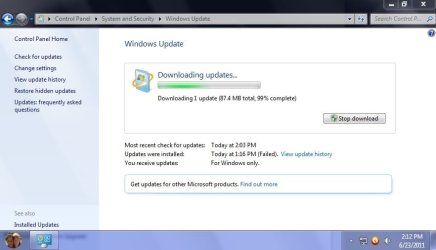
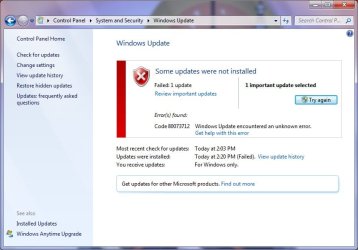
Yesturday I tried to install SP1 & recieved this error: "WindowsUpdate_80073712" "WindowsUpdate_dt000"

After finding out it was most likely due to registry problems, I tried WiseFixer, which a few sites recommended as a free DL & install cleaner & although it found several errors, to use its 'cleanup' function I have to pay $50.00 ... no thank you. So I cleaned the registry using Auslogics Registry Cleaner & then CCleaner's registry tool & shut down the comfuser.

This morning I booted the comfuser & as a precaution, ran Auslogics Registry Cleaner & then CCleaner's registry tool once again, no errors found by either program. So I procceded to install SP1 again, again I recieved the same error. Any recommendations on what to try next?

Also, is WiseFixer a better registry cleaner? It found hundreds more errors than Auslogics Registry Cleaner & CCleaner's registry tool did.
 

My Computer

Computer type
PC/Desktop
Computer Manufacturer/Model Number
Self built comfuser
OS
10 Pro. 64Bit
CPU
AMD FX 4100, 4-Core Black Edition. Socket AM3+ ~ 3.60GHz
Motherboard
ASUS M5A97 LE R2.0
Memory
2x 4GB Kingston HyperX DDR3-1866 (PC3-14900) - 8GB Total
Graphics Card(s)
ASUS Radeon HD 6670-2GD3
Sound Card
Onboard High Definition Audio Device
Monitor(s) Displays
HP 2009m LCD
Screen Resolution
1600x900, True Color (32bit), 60Hertz
Hard Drives
WD Blue - 1TB, 3D NAND - SATA SSD
PSU
XFX Pro 450W Core Edition - Fully Wired
Case
Antec Super Lanboy
Cooling
Stock CPU fan + 2 (1 front, 1 back) 120mm Antec fans
Keyboard
Logitech MK700/MK710
Mouse
Logitech M705
Internet Speed
Frontier FiOS 50/50
Antivirus
Windows Security
Browser
Vivaldi
Other Info
1x ASUS DRW-24B1ST Multi-DVD Rewriter
1x RocketFish AIO Media Card Reader
1x WD 1TB Passport USB External Drive

My Computer

Computer type
PC/Desktop
Computer Manufacturer/Model Number
Home made Desktop
OS
Windows 10 Pro. 64/ version 1709 Windows 7 Pro/64
CPU
Intel i7-6800K @ 4.3
Motherboard
ASUS X-99 Deluxe II
Memory
Corsair Platinum 16 gig @2400
Graphics Card(s)
EVGA GTX 1070 OC
Monitor(s) Displays
Asus 27" LED LCD/VE278Q
Screen Resolution
1920-1080 or 1280-720 HDMI
Hard Drives
INTEL SSD 730-240 Gb Sata 3.0/
PSU
EVGA Platium 1200W
Case
Phanteks Luxe Tempered Glass 8 fans/ one radiator
Cooling
XSPC/ Water Cooled CPU
Keyboard
Das 4 Professional
Mouse
Logitech M705/MX Anywhere 2-S
Internet Speed
100 mbits
Antivirus
Microsoft Security Essentials/ Malwarebytes Premium 3.0/ SAS
Browser
I.E. 11 default/Firefox/ ISP Time Warner Cable/Spectrum
Other Info
LG BluRay Burner/
Sound system-KLipsch-THX/
Icy Dock ssd Hot Swap bays.
I've tried all I could in the supplied link, rebooted each time, tried again; no go.

I've tried through my Standard account & Admin. account; no go.

Cleaned the registry multiple times w/Auslogics Registry Cleaner, CCleaner's registry tool, Uniblue's Registy Booster & manually; no go.

Used the cleanup tool from Microsoft's website; no go.

I have no idea what to try next, think I just may have to skip this 1.

Wish we were told what it is that causes progress to stop. Don't know if this helps, but when DLing, I get 0MB & 0% for around 10mins. then next second it shoots to 87.4MB & 99%. Then in another 15/so mins. I get the error: Some updates were not installed.
 

Attachments

  • SP1~1.jpg
    SP1~1.jpg
    85.2 KB · Views: 5
  • SP1~2.jpg
    SP1~2.jpg
    100.6 KB · Views: 8

My Computer

Computer type
PC/Desktop
Computer Manufacturer/Model Number
Self built comfuser
OS
10 Pro. 64Bit
CPU
AMD FX 4100, 4-Core Black Edition. Socket AM3+ ~ 3.60GHz
Motherboard
ASUS M5A97 LE R2.0
Memory
2x 4GB Kingston HyperX DDR3-1866 (PC3-14900) - 8GB Total
Graphics Card(s)
ASUS Radeon HD 6670-2GD3
Sound Card
Onboard High Definition Audio Device
Monitor(s) Displays
HP 2009m LCD
Screen Resolution
1600x900, True Color (32bit), 60Hertz
Hard Drives
WD Blue - 1TB, 3D NAND - SATA SSD
PSU
XFX Pro 450W Core Edition - Fully Wired
Case
Antec Super Lanboy
Cooling
Stock CPU fan + 2 (1 front, 1 back) 120mm Antec fans
Keyboard
Logitech MK700/MK710
Mouse
Logitech M705
Internet Speed
Frontier FiOS 50/50
Antivirus
Windows Security
Browser
Vivaldi
Other Info
1x ASUS DRW-24B1ST Multi-DVD Rewriter
1x RocketFish AIO Media Card Reader
1x WD 1TB Passport USB External Drive
I've tried all I could in the supplied link, rebooted each time, tried again; no go.

I've tried through my Standard account & Admin. account; no go.

Cleaned the registry multiple times w/Auslogics Registry Cleaner, CCleaner's registry tool, Uniblue's Registy Booster & manually; no go.

Used the cleanup tool from Microsoft's website; no go.

I have no idea what to try next, think I just may have to skip this 1.

Wish we were told what it is that causes progress to stop. Don't know if this helps, but when DLing, I get 0MB & 0% for around 10mins. then next second it shoots to 87.4MB & 99%. Then in another 15/so mins. I get the error: Some updates were not installed.
The indiscriminate use of registry "cleaners" is only making the issue worse. Can you restore all of the backups that these "cleaners" made for each time they were run to go back to square one ?

If so, then download and save the System Update Readiness Tool for Windows 7 64-bit (CheckSUR)

If the installed antivirus is a Norton, McAfee, Trend, or Kaspersky product, then configure the system to Clean boot prior to running CheckSUR.

If a 3rd party firewall was being used previously, then ensure that the native Win 7 firewall is now showing as On as all 3rd party firewalls are Disabled in the Clean boot state and the system must be connected to the internet so that CheckSUR can download files.

Now run CheckSUR. When it's finished running either go over the logs it created or .zip up one of them and attach it to your response.
The logs are located at and named

Window\Logs\CBS\CheckSUR.log
Windows\Logs\CBS\CheckSUR.persist.log

Undo the Clean boot configuration after running CheckSUR and restart to normal Windows mode. If a 3rd party firewall was being used then ensure it's now On and the native Win 7 firewall is Off.

You are most likely looking at a Repair Installation or, at worse if the registry "cleaners" backups can not be completely restored, a Clean reinstallation of Windows 7.
 

My Computer

OS
Windows 7 Ultimate x86; Windows XP Pro SP3 x86; Windows Vista Ultimate x86
Yesturday my Admin. Account went MIA :mad:
Tried Sys. Restore, no go. Safe Mode, no go. Sys. Restore while in Safe Mode, no go.
Just going to do a complete wipe & reinstall :rolleyes: May even be the best thing to do & I don't mind it anyway.
 

My Computer

Computer type
PC/Desktop
Computer Manufacturer/Model Number
Self built comfuser
OS
10 Pro. 64Bit
CPU
AMD FX 4100, 4-Core Black Edition. Socket AM3+ ~ 3.60GHz
Motherboard
ASUS M5A97 LE R2.0
Memory
2x 4GB Kingston HyperX DDR3-1866 (PC3-14900) - 8GB Total
Graphics Card(s)
ASUS Radeon HD 6670-2GD3
Sound Card
Onboard High Definition Audio Device
Monitor(s) Displays
HP 2009m LCD
Screen Resolution
1600x900, True Color (32bit), 60Hertz
Hard Drives
WD Blue - 1TB, 3D NAND - SATA SSD
PSU
XFX Pro 450W Core Edition - Fully Wired
Case
Antec Super Lanboy
Cooling
Stock CPU fan + 2 (1 front, 1 back) 120mm Antec fans
Keyboard
Logitech MK700/MK710
Mouse
Logitech M705
Internet Speed
Frontier FiOS 50/50
Antivirus
Windows Security
Browser
Vivaldi
Other Info
1x ASUS DRW-24B1ST Multi-DVD Rewriter
1x RocketFish AIO Media Card Reader
1x WD 1TB Passport USB External Drive
Yesturday my Admin. Account went MIA :mad:
Tried Sys. Restore, no go. Safe Mode, no go. Sys. Restore while in Safe Mode, no go.
Just going to do a complete wipe & reinstall :rolleyes: May even be the best thing to do & I don't mind it anyway.
That's a wise choice and please, whatever you do, stay away from those "wonderful\miraculous\magical registry cleaners". As you've seen first hand, if one does not know how to manually edit the registry than running one of these so-called "cleaners' is akin to giving a loaded gun to a 3 year old.

If one understands how to edit the registry properly and the registry cleaner provides reliable backups than can be easily restored, then and only then, is it safe to run it.
 

My Computer

OS
Windows 7 Ultimate x86; Windows XP Pro SP3 x86; Windows Vista Ultimate x86
Back
Top