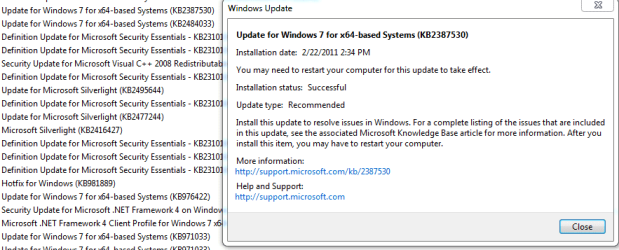
Upon checking updates, there are times when updates are checked and one or two are not unchecked. These are not the optional updates I'm referring to but "Important and Recommended updates. I usually install the checked updates, first. I then go back and install the unchecked updates.
When I brought up Windows Update a day or so after the SP1 release,
I noticed two recommended updates were checked.......KB2387530 and KB2484033.
SP1 KB976932 was not checked.
So naturally I installed the checked updates, first and then SP1.
Checking and unchecking certain boxes may be a way of the OS telling us to install
Recommended updates before the Important updates.
Your thoughts, please!
When I brought up Windows Update a day or so after the SP1 release,
I noticed two recommended updates were checked.......KB2387530 and KB2484033.
SP1 KB976932 was not checked.
So naturally I installed the checked updates, first and then SP1.
Checking and unchecking certain boxes may be a way of the OS telling us to install
Recommended updates before the Important updates.
Your thoughts, please!
My Computer
- Computer type
- PC/Desktop
- Computer Manufacturer/Model Number
- Custom Build
- OS
- Windows 7 Home Premium 64 bit
- CPU
- Intel Core i7-4790
- Motherboard
- GA-Z87X-D3H
- Memory
- G.SKILL 8GB (2 x 4GB) DDR3 F3-10666CL9D-8GBNT
- Graphics Card(s)
- AMD Radeon R7 250
- Sound Card
- Realtek ALC892
- Monitor(s) Displays
- Samsung UN32EH5000, Dell 1703FPT
- Screen Resolution
- 1920 x 1080, 1280 x 1024
- Hard Drives
- WD5003AZEX
WD10EZEX
Samsung HD103SJ
Samsung 128 GB 840 PRO
- PSU
- SeaSonic M12II SS-500GM
- Case
- Fractal Design Define R4
- Cooling
- Zalman CNPS9900ALED
- Keyboard
- Logitech K800
- Mouse
- Logitech M705
- Internet Speed
- 16 Mbps
- Antivirus
- Avast
- Browser
- Firefox
- Other Info
- Bose Companion 2 Multimedia Speakers