
Hello,
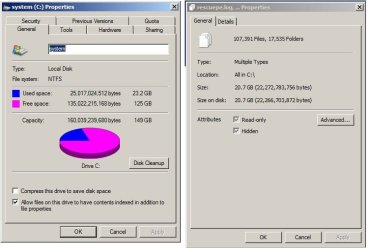
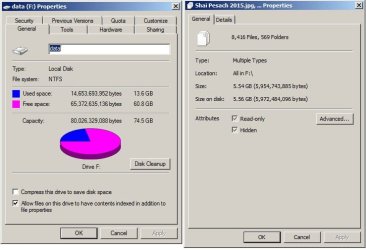
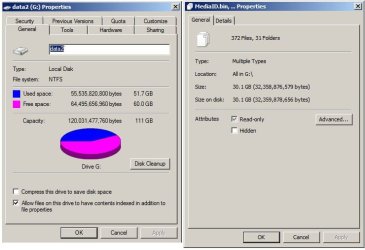
On my computer are 3 hard disks, letters "C" (system), "F" and "G" both to store data. (D and E are DVD).
"G" capacity = 149 GB, used space = 23.2 GB, actually all folders and files = 20.7 GB, missing 3 GB ?
The same on the others
"F" capacity = 74.5 GB, used space = 13.6 GB, actually all folders and files = 5.54 GB, missing 8 GB ?
"G" capacity = 111 GB, used space = 51.7 GB. actually all folders and files = 30.1 GB. missing 21 GB ?
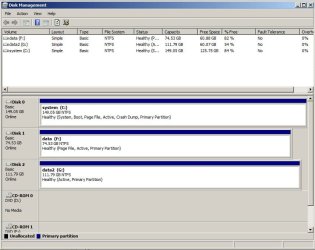
Each disk is one whole partition.
How can I find out what is on the "missing" spaces ?
To demonstrate this "riddle" enclosed here screenshots of the 3 disks and one of "disk management" window.
Hope the images won't overlap.
Answers will be appreciated.
Thanks
Motim
On my computer are 3 hard disks, letters "C" (system), "F" and "G" both to store data. (D and E are DVD).
"G" capacity = 149 GB, used space = 23.2 GB, actually all folders and files = 20.7 GB, missing 3 GB ?
The same on the others
"F" capacity = 74.5 GB, used space = 13.6 GB, actually all folders and files = 5.54 GB, missing 8 GB ?
"G" capacity = 111 GB, used space = 51.7 GB. actually all folders and files = 30.1 GB. missing 21 GB ?
Each disk is one whole partition.
How can I find out what is on the "missing" spaces ?
To demonstrate this "riddle" enclosed here screenshots of the 3 disks and one of "disk management" window.
Hope the images won't overlap.
Answers will be appreciated.
Thanks
Motim
Attachments
My Computer
- Computer type
- PC/Desktop
- Computer Manufacturer/Model Number
- custom built
- OS
- Windows 7 Pro 32 bit
- CPU
- intel celeron 2.66GH 2.56GH
- Memory
- 2.00 GB
- Graphics Card(s)
- Nvidia fx5500
- Hard Drives
- Western digital
- Antivirus
- AVG
- Browser
- firefox
