Solved Speaker mode (unable to change to Headphones)

dt76

New member
Local time
2:53 PM
Messages
7
Hello everyone,

My motherboard is Asus M4N68-T-M V2 with VIA HD Audio as the sound.

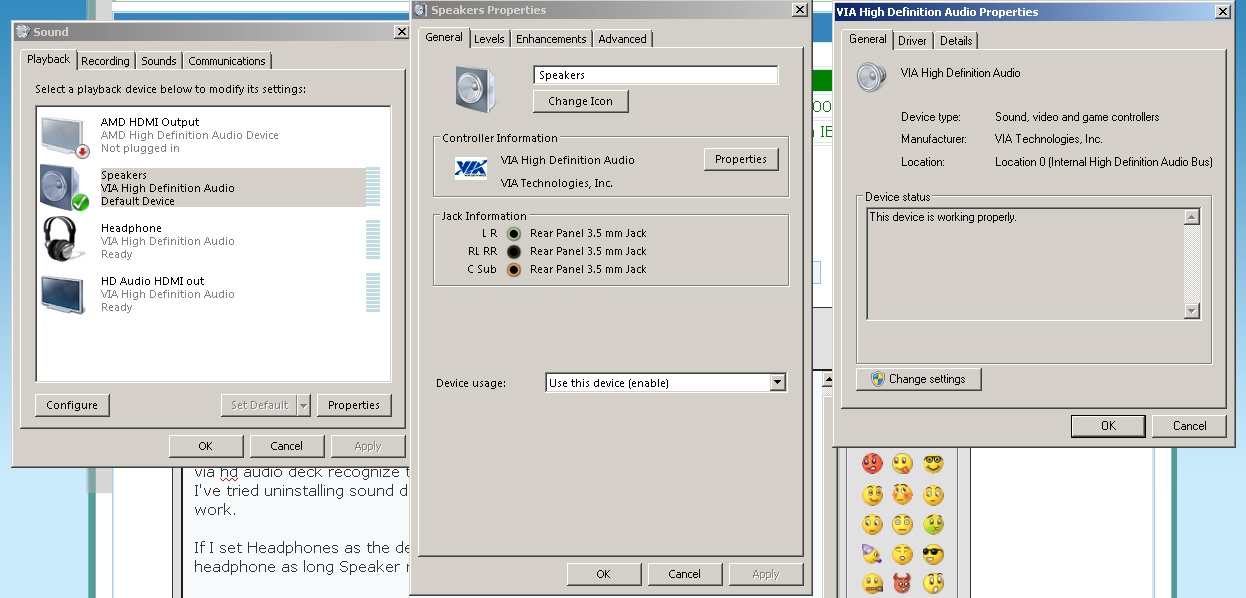
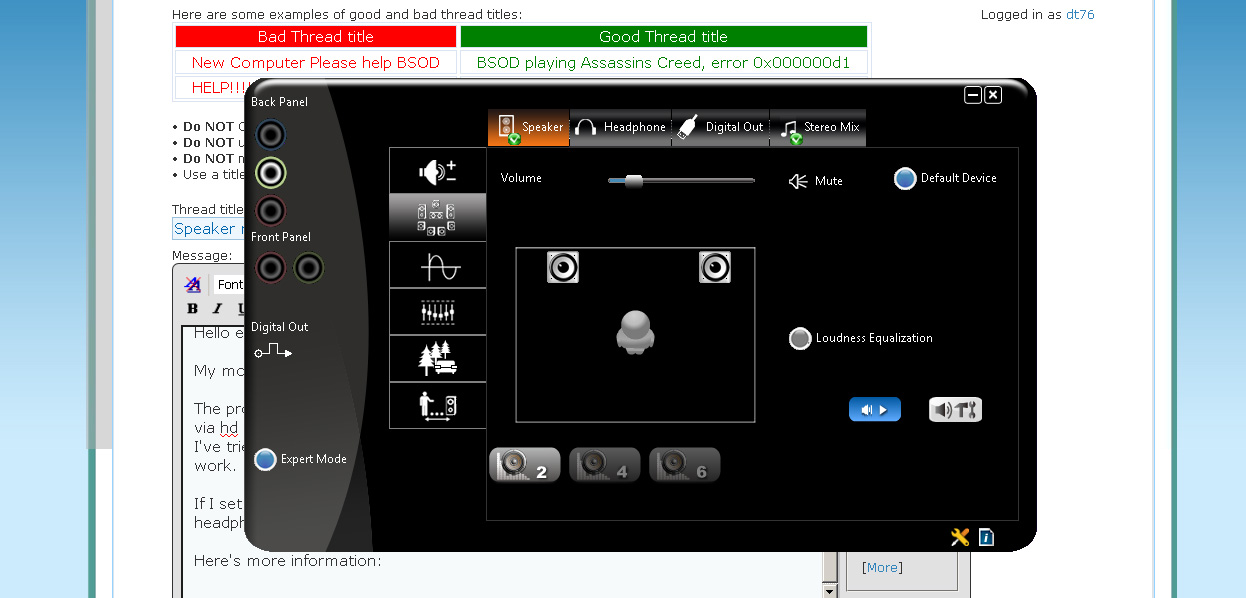
The problem: I'm using a headphone but when it is plugged it, both windows7 and via hd audio deck recognize the device only as a Speaker instead of Headphone. I've tried uninstalling sound driver as well as VIA HD audio deck but still it doesn't work.

If I set Headphones as the default device, there's no sound. There is sound on my headphone as long Speaker mode is set as default device instead.

Btw my headphone is plugged at the back, when I plug it in the front it doesn't work presumably the jack at the front has spoilt but this didn't quite matter since I was using the back jack in the past with no problem and the mode used to be Headphones but now it's Speaker mode. I've also tried inserting in my iphone's earphone instead and it is still Speaker mode

Here's more information:
J98l8.jpg

C7JfG.jpg

iEzkK.jpg


Hope you guys can help me out!
 

My Computer My Computer

At a glance

Windows 7 Pro 32bit
OS
Windows 7 Pro 32bit
You have to generally use the front panel connections to get that identification.

Since you are plugging it into the back panel the system basically assumes it's speakers. It can't actually tell the difference based on the plug... it's not a usb device that communicates with the system. So all the system has to go on is where it's being plugged in.

Does your system have front panel audio hook ups?
 

My Computer My Computer

At a glance

Windows 7 x64Intel i7 2600kG.skill Ripjaw 16gigs @ 1866Nvidia gtx580 (evga)
Computer Manufacturer/Model Number
Insane hobo technologies. ;-)
OS
Windows 7 x64
CPU
Intel i7 2600k
Motherboard
Asrock z68 extreme 4 gen 3
Memory
G.skill Ripjaw 16gigs @ 1866
Graphics Card(s)
Nvidia gtx580 (evga)
Sound Card
Integrated HD audio + hdmi
Monitor(s) Displays
24" ASUS widescreen + 42" insignia
Screen Resolution
1080p (1920x1080)
Hard Drives
128 Samsung 830
256 Samsung 840
3 x 1tb storage drive (various)
1 western digital 1tb (eSATA)
1 Seagate 1tb (eSATA)
PSU
1 kilowatt SLI/Crossfire rated Silverstone modular
Case
NZXT Phantom + additional 220 fan
Cooling
Zalmann
Keyboard
Microsoft wireless 3000 (v2)
Mouse
MS - wireless 5000 (bluetrack)
Internet Speed
depends on if you ask me or my provider.
Other Info
The above information is provided as is, and the author assumes no responsibility for issues it may cause with your sanity or fanboyism.
Thanks for your prompt reply Maguscreed

I do have front panel jack but I don't think it is working because when I plugged it in, nothing happens and there's no sound to it.

One odd thing is that the back panel used to be able to identify my headphone as Headphone in the past, something suddenly changed when I notice it during gaming.
 

My Computer My Computer

At a glance

Windows 7 Pro 32bit
OS
Windows 7 Pro 32bit
Also is there a program or thing I can do to force windows to recognize the jacked in device is headphone?
 

My Computer My Computer

At a glance

Windows 7 Pro 32bit
OS
Windows 7 Pro 32bit
Are you saying you have a front panel jack but it does not work? If so it probably just needs connecting to the mother board. Time to get your manual out & see where it goes.

Have you checked the advance options in VIA HD?
 

My Computer My Computer

At a glance

Windows 7 Pro x64 -- PCLinuxOS KDE4 FullMonty...i7-875k @ Turbo - 7,6,5,5 - 3.6ghzCorsair CMD8GX3M4A1600C8 8gbAsus EAH5850 DirectCU/2DIS/1GD5
Computer Manufacturer/Model Number
Custom
OS
Windows 7 Pro x64 -- PCLinuxOS KDE4 FullMonty 2011
CPU
i7-875k @ Turbo - 7,6,5,5 - 3.6ghz
Motherboard
Asus P7P55D-E Deluxe
Memory
Corsair CMD8GX3M4A1600C8 8gb
Graphics Card(s)
Asus EAH5850 DirectCU/2DIS/1GD5
Sound Card
On Board
Monitor(s) Displays
Samsung SyncMaster T220 - Panasonic VT30a 50"
Screen Resolution
1680x1050 -
Hard Drives
Corsair Force 3 SSD 120GB x 2 ::
WD VelociRaptor 150GB WD1500HLFS x 2
PSU
Corsair HX-850 Power Supply
Case
Coolmaster HAF 932
Cooling
Corsair H50
Keyboard
Logitech Wireless MK700
Mouse
Logitech Wireless MX620
Internet Speed
Good enough for now
Other Info
Voip. Insanely cheap phone calls.

My Computer My Computer

At a glance

Windows 7 Pro 32bit
OS
Windows 7 Pro 32bit
sorry went to bed on you.
Yes, the aafp appears to be the 10 pin front panel connector.

It was labeled that way on my old asus board.
 

My Computer My Computer

At a glance

Windows 7 x64Intel i7 2600kG.skill Ripjaw 16gigs @ 1866Nvidia gtx580 (evga)
Computer Manufacturer/Model Number
Insane hobo technologies. ;-)
OS
Windows 7 x64
CPU
Intel i7 2600k
Motherboard
Asrock z68 extreme 4 gen 3
Memory
G.skill Ripjaw 16gigs @ 1866
Graphics Card(s)
Nvidia gtx580 (evga)
Sound Card
Integrated HD audio + hdmi
Monitor(s) Displays
24" ASUS widescreen + 42" insignia
Screen Resolution
1080p (1920x1080)
Hard Drives
128 Samsung 830
256 Samsung 840
3 x 1tb storage drive (various)
1 western digital 1tb (eSATA)
1 Seagate 1tb (eSATA)
PSU
1 kilowatt SLI/Crossfire rated Silverstone modular
Case
NZXT Phantom + additional 220 fan
Cooling
Zalmann
Keyboard
Microsoft wireless 3000 (v2)
Mouse
MS - wireless 5000 (bluetrack)
Internet Speed
depends on if you ask me or my provider.
Other Info
The above information is provided as is, and the author assumes no responsibility for issues it may cause with your sanity or fanboyism.
Hi MagusCreed,

Thanks but I would like to reconfirm before I do anything as I'm not savvy with computers and doesn't want to mess up anything.

Basically I'll just move everything from the Fpanel to aafp, in the same format as well? I tried plugging out and each pin is individual wire.

Pls see http://i.imgur.com/8HcYh.jpg
 

My Computer My Computer

At a glance

Windows 7 Pro 32bit
OS
Windows 7 Pro 32bit
whoa, no there should be separate connectors for the audio.

Trace it back up to where the plugs are in the case if you can't find them right now.
The ones currently plugged in are the ones for controlling the power button and hard drive lights, etc...
 

My Computer My Computer

At a glance

Windows 7 x64Intel i7 2600kG.skill Ripjaw 16gigs @ 1866Nvidia gtx580 (evga)
Computer Manufacturer/Model Number
Insane hobo technologies. ;-)
OS
Windows 7 x64
CPU
Intel i7 2600k
Motherboard
Asrock z68 extreme 4 gen 3
Memory
G.skill Ripjaw 16gigs @ 1866
Graphics Card(s)
Nvidia gtx580 (evga)
Sound Card
Integrated HD audio + hdmi
Monitor(s) Displays
24" ASUS widescreen + 42" insignia
Screen Resolution
1080p (1920x1080)
Hard Drives
128 Samsung 830
256 Samsung 840
3 x 1tb storage drive (various)
1 western digital 1tb (eSATA)
1 Seagate 1tb (eSATA)
PSU
1 kilowatt SLI/Crossfire rated Silverstone modular
Case
NZXT Phantom + additional 220 fan
Cooling
Zalmann
Keyboard
Microsoft wireless 3000 (v2)
Mouse
MS - wireless 5000 (bluetrack)
Internet Speed
depends on if you ask me or my provider.
Other Info
The above information is provided as is, and the author assumes no responsibility for issues it may cause with your sanity or fanboyism.
Okay I'm a tad confuse right now, do you mind telling me which should I plug out and connect to the aafp?

The problem is some plug is connected to Fpanel when it should be connected to aafp right? which is why the front jack audio is not working.

I plugged out some wire on the fpanel before plugging them back in, I did turn it around and there's some wording written below.
 

My Computer My Computer

At a glance

Windows 7 Pro 32bit
OS
Windows 7 Pro 32bit
I'm telling you the wires you are looking at there, that are attached to the motherboard are in the correct place and shouldn't be messed with.

There is another plug that should match up to the aafp in the case.

As I was trying to say if you just look at the case where the headphone/mic jack is on the front then look on the inside and follow the wire where do you wind up?

I'm guessing it's something that it looks like this.
xfi_extremeaudio_frontpanel2a.jpg


at least I hope so, some cases have a mess of loose wires for the front panel audio that's a pain to hookup.

To be perfectly honest, from how unsure of yourself you seem inside that case. I'm thinking it may be best to just deal with the problem.
I'm honestly starting to feel like I may already have you confused.
 

My Computer My Computer

At a glance

Windows 7 x64Intel i7 2600kG.skill Ripjaw 16gigs @ 1866Nvidia gtx580 (evga)
Computer Manufacturer/Model Number
Insane hobo technologies. ;-)
OS
Windows 7 x64
CPU
Intel i7 2600k
Motherboard
Asrock z68 extreme 4 gen 3
Memory
G.skill Ripjaw 16gigs @ 1866
Graphics Card(s)
Nvidia gtx580 (evga)
Sound Card
Integrated HD audio + hdmi
Monitor(s) Displays
24" ASUS widescreen + 42" insignia
Screen Resolution
1080p (1920x1080)
Hard Drives
128 Samsung 830
256 Samsung 840
3 x 1tb storage drive (various)
1 western digital 1tb (eSATA)
1 Seagate 1tb (eSATA)
PSU
1 kilowatt SLI/Crossfire rated Silverstone modular
Case
NZXT Phantom + additional 220 fan
Cooling
Zalmann
Keyboard
Microsoft wireless 3000 (v2)
Mouse
MS - wireless 5000 (bluetrack)
Internet Speed
depends on if you ask me or my provider.
Other Info
The above information is provided as is, and the author assumes no responsibility for issues it may cause with your sanity or fanboyism.
Thank you so much Maguscreed

I've open up and followed the wires and found a wire labebed Audio wasnt plugged in, I've now plugged it into the aaf panel and I can hear sounds for headphone mode now

thanks!!
 

My Computer My Computer

At a glance

Windows 7 Pro 32bit
OS
Windows 7 Pro 32bit
Glad you found it!

Could you go back up to your first post and mark this thread solved please?
 

My Computer My Computer

At a glance

Windows 7 x64Intel i7 2600kG.skill Ripjaw 16gigs @ 1866Nvidia gtx580 (evga)
Computer Manufacturer/Model Number
Insane hobo technologies. ;-)
OS
Windows 7 x64
CPU
Intel i7 2600k
Motherboard
Asrock z68 extreme 4 gen 3
Memory
G.skill Ripjaw 16gigs @ 1866
Graphics Card(s)
Nvidia gtx580 (evga)
Sound Card
Integrated HD audio + hdmi
Monitor(s) Displays
24" ASUS widescreen + 42" insignia
Screen Resolution
1080p (1920x1080)
Hard Drives
128 Samsung 830
256 Samsung 840
3 x 1tb storage drive (various)
1 western digital 1tb (eSATA)
1 Seagate 1tb (eSATA)
PSU
1 kilowatt SLI/Crossfire rated Silverstone modular
Case
NZXT Phantom + additional 220 fan
Cooling
Zalmann
Keyboard
Microsoft wireless 3000 (v2)
Mouse
MS - wireless 5000 (bluetrack)
Internet Speed
depends on if you ask me or my provider.
Other Info
The above information is provided as is, and the author assumes no responsibility for issues it may cause with your sanity or fanboyism.
Back
Top