Solved Speakers and WMC work, but can't play any other sound files

excessive03

New member
Local time
1:56 PM
Messages
8
I have a strange problem after re-installing Window 7 Home Premium onto a new Transcend SSD, having altered the BIOS drive mode to ACHI. All my data was backed up and re-installed with little trouble. But now I can't play music on WMP or anything else, and there are no system sounds at all.

I thought at first it was a matter of settings, and have altered everything I can think of, to no avail. I have uninstalled and re-installed all the sound devices, updated all the drivers I can see, and nothing works. However the restored files themselves are not corrupted, as I can hear them (and the system sounds) by plugging in earphones. The (Creative) speakers test properly in Control Panel. Also, Windows Media Centre does play and record TV, with normal sound. One USB device is shown as not starting, but I think it's the volume control for the speakers and it has always worked even when shown thus.

The MOBO is an AsusTek M2N68-VM, and Device Manager also shows under Sound, video and game controllers a TV card (USB), High Def Audio Device (Windows basic?), Nvidia HDMI Audio Device, and VIA High Def Audio, which I think is the one that matters.

Can anyone help me before I throw the SSD away and re-install everything as it was before!
 

My Computer My Computer

At a glance

Windows 7 Home Premium 64bit2.60 gigahertz AMD Phenom 9950 Quad-Core8192MBATI Radeon HD 4550
Computer type
PC/Desktop
Computer Manufacturer/Model Number
Mesh
OS
Windows 7 Home Premium 64bit
CPU
2.60 gigahertz AMD Phenom 9950 Quad-Core
Motherboard
ASUSTeK Computer INC. M2N68-VM Rev X.0x
Memory
8192MB
Graphics Card(s)
ATI Radeon HD 4550
Hard Drives
SAMSUNG HD103SI SCSI Disk Device (1000.20 GB) -- drive 0
TS64GSSD 340 SCSI Disk Device (64.02 GB) -- drive 1
Antivirus
Microsoft Security Essentials
Browser
Firrefox
Hello and welcome excessive now do the speakers work on another machine or sound device?

Are they connected by USB or the jack I can't quite make out how from your description and also the Creative speakers did they come with any form of software if so what is the model number of them.


Now I am assuming you have updated the driver for audio but from what source - I am not a fan of the Windows feature and always use the board or the actual manufactures site for drivers such as that.
The one you want is this one for that update http://www.asus.com/Motherboards/M2N68VM/HelpDesk_Download/

I am not sure of what the NVidia Sound Device you mention is though? as I can find no mention of it on the Asus site.

I think you should also look at what version of the BIOS you have installed too and I am assuming you know the risks of updating the BIOS so be careful.
 

My Computer My Computer

At a glance

Desk1 7 Home Prem / Desk2 10 Pro / Main lap A...Desk1 i5 3750K / Laptop i7 GTX 860M / Desk2 i...Desk1 8GB (1866) / Desk2 16GB (1333) / Laptop...Desk 1& 2NVidia GTX 650 & Laptops on board Intel
Computer type
PC/Desktop
Computer Manufacturer/Model Number
Own build (new) Desk1 / Asus ROG Win 7 / Desk2 1st build
OS
Desk1 7 Home Prem / Desk2 10 Pro / Main lap Asus ROG 10 Pro 2 laptop Toshiba 7 Pro Asus P2520 7 & 10
CPU
Desk1 i5 3750K / Laptop i7 GTX 860M / Desk2 i5 2500
Motherboard
Desk1 Asus P877-V / Desk2 Gigabyte H67 UD3H / Laptop ?
Memory
Desk1 8GB (1866) / Desk2 16GB (1333) / Laptop 8Gb DDR3
Graphics Card(s)
Desk 1& 2NVidia GTX 650 & Laptops on board Intel
Sound Card
Desk 1 & 2 -XONAR DG Realtek High Def audio Laptop
Monitor(s) Displays
Desk 1 Benq HD 2450 / Desk2 Philips 24" / Laptop 17.5"
Screen Resolution
1920x1080 D1 & D2 & Laptop 1
Hard Drives
Desk1 Samsung 120GB 830 SSD
Asus ROG 256GB 850 Pro SSD
Desk2 Samsung 840 256 SSD
Toshiba 120GB EVO
PSU
Desk 1 Corsair HX 1050/ Laptop ? / Desk 2 Corsair HX 650
Case
Desk 1 Cooler HAF XM ? Toshiba laptop / Desk2 Coolermaster
Cooling
Fans on all Desk1 -2 Desk2 - all Coolermasters 5 Laptop ?
Keyboard
Desk 1 MS Sidewinder X6 Desk 2 MS Sidewinder X 4
Mouse
Desk 1&2 - Gigabyte MS 900 gamer - laptop - Logitec wireless
Internet Speed
ADSL2+
Other Info
One other Desktop (tester) and spare Toshba laptop both with SSD's
Running Kaspersky 2016 ISS on all machines config'd identically
Logitec audio stereo systems on each machine (x3)
Canon MG5250MFC
Router/modem TP-Link running WPA2SK
Hi, I appreciate your help.

Yes, the speakers work on a hifi. They are Creative Inspire P580 and are connected to the onboard sound card by jack. They came with the computer (Mesh Nero) and all I had to do was connect them, so no disc. They still work perfectly when playing live or recorded TV through Windows Media Centre, and when tested in Control Panel.

I updated drivers for all the devices through Device Manager but also tried to find drivers on the net, installing and uninstalling several. I'm sure however that I didn't find the page you have pointed me to, so I'll try that next. Windows reports all devices working and drivers up-to-date.

Regarding the Nvidia device, the motherboard user guide refers to HD Audio as VT1708B 8-Channel CODEC. No idea what that means but I wonder whether that comes with onboard graphics. I think I specified (five years ago!) a different and separate graphics card, because I have a ATI Radeon HD 4550, so the Nvidia might be redundant?

The only change I made to the BIOS was enable ACHI.

I'll get back with results of following the link you gave. Meanwhile, thanks again.
 

My Computer My Computer

At a glance

Windows 7 Home Premium 64bit2.60 gigahertz AMD Phenom 9950 Quad-Core8192MBATI Radeon HD 4550
Computer type
PC/Desktop
Computer Manufacturer/Model Number
Mesh
OS
Windows 7 Home Premium 64bit
CPU
2.60 gigahertz AMD Phenom 9950 Quad-Core
Motherboard
ASUSTeK Computer INC. M2N68-VM Rev X.0x
Memory
8192MB
Graphics Card(s)
ATI Radeon HD 4550
Hard Drives
SAMSUNG HD103SI SCSI Disk Device (1000.20 GB) -- drive 0
TS64GSSD 340 SCSI Disk Device (64.02 GB) -- drive 1
Antivirus
Microsoft Security Essentials
Browser
Firrefox

I am not sure why the manual referred to NVidia for a sound device as thedriver as you see for that board is in that link along with all the otherupdate driver stuff you would need for that board.
To get exact details try this

Using HW Info general components

DownloadHW Info and pick the right bit version - HWiNFO, HWiNFO32/64 - Download - (copy andpaste this site into the search bar) If you do not need the running informationin the smaller right hand panel close it. In the left hand window click on the+ for the individual device groupings and they will open out to the variouscomponents.

Goon opening out further until you get to the device itself. click on it and itwill highlight. In the right hand window there will be a very detaileddescription of that device as in brand, speeds model number etc etc These arevery detailed and are just what is needed for searching for drivers etc.

Seemy pic for an example - in this I have opened out one my components and then highlighted one of the one you need andyou can see the detail.


The AMD card you have you only need the site for the driver it andyes inserting a card "bypasses" the inbuilt graphics so to speak.

The driver for it I am assuming you have but if not it is this one http://support.amd.com/en-us/download/desktop?os=Windows+7+-+64

Just wondering if you need to update the firmware for the SSD don't discardit and that the install did not go right. The Transcend site I cannot find for the firmware and there was similar post a while ago that suggested quite rightly the size of the drive unless purely for the OS is a bit on the small side.
 

Attachments

  • HW INFO DEVICESX2.PNG
    HW INFO DEVICESX2.PNG
    36.5 KB · Views: 1

My Computer My Computer

At a glance

Desk1 7 Home Prem / Desk2 10 Pro / Main lap A...Desk1 i5 3750K / Laptop i7 GTX 860M / Desk2 i...Desk1 8GB (1866) / Desk2 16GB (1333) / Laptop...Desk 1& 2NVidia GTX 650 & Laptops on board Intel
Computer type
PC/Desktop
Computer Manufacturer/Model Number
Own build (new) Desk1 / Asus ROG Win 7 / Desk2 1st build
OS
Desk1 7 Home Prem / Desk2 10 Pro / Main lap Asus ROG 10 Pro 2 laptop Toshiba 7 Pro Asus P2520 7 & 10
CPU
Desk1 i5 3750K / Laptop i7 GTX 860M / Desk2 i5 2500
Motherboard
Desk1 Asus P877-V / Desk2 Gigabyte H67 UD3H / Laptop ?
Memory
Desk1 8GB (1866) / Desk2 16GB (1333) / Laptop 8Gb DDR3
Graphics Card(s)
Desk 1& 2NVidia GTX 650 & Laptops on board Intel
Sound Card
Desk 1 & 2 -XONAR DG Realtek High Def audio Laptop
Monitor(s) Displays
Desk 1 Benq HD 2450 / Desk2 Philips 24" / Laptop 17.5"
Screen Resolution
1920x1080 D1 & D2 & Laptop 1
Hard Drives
Desk1 Samsung 120GB 830 SSD
Asus ROG 256GB 850 Pro SSD
Desk2 Samsung 840 256 SSD
Toshiba 120GB EVO
PSU
Desk 1 Corsair HX 1050/ Laptop ? / Desk 2 Corsair HX 650
Case
Desk 1 Cooler HAF XM ? Toshiba laptop / Desk2 Coolermaster
Cooling
Fans on all Desk1 -2 Desk2 - all Coolermasters 5 Laptop ?
Keyboard
Desk 1 MS Sidewinder X6 Desk 2 MS Sidewinder X 4
Mouse
Desk 1&2 - Gigabyte MS 900 gamer - laptop - Logitec wireless
Internet Speed
ADSL2+
Other Info
One other Desktop (tester) and spare Toshba laptop both with SSD's
Running Kaspersky 2016 ISS on all machines config'd identically
Logitec audio stereo systems on each machine (x3)
Canon MG5250MFC
Router/modem TP-Link running WPA2SK
Well, I'm stuck. I downloaded and unpacked the Via Audio Driver V6.0.1.7200, chose to "Install/update", and was offered only one item (the driver) on the Install List. But when I selected it, the following screen showed nothing in the "current setting" window and the "Next" button was greyed out. I then tried through Device Manager, but was told the existing driver is up-to-date. I suppose therefore it can't be a driver problem.
 

My Computer My Computer

At a glance

Windows 7 Home Premium 64bit2.60 gigahertz AMD Phenom 9950 Quad-Core8192MBATI Radeon HD 4550
Computer type
PC/Desktop
Computer Manufacturer/Model Number
Mesh
OS
Windows 7 Home Premium 64bit
CPU
2.60 gigahertz AMD Phenom 9950 Quad-Core
Motherboard
ASUSTeK Computer INC. M2N68-VM Rev X.0x
Memory
8192MB
Graphics Card(s)
ATI Radeon HD 4550
Hard Drives
SAMSUNG HD103SI SCSI Disk Device (1000.20 GB) -- drive 0
TS64GSSD 340 SCSI Disk Device (64.02 GB) -- drive 1
Antivirus
Microsoft Security Essentials
Browser
Firrefox
Sorry, missed your last post, I'll look at it now.
 

My Computer My Computer

At a glance

Windows 7 Home Premium 64bit2.60 gigahertz AMD Phenom 9950 Quad-Core8192MBATI Radeon HD 4550
Computer type
PC/Desktop
Computer Manufacturer/Model Number
Mesh
OS
Windows 7 Home Premium 64bit
CPU
2.60 gigahertz AMD Phenom 9950 Quad-Core
Motherboard
ASUSTeK Computer INC. M2N68-VM Rev X.0x
Memory
8192MB
Graphics Card(s)
ATI Radeon HD 4550
Hard Drives
SAMSUNG HD103SI SCSI Disk Device (1000.20 GB) -- drive 0
TS64GSSD 340 SCSI Disk Device (64.02 GB) -- drive 1
Antivirus
Microsoft Security Essentials
Browser
Firrefox
Ok mate I am offline for a bit now so will look later.:)
 

My Computer My Computer

At a glance

Desk1 7 Home Prem / Desk2 10 Pro / Main lap A...Desk1 i5 3750K / Laptop i7 GTX 860M / Desk2 i...Desk1 8GB (1866) / Desk2 16GB (1333) / Laptop...Desk 1& 2NVidia GTX 650 & Laptops on board Intel
Computer type
PC/Desktop
Computer Manufacturer/Model Number
Own build (new) Desk1 / Asus ROG Win 7 / Desk2 1st build
OS
Desk1 7 Home Prem / Desk2 10 Pro / Main lap Asus ROG 10 Pro 2 laptop Toshiba 7 Pro Asus P2520 7 & 10
CPU
Desk1 i5 3750K / Laptop i7 GTX 860M / Desk2 i5 2500
Motherboard
Desk1 Asus P877-V / Desk2 Gigabyte H67 UD3H / Laptop ?
Memory
Desk1 8GB (1866) / Desk2 16GB (1333) / Laptop 8Gb DDR3
Graphics Card(s)
Desk 1& 2NVidia GTX 650 & Laptops on board Intel
Sound Card
Desk 1 & 2 -XONAR DG Realtek High Def audio Laptop
Monitor(s) Displays
Desk 1 Benq HD 2450 / Desk2 Philips 24" / Laptop 17.5"
Screen Resolution
1920x1080 D1 & D2 & Laptop 1
Hard Drives
Desk1 Samsung 120GB 830 SSD
Asus ROG 256GB 850 Pro SSD
Desk2 Samsung 840 256 SSD
Toshiba 120GB EVO
PSU
Desk 1 Corsair HX 1050/ Laptop ? / Desk 2 Corsair HX 650
Case
Desk 1 Cooler HAF XM ? Toshiba laptop / Desk2 Coolermaster
Cooling
Fans on all Desk1 -2 Desk2 - all Coolermasters 5 Laptop ?
Keyboard
Desk 1 MS Sidewinder X6 Desk 2 MS Sidewinder X 4
Mouse
Desk 1&2 - Gigabyte MS 900 gamer - laptop - Logitec wireless
Internet Speed
ADSL2+
Other Info
One other Desktop (tester) and spare Toshba laptop both with SSD's
Running Kaspersky 2016 ISS on all machines config'd identically
Logitec audio stereo systems on each machine (x3)
Canon MG5250MFC
Router/modem TP-Link running WPA2SK
Right, you gave me something to think about.

First, the manual didn't refer to Nvidia, only Device Manager does.

I did as you suggested and screenshots are below. The only one that seems to matter is termed ATI/AMD RV 730. There is mention of a Radeon audio codec. Could it be on the graphics card?

The link to AMD support you suggested is interesting, identifying a problem caused by the ACHI driver component of the latest Catalyst package. There is therefore a procedure to remove previous drivers before installing 14.4. I'm uncomfortable with this and anyway I can't see the folders they refer to. Should I look for an earlier version? Or are we barking up the wrong tree anyway, to look for an answer to an audio problem in a graphics card?

By the way, yes, the SSD is small but it's only for Windows 7 and what Microsoft insists goes there. All data and programmes are on a 1TB D drive, and I still have about 20GB spare on the SSD.

Thanks for you continued interest!
 

Attachments

  • Nvidia.JPG
    Nvidia.JPG
    38.5 KB · Views: 1
  • ATI.JPG
    ATI.JPG
    60.8 KB · Views: 0

My Computer My Computer

At a glance

Windows 7 Home Premium 64bit2.60 gigahertz AMD Phenom 9950 Quad-Core8192MBATI Radeon HD 4550
Computer type
PC/Desktop
Computer Manufacturer/Model Number
Mesh
OS
Windows 7 Home Premium 64bit
CPU
2.60 gigahertz AMD Phenom 9950 Quad-Core
Motherboard
ASUSTeK Computer INC. M2N68-VM Rev X.0x
Memory
8192MB
Graphics Card(s)
ATI Radeon HD 4550
Hard Drives
SAMSUNG HD103SI SCSI Disk Device (1000.20 GB) -- drive 0
TS64GSSD 340 SCSI Disk Device (64.02 GB) -- drive 1
Antivirus
Microsoft Security Essentials
Browser
Firrefox

Well if it were me I would uninstall the previous Catalyst Control Centre(CCC) and reinstall the new version.

To do that I would download the new CCC first and save it to anywhereyou like I have all my download stuff in an icon the desktop called Downloadsbut you can use a new folder on the desktop but somewhere it is easilyaccessed. Then uninstall the old stuff and the rest go from there.

You could also save the older version too it really makes no difference asit stays just as a saved software until you need it. You can find those here http://support.amd.com/en-us/download/desktop/previous?os=Windows%207%20-%2064 theone thing I would be very wary of is using anything beta.

I have installed CCC without uninstalling the old first before and it has hadconflicts.

Now looking at the board specs the chipset is the NVidia feature youare referring to http://www.asus.com/Motherboards/M2N68VM/specifications/ why I don't know because Googling that listed NVidia stuff just refers to graphics stuff and chipset features usually deal with the north and south bridge functions ie how the SATA drives are controlled and routed so I am at a loss with that one.

Now I see this is an older board too because of he DDR2 RAM and I was ratherhoping it was newer board that had dual BIOS so if you brick one there is abackup. So it has to be done very carefully. Having said that it does state in the specs that the board has crash free BIOS 3 and an Asus EZ flash that is fairly straight forward but I am not sure of the crash free stuff and will have to do some more searching to see what it is all about.

The SSD I wasn't criticising and guessed that is what you are using - sorryif I sounded a little overly clever - which I am not really just do this for ahobby.

I do the same thing with my other machines using spinners as data storagebut I stick to 500GB drives as I have had some fairly disastrousexperiences with the large drives. I tend to think the larger the drive andcrash the more data is possibly lost. But that is me and OCD
Just remember the board only supports 3Gbs SATA the SSD will be able to handle that but obviously not so fast as the 6Gbs able boards.

What I am rather confused by is the lack of support or info on that SSD as Iwould really think it could do with the firmware being updated. The BIOS againdepending on what version you have might be worth looking at but again it issomething one has to use great caution with as above.

Now I don't want to influence what you have for graphics but I went over toNVidia for graphics as the original cards were CCC controlled and I had so manyproblems. I find the NVidia stuff so much easier to use but it depends on yourpreference and budget and what sort of performance you want.

I run GTX 650's in my desktops and find they are more than enough for what Iwant.
 

My Computer My Computer

At a glance

Desk1 7 Home Prem / Desk2 10 Pro / Main lap A...Desk1 i5 3750K / Laptop i7 GTX 860M / Desk2 i...Desk1 8GB (1866) / Desk2 16GB (1333) / Laptop...Desk 1& 2NVidia GTX 650 & Laptops on board Intel
Computer type
PC/Desktop
Computer Manufacturer/Model Number
Own build (new) Desk1 / Asus ROG Win 7 / Desk2 1st build
OS
Desk1 7 Home Prem / Desk2 10 Pro / Main lap Asus ROG 10 Pro 2 laptop Toshiba 7 Pro Asus P2520 7 & 10
CPU
Desk1 i5 3750K / Laptop i7 GTX 860M / Desk2 i5 2500
Motherboard
Desk1 Asus P877-V / Desk2 Gigabyte H67 UD3H / Laptop ?
Memory
Desk1 8GB (1866) / Desk2 16GB (1333) / Laptop 8Gb DDR3
Graphics Card(s)
Desk 1& 2NVidia GTX 650 & Laptops on board Intel
Sound Card
Desk 1 & 2 -XONAR DG Realtek High Def audio Laptop
Monitor(s) Displays
Desk 1 Benq HD 2450 / Desk2 Philips 24" / Laptop 17.5"
Screen Resolution
1920x1080 D1 & D2 & Laptop 1
Hard Drives
Desk1 Samsung 120GB 830 SSD
Asus ROG 256GB 850 Pro SSD
Desk2 Samsung 840 256 SSD
Toshiba 120GB EVO
PSU
Desk 1 Corsair HX 1050/ Laptop ? / Desk 2 Corsair HX 650
Case
Desk 1 Cooler HAF XM ? Toshiba laptop / Desk2 Coolermaster
Cooling
Fans on all Desk1 -2 Desk2 - all Coolermasters 5 Laptop ?
Keyboard
Desk 1 MS Sidewinder X6 Desk 2 MS Sidewinder X 4
Mouse
Desk 1&2 - Gigabyte MS 900 gamer - laptop - Logitec wireless
Internet Speed
ADSL2+
Other Info
One other Desktop (tester) and spare Toshba laptop both with SSD's
Running Kaspersky 2016 ISS on all machines config'd identically
Logitec audio stereo systems on each machine (x3)
Canon MG5250MFC
Router/modem TP-Link running WPA2SK
excessive03

Good morning - or it is here!

Well I installed Catalyst Control Centre and it made no difference. Still no sound from the speakers, except in Media Centre.

No, I realise you weren't criticising but you would be right to point out that the SSD is too small, I'll just have to manage it by ensuring everything goes to "D".

I can see nothing in the BIOS referring to devices but I think I'll try to use the Asus EZ Flash.
----------------------------------------------------------------------------------------
 

My Computer My Computer

At a glance

Windows 7 Home Premium 64bit2.60 gigahertz AMD Phenom 9950 Quad-Core8192MBATI Radeon HD 4550
Computer type
PC/Desktop
Computer Manufacturer/Model Number
Mesh
OS
Windows 7 Home Premium 64bit
CPU
2.60 gigahertz AMD Phenom 9950 Quad-Core
Motherboard
ASUSTeK Computer INC. M2N68-VM Rev X.0x
Memory
8192MB
Graphics Card(s)
ATI Radeon HD 4550
Hard Drives
SAMSUNG HD103SI SCSI Disk Device (1000.20 GB) -- drive 0
TS64GSSD 340 SCSI Disk Device (64.02 GB) -- drive 1
Antivirus
Microsoft Security Essentials
Browser
Firrefox
Must be there mate cos it is 10pm here LOL!!

hum I wasn't really meaning the SSD is too small but it needs keeping an eye on for capacity. There is a tutorial for booting from and using a second drive for data but if you have it under control then all's ok. I tried it but I found that putting all my music on the secondary drive made it difficult to get it back to play but I ma probably doing something wrong.

Just be careful with that BIOS stuff mate as it has it's risks.

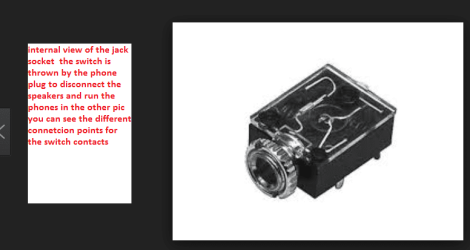
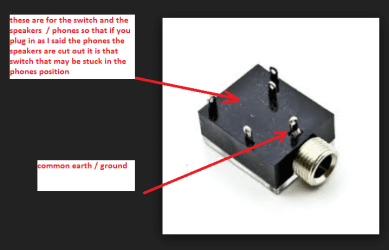
Now just thinking about the sound again if you can hear the sound through phones then maybe there is something wrong with that jack socket because a jack socket for phones will have a switch device that cuts the speakers out when the phones are plugged in and I am wondering if that switch is somehow stuck!
See pics for very basic understanding
 

Attachments

  • SOCKET X.PNG
    SOCKET X.PNG
    24.2 KB · Views: 0
  • SOCKET XX.PNG
    SOCKET XX.PNG
    27.3 KB · Views: 0

My Computer My Computer

At a glance

Desk1 7 Home Prem / Desk2 10 Pro / Main lap A...Desk1 i5 3750K / Laptop i7 GTX 860M / Desk2 i...Desk1 8GB (1866) / Desk2 16GB (1333) / Laptop...Desk 1& 2NVidia GTX 650 & Laptops on board Intel
Computer type
PC/Desktop
Computer Manufacturer/Model Number
Own build (new) Desk1 / Asus ROG Win 7 / Desk2 1st build
OS
Desk1 7 Home Prem / Desk2 10 Pro / Main lap Asus ROG 10 Pro 2 laptop Toshiba 7 Pro Asus P2520 7 & 10
CPU
Desk1 i5 3750K / Laptop i7 GTX 860M / Desk2 i5 2500
Motherboard
Desk1 Asus P877-V / Desk2 Gigabyte H67 UD3H / Laptop ?
Memory
Desk1 8GB (1866) / Desk2 16GB (1333) / Laptop 8Gb DDR3
Graphics Card(s)
Desk 1& 2NVidia GTX 650 & Laptops on board Intel
Sound Card
Desk 1 & 2 -XONAR DG Realtek High Def audio Laptop
Monitor(s) Displays
Desk 1 Benq HD 2450 / Desk2 Philips 24" / Laptop 17.5"
Screen Resolution
1920x1080 D1 & D2 & Laptop 1
Hard Drives
Desk1 Samsung 120GB 830 SSD
Asus ROG 256GB 850 Pro SSD
Desk2 Samsung 840 256 SSD
Toshiba 120GB EVO
PSU
Desk 1 Corsair HX 1050/ Laptop ? / Desk 2 Corsair HX 650
Case
Desk 1 Cooler HAF XM ? Toshiba laptop / Desk2 Coolermaster
Cooling
Fans on all Desk1 -2 Desk2 - all Coolermasters 5 Laptop ?
Keyboard
Desk 1 MS Sidewinder X6 Desk 2 MS Sidewinder X 4
Mouse
Desk 1&2 - Gigabyte MS 900 gamer - laptop - Logitec wireless
Internet Speed
ADSL2+
Other Info
One other Desktop (tester) and spare Toshba laptop both with SSD's
Running Kaspersky 2016 ISS on all machines config'd identically
Logitec audio stereo systems on each machine (x3)
Canon MG5250MFC
Router/modem TP-Link running WPA2SK
Good idea - but then the speakers wouldn't work with Media Centre, and they do!
I had an idea - I have an old Creative Audigy 2 ZS that I kept when I scrapped a previous machine - at the time it was a great card. Do you think that would work? I don't know about drivers etc. so maybe I'm clutching at straws.
 

My Computer My Computer

At a glance

Windows 7 Home Premium 64bit2.60 gigahertz AMD Phenom 9950 Quad-Core8192MBATI Radeon HD 4550
Computer type
PC/Desktop
Computer Manufacturer/Model Number
Mesh
OS
Windows 7 Home Premium 64bit
CPU
2.60 gigahertz AMD Phenom 9950 Quad-Core
Motherboard
ASUSTeK Computer INC. M2N68-VM Rev X.0x
Memory
8192MB
Graphics Card(s)
ATI Radeon HD 4550
Hard Drives
SAMSUNG HD103SI SCSI Disk Device (1000.20 GB) -- drive 0
TS64GSSD 340 SCSI Disk Device (64.02 GB) -- drive 1
Antivirus
Microsoft Security Essentials
Browser
Firrefox

My Computer My Computer

At a glance

Desk1 7 Home Prem / Desk2 10 Pro / Main lap A...Desk1 i5 3750K / Laptop i7 GTX 860M / Desk2 i...Desk1 8GB (1866) / Desk2 16GB (1333) / Laptop...Desk 1& 2NVidia GTX 650 & Laptops on board Intel
Computer type
PC/Desktop
Computer Manufacturer/Model Number
Own build (new) Desk1 / Asus ROG Win 7 / Desk2 1st build
OS
Desk1 7 Home Prem / Desk2 10 Pro / Main lap Asus ROG 10 Pro 2 laptop Toshiba 7 Pro Asus P2520 7 & 10
CPU
Desk1 i5 3750K / Laptop i7 GTX 860M / Desk2 i5 2500
Motherboard
Desk1 Asus P877-V / Desk2 Gigabyte H67 UD3H / Laptop ?
Memory
Desk1 8GB (1866) / Desk2 16GB (1333) / Laptop 8Gb DDR3
Graphics Card(s)
Desk 1& 2NVidia GTX 650 & Laptops on board Intel
Sound Card
Desk 1 & 2 -XONAR DG Realtek High Def audio Laptop
Monitor(s) Displays
Desk 1 Benq HD 2450 / Desk2 Philips 24" / Laptop 17.5"
Screen Resolution
1920x1080 D1 & D2 & Laptop 1
Hard Drives
Desk1 Samsung 120GB 830 SSD
Asus ROG 256GB 850 Pro SSD
Desk2 Samsung 840 256 SSD
Toshiba 120GB EVO
PSU
Desk 1 Corsair HX 1050/ Laptop ? / Desk 2 Corsair HX 650
Case
Desk 1 Cooler HAF XM ? Toshiba laptop / Desk2 Coolermaster
Cooling
Fans on all Desk1 -2 Desk2 - all Coolermasters 5 Laptop ?
Keyboard
Desk 1 MS Sidewinder X6 Desk 2 MS Sidewinder X 4
Mouse
Desk 1&2 - Gigabyte MS 900 gamer - laptop - Logitec wireless
Internet Speed
ADSL2+
Other Info
One other Desktop (tester) and spare Toshba laptop both with SSD's
Running Kaspersky 2016 ISS on all machines config'd identically
Logitec audio stereo systems on each machine (x3)
Canon MG5250MFC
Router/modem TP-Link running WPA2SK
Well the Audigy card did it! Sound back to normal on everything - maybe better than normal. The game port doesn't work but I'll put in a virtual machine on either XP or Ubuntu and get the use of a keyboard again, and some games for the grandkids.

Thanks for all your support pal, I was thinking I'd lost the plot somehow and you helped me to keep looking for an answer. Glad there are folks with all your experience able and willing to help us. Saved an SSD from the bin too!
.:)
 

My Computer My Computer

At a glance

Windows 7 Home Premium 64bit2.60 gigahertz AMD Phenom 9950 Quad-Core8192MBATI Radeon HD 4550
Computer type
PC/Desktop
Computer Manufacturer/Model Number
Mesh
OS
Windows 7 Home Premium 64bit
CPU
2.60 gigahertz AMD Phenom 9950 Quad-Core
Motherboard
ASUSTeK Computer INC. M2N68-VM Rev X.0x
Memory
8192MB
Graphics Card(s)
ATI Radeon HD 4550
Hard Drives
SAMSUNG HD103SI SCSI Disk Device (1000.20 GB) -- drive 0
TS64GSSD 340 SCSI Disk Device (64.02 GB) -- drive 1
Antivirus
Microsoft Security Essentials
Browser
Firrefox
Well the Audigy card did it! Sound back to normal on everything - maybe better than normal. The game port doesn't work but I'll put in a virtual machine on either XP or Ubuntu and get the use of a keyboard again, and some games for the grandkids.

Thanks for all your support pal, I was thinking I'd lost the plot somehow and you helped me to keep looking for an answer. Glad there are folks with all your experience able and willing to help us. Saved an SSD from the bin too!
.:)
Not a problem and well done excessive - keep the Asus card in mind if you want a replacement mate it is the best I have come across at that price and being a bit of an audiophile it suits me to a tee.
 

My Computer My Computer

At a glance

Desk1 7 Home Prem / Desk2 10 Pro / Main lap A...Desk1 i5 3750K / Laptop i7 GTX 860M / Desk2 i...Desk1 8GB (1866) / Desk2 16GB (1333) / Laptop...Desk 1& 2NVidia GTX 650 & Laptops on board Intel
Computer type
PC/Desktop
Computer Manufacturer/Model Number
Own build (new) Desk1 / Asus ROG Win 7 / Desk2 1st build
OS
Desk1 7 Home Prem / Desk2 10 Pro / Main lap Asus ROG 10 Pro 2 laptop Toshiba 7 Pro Asus P2520 7 & 10
CPU
Desk1 i5 3750K / Laptop i7 GTX 860M / Desk2 i5 2500
Motherboard
Desk1 Asus P877-V / Desk2 Gigabyte H67 UD3H / Laptop ?
Memory
Desk1 8GB (1866) / Desk2 16GB (1333) / Laptop 8Gb DDR3
Graphics Card(s)
Desk 1& 2NVidia GTX 650 & Laptops on board Intel
Sound Card
Desk 1 & 2 -XONAR DG Realtek High Def audio Laptop
Monitor(s) Displays
Desk 1 Benq HD 2450 / Desk2 Philips 24" / Laptop 17.5"
Screen Resolution
1920x1080 D1 & D2 & Laptop 1
Hard Drives
Desk1 Samsung 120GB 830 SSD
Asus ROG 256GB 850 Pro SSD
Desk2 Samsung 840 256 SSD
Toshiba 120GB EVO
PSU
Desk 1 Corsair HX 1050/ Laptop ? / Desk 2 Corsair HX 650
Case
Desk 1 Cooler HAF XM ? Toshiba laptop / Desk2 Coolermaster
Cooling
Fans on all Desk1 -2 Desk2 - all Coolermasters 5 Laptop ?
Keyboard
Desk 1 MS Sidewinder X6 Desk 2 MS Sidewinder X 4
Mouse
Desk 1&2 - Gigabyte MS 900 gamer - laptop - Logitec wireless
Internet Speed
ADSL2+
Other Info
One other Desktop (tester) and spare Toshba laptop both with SSD's
Running Kaspersky 2016 ISS on all machines config'd identically
Logitec audio stereo systems on each machine (x3)
Canon MG5250MFC
Router/modem TP-Link running WPA2SK
Back
Top