Solved Speakers stopped functioning suddenly !

goodlad

New member
Member
VIP
Local time
10:14 AM
Messages
239
I'm pretty much when it comes to these stuffs.. so here it goes..

In terms of events:

Had winamp running some mp3 files in background - > No probs (have been running these files for more than an year now, never had an issue)
Tried opening skype -> at first no probs

skype upgraded -> again no probs
after its loaded -> my speakers went whoosh with the skype starting up sound & stopped playing any sound suddenly..

I had a doubt whether any virus or anything was wrong, so I ran malware bytes & sfc /scannow .. had no issues popup in either of them.

Rebooted system after these scans & sound is not yet back :confused:


Just wanted to double check if at least headphones were working, a big relief ! They do :rolleyes:


Just in case if it matters.. when I tried looking in Devices troubleshoot, it had only Base System Device doesn't have an driver!

then tried Microsoft Fix Troubleshooters:
http://go.microsoft.com/?linkid=9740814
http://go.microsoft.com/?linkid=9740816

no prob detected in either of them.
What should I do next ? I tried googling & was scared to test different methods listed around, I didn't want to break anything around. I didn't want to uninstall the sound device, as I feared, what would happen if it doesn't & even my headphones stop functioning now :o

And will there be any probs if I continue using headphones with speaker not functioning ?
 
Last edited:

My Computer

Computer type
Laptop
Computer Manufacturer/Model Number
DELL
OS
windows 7 ultimate x32
CPU
T6670,
Motherboard
INTEL CORE 2 DUO, 0TFXK9
Memory
8GB DDR3
Screen Resolution
1366*768
Hard Drives
512GB SSD
Mouse
Logitech M165 w/sidebuttons
Internet Speed
30-150 mb/s
Antivirus
Bitdefender
Browser
FF, Opera GX
What is shown as the Default Playback Device? Your "Speakers" should be set as the default playback device.
 

My Computer

Computer type
PC/Desktop
Computer Manufacturer/Model Number
My Own Build
OS
Windows 10 64 bit
CPU
Intel i7 6700K
Motherboard
ASUS ROG Maximus VIII Hero
Memory
16GB Corsair Dominator
Graphics Card(s)
Intel CPU Graphics
Sound Card
RealTek
Monitor(s) Displays
27" Dell S2719dgf
Screen Resolution
2560X1440
Hard Drives
1 TB Samsung 850 EVO SSD for Win 10 Pro
500GB Samsung 850 EVO SSD for Win 10 Insider
2 TB drive for backup
PSU
EVGA Supernova 750G2
Case
BeQuiet Silent Base 600
Cooling
Deepcool Captain 120EX
Keyboard
Microsoft Wireless 2000
Mouse
Microsoft wireless
Internet Speed
100 MB/sec (Cable)
Antivirus
Microsoft Defender and Malwarebytes
Browser
Edge/Firefox
Other Info
Cakewalk (Sonar) by BandLab and Studio One 4.1 Pro recording studio software. MOTU 896Mk3 Hybrid recording interface, Frontier Tranzport wireless control unit, Behringer X-Touch Control Surface.
Five USB connected optical drives for CD Audio production using Nero BurningROM
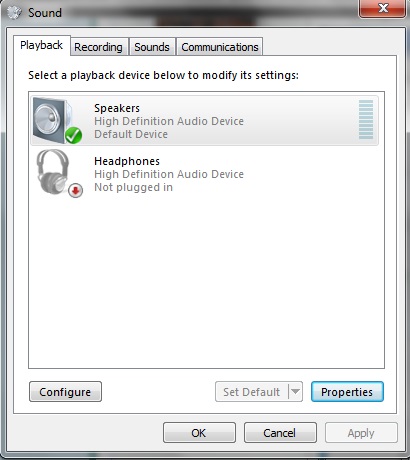
What is shown as the Default Playback Device? Your "Speakers" should be set as the default playback device.

Its set as Speaker :)

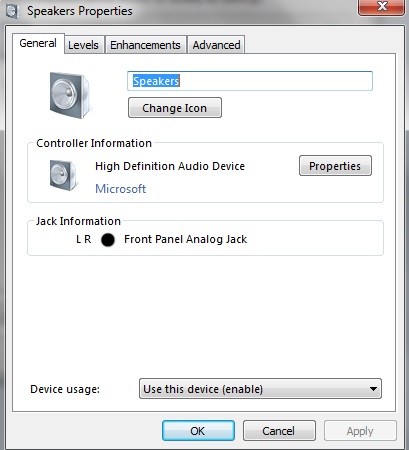
in the Speaker Properties it shows a Black Circle - Front Panel Analog Jack
 

My Computer

Computer type
Laptop
Computer Manufacturer/Model Number
DELL
OS
windows 7 ultimate x32
CPU
T6670,
Motherboard
INTEL CORE 2 DUO, 0TFXK9
Memory
8GB DDR3
Screen Resolution
1366*768
Hard Drives
512GB SSD
Mouse
Logitech M165 w/sidebuttons
Internet Speed
30-150 mb/s
Antivirus
Bitdefender
Browser
FF, Opera GX
This is my system Note the "Speakers" is set as default.
 

Attachments

  • Sound Panel Capture.JPG
    Sound Panel Capture.JPG
    39.2 KB · Views: 11

My Computer

Computer type
PC/Desktop
Computer Manufacturer/Model Number
My Own Build
OS
Windows 10 64 bit
CPU
Intel i7 6700K
Motherboard
ASUS ROG Maximus VIII Hero
Memory
16GB Corsair Dominator
Graphics Card(s)
Intel CPU Graphics
Sound Card
RealTek
Monitor(s) Displays
27" Dell S2719dgf
Screen Resolution
2560X1440
Hard Drives
1 TB Samsung 850 EVO SSD for Win 10 Pro
500GB Samsung 850 EVO SSD for Win 10 Insider
2 TB drive for backup
PSU
EVGA Supernova 750G2
Case
BeQuiet Silent Base 600
Cooling
Deepcool Captain 120EX
Keyboard
Microsoft Wireless 2000
Mouse
Microsoft wireless
Internet Speed
100 MB/sec (Cable)
Antivirus
Microsoft Defender and Malwarebytes
Browser
Edge/Firefox
Other Info
Cakewalk (Sonar) by BandLab and Studio One 4.1 Pro recording studio software. MOTU 896Mk3 Hybrid recording interface, Frontier Tranzport wireless control unit, Behringer X-Touch Control Surface.
Five USB connected optical drives for CD Audio production using Nero BurningROM
Thanks firebird :) , I understood that bit.. here are my screenshots:

Ra5tmlM.jpg


xsQ6qsY.jpg
 

My Computer

Computer type
Laptop
Computer Manufacturer/Model Number
DELL
OS
windows 7 ultimate x32
CPU
T6670,
Motherboard
INTEL CORE 2 DUO, 0TFXK9
Memory
8GB DDR3
Screen Resolution
1366*768
Hard Drives
512GB SSD
Mouse
Logitech M165 w/sidebuttons
Internet Speed
30-150 mb/s
Antivirus
Bitdefender
Browser
FF, Opera GX
I see you only have the generic, basic function, High Definition Audio Drivers and not the actual hardware sound drivers. I don't know if that will fix your problem, but if Win 7 drivers are available they should be used. Your system looks like an older Dell and there may not be any better drivers available. What is the actual Dell model? for example OptiPlex G260, etc.
 

My Computer

Computer type
PC/Desktop
Computer Manufacturer/Model Number
My Own Build
OS
Windows 10 64 bit
CPU
Intel i7 6700K
Motherboard
ASUS ROG Maximus VIII Hero
Memory
16GB Corsair Dominator
Graphics Card(s)
Intel CPU Graphics
Sound Card
RealTek
Monitor(s) Displays
27" Dell S2719dgf
Screen Resolution
2560X1440
Hard Drives
1 TB Samsung 850 EVO SSD for Win 10 Pro
500GB Samsung 850 EVO SSD for Win 10 Insider
2 TB drive for backup
PSU
EVGA Supernova 750G2
Case
BeQuiet Silent Base 600
Cooling
Deepcool Captain 120EX
Keyboard
Microsoft Wireless 2000
Mouse
Microsoft wireless
Internet Speed
100 MB/sec (Cable)
Antivirus
Microsoft Defender and Malwarebytes
Browser
Edge/Firefox
Other Info
Cakewalk (Sonar) by BandLab and Studio One 4.1 Pro recording studio software. MOTU 896Mk3 Hybrid recording interface, Frontier Tranzport wireless control unit, Behringer X-Touch Control Surface.
Five USB connected optical drives for CD Audio production using Nero BurningROM
I see you only have the generic, basic function, High Definition Audio Drivers and not the actual hardware sound drivers. I don't know if that will fix your problem, but if Win 7 drivers are available they should be used. Your system looks like an older Dell and there may not be any better drivers available. What is the actual Dell model? for example OptiPlex G260, etc.

yeah its a bit older one, its Dell Vostro 1015 :)
 

My Computer

Computer type
Laptop
Computer Manufacturer/Model Number
DELL
OS
windows 7 ultimate x32
CPU
T6670,
Motherboard
INTEL CORE 2 DUO, 0TFXK9
Memory
8GB DDR3
Screen Resolution
1366*768
Hard Drives
512GB SSD
Mouse
Logitech M165 w/sidebuttons
Internet Speed
30-150 mb/s
Antivirus
Bitdefender
Browser
FF, Opera GX
Dell only has Windows XP drivers and they are incompatible. If it had Vista drivers they would work.

Have you tried a "refresh"? Go to the Device Manager, RIGHT click on the entry for the sound device (High Definition Audio) and then LEFT click "Uninstall". No need to uninstall the drivers are they are just generic Windows drivers. Then restart the PC and when Windows starts it will detect and reinstall the sound. Any Windows corruptions will be fixed.
 

My Computer

Computer type
PC/Desktop
Computer Manufacturer/Model Number
My Own Build
OS
Windows 10 64 bit
CPU
Intel i7 6700K
Motherboard
ASUS ROG Maximus VIII Hero
Memory
16GB Corsair Dominator
Graphics Card(s)
Intel CPU Graphics
Sound Card
RealTek
Monitor(s) Displays
27" Dell S2719dgf
Screen Resolution
2560X1440
Hard Drives
1 TB Samsung 850 EVO SSD for Win 10 Pro
500GB Samsung 850 EVO SSD for Win 10 Insider
2 TB drive for backup
PSU
EVGA Supernova 750G2
Case
BeQuiet Silent Base 600
Cooling
Deepcool Captain 120EX
Keyboard
Microsoft Wireless 2000
Mouse
Microsoft wireless
Internet Speed
100 MB/sec (Cable)
Antivirus
Microsoft Defender and Malwarebytes
Browser
Edge/Firefox
Other Info
Cakewalk (Sonar) by BandLab and Studio One 4.1 Pro recording studio software. MOTU 896Mk3 Hybrid recording interface, Frontier Tranzport wireless control unit, Behringer X-Touch Control Surface.
Five USB connected optical drives for CD Audio production using Nero BurningROM
Dell only has Windows XP drivers and they are incompatible. If it had Vista drivers they would work.

Have you tried a "refresh"? Go to the Device Manager, RIGHT click on the entry for the sound device (High Definition Audio) and then LEFT click "Uninstall". No need to uninstall the drivers are they are just generic Windows drivers. Then restart the PC and when Windows starts it will detect and reinstall the sound. Any Windows corruptions will be fixed.

looks like bad luck is following me :(

Just tried the refresh method, uninstalled then rebooted, it got reinstalled in the setup. But the speakers just don't work :o

btw.. I found this link while googling : Dell Vostro 1015 Drivers Download for Windows 10, 8.1, 7, Vista, XP

do u think I can try that if its necessary ?
 

My Computer

Computer type
Laptop
Computer Manufacturer/Model Number
DELL
OS
windows 7 ultimate x32
CPU
T6670,
Motherboard
INTEL CORE 2 DUO, 0TFXK9
Memory
8GB DDR3
Screen Resolution
1366*768
Hard Drives
512GB SSD
Mouse
Logitech M165 w/sidebuttons
Internet Speed
30-150 mb/s
Antivirus
Bitdefender
Browser
FF, Opera GX
Well, I just wanted to post an update...

I couldn't get the speakers fixed & when I took it to my Dell Authorized dealer, they said.. speaker went kaput .. so they asked me to get a new one. I thought of replacing with an internal speaker while they suggested to go for external as it would be much cheaper & the audio output would be much better, considering there would be 2 speakers. So, I got myself Logitech z120 Stereo Speakers :)
 

My Computer

Computer type
Laptop
Computer Manufacturer/Model Number
DELL
OS
windows 7 ultimate x32
CPU
T6670,
Motherboard
INTEL CORE 2 DUO, 0TFXK9
Memory
8GB DDR3
Screen Resolution
1366*768
Hard Drives
512GB SSD
Mouse
Logitech M165 w/sidebuttons
Internet Speed
30-150 mb/s
Antivirus
Bitdefender
Browser
FF, Opera GX
Back
Top