Solved Speakers will not be recognised

sean2006

New member
Local time
4:52 PM
Messages
6
Hi,

I have recently bought a new computer but there were no speakers. I purchased some EACAN speakers that attach via USB. These will not install though. I have tried all manner of searches but nothing has worked. In my device manager under the 'Sound, Video and game controllers' menu I have 'NVIDIA High definition Audio' 4 times. This says the device is working properly on each when I look in the properties section. The USB port definately works as other equipment can be used. The speakers should be working as the light comes on but the volume control always says 'No Audio Output Device is installed'. I have tried uninstalling the NVIDIA but then re-installing gives the same result. Is there an easy solution to this that I am missing?

Thankyou very much in advance of any help!
 

My Computer

Computer type
PC/Desktop
OS
7
Hi sean2006 and welcome,

This may seem like a silly question but are the speakers plugged into the audio port on your computer? Most desktop speakers have a USB port which is used for power and a 3.5mm TRS Mini-Jack connector used to transmit audio. Did you happen to forget to plug something in or is it strictly a USB setup?

-JackALope
 

My Computer

Computer type
PC/Desktop
Computer Manufacturer/Model Number
Custom Build
OS
Windows 7 Ultimate x64
CPU
Intel Core i7-2700K Sandy Bridge 3.5GHz
Motherboard
Asus P8Z68-V Pro
Memory
Corsair Vengeance 16GB DDR3 1600Mhz
Graphics Card(s)
Asus GeForce GTX 670 2GB
Sound Card
Creative Sound Blaster X-Fi Xtreme 7.1
Monitor(s) Displays
Samsung 24" LED Monitor
Screen Resolution
1920 x 1080
Hard Drives
Corsair Force GT 240GB SSD
Western Digital 3TB HDD
PSU
Corsair AX860i Fully-Modular
Case
Cooler Master HAF 922 Powder Coated White
Cooling
Noctua NH-U12S
Keyboard
Razer BlackWidow Ultimate Stealth Edition
Mouse
Razer Mamba
Internet Speed
Verizon FiOS 20Mbps
Antivirus
Microsoft Security Essentials
Browser
Internet Explorer
Other Info
Razer Tiamat 7.1 Surround Sound Headset
Hi Jack,

Thanks for your quick response! I have plugged the green jack into into the green plug on the back and was under the impression that USB could go in any port. Is there a specific USB port to be used for audio? There are no markings to suggest this anywhere? Also, even if I didn't put the jack in should the USB not mean the speakers get recognised by the computer? Apologies if I am being naive!!

Thanks again
 

My Computer

Computer type
PC/Desktop
OS
7
Yeah you did it right. The USB can go into any port because it is only used to provide power for the speakers. The actual audio comes from the "green jack" and that needs to be connected to the "green plug", which is what you did.

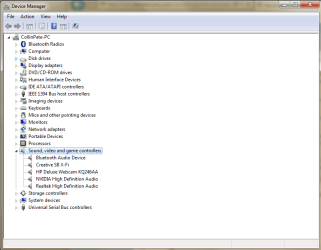
Anyways, there are a few things you can do to troubleshoot the problem. First try plugging the speakers green audio jack into another audio port on the computer. If no audio comes out of any of the ports, check to see if your audio device is actually Enabled in Device Manager. To get there, go to your Control Panel and click Hardware and Sound, from there go to the Device and Printers section and click on Device Manager. Once you are in Device Manager, go to the Sounds section and se what audio devices you have installed (see picture). You can right click on them to Disable / Enable them and even go to their properties to update their drivers.

If they are all Enabled and there is still a problem, then I would go to your computer manufactures website and see if they have a specific audio driver for you model, if so try installing / reinstalling it. Hope this helps and let us know how it goes.
 

Attachments

  • Capture.PNG
    Capture.PNG
    22.8 KB · Views: 4

My Computer

Computer type
PC/Desktop
Computer Manufacturer/Model Number
Custom Build
OS
Windows 7 Ultimate x64
CPU
Intel Core i7-2700K Sandy Bridge 3.5GHz
Motherboard
Asus P8Z68-V Pro
Memory
Corsair Vengeance 16GB DDR3 1600Mhz
Graphics Card(s)
Asus GeForce GTX 670 2GB
Sound Card
Creative Sound Blaster X-Fi Xtreme 7.1
Monitor(s) Displays
Samsung 24" LED Monitor
Screen Resolution
1920 x 1080
Hard Drives
Corsair Force GT 240GB SSD
Western Digital 3TB HDD
PSU
Corsair AX860i Fully-Modular
Case
Cooler Master HAF 922 Powder Coated White
Cooling
Noctua NH-U12S
Keyboard
Razer BlackWidow Ultimate Stealth Edition
Mouse
Razer Mamba
Internet Speed
Verizon FiOS 20Mbps
Antivirus
Microsoft Security Essentials
Browser
Internet Explorer
Other Info
Razer Tiamat 7.1 Surround Sound Headset
Hi Jack,

Thanks again for trying to help. I keep looking in the device manager and just have the 4 NVIDIA High definition Aduio tabs. All of these say 'this device is working properly' in their properties. The speakers aren't faulty as I have checked them on a laptop. There is something stopping my Audio from working but I simply cannot fathom what. Everything just seems to say no Audio Output Device is installed.

Thanks again
 
Last edited:

My Computer

Computer type
PC/Desktop
OS
7
Have you tried going to the computers manufactures website and seeing if you can download the audio device / driver for your specific model?
 

My Computer

Computer type
PC/Desktop
Computer Manufacturer/Model Number
Custom Build
OS
Windows 7 Ultimate x64
CPU
Intel Core i7-2700K Sandy Bridge 3.5GHz
Motherboard
Asus P8Z68-V Pro
Memory
Corsair Vengeance 16GB DDR3 1600Mhz
Graphics Card(s)
Asus GeForce GTX 670 2GB
Sound Card
Creative Sound Blaster X-Fi Xtreme 7.1
Monitor(s) Displays
Samsung 24" LED Monitor
Screen Resolution
1920 x 1080
Hard Drives
Corsair Force GT 240GB SSD
Western Digital 3TB HDD
PSU
Corsair AX860i Fully-Modular
Case
Cooler Master HAF 922 Powder Coated White
Cooling
Noctua NH-U12S
Keyboard
Razer BlackWidow Ultimate Stealth Edition
Mouse
Razer Mamba
Internet Speed
Verizon FiOS 20Mbps
Antivirus
Microsoft Security Essentials
Browser
Internet Explorer
Other Info
Razer Tiamat 7.1 Surround Sound Headset
Yes, I went on the site but in all honesty I'm not sure what I needed. I downloaded what I thought was the correct one but it made no difference. I then went on the NVIDIA site and tried theirs, again with no success! My motherboard is a gigabyte b75m-d3h.

Thanks again
 

My Computer

Computer type
PC/Desktop
OS
7

My Computer

Computer type
PC/Desktop
Computer Manufacturer/Model Number
home built
OS
Multi-Boot W7_Pro_x64 W8.1_Pro_x64 W10_Pro_x64 +Linux_VMs +Chromium_VM
CPU
AMD Athlon II x4 620
Motherboard
Gigabyte GA-MA785G-UD3H
Memory
6GB GSkill DDR2 800
Graphics Card(s)
AMD 4670 GPU + AMD 4200 IGP
Sound Card
on board Realtek ALC889A
Monitor(s) Displays
RCA 40" LCD TV, Insignia 32" LCD TV, HP 15" LCD monitor
Screen Resolution
1680 x 1050
Hard Drives
OCZ Vertex 3 120GB,
Samsung F3 1TB (3),
Several others - WD, Seagate, Hitachi, ...
PSU
Corsair 500 W
Case
Rosewill mid tower
Cooling
CM 90mm rifle
Keyboard
Gyration wireless, Logitech wireless, Dell USB wired
Mouse
Gyration wireless, Logitech wireless, V7 USB wired
Internet Speed
Spectrum - 100Mbps D / 10Mbps U
Antivirus
Avast, MBAM3, EMET, WinPatrol
Browser
Pale Moon, Firefox, IE
Other Info
2 multi-boot PC's
Mainly HTPC/Office/Gen purpose (no gaming).
Trendnet USB KVM.
LG DVD burner/Blue Ray Player.
Tray system for removable SATA backup drives.

Not currently OCd, under-volted.
I use Hybrid sleep, rarely re-boot or shutdown.

Hauppauge HD-PVR, Avermedia PCIe TV Tuner, Hauppauge PCI TV Tuner.
My next suggestion. Nice call, thanks. :)
 

My Computer

Computer type
PC/Desktop
Computer Manufacturer/Model Number
Custom Build
OS
Windows 7 Ultimate x64
CPU
Intel Core i7-2700K Sandy Bridge 3.5GHz
Motherboard
Asus P8Z68-V Pro
Memory
Corsair Vengeance 16GB DDR3 1600Mhz
Graphics Card(s)
Asus GeForce GTX 670 2GB
Sound Card
Creative Sound Blaster X-Fi Xtreme 7.1
Monitor(s) Displays
Samsung 24" LED Monitor
Screen Resolution
1920 x 1080
Hard Drives
Corsair Force GT 240GB SSD
Western Digital 3TB HDD
PSU
Corsair AX860i Fully-Modular
Case
Cooler Master HAF 922 Powder Coated White
Cooling
Noctua NH-U12S
Keyboard
Razer BlackWidow Ultimate Stealth Edition
Mouse
Razer Mamba
Internet Speed
Verizon FiOS 20Mbps
Antivirus
Microsoft Security Essentials
Browser
Internet Explorer
Other Info
Razer Tiamat 7.1 Surround Sound Headset
Hi guys,

Thanks so much to you both for helping! I have downloaded the one that says:

Realtek Function driver for Realtek Azalia audio chip (Including Microsoft UAA Driver in English edition)

This doesn't seem to have worked though, I still only see the 4 NVIDIA drivers. I have opened the RealTek file and installed the download but still nothing seems to be adding into the drivers!

Sorry if I am missing something obvious and thanks again so much for your help.
 

My Computer

Computer type
PC/Desktop
OS
7
Hi guys,

Thanks so much to you both for helping! I have downloaded the one that says:

Realtek Function driver for Realtek Azalia audio chip (Including Microsoft UAA Driver in English edition)

This doesn't seem to have worked though, I still only see the 4 NVIDIA drivers. I have opened the RealTek file and installed the download but still nothing seems to be adding into the drivers!

Sorry if I am missing something obvious and thanks again so much for your help.

Hey Sean,

Sorry for the late reply. I believe you have to go into your BIOS and make sure the Azalia Audio Chip is enabled. Once it has been enabled reinstall the drivers and restart the computer. Let us know the outcome.
 

My Computer

Computer type
PC/Desktop
Computer Manufacturer/Model Number
Custom Build
OS
Windows 7 Ultimate x64
CPU
Intel Core i7-2700K Sandy Bridge 3.5GHz
Motherboard
Asus P8Z68-V Pro
Memory
Corsair Vengeance 16GB DDR3 1600Mhz
Graphics Card(s)
Asus GeForce GTX 670 2GB
Sound Card
Creative Sound Blaster X-Fi Xtreme 7.1
Monitor(s) Displays
Samsung 24" LED Monitor
Screen Resolution
1920 x 1080
Hard Drives
Corsair Force GT 240GB SSD
Western Digital 3TB HDD
PSU
Corsair AX860i Fully-Modular
Case
Cooler Master HAF 922 Powder Coated White
Cooling
Noctua NH-U12S
Keyboard
Razer BlackWidow Ultimate Stealth Edition
Mouse
Razer Mamba
Internet Speed
Verizon FiOS 20Mbps
Antivirus
Microsoft Security Essentials
Browser
Internet Explorer
Other Info
Razer Tiamat 7.1 Surround Sound Headset
Hi Jack,

No problem about the response time - I am just so grateful for your time and effort in helping me. Thankfully you have successfully solved my issue. In the BIOS the section for auto detecting sound was disabled (I still couldn't see the chip in there!), anyway I enabled that -I have no idea how or why it was disabled, it was the only thing not enabled. This immediately installed the drivers on start up again and sound was available!!

Thanks again so much for your help, it really is most appreciated.

Sean
 

My Computer

Computer type
PC/Desktop
OS
7
Awesome, I am glad we it got it to work. Also thanks for marking the thread as "Solved", not to many people do that. Anyways if you run into anymore problems you know where we are.:thumbsup:

-Collin
 

My Computer

Computer type
PC/Desktop
Computer Manufacturer/Model Number
Custom Build
OS
Windows 7 Ultimate x64
CPU
Intel Core i7-2700K Sandy Bridge 3.5GHz
Motherboard
Asus P8Z68-V Pro
Memory
Corsair Vengeance 16GB DDR3 1600Mhz
Graphics Card(s)
Asus GeForce GTX 670 2GB
Sound Card
Creative Sound Blaster X-Fi Xtreme 7.1
Monitor(s) Displays
Samsung 24" LED Monitor
Screen Resolution
1920 x 1080
Hard Drives
Corsair Force GT 240GB SSD
Western Digital 3TB HDD
PSU
Corsair AX860i Fully-Modular
Case
Cooler Master HAF 922 Powder Coated White
Cooling
Noctua NH-U12S
Keyboard
Razer BlackWidow Ultimate Stealth Edition
Mouse
Razer Mamba
Internet Speed
Verizon FiOS 20Mbps
Antivirus
Microsoft Security Essentials
Browser
Internet Explorer
Other Info
Razer Tiamat 7.1 Surround Sound Headset
Back
Top