Solved Speech Recognition could not start

tryagainplss

New member
Speech Recognition could not start because the language configuration is not supported.

The recognizer language must match the language of the user interface. Please change the recognizer language in the Speech Recognition control panel under Advanced Options.

That's my problem....
 

My Computer

OS
Windows 7 Ultimate - 32bit
Hi! tryagainplss, welcome to 7F :)

Speech Recognition could not start because the language configuration is not supported.

The recognizer language must match the language of the user interface. Please change the recognizer language in the Speech Recognition control panel under Advanced Options.

That's my problem....

Your Forum Profile shows that you are located anywhere from Western Australia to Siberia. [SIZE=+1]A general 115°E Longitude.[/SIZE]

And what that warning is trying to tell you is that your new Speech Recognition Program (SRP) does not match the Language pack/Region/area that you or the manufacturer registered for your machine.

You need to do what the instructions tell you, you need to:
Please change the recognizer language in the Speech Recognition control panel under Advanced Options.
If there is nothing in the drop-down list that matches your Region you will have to re-visit the web site, and download a Language pack that matches yours.

If there are no available packs, you will have to contact the developer to see if you can get one, otherwise you will not be able to use this program.


There maybeee....compatible language packs, but we need more information.

What is the name of the SRP, can you post a web site link?

It would also help if you would post your How to - System Specs
 

My Computer

Computer type
PC/Desktop
Computer Manufacturer/Model Number
Gateway DX4831-01e (Mid-Tower Desktop)
OS
Originally Win 7 Hm Prem x64 Ver 6.1.7600 Build 7601-SP1 | Upgraded to Windows 10 December 14, 2019
CPU
Intel i3 530 2.93GHz, 2933MHz 2 Cores 4 Logical Processors
Motherboard
Gateway H57M01 133 megahertz
Memory
6GB of 1,333MHz DDR3 SDRAM
Graphics Card(s)
32MB Intel Graphics Media Accelerator HD IGChip
Sound Card
Realtek High Definition Audio
Monitor(s) Displays
Gateway HX2000 20inch TFT active matrix TN
Screen Resolution
1600 x 900 x 59 hertz
Hard Drives
WDC WD10EADS-00M2B0 [HDD] (1000.20 GB) -- drive 0,
HL-DT-ST DVDRAM GH41N [CD-ROM dr]
Four card readers, and Four USB 2.0
PSU
300watts.
Case
Mid-Tower Desktop
Cooling
Stock from Gateway
Keyboard
Natural Ergonomic Keyboard 4000, see Other Info
Mouse
Orig. Gateway wore out now using Insignia USB wired optical
Internet Speed
Vz FIOS 10ms png 57.64Mbps down 65.53Mbps up Speedtest.org
Antivirus
Zamana Anti-logger with Anti-malware, MSE, Windows Firewall,
Browser
IE11.0.9600.19399-Upd ver11.0.135, Firefox 68.0.1 x64
Other Info
System Specs by Belarc.

BIOS: American Megatrends Inc. P01-A0 11/17/2009

Replaced the MS 'Natural' Standard PS/2 Enhanced 101-102 Keyboard with a new Natural Ergonomic Keyboard 4000 on August 1st 2014.

Canon Pixma MG3222 Printer.

Updated to IE11 on 12102015 | Fios Quantum Router g1100

Additional AV: SpywareBlaster, manual Mbam, SAS
I still do not get it....

>.<


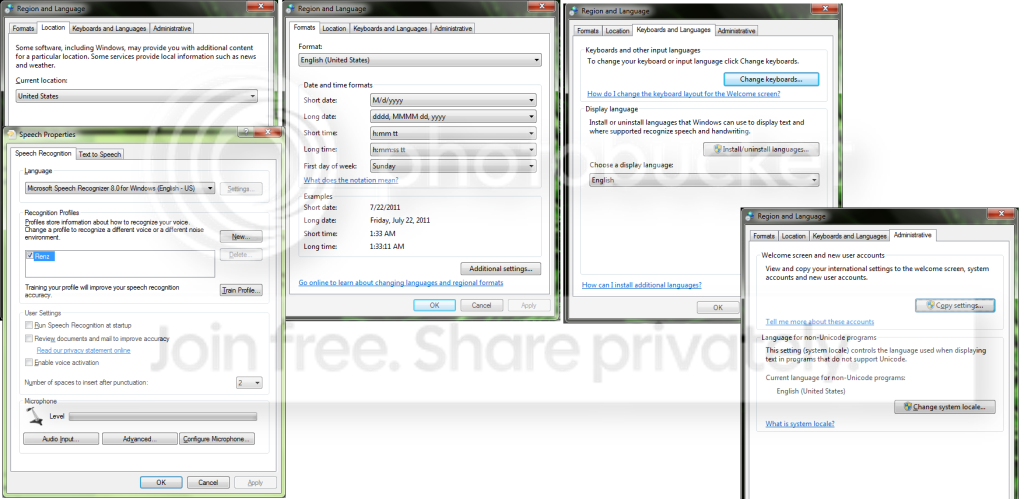
EDIT:: Here are my settings


1234-9.png
 
Last edited:

My Computer

OS
Windows 7 Ultimate - 32bit
Did you edit your post to delete this quote, and replace it with the screenshots? Because this is the message I received in my Instant Notifications.
I see..

So I can't tell the computer that I "Live" in the US?

xDD

anyway, trying the solutions right now.

Thank you
Just seems weird, it is the first time I have had a difference like that. :confused:

Anyhow, I think I know what you are trying to do, and correct me if I am wrong.

You do live in that time zone, but you are forcing your OS to believe it is in the U.S., and want to install the SRP in a similar fashion.

Here are some results: Windows 7 Forums, Search Results for Speech Recognition could not start because the language configuration is not supported:

Here are two variations to setting the Region:
Do you remember making any recent changes to computer prior to this issue?
Did you try the steps provided by irfan H I would suggest you to follow the steps below:
Method 1:
Follow the steps below and uncheck “Allow computer to review your documents”:
a. Click on start.
b. Open Control Panel then click on ease of access then click on Speech Recognition Options.
c. In the upper right of the Speech Recognition Option window click Advanced Speech Options.
d. Remove the checkmark next to, ‘Allow computer to review your documents’.
e. Click Apply and ok.
Method 2:
If the above step fails change regional language settings and check follow the steps below:
a. Click on Start button
b. Click on Control Panel
c. Then click on Clock Language and Region and then clicking Regional and Language Options.
d. Select the appropriate language and region.
e. Then reboot the computer and check if it works.
Hope this helps.
Source: Speech Recognition could not start because the language configuration - Microsoft Answers

And,
Did you make any changes on the computer prior to this issue?

Let’s try these steps and check if that helps.
1. Open Control Panel then Speech Recognition Options.
2. In the upper right of the Speech Recognition Option window click Advanced Speech Options.
3. Remove the checkmark next to, ‘Allow computer to review your documents’.
4. Click Apply.
If the above does not work, go back to Speech Recognition Options and click Train Profile and see if you are able to Train. Failing that, click the New button and try creating a new User Profile with a new name. If that works, you will be able to delete your first profile.
OR
Change the locale to a different one from what you have set.
Then reboot your system.
Next, change it back to your preferred locale.
Now, see if the problem has been resolved.
Source: Speech recognition could not start because the language configuration - Microsoft Answers

There is also a registry edit that may help.


My Computer

Computer type
PC/Desktop
Computer Manufacturer/Model Number
Gateway DX4831-01e (Mid-Tower Desktop)
OS
Originally Win 7 Hm Prem x64 Ver 6.1.7600 Build 7601-SP1 | Upgraded to Windows 10 December 14, 2019
CPU
Intel i3 530 2.93GHz, 2933MHz 2 Cores 4 Logical Processors
Motherboard
Gateway H57M01 133 megahertz
Memory
6GB of 1,333MHz DDR3 SDRAM
Graphics Card(s)
32MB Intel Graphics Media Accelerator HD IGChip
Sound Card
Realtek High Definition Audio
Monitor(s) Displays
Gateway HX2000 20inch TFT active matrix TN
Screen Resolution
1600 x 900 x 59 hertz
Hard Drives
WDC WD10EADS-00M2B0 [HDD] (1000.20 GB) -- drive 0,
HL-DT-ST DVDRAM GH41N [CD-ROM dr]
Four card readers, and Four USB 2.0
PSU
300watts.
Case
Mid-Tower Desktop
Cooling
Stock from Gateway
Keyboard
Natural Ergonomic Keyboard 4000, see Other Info
Mouse
Orig. Gateway wore out now using Insignia USB wired optical
Internet Speed
Vz FIOS 10ms png 57.64Mbps down 65.53Mbps up Speedtest.org
Antivirus
Zamana Anti-logger with Anti-malware, MSE, Windows Firewall,
Browser
IE11.0.9600.19399-Upd ver11.0.135, Firefox 68.0.1 x64
Other Info
System Specs by Belarc.

BIOS: American Megatrends Inc. P01-A0 11/17/2009

Replaced the MS 'Natural' Standard PS/2 Enhanced 101-102 Keyboard with a new Natural Ergonomic Keyboard 4000 on August 1st 2014.

Canon Pixma MG3222 Printer.

Updated to IE11 on 12102015 | Fios Quantum Router g1100

Additional AV: SpywareBlaster, manual Mbam, SAS
Yes. I edited my first post and replaced it with my statement.


Anyway, the solutions did not work for me.

I've also browsed the other threads and tried their solutions but nothing has worked yet.

Oh well
 

My Computer

OS
Windows 7 Ultimate - 32bit
How comfortable are you with working with the Registry? There is that registry edit that may help.
 

My Computer

Computer type
PC/Desktop
Computer Manufacturer/Model Number
Gateway DX4831-01e (Mid-Tower Desktop)
OS
Originally Win 7 Hm Prem x64 Ver 6.1.7600 Build 7601-SP1 | Upgraded to Windows 10 December 14, 2019
CPU
Intel i3 530 2.93GHz, 2933MHz 2 Cores 4 Logical Processors
Motherboard
Gateway H57M01 133 megahertz
Memory
6GB of 1,333MHz DDR3 SDRAM
Graphics Card(s)
32MB Intel Graphics Media Accelerator HD IGChip
Sound Card
Realtek High Definition Audio
Monitor(s) Displays
Gateway HX2000 20inch TFT active matrix TN
Screen Resolution
1600 x 900 x 59 hertz
Hard Drives
WDC WD10EADS-00M2B0 [HDD] (1000.20 GB) -- drive 0,
HL-DT-ST DVDRAM GH41N [CD-ROM dr]
Four card readers, and Four USB 2.0
PSU
300watts.
Case
Mid-Tower Desktop
Cooling
Stock from Gateway
Keyboard
Natural Ergonomic Keyboard 4000, see Other Info
Mouse
Orig. Gateway wore out now using Insignia USB wired optical
Internet Speed
Vz FIOS 10ms png 57.64Mbps down 65.53Mbps up Speedtest.org
Antivirus
Zamana Anti-logger with Anti-malware, MSE, Windows Firewall,
Browser
IE11.0.9600.19399-Upd ver11.0.135, Firefox 68.0.1 x64
Other Info
System Specs by Belarc.

BIOS: American Megatrends Inc. P01-A0 11/17/2009

Replaced the MS 'Natural' Standard PS/2 Enhanced 101-102 Keyboard with a new Natural Ergonomic Keyboard 4000 on August 1st 2014.

Canon Pixma MG3222 Printer.

Updated to IE11 on 12102015 | Fios Quantum Router g1100

Additional AV: SpywareBlaster, manual Mbam, SAS
Well... The only time I messed with my registry was when I changed some values to make Warcraft 3 run in 1366x768.


I guess I could save a backup of my registry or create a restore point before messing with it so in case something went wrong I could just revert to the original settings
 

My Computer

OS
Windows 7 Ultimate - 32bit
Here is that fix:
Speech Recognition could not start because the language configuration is not supported.

The recognizer language must match the language of the user interface. Please change the recognizer language in the Speech Recognition control panel under Advanced Options.
Its a known problem in Windows Vista and 7. Most of the times it happens when ctfmon.exe is not set to automatically start with Windows.
Source, see SOLUTION 1: Add ctfmon.exe to Startup: http://www.sevenforums.com/tutorial...ge-configuration-not-supported-error-fix.html


A visual on how to create String Value in your Windows Registry: How to Create String Value in your Windows Registry - YouTube
 
Last edited by a moderator:

My Computer

Computer type
PC/Desktop
Computer Manufacturer/Model Number
Gateway DX4831-01e (Mid-Tower Desktop)
OS
Originally Win 7 Hm Prem x64 Ver 6.1.7600 Build 7601-SP1 | Upgraded to Windows 10 December 14, 2019
CPU
Intel i3 530 2.93GHz, 2933MHz 2 Cores 4 Logical Processors
Motherboard
Gateway H57M01 133 megahertz
Memory
6GB of 1,333MHz DDR3 SDRAM
Graphics Card(s)
32MB Intel Graphics Media Accelerator HD IGChip
Sound Card
Realtek High Definition Audio
Monitor(s) Displays
Gateway HX2000 20inch TFT active matrix TN
Screen Resolution
1600 x 900 x 59 hertz
Hard Drives
WDC WD10EADS-00M2B0 [HDD] (1000.20 GB) -- drive 0,
HL-DT-ST DVDRAM GH41N [CD-ROM dr]
Four card readers, and Four USB 2.0
PSU
300watts.
Case
Mid-Tower Desktop
Cooling
Stock from Gateway
Keyboard
Natural Ergonomic Keyboard 4000, see Other Info
Mouse
Orig. Gateway wore out now using Insignia USB wired optical
Internet Speed
Vz FIOS 10ms png 57.64Mbps down 65.53Mbps up Speedtest.org
Antivirus
Zamana Anti-logger with Anti-malware, MSE, Windows Firewall,
Browser
IE11.0.9600.19399-Upd ver11.0.135, Firefox 68.0.1 x64
Other Info
System Specs by Belarc.

BIOS: American Megatrends Inc. P01-A0 11/17/2009

Replaced the MS 'Natural' Standard PS/2 Enhanced 101-102 Keyboard with a new Natural Ergonomic Keyboard 4000 on August 1st 2014.

Canon Pixma MG3222 Printer.

Updated to IE11 on 12102015 | Fios Quantum Router g1100

Additional AV: SpywareBlaster, manual Mbam, SAS
I just tried the Registry fix and it worked like a charm!

I am now able to use Speech Recognition. Thank you very very much for your help
 

My Computer

OS
Windows 7 Ultimate - 32bit
Your welcome!
That is wonderful, I am happy to have helped you out!
 

My Computer

Computer type
PC/Desktop
Computer Manufacturer/Model Number
Gateway DX4831-01e (Mid-Tower Desktop)
OS
Originally Win 7 Hm Prem x64 Ver 6.1.7600 Build 7601-SP1 | Upgraded to Windows 10 December 14, 2019
CPU
Intel i3 530 2.93GHz, 2933MHz 2 Cores 4 Logical Processors
Motherboard
Gateway H57M01 133 megahertz
Memory
6GB of 1,333MHz DDR3 SDRAM
Graphics Card(s)
32MB Intel Graphics Media Accelerator HD IGChip
Sound Card
Realtek High Definition Audio
Monitor(s) Displays
Gateway HX2000 20inch TFT active matrix TN
Screen Resolution
1600 x 900 x 59 hertz
Hard Drives
WDC WD10EADS-00M2B0 [HDD] (1000.20 GB) -- drive 0,
HL-DT-ST DVDRAM GH41N [CD-ROM dr]
Four card readers, and Four USB 2.0
PSU
300watts.
Case
Mid-Tower Desktop
Cooling
Stock from Gateway
Keyboard
Natural Ergonomic Keyboard 4000, see Other Info
Mouse
Orig. Gateway wore out now using Insignia USB wired optical
Internet Speed
Vz FIOS 10ms png 57.64Mbps down 65.53Mbps up Speedtest.org
Antivirus
Zamana Anti-logger with Anti-malware, MSE, Windows Firewall,
Browser
IE11.0.9600.19399-Upd ver11.0.135, Firefox 68.0.1 x64
Other Info
System Specs by Belarc.

BIOS: American Megatrends Inc. P01-A0 11/17/2009

Replaced the MS 'Natural' Standard PS/2 Enhanced 101-102 Keyboard with a new Natural Ergonomic Keyboard 4000 on August 1st 2014.

Canon Pixma MG3222 Printer.

Updated to IE11 on 12102015 | Fios Quantum Router g1100

Additional AV: SpywareBlaster, manual Mbam, SAS
Registry fix works well. Thank you. Couldn't find a fix anywhere else but here. Even MS didn't have one.
 

My Computer

OS
Vista and Win7
Hi pasca1228, welcome to 7F! :)

Glad it was able to help.
 

My Computer

Computer type
PC/Desktop
Computer Manufacturer/Model Number
Gateway DX4831-01e (Mid-Tower Desktop)
OS
Originally Win 7 Hm Prem x64 Ver 6.1.7600 Build 7601-SP1 | Upgraded to Windows 10 December 14, 2019
CPU
Intel i3 530 2.93GHz, 2933MHz 2 Cores 4 Logical Processors
Motherboard
Gateway H57M01 133 megahertz
Memory
6GB of 1,333MHz DDR3 SDRAM
Graphics Card(s)
32MB Intel Graphics Media Accelerator HD IGChip
Sound Card
Realtek High Definition Audio
Monitor(s) Displays
Gateway HX2000 20inch TFT active matrix TN
Screen Resolution
1600 x 900 x 59 hertz
Hard Drives
WDC WD10EADS-00M2B0 [HDD] (1000.20 GB) -- drive 0,
HL-DT-ST DVDRAM GH41N [CD-ROM dr]
Four card readers, and Four USB 2.0
PSU
300watts.
Case
Mid-Tower Desktop
Cooling
Stock from Gateway
Keyboard
Natural Ergonomic Keyboard 4000, see Other Info
Mouse
Orig. Gateway wore out now using Insignia USB wired optical
Internet Speed
Vz FIOS 10ms png 57.64Mbps down 65.53Mbps up Speedtest.org
Antivirus
Zamana Anti-logger with Anti-malware, MSE, Windows Firewall,
Browser
IE11.0.9600.19399-Upd ver11.0.135, Firefox 68.0.1 x64
Other Info
System Specs by Belarc.

BIOS: American Megatrends Inc. P01-A0 11/17/2009

Replaced the MS 'Natural' Standard PS/2 Enhanced 101-102 Keyboard with a new Natural Ergonomic Keyboard 4000 on August 1st 2014.

Canon Pixma MG3222 Printer.

Updated to IE11 on 12102015 | Fios Quantum Router g1100

Additional AV: SpywareBlaster, manual Mbam, SAS
Tried the first solution on my Windows 10 stripped LTSC, sadly didn't work.
 

My Computers

System One System Two

  • Computer type
    Laptop
    Computer Manufacturer/Model Number
    Lenovo Ideapad 3
    OS
    Windows 10 LTSC
    CPU
    AMD Ryzen 7 5000 Series
    Graphics Card(s)
    AMD Radeon IGPU
    Hard Drives
    120 SSD & 1 TB HDD
    Antivirus
    Microsoft Defender
    Browser
    Chrome
  • Computer type
    PC/Desktop
Back
Top