How to Disable Speech Recognition

henedu

New member
Local time
5:26 PM
Messages
8
I have updated Windows 7 with English as user interface language to try out some software with speech commands.
It wasn't satisfying, so I uninstalled the extra language and returned to the original installed language for user interface installed: in my case Dutch.
Now, when I start up Windows, I get the message "Speech recognition not availabe for this language", in this case Dutch.... which is quite obvious ànd annoying.
How can I de-activate speech recogniton at start up ?
 

My Computer

Computer type
PC/Desktop
OS
Windows 7 Ultimate SP1

My Computer

Computer type
PC/Desktop
Computer Manufacturer/Model Number
Built 2/11/2011
OS
Windows 7 Pro-x64
CPU
i7-2600 3.4GHz - 3.8GHz Turbo
Motherboard
Intel DH67BL-B3
Memory
8Gb - 2x4GB, Muskin 991770 PC3-1333
Graphics Card(s)
Integrated Intel HD 2000
Sound Card
Integrated Intel 10.1 HD, RealTek ALC892
Monitor(s) Displays
Asus LCD VH222H, Haier HL24XSL2a
Screen Resolution
1920x1080, 1920x1080
Hard Drives
Crucial SSD C300-128Gb,
Western Digital WD5002AALX - 500Gb,
Western Digital WD7501AALS - 750Gb
PSU
Seasonic 650W 80+ Gold Modular
Case
Rosewill Defender
Cooling
Stock CPU, Four 120mm case fans, PCH fan added
Keyboard
Logitech EX100 Y-RBH94 Wireless
Mouse
Logitech EX100 M-RCE95 Wireless
Internet Speed
3.0/1.5 Mbs
Antivirus
Microsoft Security Essentials
Browser
Microsoft Internet Explorer 11
Other Info
Antec Veris Premier-Multimedia IR Station,
Cyber Accoustics-3602 Speakers,
AFT XM-5U Card Reader,
Hauppauge TV-HVR-2250,
Sony LX300 USB Turntable
Sorry, no restore points from before the activating of speech recognition.

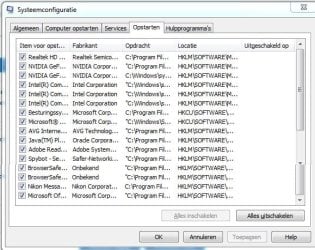
Below the screencopy of the startup information from msconfig.
Hmm, strange ... I thought the window can be adjusted ...anyhow, this is the complete list

Wish I would know the name of the program/service which regulates speech recognition, do you?
 

Attachments

  • scr msconfig.JPG
    scr msconfig.JPG
    83.3 KB · Views: 12

My Computer

Computer type
PC/Desktop
OS
Windows 7 Ultimate SP1
What I was hoping for doesn't show up. :(

Windows Update from two weeks ago should have created one. Do you have that one?

About all I can suggest is to try and re-install the English language pack and see if the Advanced speech menu option is displayed. That's the only way to turn speech on and off. If that doesn't work and you don't have the restore point from the update, you'll have to do a Repair Install of Windows. Do you have the original Windows install CD?
 

My Computer

Computer type
PC/Desktop
Computer Manufacturer/Model Number
Built 2/11/2011
OS
Windows 7 Pro-x64
CPU
i7-2600 3.4GHz - 3.8GHz Turbo
Motherboard
Intel DH67BL-B3
Memory
8Gb - 2x4GB, Muskin 991770 PC3-1333
Graphics Card(s)
Integrated Intel HD 2000
Sound Card
Integrated Intel 10.1 HD, RealTek ALC892
Monitor(s) Displays
Asus LCD VH222H, Haier HL24XSL2a
Screen Resolution
1920x1080, 1920x1080
Hard Drives
Crucial SSD C300-128Gb,
Western Digital WD5002AALX - 500Gb,
Western Digital WD7501AALS - 750Gb
PSU
Seasonic 650W 80+ Gold Modular
Case
Rosewill Defender
Cooling
Stock CPU, Four 120mm case fans, PCH fan added
Keyboard
Logitech EX100 Y-RBH94 Wireless
Mouse
Logitech EX100 M-RCE95 Wireless
Internet Speed
3.0/1.5 Mbs
Antivirus
Microsoft Security Essentials
Browser
Microsoft Internet Explorer 11
Other Info
Antec Veris Premier-Multimedia IR Station,
Cyber Accoustics-3602 Speakers,
AFT XM-5U Card Reader,
Hauppauge TV-HVR-2250,
Sony LX300 USB Turntable
what i was afraid for: in the list of all available languages, English is not shown anymore ...
I also don't know what the KB-number is to look up it up in the list of installed updates ...
so re-installing is part of my problem.

That list op installed windows updates start with "Windows Update-agent 7.6.7600.256 of ‎4-‎8-‎2014 19:59"
It ends with "KB2923545: Update voor Windows 7 voor x64-systemen: ‎25-‎8-‎2014 14:54"

The list contains a 200 updates ... ppfff

Of course, I have the installation DVD of the lagal Windows 7 Ultimate, but that means that I have to re-install all my user programms also
Not to mention to install those 200 updates !!
Tha is the last option ...
 

My Computer

Computer type
PC/Desktop
OS
Windows 7 Ultimate SP1
The last update should have created a restore point unless you have disabled it. That could have been your fix and would have taken a few minutes. I would recommend you enable restore points or increase the allocation. It can save you from reinstalling Windows or doing a repair install every time you have a problem.

A repair install is just that--A repair, not a reinstall. It's recommended that you back up your system but it should not remove programs or updates. Follow the tutorial link below.

http://www.sevenforums.com/tutorials/3413-repair-install.html

I forgot to mention that you may have to reinstall some drivers.
 

My Computer

Computer type
PC/Desktop
Computer Manufacturer/Model Number
Built 2/11/2011
OS
Windows 7 Pro-x64
CPU
i7-2600 3.4GHz - 3.8GHz Turbo
Motherboard
Intel DH67BL-B3
Memory
8Gb - 2x4GB, Muskin 991770 PC3-1333
Graphics Card(s)
Integrated Intel HD 2000
Sound Card
Integrated Intel 10.1 HD, RealTek ALC892
Monitor(s) Displays
Asus LCD VH222H, Haier HL24XSL2a
Screen Resolution
1920x1080, 1920x1080
Hard Drives
Crucial SSD C300-128Gb,
Western Digital WD5002AALX - 500Gb,
Western Digital WD7501AALS - 750Gb
PSU
Seasonic 650W 80+ Gold Modular
Case
Rosewill Defender
Cooling
Stock CPU, Four 120mm case fans, PCH fan added
Keyboard
Logitech EX100 Y-RBH94 Wireless
Mouse
Logitech EX100 M-RCE95 Wireless
Internet Speed
3.0/1.5 Mbs
Antivirus
Microsoft Security Essentials
Browser
Microsoft Internet Explorer 11
Other Info
Antec Veris Premier-Multimedia IR Station,
Cyber Accoustics-3602 Speakers,
AFT XM-5U Card Reader,
Hauppauge TV-HVR-2250,
Sony LX300 USB Turntable
thx ... problem is "solved"; because of malfunction of my hd, i had to re-install windows ... ppfff
 

My Computer

Computer type
PC/Desktop
OS
Windows 7 Ultimate SP1
I've tried speech recognition too and it's annoying having it on startup. If you should run into the same problem again:

Control Panel, show small icons, Speech Recognition, Advanced Speech options, uncheck "Run Speech Recognition at startup"
 

My Computer

Computer type
Laptop
Computer Manufacturer/Model Number
HP Elitebook 8540p
OS
Windows 7 Pro 32
CPU
Intel(R) Core(TM) i5 CPU M 540 @ 2.53GHz
Motherboard
Hewlett-Packard 1521
Memory
4,00 GB (Usable 2,98)
Graphics Card(s)
NVIDIA NVS 5100M
Sound Card
NVIDIA High Definition Audio
Screen Resolution
1600x900
Hard Drives
INTEL SSDSA2CW120G3
Antivirus
F-Secure Internet Security
Browser
IE, Firefox, Opera
Other Info
Sandboxie,
SRP (Software Restriction Policy),
EMET (Enhanced Mitigation Experience Toolkit),
WFC (Windows Firewall Control by BiniSoft),
Malwarebytes Premium
Back
Top