Speech Recognition

lostsoul62

Banned
Local time
1:01 AM
Messages
380
Location
AZ
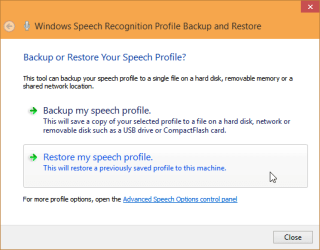
When I teach my computer Speech Recongnition and change computers, where is the database so I can transfer it to the new computer?
 

My Computer

OS
Windows 7 x64 RC1, Vista Ultimate, XP Pro
CPU
AMD 955
Memory
4 gigs - 1333
Graphics Card(s)
5750
Monitor(s) Displays
i-inc 28"
Screen Resolution
1920x1200
Hard Drives
2 SATA2 750 GB - 1 SATA2 1TB - 1 SATA3 1TB - 1 USB3 2TB - 1 USB3 500 GB, SSD 60 GB
Internet Speed
7 Megs

My Computer

Computer type
Laptop
Computer Manufacturer/Model Number
HP ENVY 17-1150eg
OS
Windows 10 Pro x64 EN-GB
CPU
1.6 GHz Intel Core i7-720QM Processor
Memory
6 GB
Graphics Card(s)
ATI Mobility Radeon HD 5850 Graphics
Sound Card
Beats sound system with integrated subwoofer
Monitor(s) Displays
17" laptop display, 22" LED and 32" Full HD TV through HDMI
Screen Resolution
1600*900 (1), 1920*1080 (2&3)
Hard Drives
Internal: 2 x 500 GB SATA Hard Disk Drive 7200 rpm
External: 2TB for backups, 3TB USB3 network drive for media
Cooling
As Envy runs a bit warm, I have it on a Cooler Master pad
Keyboard
Logitech diNovo Media Desktop Laser (bluetooth)
Mouse
Logitech Performance Mouse MX
Internet Speed
50/10 Mbps VDSL
Antivirus
Windows Defender 4.3.9431.0
Browser
Maxthon 3.5.2., IE11
hi Kari...a try to download the prescribed item would not execute. it is an _exe file not an .exe. i downloaded the extra bits as well and I tried a reset of the extension but, no go.
please look into this and advise, thanks ahead.
 

My Computer

Computer type
PC/Desktop
OS
windows 7 ultimate 32bit
hi Kari...a try to download the prescribed item would not execute. it is an _exe file not an .exe. i downloaded the extra bits as well and I tried a reset of the extension but, no go.
please look into this and advise, thanks ahead.
It works perfectly, I just downloaded and installed it in this computer which did not have it previously. Download is an .exe file (Windows executable) as it is supposed to be, and it installes OK:

2014-12-15_07h04_03.png

I think you have either a corrupted user profile or your browser has some issues. Try first to download some other .exe files, I guess they also come as _exe instead of.exe. To find out if this is a browser issue download same files with another browser, if they work the issue was in your first browser. If the other browser also downloads with _exe extension, I recommend you start a new thread explaining that suddenly all downloads come as _exe instead of.exe, to get help in that issue.

Anyway, you should get your downloaded files to work simply by changing the extension from _exe to .exe.

Kari
 

My Computer

Computer type
Laptop
Computer Manufacturer/Model Number
HP ENVY 17-1150eg
OS
Windows 10 Pro x64 EN-GB
CPU
1.6 GHz Intel Core i7-720QM Processor
Memory
6 GB
Graphics Card(s)
ATI Mobility Radeon HD 5850 Graphics
Sound Card
Beats sound system with integrated subwoofer
Monitor(s) Displays
17" laptop display, 22" LED and 32" Full HD TV through HDMI
Screen Resolution
1600*900 (1), 1920*1080 (2&3)
Hard Drives
Internal: 2 x 500 GB SATA Hard Disk Drive 7200 rpm
External: 2TB for backups, 3TB USB3 network drive for media
Cooling
As Envy runs a bit warm, I have it on a Cooler Master pad
Keyboard
Logitech diNovo Media Desktop Laser (bluetooth)
Mouse
Logitech Performance Mouse MX
Internet Speed
50/10 Mbps VDSL
Antivirus
Windows Defender 4.3.9431.0
Browser
Maxthon 3.5.2., IE11
didn't download 3 times out of the four. eventually it came across.

as far as the browser is concerned, it's IE not ff or other...dunno what sort of problems that ie11 has but, it's it's own browser...7's I mean :(

got it to finally download and used it.
attempted to change the .exe extension but no difference made...v odd.

did the job backup/we'll see how it works when reinstated... :)
 

My Computer

Computer type
PC/Desktop
OS
windows 7 ultimate 32bit
Back
Top