I had some reason for moving from Sata mode AHCI to IDE (Reason in this thread)
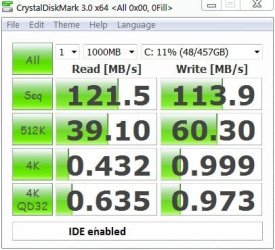
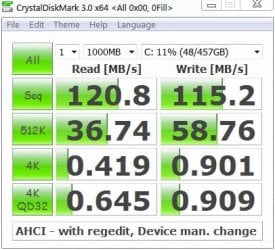
Most material I read didn't have any compelling speed disadvantage so I did some informal speed tests. Results for those interested (This not an SSD):
CrystalDiskMark speed tests don't show any significant difference.
The first row is a sequential 1GB R/W test. Next rows are various random R/W tests.
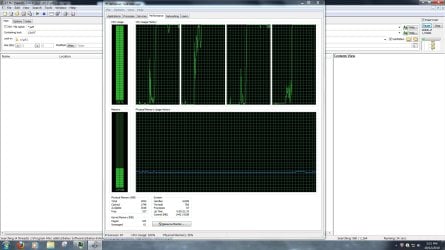
A four thread unindexed search for a text string in
1,164 pdfs (1.7GB)
from 253,302 files (173GB)
Took: 2min 12 secs for AHCI and 2min 5 secs for IDE
Informal conclusion: No significant speed difference.
Add: In addition to specs listed. Seagate 1TB (ST31000528AS), AMI BIOS.
Last edited:
My Computer
At a glance
Windows 7x64 Home Premium SP1Intel i7 2600kG.Skill Ripjaws (DDR3-1600) 2x4GBNvidia GeForce GTS 450; Intel HD Graphics 300...
Computer type
PC/Desktop
Computer Manufacturer/Model Number
Own build
OS
Windows 7x64 Home Premium SP1
CPU
Intel i7 2600k
Motherboard
ASUS P8Z68 Deluxe
Memory
G.Skill Ripjaws (DDR3-1600) 2x4GB
Graphics Card(s)
Nvidia GeForce GTS 450; Intel HD Graphics 3000(GT2+)
1*Samsung 840 EVO 120GB SSD;
1*OCZ Vertex 2 60GB SSD;
2*Samsung F3 SpinPoint 1TB in RAID0;
1*Samsung F1 SpinPoint 1TB;
2*Western Digital 1TB External USB 3.0
1*Western Digital 500GB External USB 3.0
1*Seagate 500GB External USB 2.0
PSU
Thermaltake ToughPower QFan 750W
Case
Thermaltake Element S VK60001W2Z
Cooling
Corsair H60 Water Cooling, 2*230mm and 2*80mm case fans
1*Samsung 840 EVO 120GB SSD;
1*OCZ Vertex 2 60GB SSD;
2*Samsung F3 SpinPoint 1TB in RAID0;
1*Samsung F1 SpinPoint 1TB;
2*Western Digital 1TB External USB 3.0
1*Western Digital 500GB External USB 3.0
1*Seagate 500GB External USB 2.0
PSU
Thermaltake ToughPower QFan 750W
Case
Thermaltake Element S VK60001W2Z
Cooling
Corsair H60 Water Cooling, 2*230mm and 2*80mm case fans
I was able to run sata mode AHCI enabled in the BIOS after making the msahci registry change and driver change due to my Nvidia nForce board. But no speed improvements for a conventional HDD.
But still had a problem with Hirens boot disk running mini XP not recognising the sata drive. Probably due to the Nvidia board.
So I'm staying with the IDE mode setting for now.
My Computer
At a glance
Windows 7x64 Home Premium SP1Intel i7 2600kG.Skill Ripjaws (DDR3-1600) 2x4GBNvidia GeForce GTS 450; Intel HD Graphics 300...
Computer type
PC/Desktop
Computer Manufacturer/Model Number
Own build
OS
Windows 7x64 Home Premium SP1
CPU
Intel i7 2600k
Motherboard
ASUS P8Z68 Deluxe
Memory
G.Skill Ripjaws (DDR3-1600) 2x4GB
Graphics Card(s)
Nvidia GeForce GTS 450; Intel HD Graphics 3000(GT2+)
I've seen reference to the NCQ and the Wikipedia article represents the depth (or lack of) my knowledge. The last 4 rows in the speed test tables are various size random R/Ws. I might have thought this NCQ effect in terms of performance imrovement would have shown up here?
My BIOS has been previous set to AHCI since I owned the PC (default setting).
It is only that I want to boot to the Hirens (12.0) boot CD/USB using mini XP that I've changed the setting.
My Computer
At a glance
Windows 7x64 Home Premium SP1Intel i7 2600kG.Skill Ripjaws (DDR3-1600) 2x4GBNvidia GeForce GTS 450; Intel HD Graphics 300...
Computer type
PC/Desktop
Computer Manufacturer/Model Number
Own build
OS
Windows 7x64 Home Premium SP1
CPU
Intel i7 2600k
Motherboard
ASUS P8Z68 Deluxe
Memory
G.Skill Ripjaws (DDR3-1600) 2x4GB
Graphics Card(s)
Nvidia GeForce GTS 450; Intel HD Graphics 3000(GT2+)