Speed fan configuration?

Alexey2912

New member
Member
VIP
Local time
4:39 AM
Messages
1,351
Location
Honolulu
Hi,

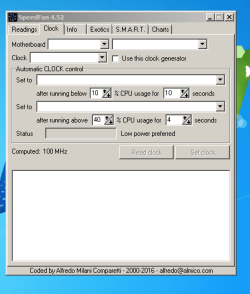
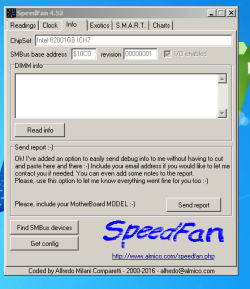
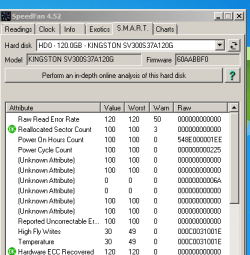
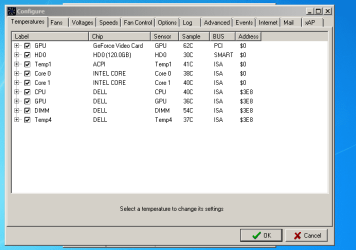
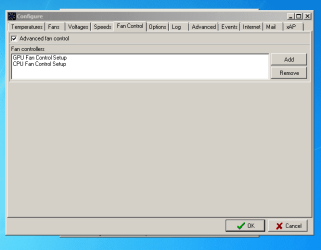
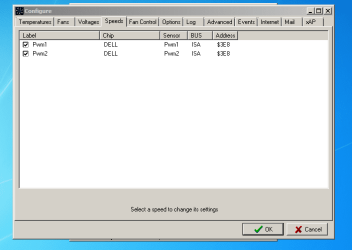
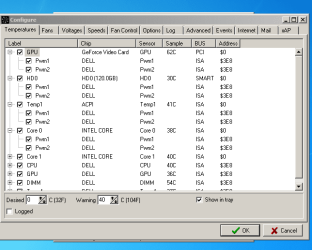
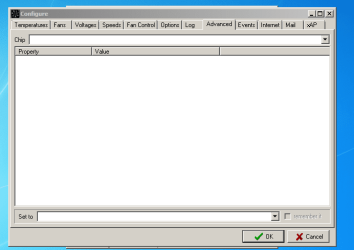
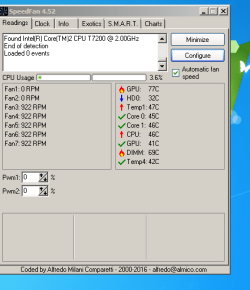
On my vintage Dell XPS 1710 running W7 64 bit, am unable to configure it's settings. Have a attachment with it since was gifted my my wife who passed away 3 years back......

Attaching screenshots for your expert views.

Snick suggested it since i8kfangui 64 bit won't install.

Have burnt 2 video cards, but despite setting at 40C GPU goes up to 70, and cannot hear fans running.....

Another query how to make it auto run...

Hoping to hear from you as always,

Thanks.
 

Attachments
  • SF.PNG
    SF.PNG
    49.3 KB · Views: 4
  • SF1.PNG
    SF1.PNG
    58.3 KB · Views: 4
  • SF2.PNG
    SF2.PNG
    52 KB · Views: 4
  • SF3.PNG
    SF3.PNG
    26.3 KB · Views: 4
  • SF4.PNG
    SF4.PNG
    56 KB · Views: 4

My Computers

System One System Two

  • Computer type
    Laptop
    Computer Manufacturer/Model Number
    Dell
    OS
    W7 Pro 32bit
    CPU
    Intel(R) Core(TM)2 CPU T7200 @ 2.00GHz
    Motherboard
    Dell Inc. 0CF456
    Memory
    4.00 GB
    Graphics Card(s)
    NVIDIA GTX 7980 512 MB
    Sound Card
    (1) HD Pro Webcam C910 (2) Bluetooth Stereo Audio (3) Si
    Hard Drives
    SSD
    Browser
    Brave
  • Computer type
    PC/Desktop
    System Manufacturer/Model Number
    Dell XPS Special Edition 8940
    OS
    W10 Pro
    CPU
    core i7 11th gen, 11700, 2.5-4.9 GHZ
    Memory
    32 GBB, 2 X16 GB @2933 MHz.
    Graphics Card(s)
    NVIDIA GeForce RTX 3070 8GB GDDR6
    Monitor(s) Displays
    Dell UltraSharp 32 4K monitor.
    Hard Drives
    1. 1TB M.2 PCIe NVMe SSD.

    2. 1TB 7200 rpm 3.5" SATA Hard Drive.
    PSU
    500W.
    Case
    Mineral White Bezel Chassis.
More attachments........
 

Attachments

  • SF9.PNG
    SF9.PNG
    57.7 KB · Views: 4
  • SF8.PNG
    SF8.PNG
    65.2 KB · Views: 4
  • SF7.PNG
    SF7.PNG
    83.4 KB · Views: 4
  • SF6.PNG
    SF6.PNG
    57.7 KB · Views: 4
  • SF5.PNG
    SF5.PNG
    55.9 KB · Views: 4

My Computers

System One System Two

  • Computer type
    Laptop
    Computer Manufacturer/Model Number
    Dell
    OS
    W7 Pro 32bit
    CPU
    Intel(R) Core(TM)2 CPU T7200 @ 2.00GHz
    Motherboard
    Dell Inc. 0CF456
    Memory
    4.00 GB
    Graphics Card(s)
    NVIDIA GTX 7980 512 MB
    Sound Card
    (1) HD Pro Webcam C910 (2) Bluetooth Stereo Audio (3) Si
    Hard Drives
    SSD
    Browser
    Brave
  • Computer type
    PC/Desktop
    System Manufacturer/Model Number
    Dell XPS Special Edition 8940
    OS
    W10 Pro
    CPU
    core i7 11th gen, 11700, 2.5-4.9 GHZ
    Memory
    32 GBB, 2 X16 GB @2933 MHz.
    Graphics Card(s)
    NVIDIA GeForce RTX 3070 8GB GDDR6
    Monitor(s) Displays
    Dell UltraSharp 32 4K monitor.
    Hard Drives
    1. 1TB M.2 PCIe NVMe SSD.

    2. 1TB 7200 rpm 3.5" SATA Hard Drive.
    PSU
    500W.
    Case
    Mineral White Bezel Chassis.
lastly 2 more.
 

Attachments

  • SF10.PNG
    SF10.PNG
    83.4 KB · Views: 0
  • SF11.PNG
    SF11.PNG
    52.6 KB · Views: 4

My Computers

System One System Two

  • Computer type
    Laptop
    Computer Manufacturer/Model Number
    Dell
    OS
    W7 Pro 32bit
    CPU
    Intel(R) Core(TM)2 CPU T7200 @ 2.00GHz
    Motherboard
    Dell Inc. 0CF456
    Memory
    4.00 GB
    Graphics Card(s)
    NVIDIA GTX 7980 512 MB
    Sound Card
    (1) HD Pro Webcam C910 (2) Bluetooth Stereo Audio (3) Si
    Hard Drives
    SSD
    Browser
    Brave
  • Computer type
    PC/Desktop
    System Manufacturer/Model Number
    Dell XPS Special Edition 8940
    OS
    W10 Pro
    CPU
    core i7 11th gen, 11700, 2.5-4.9 GHZ
    Memory
    32 GBB, 2 X16 GB @2933 MHz.
    Graphics Card(s)
    NVIDIA GeForce RTX 3070 8GB GDDR6
    Monitor(s) Displays
    Dell UltraSharp 32 4K monitor.
    Hard Drives
    1. 1TB M.2 PCIe NVMe SSD.

    2. 1TB 7200 rpm 3.5" SATA Hard Drive.
    PSU
    500W.
    Case
    Mineral White Bezel Chassis.
I found this Youtube helpful to install I8kfanGUI .......

Driver Signing Windows 7 x64 I8KFANGUI - YouTube

It get installed, but to digitally sign it can't locate C: Windows32/ Drivers/ fanio.sys file?

Where would it be located dont see in documents or Windows> Sytsem32> Drivers folder?

Any help would be apprecaited.

Thanks.
 

My Computers

System One System Two

  • Computer type
    Laptop
    Computer Manufacturer/Model Number
    Dell
    OS
    W7 Pro 32bit
    CPU
    Intel(R) Core(TM)2 CPU T7200 @ 2.00GHz
    Motherboard
    Dell Inc. 0CF456
    Memory
    4.00 GB
    Graphics Card(s)
    NVIDIA GTX 7980 512 MB
    Sound Card
    (1) HD Pro Webcam C910 (2) Bluetooth Stereo Audio (3) Si
    Hard Drives
    SSD
    Browser
    Brave
  • Computer type
    PC/Desktop
    System Manufacturer/Model Number
    Dell XPS Special Edition 8940
    OS
    W10 Pro
    CPU
    core i7 11th gen, 11700, 2.5-4.9 GHZ
    Memory
    32 GBB, 2 X16 GB @2933 MHz.
    Graphics Card(s)
    NVIDIA GeForce RTX 3070 8GB GDDR6
    Monitor(s) Displays
    Dell UltraSharp 32 4K monitor.
    Hard Drives
    1. 1TB M.2 PCIe NVMe SSD.

    2. 1TB 7200 rpm 3.5" SATA Hard Drive.
    PSU
    500W.
    Case
    Mineral White Bezel Chassis.
Back
Top