
Speed I want it. Not getting it.

mrdemon

New member
Pro User
Local time
6:53 PM
Messages
353
Location
UK
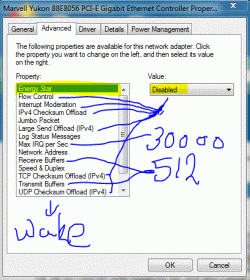
Ok so i got PC with Gigabyte lan and also Lappie with same, Both win 7 both gig lan both say gig lan. So I should be seeing atleast 50-80mbs transfer speed,

Why oh why am i getting under 1 meg after 2 mins at 2mbs.

I have turned off TCPV6 and all setting disabled.

Confused. Capture.GIF
 

My Computer My Computer

Computer Manufacturer/Model Number
Home Build.
OS
Windows 7 Home Pre
CPU
Q8200 Intell 2.333
Motherboard
Asus P5Q3 Delux
Memory
DDR3 1333 4gig
Graphics Card(s)
Ati HD4870
Sound Card
Onboard Soundmax. 7.1
Monitor(s) Displays
1, 20" Samsung
Screen Resolution
1600/900
PSU
Good enough
Case
Le Shark
Cooling
FAN FAN FAN FAN, Thermaltake Minitype 90 with speed fan 4.
Keyboard
Standard, Gaming Wolfking
Mouse
Cm-storm-inferno-wired-gaming-mouse
Internet Speed
Sky Crappy upto 20meg I get a whapping 5.8mbs.
lol ok just tested with all settings back on and with another file (mkv) 2 gig and it sits arround 49/65 kbs, still not fast but better. TCP6 slows it down, PASS. lol
 

My Computer My Computer

Computer Manufacturer/Model Number
Home Build.
OS
Windows 7 Home Pre
CPU
Q8200 Intell 2.333
Motherboard
Asus P5Q3 Delux
Memory
DDR3 1333 4gig
Graphics Card(s)
Ati HD4870
Sound Card
Onboard Soundmax. 7.1
Monitor(s) Displays
1, 20" Samsung
Screen Resolution
1600/900
PSU
Good enough
Case
Le Shark
Cooling
FAN FAN FAN FAN, Thermaltake Minitype 90 with speed fan 4.
Keyboard
Standard, Gaming Wolfking
Mouse
Cm-storm-inferno-wired-gaming-mouse
Internet Speed
Sky Crappy upto 20meg I get a whapping 5.8mbs.
Ok, I did a transfer test from my Windows 7 64-bit machine to my Windows 7 32-bit laptop. Both are connected at 1gig speeds to a Netgear 5 port 10/100/1000 switch. I was able to transfer a 3.30GB iso file in 62 seconds...so about 53MB/sec. I have not disabled IPv6 on either LAN adapter.

My desktop has an Intel Pro 1000 GT adapter with the following settings;
Adaptive Inter-Frame Spacing : Enabled
Flow Control: Disabled
Interrupt Moderation: Enabled
Interrupt Moderation Rate: Adaptive
IPv4 Checksum Offload: Rx & TX Enabled
Jumbo Packet: disabled
Large Send Offload (IPv4): Enabled
Link Speed and Duplex: Enabled
Number of Coalesce Buffers: 128
Priority and VLAN: Priority and VLAN enabled
Receive Buffers: 256
TCP Checksum Offload (IPv4): Rx and Tx Enabled
Transmit Buffers: 512
UDP Checksum Offload (IPv4): Tx and Tx Enabled
 

My Computer My Computer

Computer Manufacturer/Model Number
Self-Built in July 2009
OS
Windows 7 Ultimate x64
CPU
Intel Q9550 2.83Ghz OC'd to 3.40Ghz
Motherboard
Gigabyte GA-EP45-UD3R rev. 1.1, F12 BIOS
Memory
8GB G.Skill PI DDR2-800, 4-4-4-12 timings
Graphics Card(s)
EVGA 1280MB Nvidia GeForce GTX570
Sound Card
Realtek ALC899A 8 channel onboard audio
Monitor(s) Displays
23" Acer x233H
Screen Resolution
1920x1080
Hard Drives
Intel X25-M 80GB Gen 2 SSD
Western Digital 1TB Caviar Black, 32MB cache. WD1001FALS
PSU
Corsair 620HX modular
Case
Antec P182
Cooling
stock
Keyboard
ABS M1 Mechanical
Mouse
Logitech G9 Laser Mouse
Internet Speed
15/2 cable modem
Other Info
Windows and Linux enthusiast. Logitech G35 Headset.
ok so i got pc with gigabyte lan and also lappie with same, both win 7 both gig lan both say gig lan. So i should be seeing atleast 50-80mbs transfer speed,

why oh why am i getting under 1 meg after 2 mins at 2mbs.

I have turned off tcpv6 and all setting disabled.

Confused. View attachment 67172


i like your doodle!
 

My Computer My Computer

Computer Manufacturer/Model Number
HP Pavilion Elite HPE-410f
OS
Windows 7 Ultimate x64
CPU
AMD Phenom x6 1045t
Motherboard
N/A
Memory
8 GB
Graphics Card(s)
ATI Radeon HD 5570
Sound Card
Realtek Highdefinition Audio / 5.1 Dolby Setup
Monitor(s) Displays
HP w2207h Widescreen
Screen Resolution
1680*1050
Hard Drives
1 TB (fixed), 320 Portable maxtor, Server Hard drives
PSU
350 Watt
Case
HP CASE
Cooling
Bass
Keyboard
Logitech MX 5500
Mouse
Logitech MX 5500
Internet Speed
ROAD RUNNER 16MB D/512 U
Back
Top