Speed Test

timlab1955

New member
Member
VIP
Local time
11:41 AM
Messages
186
Is there anything out there that is like speed test, to where it would do a speed test and then save it to a log. I don't think I'm getting what I paid for and now I need proof so that I can show my ISP (Atlantic Broadband) and get a reduction in rate.

Thanks
Dan
 

My Computer

Computer Manufacturer/Model Number
Dell XPS 17
OS
Windows Professional 64bit
CPU
Intel Core i7 2820QM @ 2.30GHz, Sandy Bridge 32nm
Motherboard
03RG89, Intel Ver: A12
Memory
16GB
Graphics Card(s)
Generic PnP Monitor (1600x900@60Hz), NVIDIA GeForce GT 555m
Sound Card
High Definition Audio Device
Monitor(s) Displays
NVIDIA 3D
Screen Resolution
1600 x 900 3d
Hard Drives
250GB SAMSUNG SAMSUNG SSD PM810 2.5" 256GB ATA Device (SATA-SSD)
625GB SAMSUNG SAMSUNG HM640JJ ATA Device (SATA)
Other Info
Transend 64GB Memory Card, Lexar Echo ZE 32GB USB 2.0 Backup DriveLEHZE32GASBNA <---Newest thing and very small.
I don't know any that keep a log but you could always use the snipping tool built into Window 7 and save a picture.
 

My Computer

Computer type
PC/Desktop
Computer Manufacturer/Model Number
Home made Desktop
OS
Windows 10 Pro. 64/ version 1709 Windows 7 Pro/64
CPU
Intel i7-6800K @ 4.3
Motherboard
ASUS X-99 Deluxe II
Memory
Corsair Platinum 16 gig @2400
Graphics Card(s)
EVGA GTX 1070 OC
Monitor(s) Displays
Asus 27" LED LCD/VE278Q
Screen Resolution
1920-1080 or 1280-720 HDMI
Hard Drives
INTEL SSD 730-240 Gb Sata 3.0/
PSU
EVGA Platium 1200W
Case
Phanteks Luxe Tempered Glass 8 fans/ one radiator
Cooling
XSPC/ Water Cooled CPU
Keyboard
Das 4 Professional
Mouse
Logitech M705/MX Anywhere 2-S
Internet Speed
100 mbits
Antivirus
Microsoft Security Essentials/ Malwarebytes Premium 3.0/ SAS
Browser
I.E. 11 default/Firefox/ ISP Time Warner Cable/Spectrum
Other Info
LG BluRay Burner/
Sound system-KLipsch-THX/
Icy Dock ssd Hot Swap bays.
Is there anything out there that is like speed test, to where it would do a speed test and then save it to a log. I don't think I'm getting what I paid for and now I need proof so that I can show my ISP (Atlantic Broadband) and get a reduction in rate.

Thanks
Dan

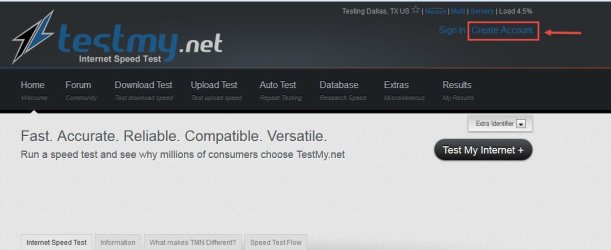
Yes, Test My dot Net and it's free;

TestMy.net Broadband Internet Speed Test

PS: You need to create an account to enable logging.

Create Account.jpg

HTH
 
Last edited:

My Computer

Computer type
PC/Desktop
Computer Manufacturer/Model Number
Custom Built
OS
Windows 7 Professional x64
CPU
Intel i5 quad processor
Motherboard
DP67BG
Memory
16 GB
Graphics Card(s)
Radeon HD 5770
Sound Card
Realtek High Definition Audio
Monitor(s) Displays
Samsung SyncMaster
Screen Resolution
1920X1080
Hard Drives
WD 2TB (SATA Internal)
WD 1TB (USB External)
PSU
Corsair GS800
Case
Tower (Generic)
Cooling
3 Internal Fans
Keyboard
MS Wireless
Mouse
MS Optical Wired
Internet Speed
54 mbps
Antivirus
Emsisoft
Browser
IE-Version 9, Palemoon-Version 24.2.0
Edit ( To make my post more constructive and answer OP's Question )

If you register with speedtest.net It will save your results, You could log on with different computers or different location and compare the results
https://www.speedtest.net/user-register.php


I would not trust any speed test sites every ISP knows those sites and give them more preference or just cashes the files they use to test
 
Last edited:

My Computer

Computer type
PC/Desktop
Computer Manufacturer/Model Number
Compac
OS
Microsoft Windows 7 Ultimate 32-bit 7601
CPU
Intel(R) Pentium(R) Dual CPU E2160 @ 1.80GHz
Motherboard
MSI Boston
Memory
4.00 GB
Graphics Card(s)
(1) VNC Mirror Driver (2) Intel(R) G33/G31 Express Chipset
Sound Card
Disabled
Monitor(s) Displays
Headless
Screen Resolution
1280 x 960 x 32 bits (4294967296 colors) @ 60 Hz
Hard Drives
ST3320820AS ATA Device
Keyboard
Headless
Mouse
Headless
Antivirus
Malwarebytes pro
Other Info
Also
Windows 8.1 Laptop and Desktop both Acer
I would not trust any speed test sites every ISP knows those sites and give them more preference or just cashes the files they use to test

The OP asked for a site that logs results which TestMy.net provides. Your opinion of speed test sites isn't germane to the question.
 

My Computer

Computer type
PC/Desktop
Computer Manufacturer/Model Number
Custom Built
OS
Windows 7 Professional x64
CPU
Intel i5 quad processor
Motherboard
DP67BG
Memory
16 GB
Graphics Card(s)
Radeon HD 5770
Sound Card
Realtek High Definition Audio
Monitor(s) Displays
Samsung SyncMaster
Screen Resolution
1920X1080
Hard Drives
WD 2TB (SATA Internal)
WD 1TB (USB External)
PSU
Corsair GS800
Case
Tower (Generic)
Cooling
3 Internal Fans
Keyboard
MS Wireless
Mouse
MS Optical Wired
Internet Speed
54 mbps
Antivirus
Emsisoft
Browser
IE-Version 9, Palemoon-Version 24.2.0
Speed Test Logger

Well you can give this a shot:

Speed Test Logger

Saves all results in a CSV file. Very handy.

It downloads a file from a remote server on a regular interval and keeps track of the download speed.

You don't need to set it to autostart with windows and you can change the download interval.
 

My Computer

Computer type
Laptop
Computer Manufacturer/Model Number
ASUS
OS
Microsoft Windows 7 Home Premium 64-bit 7601 Multiprocessor Free Service Pack 1
CPU
AMD C-60 APU with Radeon(tm) HD Graphics
Motherboard
ASUSTeK COMPUTER INC. X501U
Memory
4.00 GB
Graphics Card(s)
AMD Radeon HD 6290 Graphics
Sound Card
(1) AMD High Definition Audio Device (2) Realtek High Defi
Screen Resolution
1366 x 768 x 32 bits (4294967296 colors) @ 60 Hz
Hard Drives
Hitachi HTS545050A7E380 SATA Disk Device
Antivirus
Comodo CIS & FW, SecureAplus App Whitelisting, Threatfire
Browser
Cyberfox 64bit, Opera 64bit, Airfox
Other Info
Spy-The-Spy, HitmanPro.Alert, Norton Connect Safe, MJRegWatcher, BitDefender TrafficLight, Voodoo Shield, Zemana AntiMalware
Back
Top